1. Product Overview
The Sony 65-inch 4K Mini LED TV BRAVIA K-65XR90 offers an exceptional viewing experience with its advanced display and audio technologies. This flagship 4K LCD TV features Mini LED backlighting, precisely controlled by Sony's proprietary technology to deliver stunning brightness and deep, rich blacks, resulting in unparalleled image beauty.
Key Features
- Mini LED Backlight Control: Sony's unique LED driver precisely controls the Mini LED backlight, achieving unprecedented brightness and deep, tight blacks for overwhelming image quality.
- Cognitive Processor XR: Equipped with the Cognitive Processor "XR" and Sony's advanced backlight control technology, the Mini LED backlight is meticulously controlled. This allows for dazzling brightness and deep blacks, enabling an overwhelming contrast expression.
- Wide Viewing Angle & Low Reflection: Sony's proprietary wide viewing angle technology ensures high-quality images from any perspective. The low-reflection panel suppresses reflections from external light sources like sunlight or indoor lamps, preventing dark scenes from appearing washed out and minimizing reflections in bright environments.
- Immersive 3D Sound: Sound is reflected off the ceiling, enhancing three-dimensional audio and improving sound localization and spaciousness. This creates powerful, high-quality sound that feels as if it's emanating directly from the screen.
- SONY PICTURES CORE & Studio Quality Mode: Features Sony's exclusive content service, "SONY PICTURES CORE." The Studio Quality Mode allows you to enjoy movies with the picture quality intended by the creators.

Figure 1.1: Sony 65-inch 4K Mini LED TV BRAVIA K-65XR90
Video 1.1: Product Introduction Video. This video provides a general overview of the TV's features and design.
2. Setup
2.1 Unpacking
Carefully remove the TV and all accessories from the packaging. Ensure all components listed in the packing list are present. Retain the packaging for future transport or service needs.
2.2 Stand Installation
The TV features a versatile 4-way stand designed to adapt to various installation environments, including optimal placement for a soundbar. Follow the instructions provided in the separate stand assembly guide for your preferred configuration.
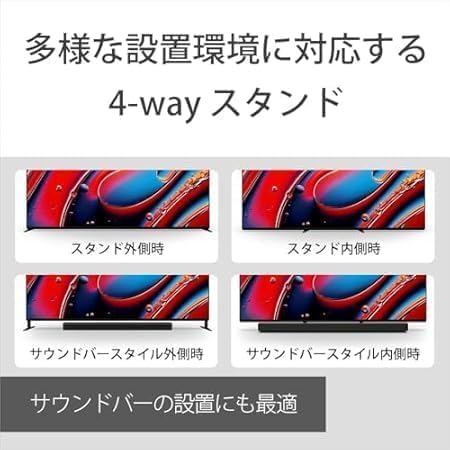
Figure 2.1: The 4-way stand allows for flexible placement, including configurations for soundbars.
2.3 Connecting Cables
Connect your external devices to the appropriate ports on the TV. The TV is equipped with multiple input/output terminals:
- HDMI ports: 4
- Video input: 1
- Optical Digital audio output: 1
- Center Speaker input: 1
- Headphone output: 1
- USB ports: 2
- LAN port: 1
- Antenna (Terrestrial) input: 1
- Antenna (BS/110CS) input: 1
Note: An antenna cable is not included with this product. Please ensure you have one or consider purchasing an antenna cable set separately if needed for broadcast reception.
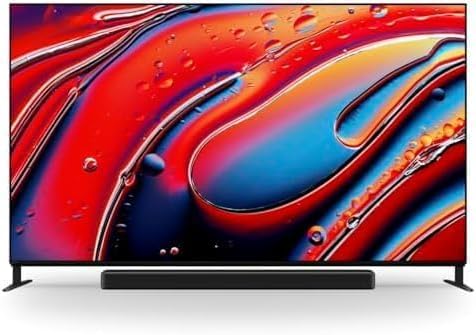
Figure 2.2: Rear view of the TV showing various input and output terminals.
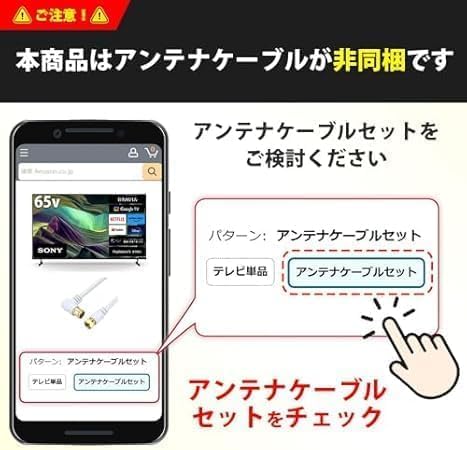
Figure 2.3: Important notice regarding the antenna cable not being included.
2.4 Initial Power On and Setup
After connecting all necessary cables, plug the TV into a power outlet. Press the power button on the remote control or the TV. Follow the on-screen instructions to complete the initial setup, including network connection, Google account login, and channel scanning.
3. Operating Instructions
3.1 Remote Control
Use the provided remote control to navigate the TV's interface. It features dedicated buttons for popular streaming services and voice control. Insert two AAA batteries (included) into the remote control.
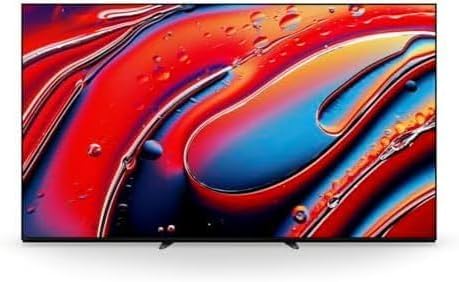
Figure 3.1: The TV remote control with dedicated service buttons.
3.2 Google TV Features
The TV runs on Google TV, providing access to a wide range of online video services and apps. Easily browse and discover content from platforms like Netflix, Prime Video, Hulu, YouTube, and more.

Figure 3.2: Google TV interface showing various supported streaming services.
3.3 Voice Control
Utilize the hands-free voice search feature with "OK Google." Simply say "OK Google" followed by your command or search query to find content, control playback, or adjust settings.

Figure 3.3: Hands-free voice search functionality for easy content discovery.
3.4 Casting from Smartphone
Easily display content from your smartphone on the large TV screen using Apple AirPlay or Chromecast built-in. This allows for seamless sharing of photos, videos, and music.
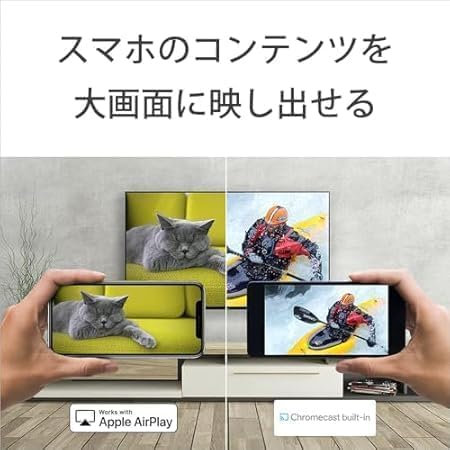
Figure 3.4: Illustrates casting content from a smartphone to the TV.
3.5 Parental Control
The TV supports parental control features, including integration with the LINE app, to help manage children's viewing habits. You can monitor TV usage and send messages to prevent excessive screen time.
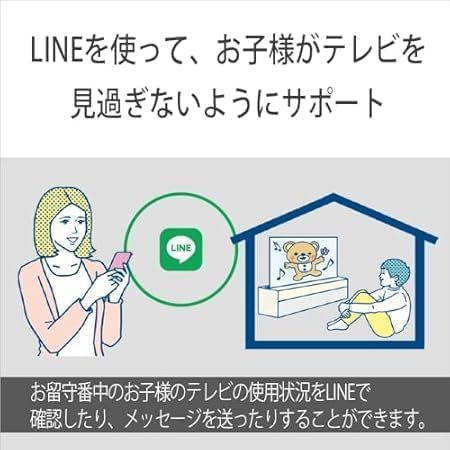
Figure 3.5: Parental control features using the LINE application.
3.6 Audio Features
Experience enhanced audio with Sony's unique sound technologies. The TV's beam tweeter reflects sound off walls and the ceiling to create an immersive three-dimensional soundstage. Voice Zoom technology ensures human voices are clear and distinct, even in complex audio environments.
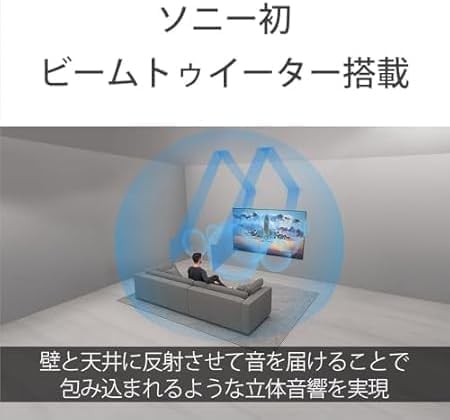
Figure 3.6: Illustration of sound projection using the beam tweeter for immersive audio.
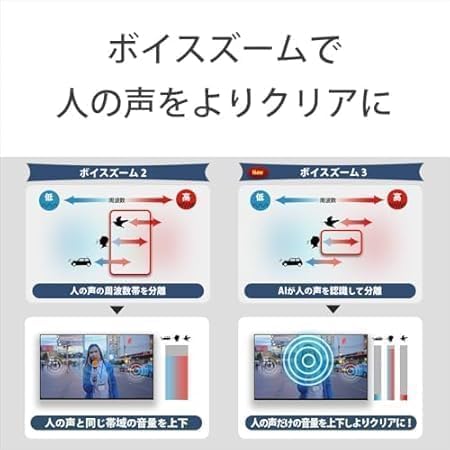
Figure 3.7: Voice Zoom technology enhances clarity of human voices.
4. Maintenance
4.1 Cleaning the TV
To clean the screen, gently wipe it with a soft, dry microfiber cloth. For stubborn smudges, lightly dampen the cloth with water or a screen-safe cleaning solution. Avoid using harsh chemicals, abrasive materials, or direct spraying onto the screen. For the TV body, use a soft, dry cloth to wipe away dust. Do not use solvents or alcohol-based cleaners.
4.2 Software Updates
Ensure your TV's software is up to date for optimal performance and access to the latest features. The TV can automatically check for and install updates when connected to the internet. You can also manually check for updates through the TV's settings menu.
5. Troubleshooting
If you encounter issues with your TV, refer to the following common troubleshooting steps before contacting support.
5.1 No Power
- Check if the power cord is securely plugged into both the TV and the wall outlet.
- Ensure the wall outlet is functioning by plugging in another device.
- Try pressing the power button on the TV itself, not just the remote control.
5.2 No Picture / Poor Picture Quality
- Verify that the correct input source is selected (e.g., HDMI 1, TV).
- Check all cable connections (HDMI, antenna) for looseness or damage.
- If using an external device, ensure it is powered on and functioning correctly.
- Adjust picture settings (brightness, contrast, color) in the TV menu.
5.3 No Sound / Poor Sound Quality
- Increase the volume on both the TV and any connected audio devices.
- Check if the TV is muted.
- Verify audio cable connections.
- If using external speakers, ensure they are powered on and correctly configured.
5.4 Remote Control Not Responding
- Replace the batteries in the remote control.
- Ensure there are no obstructions between the remote control and the TV's IR sensor.
- Point the remote directly at the TV.
5.5 Network Connection Issues
- Restart your router and modem.
- Check the Wi-Fi password and ensure it is entered correctly.
- If using a wired connection, ensure the LAN cable is securely connected.
- Try moving the TV closer to the Wi-Fi router or using a Wi-Fi extender.
6. Specifications
| Feature | Detail |
|---|---|
| Screen Size | 65 inches |
| Brand | Sony |
| Display Technology | Mini LED |
| Resolution | 4K |
| Refresh Rate | 120 Hz |
| Included Components | Remote control, Warranty card, AAA batteries x2, Standard stand, Anti-tip belt set |
| Connectivity Technology | Bluetooth, HDMI, USB, Wi-Fi |
| Aspect Ratio | 16:9 |
| Product Dimensions (D x W x H) | 4.8 x 144.3 x 83.5 cm |
| Supported Internet Services | Apple TV, Google TV, Hulu, Netflix, Prime Video |
| Display Type | Mini LED |
| Screen Surface Finish | Glossy |
| Audio Input | Optical |
| HDMI Ports | 4 |
| Hardware Interface | 3.5mm Audio, HDMI, USB, Bluetooth |
| Wireless Type | Bluetooth, Wi-Fi |
| Connector Type | HDMI, USB |
| Operating System | Google TV |
| Remote Control Technology | Infrared |
| Color | Black |
| Compatible Devices | Game console, Speaker, Smartphone, Tablet, Headphones |
| Model Number | K-65XR90 |
| Release Year / Model Year | 2024 |
| Audio Output Mode | Surround |
| Maximum Output | 70 Watts |
| Speaker Channel Configuration | Mid-range x2, Tweeter x2, Subwoofer x2, Beam Tweeter x2 |
| Wattage | 350 W |
| Lens Mount Type | Table Mount |
Figure 6.1: Detailed product specifications for the Sony K-65XR90 TV.

Figure 6.2: Screen size, recommended room size, and viewing distance for the 65-inch model.
7. Warranty and Support
7.1 Warranty Information
This product comes with a 1-year warranty from the date of purchase against natural defects, valid only for use within the country of purchase. The warranty is applicable only when purchased from a manufacturer-authorized dealer.
7.2 Customer Support
For technical assistance, service requests, or further inquiries, please contact Sony customer support. Refer to the warranty card or Sony's official website for contact details specific to your region.