
Auxbeam AC-800
Contents
Auxbeam 8 Gang Switch Panel AC-800 User Manual
Model: AC-800 | Brand: Auxbeam
Introduction
This manual provides comprehensive instructions for the installation, operation, and maintenance of your Auxbeam 8 Gang Switch Panel AC-800. This versatile switch panel allows you to control up to eight different automotive DC12-24V accessories, offering advanced control through a Bluetooth app and a wireless remote. It features customizable RGB backlighting, multiple lighting modes (Toggle, Momentary, Pulsed), and automatic dimming capabilities to enhance your vehicle's functionality and aesthetics.
What's Included
The Auxbeam 8 Gang Switch Panel AC-800 package includes the following components:
- 1 x AC-800 Switch Panel
- 1 x Circuit Control Box (with built-in solid-state relay)
- 1 x 60A Circuit Breaker
- 60 pcs Labels (stickers for customization)
- 10ft Wiring Harness
- Power Harness, Fuse Wire & Adapter, Installation Kit
- Panel Waterproof Cover
- Mounting Brackets
- Remote Control (with pre-installed batteries)
- User Manual (this document)

Image: All components included in the Auxbeam AC-800 Switch Panel package, neatly laid out. This includes the switch panel, circuit control box, remote, wiring, mounting hardware, and various labels.
Setup and Installation
Proper installation is crucial for optimal performance and safety. It is recommended to have this product installed by a qualified professional if you are not familiar with automotive electrical systems.
- Mounting the Switch Panel:
The switch panel can be mounted using the provided brackets. Ensure a secure and accessible location within your vehicle's cabin. Refer to the diagram for two common installation methods.

Image: Visual guide demonstrating two different mounting options for the switch panel, showing how to attach the panel to its brackets.
- Connecting the Circuit Control Box:
The circuit control box houses the solid-state relays and fuses. Mount it securely in the engine bay or another suitable location, ensuring it is protected from excessive heat and moisture. Connect the main power wires to your vehicle's battery (DC 12-24V) and the ACC fuse as per the wiring diagram.
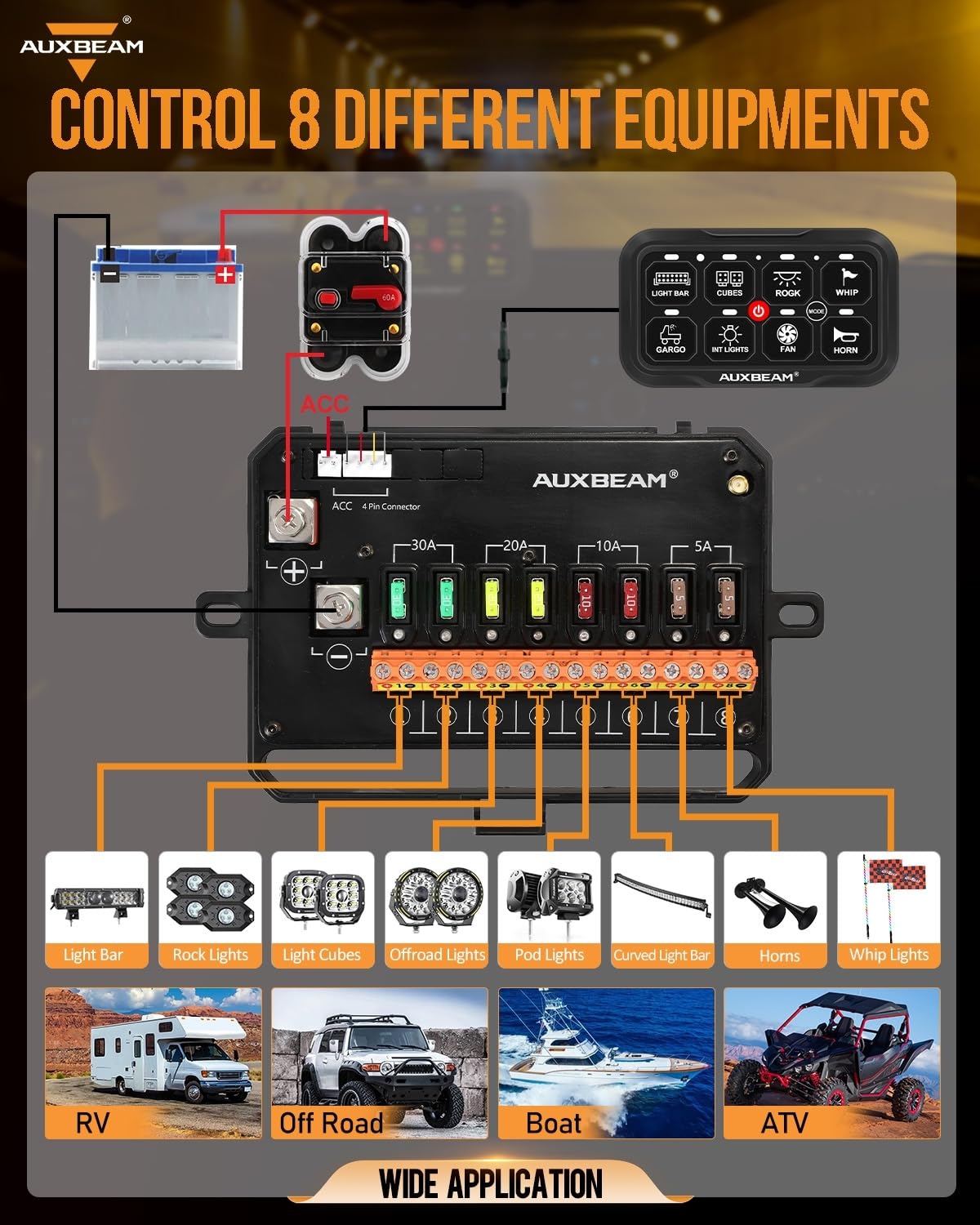
Image: Detailed wiring diagram illustrating how to connect the circuit control box to the vehicle's battery and various accessories, including light bars, rock lights, and horns.
The AC-800 features a built-in solid-state relay for enhanced reliability and faster response times compared to traditional external relays.

Image: A comparison graphic highlighting the advantages of the built-in solid-state relay in the AC-800 circuit box over traditional external relays, emphasizing features like no touch points, faster response, and low noise.
- Connecting Accessories:
Connect your desired DC12-24V accessories (e.g., light bars, cubes, fans, horns) to the corresponding output terminals on the circuit control box. Each channel is fused for protection.
- Applying Labels:
Use the provided 60pcs of labels to clearly identify each switch function on the panel. This aids in quick and intuitive operation.
- Waterproof Cover:
Utilize the included waterproof cover to protect the switch panel from environmental elements, ensuring its longevity and reliable performance.
Operating Instructions
The Auxbeam AC-800 offers multiple ways to control your accessories:
1. Panel Control
- Turning On/Off Accessories: Press the corresponding button on the switch panel to activate or deactivate an accessory.
- Backlight Control: Press the "MODE" button to manually turn the backlight on or off.
- Automatic Backlight Adjustment: The panel has a built-in light sensor that automatically adjusts backlight brightness based on ambient light conditions.
- Memory Function: The panel remembers your last settings, so accessories will return to their previous state when the vehicle is restarted.
Image: Demonstrates how to manually turn the backlight on/off and the location of the automatic light sensor for brightness adjustment.
2. Bluetooth App Control
Download the Auxbeam app to unlock advanced control features:
- Customizing Panel Colors: Adjust the RGB backlight color to match your vehicle's interior or personal preference. Long press switch 1 or switch 4 to enter color adjustment mode.
- Adjusting Brightness: Manually adjust the backlight brightness via the app.
- Setting Icons: Choose from 200 default icons or upload your own photos for DIY icons.
- Controlling Multiple Lights Simultaneously: Create groups within the app to control two or more lights with a single command.
- Lighting Modes:
- TOGGLE Mode: Provides constant lighting (Press once).
- MOMENTARY Mode: Activates only when the switch is pressed (Press twice).
- PULSED Mode: Offers a strobe effect (Press three times).

Image: Illustrates the three distinct lighting modes (Toggle, Momentary, Pulsed) available for the switch panel, with visual examples of each.
Video: A detailed demonstration of how to use the Auxbeam 8 Gang Switch Panel, covering installation, backlight adjustments, lighting modes, and app control features.
3. Wireless Remote Control
The included remote control provides convenient access to your accessories from inside or outside the vehicle.
- The remote control is magnetic, allowing it to be easily attached to metal surfaces for quick access.
- It comes with pre-installed batteries for immediate use.
- One remote can control multiple vehicles (if each has an AC-800 switch installed).
- Up to four remotes can control a single panel, offering control from multiple locations.

Image: Depicts the versatility of the wireless remote control, showing its use for car accessories, home lighting, and controlling multiple vehicles or being controlled by multiple remotes.
Maintenance
- Regular Cleaning: Keep the switch panel and circuit control box clean and free from dust and debris. Use a soft, dry cloth for cleaning.
- Inspect Wiring: Periodically check all wiring connections for tightness and signs of wear or corrosion. Ensure the waterproof cover is properly sealed.
- Fuse Replacement: The circuit control box contains fuses for each channel. If an accessory stops working, check the corresponding fuse. Replace blown fuses with ones of the correct amperage (6 extra fuses are included).
- Waterproof Integrity: While the product is IP65 waterproof, avoid direct high-pressure water jets on the connections. Ensure the panel cover is always in place when exposed to moisture.
Troubleshooting
- Accessory Not Turning On:
- Check the fuse for the specific channel in the circuit control box.
- Ensure all wiring connections are secure and correctly installed.
- Verify the accessory itself is functioning correctly by testing it directly with a power source.
- Switch Panel Not Responding:
- Check the main power connection to the circuit control box.
- Ensure the ACC fuse is properly connected and receiving power (the system stops working when the car is powered off if ACC fuse is used).
- If the red ACC wire is connected directly to the battery, the panel should remain powered on.
- Backlight Issues:
- If the backlight is too harsh, press the "MODE" button to turn it off or adjust brightness via the app.
- Ensure the automatic light sensor is not obstructed if using automatic dimming.
- Multiple Lights Controlled by One Button:
To control two or more lights simultaneously with one button, install the positive wires of both lights into the same "+" hole of the circuit control box, and similarly for the negative poles.
- Memory Function:
The ON/OFF button on the switch panel primarily serves as a memory function. It allows for full closure and opening of devices with one key. The memory function remains active even after the car is turned off and restarted the next day.
Specifications
| Feature | Detail |
|---|---|
| Model Number | AC-800 |
| Operation Mode | MULTIFUNCTIONAL RGB SWITCH PANEL |
| Input Voltage | DC 12-24V |
| Maximum Power | 720W (12V) / 1400W (24V) |
| Maximum Current | 60 Amps |
| Operating Temperature | -40°C to 105°C (-40°F to 221°F) |
| Waterproof Rating | IP65 |
| Contact Type | Normally Open |
| Connector Type | Screw Terminals |
| Circuit Type | 8-way |
| Actuator Type | Touch |
| Contact Material | Copper |

Image: Visual representation of the product's key features, including auto-sensing dimmable function, ON/OFF button, and dimensions of the switch panel and circuit box.
Warranty and Support
The Auxbeam 8 Gang Switch Panel AC-800 comes with a 2-year warranty provided by Auxbeam.
For technical support, warranty claims, or any inquiries regarding your product, please contact Auxbeam customer service through their official website or the platform where you purchased the product.
Return Policy: This product is eligible for a 30-day refund/replacement policy from the date of purchase.
Ask a question about this manual
Ask about setup, troubleshooting, compatibility, parts, safety, or missing instructions. Manuals+ will review the question and use this page’s manual context to help answer it.