
Introduction
This manual provides essential information for setting up, operating, maintaining, and troubleshooting your NINGMEI Supreme Master Gaming PC Desktop. Please read these instructions carefully before using your new computer to ensure optimal performance and longevity.
What's in the Box
Upon unpacking, please verify that all items listed below are present:
- NINGMEI Supreme Master Gaming PC Desktop (Main Unit)
- Power Cable
- Oversized Mouse Pad
- Documentation (this manual)
Note: Additional accessories such as a monitor, keyboard, and mouse are sold separately unless specified.
Setup Instructions
1. Unpacking and Placement
Carefully remove the PC from its packaging. Place the desktop on a stable, flat surface with adequate ventilation. Ensure there is sufficient space around the chassis for airflow.

Image: Front and side view of the NINGMEI Supreme Master Gaming PC Desktop, illustrating its dimensions (18 inches height, 9 inches width, 17 inches depth).
2. Graphics Card Installation (If Applicable)
Some configurations may require the graphics card to be installed by the user. If your graphics card is not pre-installed, follow these steps:
- Power Off: Ensure the PC is completely powered off and unplugged from the wall outlet.
- Open Case: Carefully open the side panel of the PC chassis.
- Locate PCIe Slot: Identify the primary PCIe x16 slot on the motherboard.
- Insert GPU: Align the graphics card with the PCIe slot and press down firmly until it clicks into place. Secure it with the retaining clip or screw.
- Connect Power: Connect the appropriate PCIe power cables from the power supply unit (PSU) to the graphics card.
- Close Case: Reattach the side panel.
3. Connecting Peripherals
Connect your monitor, keyboard, mouse, and other peripherals to the appropriate ports on the back and top of the PC. Ensure all connections are secure.

Image: Close-up view of the top panel ports, including LED control, USB 3.0, standard USB, Microphone, Headset, Reboot button, and Power button.
4. Power On
Connect the power cable to the PC and then to a wall outlet. Press the power button located on the top panel of the chassis to turn on the computer.
Operating Instructions
1. Initial Setup (Windows 11)
Upon first boot, Windows 11 Home will guide you through the initial setup process. Follow the on-screen prompts to configure your region, language, network settings, and user account.
2. System Updates
It is recommended to check for and install all available Windows updates and driver updates immediately after initial setup to ensure system stability and security. Navigate to Settings > Windows Update to check for updates.
3. Gaming Performance
The NINGMEI Supreme Master Gaming PC is equipped with an AMD Ryzen 7 5700X processor and an NVIDIA GeForce RTX 5060 Ti graphics card, designed for high-performance gaming. Ensure your game settings are optimized for your monitor's resolution and refresh rate for the best experience.

Image: The NINGMEI Supreme Master Gaming PC Desktop set up on a desk with a monitor, keyboard, and mouse, showcasing its aesthetic with blue internal lighting.
Maintenance
1. Dust Management
The NINGMEI Soul Series Case features an independent and removable magnetic dust screen on the top. Regularly clean this dust screen to prevent dust accumulation inside the chassis, which can affect cooling performance and component longevity.
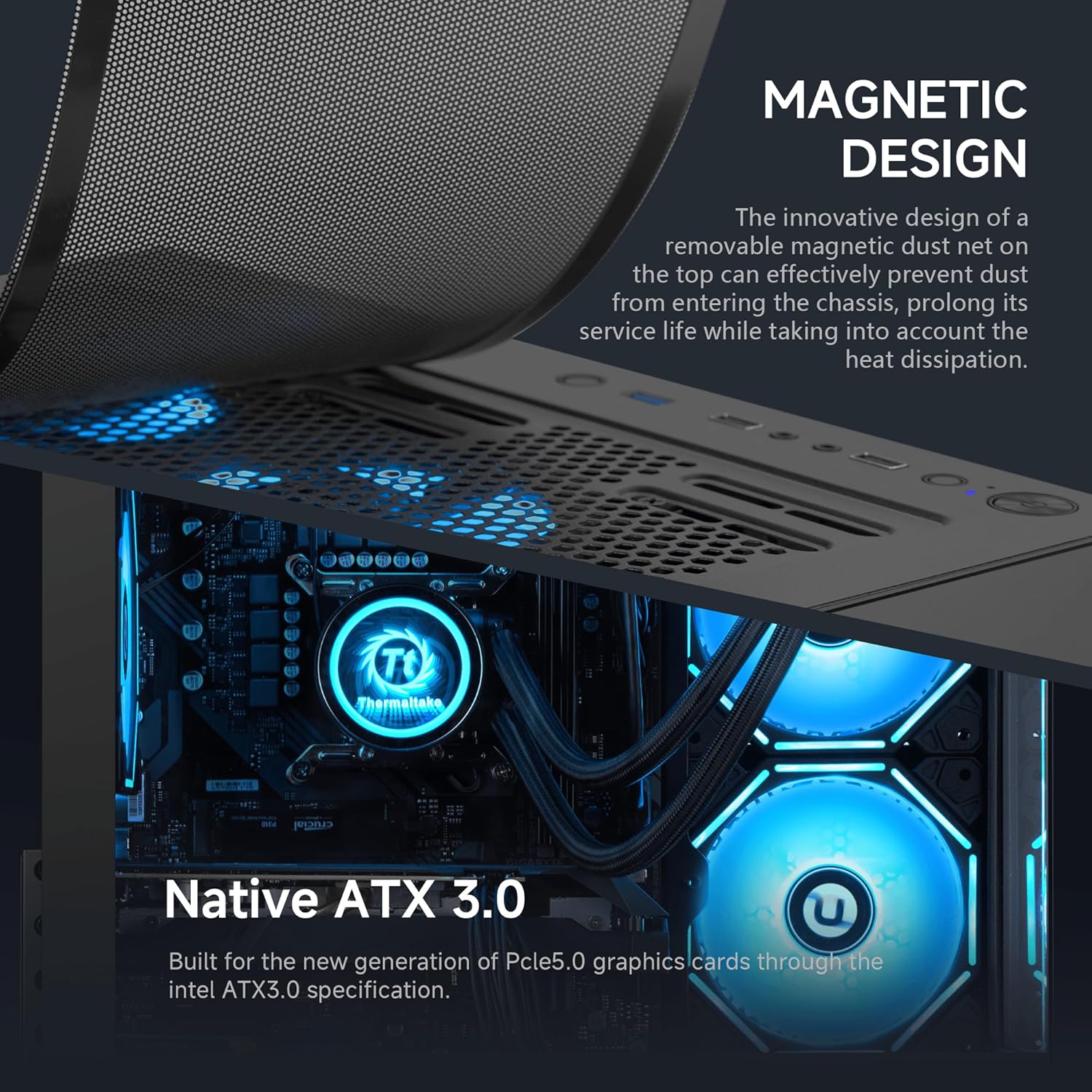
Image: Close-up view of the magnetic dust net on the top of the PC chassis, demonstrating its removable design for easy cleaning.
2. General Cleaning
Use a soft, dry cloth to clean the exterior of the PC. For internal cleaning, use compressed air to remove dust from fans and heatsinks. Always power off and unplug the PC before performing any internal cleaning.
3. Software Maintenance
Regularly update your operating system, drivers, and antivirus software. Perform periodic disk cleanup and defragmentation (for HDDs, not necessary for SSDs) to maintain system performance.
Troubleshooting
1. PC Does Not Power On
- Ensure the power cable is securely connected to both the PC and a working wall outlet.
- Verify the power supply switch on the back of the PC is in the 'ON' position.
- Test the outlet with another device to confirm it has power.
2. Display Issues (No Signal)
- Check that the monitor is powered on and the video cable (HDMI, DisplayPort) is securely connected to both the graphics card (not the motherboard) and the monitor.
- If the graphics card was user-installed, ensure it is fully seated in the PCIe slot and all power connectors are attached.
- Try a different video cable or monitor if available.
3. System Instability or Crashes
- Ensure all drivers, especially graphics drivers, are up to date.
- Check for sufficient ventilation and ensure fans are operating correctly to prevent overheating.
- If experiencing frequent crashes, consider checking RAM modules. In some cases, a faulty RAM stick can cause instability. If you suspect a RAM issue, try reseating the modules or testing them individually.
4. No Wi-Fi or Bluetooth
- Verify that any external Wi-Fi antennas are securely connected.
- Check Device Manager in Windows to ensure Wi-Fi and Bluetooth adapters are recognized and drivers are installed correctly.
- Note that some configurations may not include built-in Bluetooth or advanced Wi-Fi, requiring external adapters.
Specifications
Detailed technical specifications for your NINGMEI Supreme Master Gaming PC Desktop:
| Component | Specification |
|---|---|
| Model Number | 5700X 4060TI |
| CPU | AMD Ryzen 7 5700X (8 Cores, 3.4 GHz Base, 4.6 GHz Max Boost) |
| Graphics Card | NVIDIA GeForce RTX 5060 Ti 8GB GDDR7 |
| RAM | 32GB DDR4 3200MHz |
| Storage | 1TB NVMe SSD |
| Power Supply | 650W PSU (Native ATX 3.0) |
| Operating System | Windows 11 Home 64-bit |
| Dimensions (L x W x H) | 15.74 x 8.26 x 16.65 inches |
| Weight | 24.3 pounds |
| Total USB Ports | 8 |
| Specific Uses | Gaming |
Warranty and Support
NINGMEI offers a free one-year warranty for your Supreme Master Gaming PC Desktop. Additionally, free lifetime technical support is provided to assist you with any issues or questions you may have.
For technical assistance or warranty claims, please contact NINGMEI customer support through the retailer's platform or the official NINGMEI website.