Introduction
This manual provides essential instructions for the proper installation, operation, and maintenance of your YSIDO 60A Waterproof Brushed Electronic Speed Controller (ESC) with an XT60 plug. This ESC is designed for 1/10 scale RC cars, off-road trucks, and RC boats, compatible with 540 and 550 brushed motors. Please read this manual thoroughly before use to ensure optimal performance and safety.
Safety Information
Always prioritize safety when operating RC equipment. Failure to follow safety guidelines can result in damage to the product, property, or personal injury.
- Ensure all connections are secure and correct before powering on the ESC.
- Do not operate the ESC in conditions beyond its specified limits (e.g., voltage, current, temperature).
- Keep the ESC away from water and moisture unless specifically designed for waterproof operation. While this ESC is waterproof, ensure all other electronic components in your RC model are also protected.
- Disconnect the battery from the ESC when not in use to prevent accidental activation.
- Supervise children when they are operating RC models.
- Use only compatible batteries (2-3S LiPo or 5-9 cell NiMH) and motors (540/550 brushed).
Package Contents
Verify that all items are present in your package:
- 1 x YSIDO 60A Brushed ESC (XT60 Plug)
Features
- Waterproof and dustproof design.
- Compatible with 540 and 550 brushed motors.
- Suitable for 1/10 RC cars, off-road trucks, and RC boats.
- Strong resistant current capability.
- Excellent heat dissipation with integrated heatsink.
- Low internal resistance due to high current MOS transistors.
Specifications
| Parameter | Value |
|---|---|
| Model | YS-60A-RTR |
| Continuous Current | 60A |
| Burst Current | 320A |
| Input Voltage | 2-3S LiPo / 5-9 Cells NiMH |
| BEC Output | 6V / 3A (Switch Mode) |
| Motor Compatibility | 540/550 Brushed Motors |
| Dimensions (L*W*H) | 3.93 x 1.57 x 1.18 inches (100 x 40 x 30 mm) |
| Weight | 15.8 ounces (448 grams) |
Setup and Installation
Follow these steps for correct installation of the ESC into your RC model.
- Mounting the ESC: Securely mount the ESC in your RC model using double-sided tape or screws, ensuring good airflow around the heatsink for optimal cooling.
- Motor Connection: Connect the two motor wires from the ESC to your brushed motor. The polarity (which wire goes to which motor terminal) can affect the motor's rotation direction. If the motor spins in the wrong direction, reverse the connections.
- Receiver Connection: Plug the small three-wire cable (usually black, red, white) from the ESC into the throttle channel (CH2) of your RC receiver. This cable also supplies power to the receiver and steering servo (BEC output).
- Battery Connection: Connect your battery pack to the XT60 connector on the ESC. Ensure the polarity is correct (positive to positive, negative to negative).

Image: YSIDO 60A Brushed ESC with XT60 connector and wiring. This image displays the main unit of the ESC, showing the red heatsink, the XT60 battery connector, the motor output wires (red, blue, yellow), and the receiver connection cable.

Image: Detailed view of YSIDO 60A ESC components. This image provides a comprehensive look at all the connected parts of the ESC, including the XT60 battery connector, the motor wires, the receiver plug, and the power switch, illustrating how they are integrated.
Operating Instructions
Before operating your RC model, ensure the ESC is properly calibrated with your radio system.
- Transmitter Setup: Turn on your RC transmitter and ensure the throttle trim is set to neutral (center).
- ESC Power On: Connect the battery to the ESC. Turn on the ESC using its power switch.
- Calibration (if needed): Most ESCs automatically calibrate to the throttle range of your transmitter upon first power-up or after a reset. If your ESC does not respond correctly to throttle input, consult your radio system's manual for throttle calibration procedures. Typically, this involves holding full throttle on the transmitter, powering on the ESC, waiting for a beep, then moving to full brake, waiting for a beep, and finally returning to neutral.
- Initial Test: With the wheels off the ground, slowly apply throttle to ensure the motor spins correctly and in the desired direction. Adjust motor wire connections if the direction is incorrect.
Programming and Settings
The YSIDO 60A ESC features jumper pins for basic configuration. These pins allow you to select the operating mode and battery type.

Image: Close-up of YSIDO 60A ESC programming pins. This image shows the jumper pins on the ESC, labeled for selecting the operating mode (F/B, F/B/R, F/R) and battery type (LiPo, NiMH).
Use the provided jumper caps to select the desired settings:
- Operating Mode:
- F/B (Forward/Brake): For racing or applications where reverse is not needed.
- F/B/R (Forward/Brake/Reverse): Standard mode for general driving, allowing forward, brake, and reverse.
- F/R (Forward/Reverse): For specific applications where braking is not required, only forward and reverse.
- Battery Type:
- LiPo: Select this for Lithium Polymer batteries. The ESC will automatically detect the cell count and set the low voltage cutoff protection.
- NiMH: Select this for Nickel-Metal Hydride batteries.
Ensure the ESC is powered off before changing jumper settings. After changing settings, power on the ESC to apply the new configuration.
Maintenance
Regular maintenance helps prolong the life and performance of your ESC.
- Cleaning: Periodically clean the ESC to remove dirt, dust, and debris. Use a soft brush or compressed air. For waterproof ESCs, rinse with fresh water after use in wet conditions and allow to dry completely.
- Inspections: Regularly inspect all wires and connectors for signs of damage, fraying, or corrosion. Replace any damaged components immediately.
- Heat Management: Ensure the heatsink remains clear of obstructions to allow for efficient heat dissipation. Avoid operating the ESC in excessively hot environments.
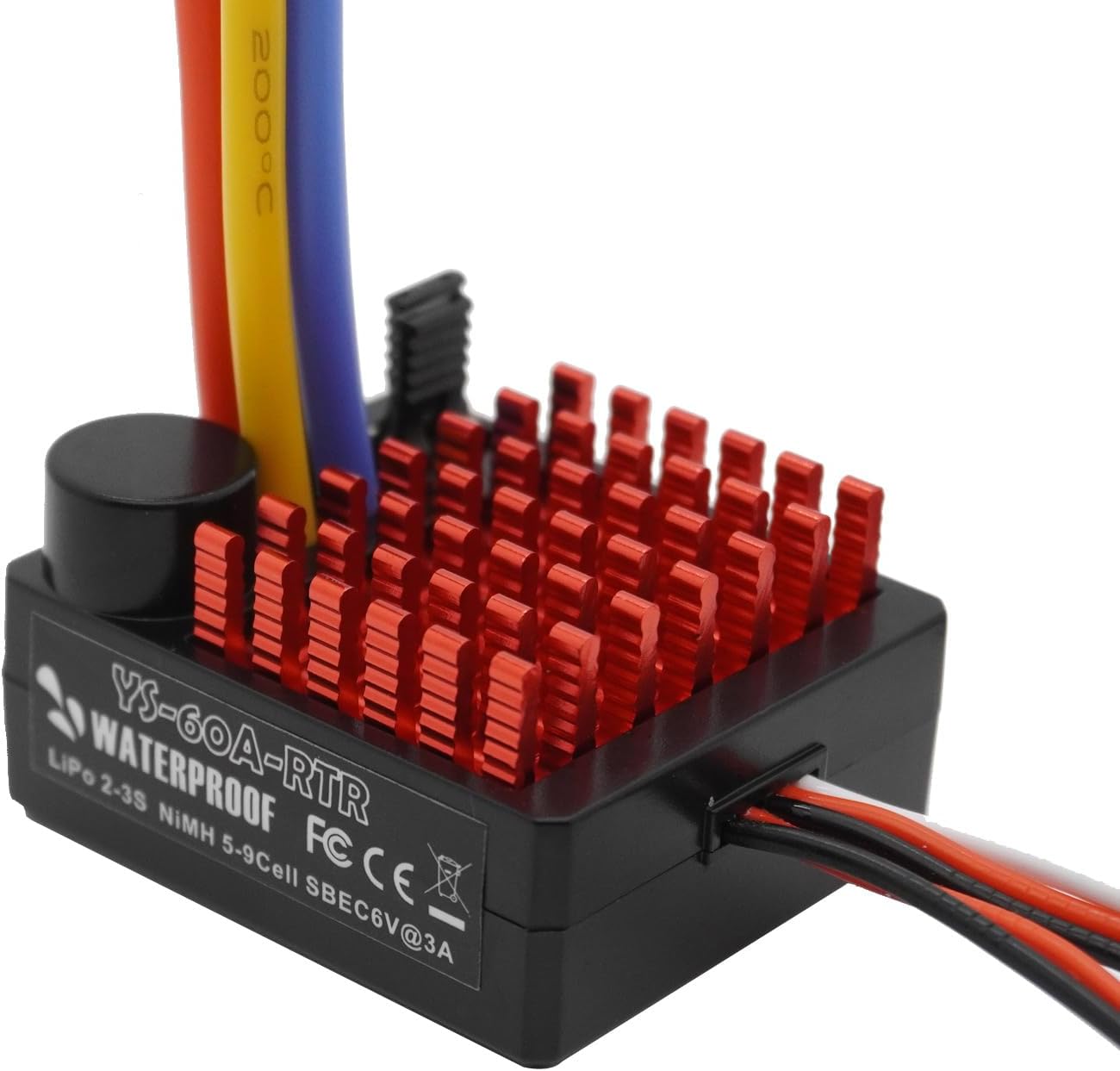
Image: Close-up of the red aluminum heatsink on YSIDO 60A ESC. This image highlights the finned red aluminum heatsink, which is crucial for dissipating heat generated during operation and maintaining optimal ESC temperature.
Troubleshooting
If you encounter issues with your ESC, refer to the following common problems and solutions:
- Motor Not Responding:
- Check all connections: battery, motor, and receiver.
- Ensure the transmitter is on and the battery is charged.
- Recalibrate the ESC throttle range.
- Verify the motor is not seized or damaged.
- Motor Runs in Wrong Direction:
- Reverse the two motor wire connections between the ESC and the motor.
- ESC Overheats:
- Ensure adequate airflow around the ESC heatsink.
- Check if the motor is too large or geared too high for the application, causing excessive load.
- Verify battery voltage is within the specified range.
- Intermittent Operation:
- Check for loose connections or damaged wiring.
- Ensure the battery is fully charged and in good condition.
- Check for radio interference.
Warranty and Support
YSIDO products are manufactured to high-quality standards. For warranty information or technical support, please refer to the retailer where you purchased this product or visit the official YSIDO website for contact details.


