
Introduction
The Generic AB-C247 E27 Bulb WiFi Camera Lamp combines illumination with surveillance capabilities. This device integrates a high-quality LED bulb with a discreet WiFi camera, allowing users to light their space while monitoring their surroundings. It offers remote access via a smartphone or tablet, providing peace of mind for home security, pet monitoring, or general surveillance needs.
This manual provides detailed instructions for the installation, operation, and maintenance of your AB-C247 E27 Bulb WiFi Camera Lamp.
Product Features
- High-Quality LED Bulb: Provides bright and energy-efficient illumination.
- Integrated WiFi Camera: Discreet surveillance for various environments.
- Remote Access: Monitor your space from anywhere using a smartphone or tablet.
- Motion Detection: Receive alert notifications for detected movement.
- Two-Way Audio: Enables real-time interaction through the device.
- Easy Installation: Simple setup process with a user-friendly application.
Package Contents
Please ensure all items are present in the package:
- AB-C247 E27 Bulb WiFi Camera Lamp
- Remote Control
- User Manual (this document)
Setup and Installation
Follow these steps to set up your AB-C247 E27 Bulb WiFi Camera Lamp:
- Unpack the Device: Carefully remove the camera lamp and all accessories from the packaging.
- Install the Bulb: Screw the AB-C247 E27 Bulb WiFi Camera Lamp into a standard E27 light bulb socket. Ensure the power is off before installation.
- Power On: Turn on the power to the light socket. The camera lamp will power on and initiate its startup sequence.
- Download the App: Scan the QR code provided in the quick start guide (or search for the recommended app name, e.g., "Smart Life" or "Tuya Smart") on your smartphone's app store (App Store for iOS, Google Play Store for Android).
- Register/Log In: Open the app and register a new account or log in if you already have one.
- Add Device: In the app, tap "Add Device" or the "+" icon. Select "Security Camera" or "Smart Bulb Camera" from the list of device types.
- Connect to WiFi: Follow the on-screen instructions to connect the camera lamp to your 2.4GHz WiFi network. You may need to reset the device by pressing a reset button (if available) or cycling power to enter pairing mode.
- Configuration: Once connected, you can configure settings such as motion detection sensitivity, recording preferences, and notification alerts within the app.
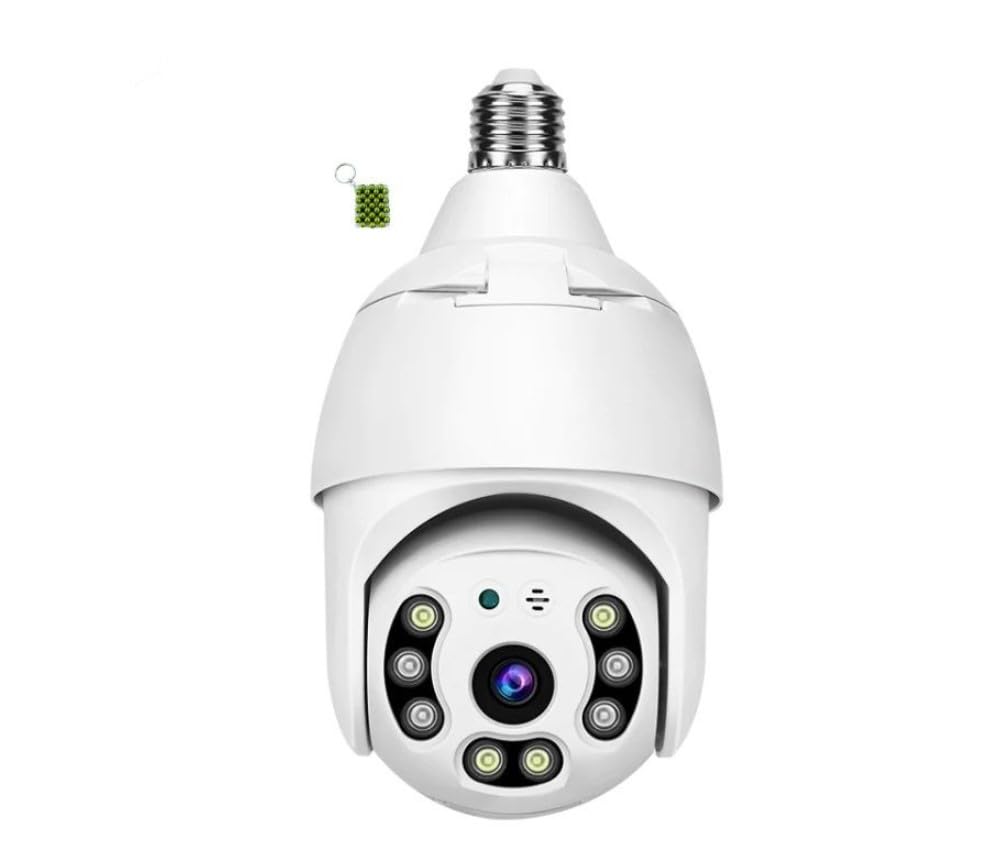
Image: The AB-C247 E27 Bulb WiFi Camera Lamp, illustrating its design and the live view displayed on a smartphone, highlighting its full-color night vision capability.
Operating Instructions
Remote Control Functions
The included remote control allows for basic functions:
- Power On/Off: Controls the LED light function.
- Brightness Adjustment: Adjusts the intensity of the LED light.
- Mode Selection: Switches between different lighting modes (if available).
Smartphone App Functions
The smartphone application provides comprehensive control and monitoring features:
- Live View: Access real-time video feed from the camera.
- Two-Way Audio: Speak through the camera and hear audio from its vicinity.
- Recording & Playback: Record video manually or view recorded footage stored on a microSD card (not included) or cloud service (subscription may be required).
- Motion Detection Alerts: Receive push notifications on your phone when motion is detected.
- PTZ Control: Pan, Tilt, and Zoom the camera lens remotely (if supported by the model).
- Light Control: Turn the LED light on/off, adjust brightness, and set schedules.
- Settings: Customize camera settings, network configuration, and user permissions.
Maintenance
To ensure optimal performance and longevity of your AB-C247 E27 Bulb WiFi Camera Lamp, follow these maintenance guidelines:
- Cleaning: Gently wipe the camera lens and the bulb's exterior with a soft, dry cloth. Do not use liquid cleaners or abrasive materials.
- Firmware Updates: Regularly check the smartphone app for available firmware updates. Keeping the firmware updated ensures the latest features and security patches.
- Network Stability: Ensure your WiFi network is stable and strong in the area where the camera lamp is installed for uninterrupted operation.
- Storage Management: If using a microSD card for recording, periodically check its storage capacity and format it if necessary to prevent data corruption.
Troubleshooting
If you encounter issues with your AB-C247 E27 Bulb WiFi Camera Lamp, refer to the following common problems and solutions:
| Problem | Possible Cause | Solution |
|---|---|---|
| Device not connecting to WiFi | Incorrect WiFi password, 5GHz network, weak signal, device not in pairing mode. |
|
| No video feed in the app | Device offline, poor internet connection, app malfunction. |
|
| Motion detection alerts not working | Motion detection disabled, incorrect sensitivity, app notifications blocked. |
|
| Remote control not responding | Dead battery, obstruction, out of range. |
|
Specifications
| Feature | Detail |
|---|---|
| Model | AB-C247 |
| Brand | Generic |
| Bulb Type | E27 Standard Socket |
| Photo Sensor Technology | Other |
| Maximum Focal Length | 40 Meters |
| Minimum Focal Length | 10 Meters |
| Video Capture Format | AVI |
| Included Components | Remote |
| Country of Origin | Cameroon |
| Manufacturer | China |
Warranty Information
The AB-C247 E27 Bulb WiFi Camera Lamp comes with a 6-month warranty from the date of purchase. This warranty covers manufacturing defects and malfunctions under normal use. It does not cover damage caused by misuse, accidents, unauthorized modifications, or improper installation. Please retain your proof of purchase for warranty claims.
Customer Support
For technical assistance, troubleshooting not covered in this manual, or warranty inquiries, please contact your retailer or the manufacturer's customer support. Refer to your purchase documentation for specific contact details.
Online Resources: For additional support and frequently asked questions, please visit the product support section on the manufacturer's website (if available).