
FUNMILY T5868
FUNMILY Treadmill with Desk Workstation User Manual
Model: T5868
1. Introduction
Thank you for choosing the FUNMILY Treadmill with Desk Workstation. This manual provides essential information for the safe and effective use, assembly, operation, and maintenance of your new fitness equipment. Please read this manual thoroughly before initial use and retain it for future reference.

Figure 1: FUNMILY Treadmill with Desk Workstation in action, highlighting its dual functionality for walking and running while working.
Key Features:
- Adjustable Height Desk: Ergonomic design allows desk height adjustment between 33" and 50" for customized comfort.
- APP & Bluetooth Connectivity: Sync workout data, access interactive training plans, and play music via the dedicated app.
- Powerful Motor: Provides speeds from 0.6 to 7.5 MPH for walking, jogging, or running.
- Manual Incline: 3 manual incline levels (0-5%) to increase workout intensity.
- 7-Layer Running Belt: High-tech non-slip, shock-absorbing belt reduces impact on joints.
- Multi-function Display: Tracks time, speed, distance, and calories. Includes 64 preset programs.
- Heart Rate Monitoring: Built-in handrail sensor for real-time heart rate tracking.
- Foldable Design: Soft drop system for easy unfolding and built-in transport wheels for storage.
- High Capacity: Solid steel frame supports up to 300 lbs.
2. Setup
2.1 Unpacking and Placement
The FUNMILY Treadmill is designed for minimal assembly. Carefully remove all packaging materials. Place the treadmill on a flat, stable surface, ensuring adequate clearance around the unit for safe operation.
2.2 Unfolding the Treadmill
The treadmill features a soft drop system for convenient unfolding. Gently step down to release the folding mechanism, allowing the running deck to lower smoothly to the floor. Ensure the deck is fully flat and locked into position before use.

Figure 2: The soft-drop folding system and transport wheels for easy storage and movement.
2.3 Adjusting Desk Height
The integrated desk workstation can be adjusted to suit users of various heights, from approximately 4.5 ft to 6.5 ft. To adjust the height, locate the adjustment knobs or levers on the vertical supports of the desk. Loosen them, raise or lower the desk to your desired ergonomic height (between 33" and 50"), and then securely tighten the knobs/levers.

Figure 3: Adjustable desk height accommodates users from 4.5 ft to 6.5 ft for comfortable walking or running.
3. Operating Instructions
3.1 Power On/Off
Connect the power cord to a grounded electrical outlet. Locate the main power switch, usually at the front base of the treadmill, and flip it to the 'ON' position. To turn off, flip the switch to 'OFF' and unplug the unit when not in use for extended periods.
3.2 Using the Control Panel
The treadmill features an intuitive control panel with an LED display. The display shows key workout metrics including speed, time, distance, and calories burned. Use the dedicated buttons to start, stop, adjust speed, and select programs.

Figure 4: The LCD display provides real-time workout data.
3.3 Speed and Incline Adjustment
- Speed: Adjust the speed from 0.6 MPH (walking) up to 7.5 MPH (running) using the '+' and '-' buttons on the control panel or handrails.
- Manual Incline: The treadmill offers 3 manual incline levels (0-5%). To adjust the incline, you will need to manually lift the rear of the treadmill and place the support bars into the desired incline position. Ensure both sides are set to the same level for stability.
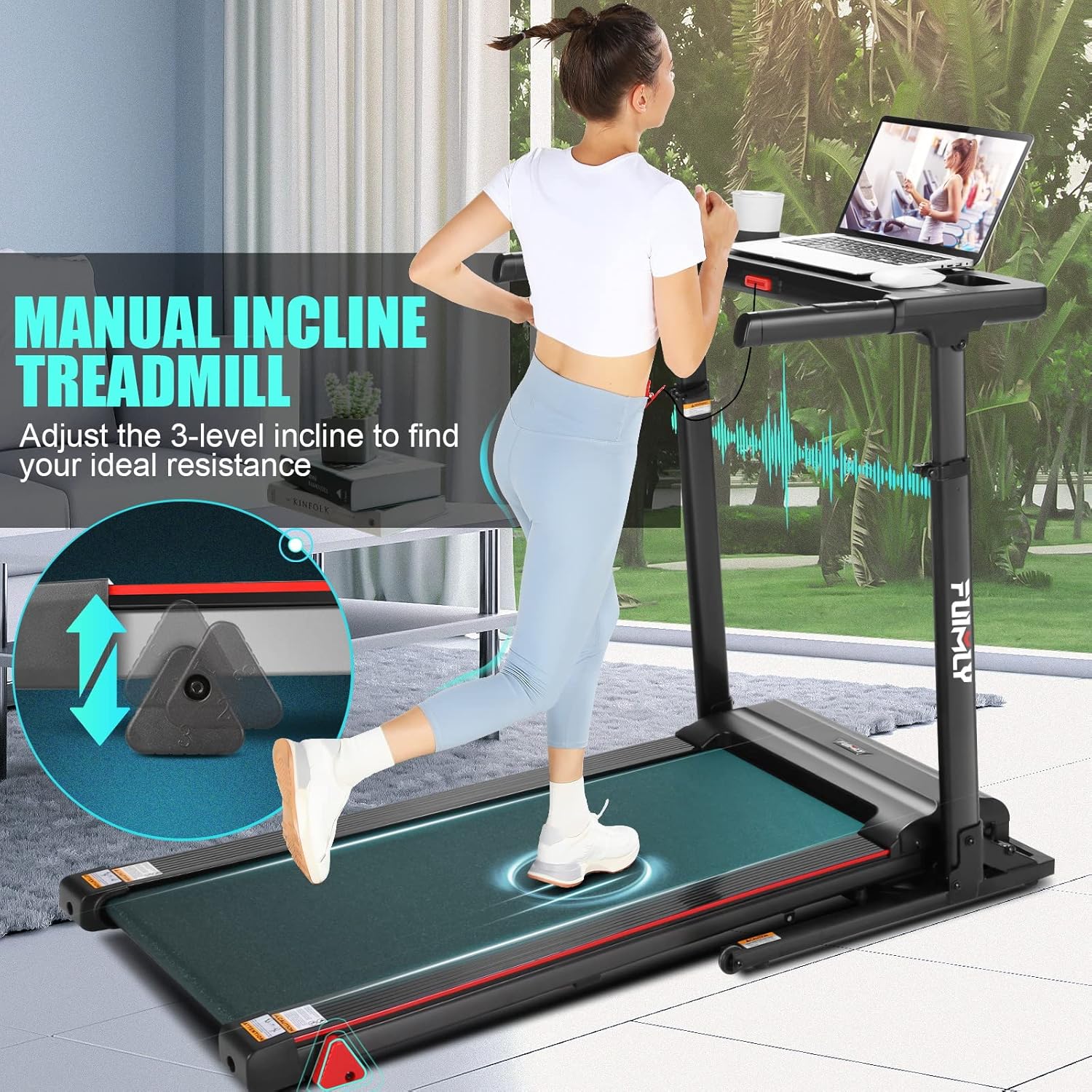
Figure 5: Manual incline adjustment for varied workout intensity.
3.4 APP and Bluetooth Connectivity
Enhance your workout experience by connecting your treadmill to the dedicated fitness app via Bluetooth. The app allows you to sync workout data, access interactive training programs, and stream music through the treadmill's built-in speakers. Scan the QR code on the control panel or visit http://fitshow.com/qr to download the FitShow APP.

Figure 6: Connect to the FitShow APP for enhanced features and control.
3.5 Child Mode Function
For safety, the treadmill includes a Child Mode. In this mode, the maximum speed is limited to 4 MPH, and only the START and STOP buttons are active. To enter Child Mode, press the 'LOCK' button. To release Child Mode, press and hold the 'UNLOCK' button for 3 seconds.

Figure 7: Kid Mode for safe operation by younger users.
3.6 Heart Rate Monitoring
Grasp the handrail heart sensors during your workout to track your target heart rate in real-time. This feature helps you monitor your intensity and optimize your training.
4. Maintenance
4.1 Lubrication
Regular lubrication of the running belt is crucial for the treadmill's longevity and smooth operation. Follow these steps:
- Turn Off Your Treadmill: Ensure the treadmill is powered off and unplugged from the wall outlet.
- Expose the Deck: Gently lift the running belt to expose the deck underneath.
- Applying the Lubricant: Apply a small amount of the provided lubricant (or a compatible silicone-based treadmill lubricant) in a Z-pattern under the center of the running belt.
- Start the Treadmill: Plug in the treadmill, turn it on, and run it at a slow speed (e.g., 1-2 MPH) for 3-5 minutes to distribute the lubricant evenly.
- Unplug Again and Clean: Turn off and unplug the treadmill. Wipe away any excess lubricant from the belt edges and frame.
Lubrication Schedule:
| Usage Frequency | Maintenance Frequency |
|---|---|
| <3 Hours/Week | 6 Months |
| 3-5 Hours/Week | 3 Months |
| ≥5 Hours/Week | 2 Months |

Figure 8: Step-by-step guide for treadmill lubrication and recommended schedule.
4.2 Cleaning
Regularly clean the treadmill to prevent dust and debris buildup. Use a soft, damp cloth to wipe down the frame, console, and running belt. Avoid using abrasive cleaners or solvents that could damage the finish.
5. Troubleshooting
If you encounter any issues with your FUNMILY Treadmill, please refer to the following common troubleshooting tips before contacting customer service.
Common Issues:
- Treadmill Not Starting: Ensure the power cord is securely plugged into a grounded outlet and the main power switch is ON. Check that the safety key is properly placed on the console.
- Belt Slipping or Sticking: This may indicate a need for lubrication (refer to Section 4.1) or belt tension adjustment. Consult the full user manual for detailed belt adjustment instructions.
- Unusual Noises: Check for loose parts or foreign objects under the belt. Lubrication may also resolve some noise issues.
- Display Not Working: Ensure all connections are secure. Try power cycling the unit (turn off, unplug, wait 30 seconds, plug in, turn on).
For issues not covered here or if problems persist, please contact FUNMILY customer support for assistance.
6. Specifications
| Feature | Detail |
|---|---|
| Brand | FUNMILY |
| Model Name | T5868 |
| Color | Black |
| Product Dimensions | 56"D x 27"W x 7"H |
| Item Weight | 100 Pounds |
| Material | Alloy Steel |
| Maximum Speed | 7.5 Miles per Hour |
| Minimum Speed | 0.6 Miles per Hour |
| Maximum Horsepower | 2.5 Horsepower |
| Maximum Incline Percentage | 5% (Manual, 3 levels) |
| Maximum Weight Recommendation | 300 Pounds |
| Desk Adjustable Height | 33"-50" |
| Display Type | LED |
| Number of Programs | 64 |
| Connectivity Technology | Bluetooth |
| Included Components | User Manual, Safety Key, Power Cord, Lubricant, Tool Kit |
7. Warranty and Support
FUNMILY is committed to providing outstanding customer support and ensuring your satisfaction.
- Warranty: We offer a 1-year premium service for the motor and frame.
- Replacement Parts: Enjoy 12 months of free replacement parts service.
- Customer Service: For any inquiries, technical assistance, or warranty claims, please contact FUNMILY customer support. Refer to your purchase documentation for specific contact details.
Ask a question about this manual
Ask about setup, troubleshooting, compatibility, parts, safety, or missing instructions. Manuals+ will review the question and use this page’s manual context to help answer it.