
Popl Black Lux
Popl Digital Business Card User Manual
Model: Black Lux
Introduction
The Popl Digital Business Card is an innovative solution for modern networking, allowing you to instantly share your contact information and social media profiles with a simple tap or scan. This manual provides detailed instructions to help you get started and make the most of your Popl card.

Image: The Popl Digital Business Card in Black Lux, positioned alongside a smartphone showcasing a digital business profile. This illustrates the primary function of the card: to transfer contact information to a mobile device.
Key Features
- Universal Compatibility: Share your information with anyone; recipients do not need a Popl app or card.
- Flexible Usage: Utilize both free and Pro versions of the Popl app for unlimited shares and advanced business features.
- Multiple Sharing Methods: Tap your Popl card to compatible iPhones (XR and newer) and Android devices (NFC enabled), or use the in-app QR code for older iPhones and other devices.
- Secure and Private: Link social accounts using only usernames and links, ensuring no passwords are required.

Image: A detailed view of the Popl Lux Card, highlighting its premium brushed finish. Text on the image indicates key attributes such as 'Smudge-proof Coating', 'Unlimited Sharing', and 'No Subscription Required', emphasizing its durability and cost-effectiveness.

Image: An exploded diagram of the Popl card, revealing the internal 'X1 Nano-Chip'. This visual demonstrates the advanced NFC technology embedded within the card, responsible for its rapid sharing capabilities.
Setup Guide
Initial Activation
Follow these steps to activate your Popl Digital Business Card and begin sharing your profile:
- Step 1: Order Your Popl Lux Card. Acquire your Popl Lux Card from an authorized retailer.
- Step 2: Login to the Free Popl App. Download the Popl app from your device's app store and log in to create or manage your digital business profile.
- Step 3: Scan QR Code to Activate. Upon receiving your card, locate the QR code on its surface and scan it using the Popl app to link the card to your profile.
- Step 4: Start Sharing Your Info. Once activated, your Popl Lux Card is ready for use.

Image: A visual representation of the four-step setup process for the Popl Lux Card, from ordering the card to activating it via the Popl app and preparing it for sharing.

Image: Step 1 of the setup process, showing the Popl card alongside a smartphone and other accessories, indicating the initial components required.
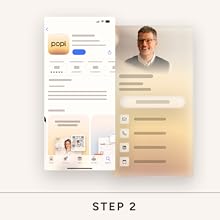
Image: Step 2 of the setup process, illustrating the Popl app's presence on an app store, ready for download and installation on a mobile device.

Image: Step 3 of the setup process, displaying the 'Activate Your Device' screen within the Popl app, prompting the user to scan the QR code on their Popl card for activation.

Image: Step 4 of the setup process, showing the 'Scan Accessory' screen in the Popl app, indicating the final step before the card is fully operational for sharing.
Operating Instructions
How to Share Your Profile
The Popl card offers two primary methods for sharing your digital profile:
- Tap-to-Share (NFC): For iPhone XR and newer, tap your Popl card to the very top of the iPhone. For Android devices, tap your Popl card to the center of the Android phone. Ensure NFC is enabled in the Android settings.
- Scan QR Code: For iPhone X and older models, or if NFC is not preferred, use the in-app Popl QR code. The integrated QR code on your card is also a reliable sharing method.

Image: A visual comparison of the two main sharing methods: 'Tap-To-Share' via NFC, depicted by a Popl card tapping a phone, and 'Scan QR to Share', showing a phone scanning the QR code on the card. Both methods enable seamless information exchange.
Managing Your Digital Identity
The Popl app serves as your central hub for managing your digital profile. You can update your information, add new links, and track interactions effortlessly.

Image: A screenshot of the Popl app interface, demonstrating how users can manage their digital identity. It shows various customizable fields and links, emphasizing the ease of keeping contact information current and comprehensive.
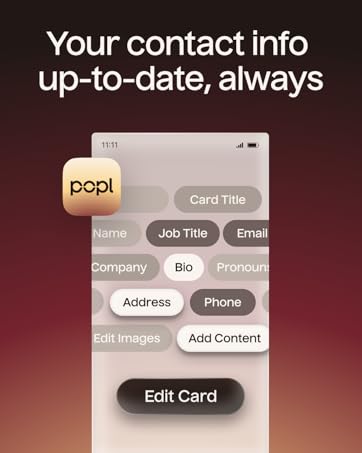
Image: A Popl app screen displaying various input fields for contact information, such as name, job title, email, and bio. The accompanying text, 'Your contact info up-to-date, always', highlights the app's ability to keep your digital profile current.

Image: The Popl app's 'Create New Card' interface, offering options to create either a 'Personal Card' or a 'Work Card', demonstrating the flexibility in managing different professional and personal profiles.

Image: A grid displaying numerous icons of popular social media platforms and communication apps, illustrating the wide range of integrations available through the Popl app for comprehensive digital networking.

Image: The 'Theme & Style' customization screen within the Popl app, showing options to personalize the appearance of your digital card, including card color, link color, custom code, and icon/title settings.
Maintenance
To ensure the longevity and optimal performance of your Popl Digital Business Card, follow these simple maintenance guidelines:
- Cleaning: Wipe the card gently with a soft, dry cloth to remove dust or smudges. Avoid abrasive materials or harsh chemicals.
- Storage: Store your Popl card in a safe place, away from extreme temperatures, direct sunlight, and strong magnetic fields, which could potentially affect the NFC chip.
- Durability: The Popl Lux Card features a premium brushed finish with a smudge-proof coating, designed for daily use. However, avoid excessive bending or scratching to preserve its appearance and functionality.
Troubleshooting
Common Issues and Solutions
- Card Not Tapping: Ensure the recipient's phone is compatible with NFC (iPhone XR/newer, most Androids). For Android, verify NFC is enabled in settings. Try tapping the card to different areas of the phone (top for iPhone, center for Android).
- QR Code Not Scanning: Ensure good lighting and a clear view of the QR code. Clean the card surface if smudged. Use the Popl app's built-in QR scanner for best results.
- Profile Not Updating: Verify your internet connection. Changes made in the Popl app require an active connection to sync. If you collect leads offline, they will be enriched once you are back online.
- App Issues: Ensure your Popl app is updated to the latest version. If problems persist, try restarting the app or your device.

Image: A Popl app screen indicating that new leads collected offline will be enriched once an internet connection is re-established, highlighting the app's ability to function even without immediate connectivity.
Specifications
| Feature | Detail |
|---|---|
| Brand | Popl |
| Model | Black Lux |
| Package Dimensions | 4.89 x 3.66 x 0.16 inches |
| Item Weight | 0.81 ounces |
| Hardware Interface | Radio Frequency (NFC) |
| Compatible Devices | Smartphone (iPhone & Android) |
| ASIN | B0D8QGL3CT |
| UPC | 850019894936 |
| Date First Available | July 3, 2024 |
Warranty and Support
Popl products are designed for durability and performance. For specific warranty details and terms, please refer to the official Popl website or contact customer support directly. Keep your purchase receipt for warranty claims.
Customer Support
For technical assistance, troubleshooting, or any inquiries regarding your Popl Digital Business Card, please visit the official Popl support page or contact their customer service team. You can find more information and resources on the Popl Brand Store.
Image: A scene depicting two professionals engaging in networking, with the Popl logo and text emphasizing its trust among Fortune 500 teams globally for enhanced networking.

Image: A visual emphasizing the concept of 'Connecting you with your future customers', illustrating Popl's role in facilitating in-person interactions for business growth.
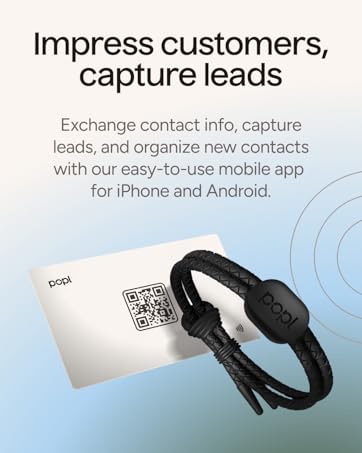
Image: A Popl card and bracelet are shown with the text 'Impress customers, capture leads', highlighting the product's effectiveness in exchanging contact information and managing leads.
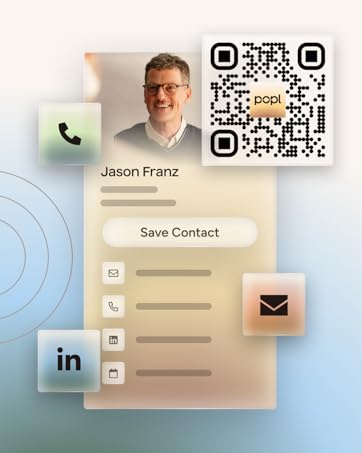
Image: An example of a digital business card profile for 'Jason Franz', showcasing contact details and a QR code, demonstrating the comprehensive information that can be shared.

Image: A woman interacting with a smartphone, accompanied by the text 'Easy setup and centralized accessory management', illustrating the user-friendly nature of the Popl mobile app dashboard.
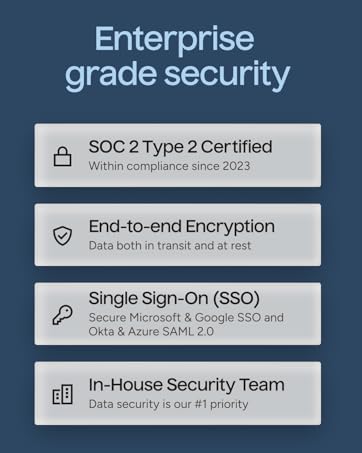
Image: A graphic detailing 'Enterprise grade security' features, including SOC 2 Type 2 Certification, End-to-end Encryption, Single Sign-On (SSO), and the presence of an In-House Security Team, emphasizing data protection.
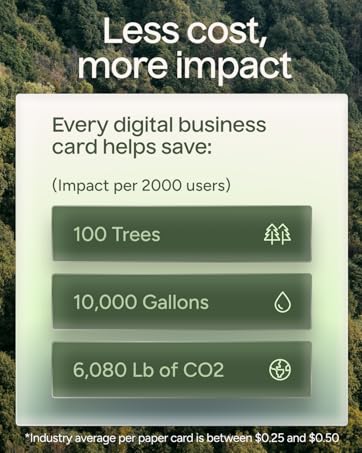
Image: A visual illustrating the environmental benefits of using digital business cards, with text 'Less cost, more impact' and statistics on trees, gallons of water, and CO2 saved per 2000 users.
Ask a question about this manual
Ask about setup, troubleshooting, compatibility, parts, safety, or missing instructions. Manuals+ will review the question and use this page’s manual context to help answer it.