
Saker HL133
Saker HL133 Portable Handheld Vacuum Cleaner User Manual
Model: HL133 | Brand: Saker
Introduction
Thank you for choosing the Saker HL133 Portable Handheld Vacuum Cleaner. This versatile 3-in-1 device is designed to provide powerful and convenient cleaning for various environments, including your car, office, and home. With its compact, foldable design and strong suction, the HL133 makes maintaining cleanliness effortless.

Figure 1: Saker HL133 Portable Handheld Vacuum Cleaner and included accessories.
Product Features
- 3-in-1 Multifunctional Design: Equipped for blowing, sucking, and pumping, meeting diverse cleaning needs from keyboards to car interiors.
- Powerful Suction: Features an upgraded high-speed brushless motor delivering up to 17000PA super suction. Three-speed adjustment (7KPA-15kPA) for various debris.
- Compact and Portable: Weighing only 380g, its wireless and foldable design allows for easy carrying and storage, fitting in the palm of your hand when folded.
- Extended Battery Life: Powered by 3 x 2500mAH high-quality Lithium-Ion batteries, offering ultra-long standby time. Quick recharging via Type-C port.
- Advanced Filtration: Includes both a washable HEPA filter (2-3 months lifespan) and an upgraded washable fine steel filter (over 1 year lifespan) for efficient dust capture.
- Versatile Accessories: Comes with an extension tube, brush sleeve, and blowing accessory set for hard-to-reach areas, stubborn dust, inflating items, and blowing sawdust.

Figure 2: Illustration of the powerful brushless motor and 3x2500mAh battery capacity.

Figure 3: The compact and foldable design of the Saker HL133, highlighting its portability.
Setup
- Unboxing: Carefully remove all components from the packaging. Verify that all accessories listed in the "Product Features" section are present.
- Initial Charge: Before first use, fully charge the vacuum cleaner. Connect the Type-C charging cable to the vacuum's charging port and a suitable power source. The indicator light will be red during charging and turn green when fully charged. A full charge takes approximately 3 hours.
- Attaching Accessories: Select the appropriate accessory for your cleaning task. Align the accessory with the vacuum's nozzle and push firmly until it clicks into place. To remove, gently pull the accessory away from the nozzle.
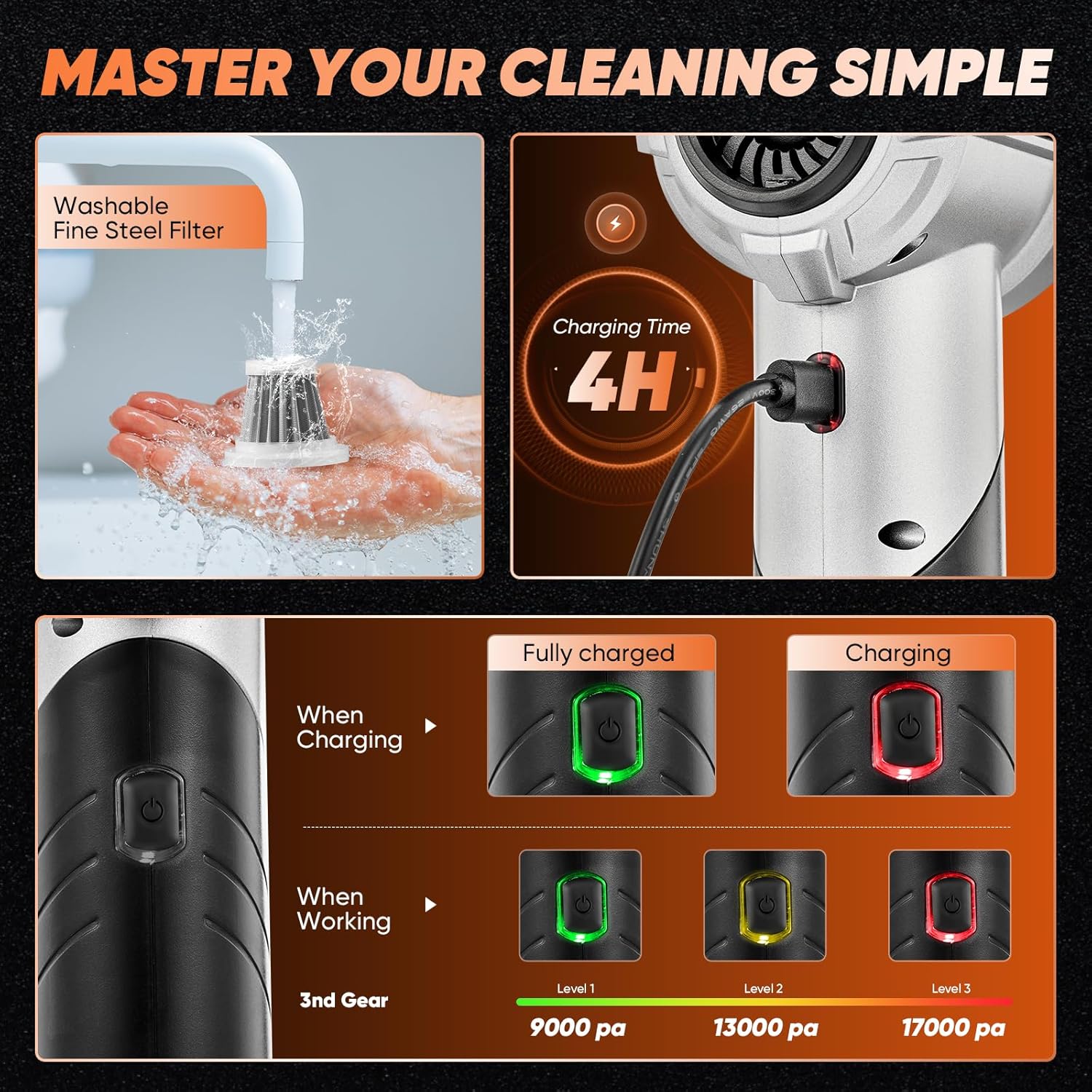
Figure 4: Charging status indicators and power level display on the Saker HL133.
Operating Instructions
- Power On/Off: Press the power button (push button controller) to turn the vacuum on. Press it again to cycle through power modes or turn off.
- Adjusting Suction Power: The Saker HL133 offers three power levels:
- Level 1 (Green Light): Approximately 9000 PA suction. Ideal for light dust and debris.
- Level 2 (Yellow Light): Approximately 13000 PA suction. Suitable for general cleaning tasks.
- Level 3 (Red Light): Up to 17000 PA super suction. For stubborn dirt and larger particles.
- Using Vacuum Mode: Attach the desired vacuum nozzle (e.g., flat suction, floor brush) and select the appropriate power level.
- For car interiors, use the flat suction nozzle to reach tight spaces like cup holders and seat crevices.
- For home use, the floor brush is effective on carpets and upholstery.
- Using Blower Mode: Attach a blowing nozzle. This mode is useful for:
- Blowing dust from computer keyboards, vents, or hard-to-reach areas.
- Assisting with outdoor barbecues or blowing sawdust in workshops.
- Inflating small items like swimming rings or kayaks (using the inflator nozzle).
- Using Air Extractor Mode: Attach the air extractor nozzle. This mode is designed for:
- Compressing vacuum storage bags to save space.

Figure 5: Demonstrating the vacuum clean mode for various surfaces and air extractor mode for storage bags.

Figure 6: Examples of using the blow mode for cleaning air conditioners, woodworking, inflating, and cleaning electronics.
Maintenance
- Emptying the Dust Cup: Regularly empty the 0.2-liter dust cup to maintain optimal suction performance. Twist to detach the dust cup and dispose of collected debris.
- Cleaning Filters:
- HEPA Filter: The HEPA filter is washable. Rinse it under running water until clean. Allow it to air dry completely before reinserting. Replace every 2-3 months for best performance.
- Fine Steel Filter: The upgraded fine steel filter is also washable. A simple rinse is sufficient. Ensure it is completely dry before reuse. This filter has a lifespan of over 1 year.
- General Cleaning: Wipe the exterior of the vacuum cleaner with a soft, damp cloth. Do not use harsh chemicals or abrasive cleaners.
Figure 7: Instructions for washing the fine steel filter to ensure prolonged use.
Troubleshooting
| Problem | Possible Cause | Solution |
|---|---|---|
| Low suction power | Dust cup is full; Filter is clogged; Battery is low. | Empty the dust cup; Clean or replace the filter; Recharge the battery. |
| Vacuum does not turn on | Battery is completely drained; Power button not pressed correctly. | Charge the vacuum fully; Ensure the power button is pressed firmly. |
| Short battery life | Using highest power mode continuously; Battery degradation over time. | Use lower power modes for lighter tasks; Ensure full charge before use. |
Specifications
| Brand | Saker |
| Model Name | Saker Vacuum Cleaner HL133 |
| Color | Black |
| Special Features | Bag, Cordless, Foldable, Lightweight |
| Filter Type | HEPA Filter |
| Included Components | Accessory Kit, Blowing brush, Flat suction, Floor brush, Inflator nozzle |
| Is Cordless? | Yes |
| Dust Cup Capacity | 0.2 Liters |
| Wattage | 100 watts |
| Runtime | Up to 40 minutes |
| Charging Time | 3 Hours |
| Maximum Suction Power | 17000 PA |
| Form Factor | Handheld |
| Product Dimensions | 6.5"L x 2.75"W x 8.5"H |
| Battery Type | 3 Lithium Ion batteries (included) |
| Noise Level | 80 dB |
| Number of Speeds | 3 |
| Indoor/Outdoor Usage | Indoor |
Warranty and Support
For any questions regarding your Saker HL133 Portable Handheld Vacuum Cleaner, including warranty information or technical support, please contact Saker customer service. We are committed to providing timely assistance and will respond to your inquiries within 24 hours.
Please refer to your purchase documentation for specific warranty terms and conditions.
Ask a question about this manual
Ask about setup, troubleshooting, compatibility, parts, safety, or missing instructions. Manuals+ will review the question and use this page’s manual context to help answer it.