1. Setup
The BEATYL Reverse Osmosis Water Filter is designed for convenience with zero installation required. Follow these steps to prepare your unit for first use:
- Unpack all components from the packaging.
- Place the unit on a stable, flat countertop surface.
- Insert the removable kettle and water tray into their designated positions.
- Fill the raw water tank with tap water.
- Plug the power cord into a suitable electrical outlet.
- Turn on the power. The intelligent display will illuminate.
- Before first use, it is recommended to run a cleaning cycle to flush the system. Refer to the 'Operating' section for instructions on the cleaning function.

Image: The BEATYL water purifier is designed for countertop placement, requiring no complex plumbing installation. Simply place it in your desired location, such as a kitchen, living room, office, or RV.
Video: This video demonstrates how to operate the clean function, which is important for initial setup and regular maintenance to ensure optimal water quality.
2. Operating Instructions
The intelligent display provides easy control and monitoring of your water purification process.
2.1 Intelligent Display Overview
The intelligent screen displays crucial information including water quality (TDS), filter life, and allows for water volume settings, system cleaning, and filter reset. The 'IN TDS' shows the Total Dissolved Solids of the input water, while 'OUT TDS' shows the TDS of the purified water.

Image: The intelligent display panel provides real-time information and controls for dispensing water.
2.2 Dispensing Water
- Ensure the raw water tank is filled.
- Place a cup or the portable kettle under the water outlet.
- Gently touch the water outlet button or select a preset volume (e.g., 6 oz, 12 oz, 15 oz, 25 oz) on the intelligent display to start water production.
- To stop dispensing before the preset volume is reached, touch the water outlet button again.
2.3 Portable Kettle Use
The filtered water is stored in a portable kettle, allowing you to easily move purified water to different locations without moving the entire unit. Simply lift the kettle from its base when filled.
2.4 TDS Testing
The unit provides real-time TDS readings. TDS (Total Dissolved Solids) is a measure of the concentration of dissolved inorganic and organic substances in water. A lower TDS value indicates purer water.

Image: A visual representation of a TDS test, highlighting the significant reduction in Total Dissolved Solids after water passes through the purification system.
Video: This video demonstrates how to perform a TDS test on the purified water, showcasing the effectiveness of the RO system in reducing dissolved solids.
3. Maintenance
Regular maintenance ensures the longevity and optimal performance of your water filter system.
3.1 Filter Replacement
The system features an 8-stage filtration process. The intelligent display will indicate when the filter needs replacement. It is recommended to replace the filter cartridge approximately every 12 months, depending on usage and water quality.
- Lift the water tank from the main unit.
- Push out the top of the equipment towards the water tank to access the filter compartment.
- Turn the old cartridge counter-clockwise and lift it up to remove.
- Install the new cartridge by aligning it with the hole and rotating clockwise into place until secure.
- After replacing the filter, use the 'Reset' function on the intelligent display to reset the filter life indicator.
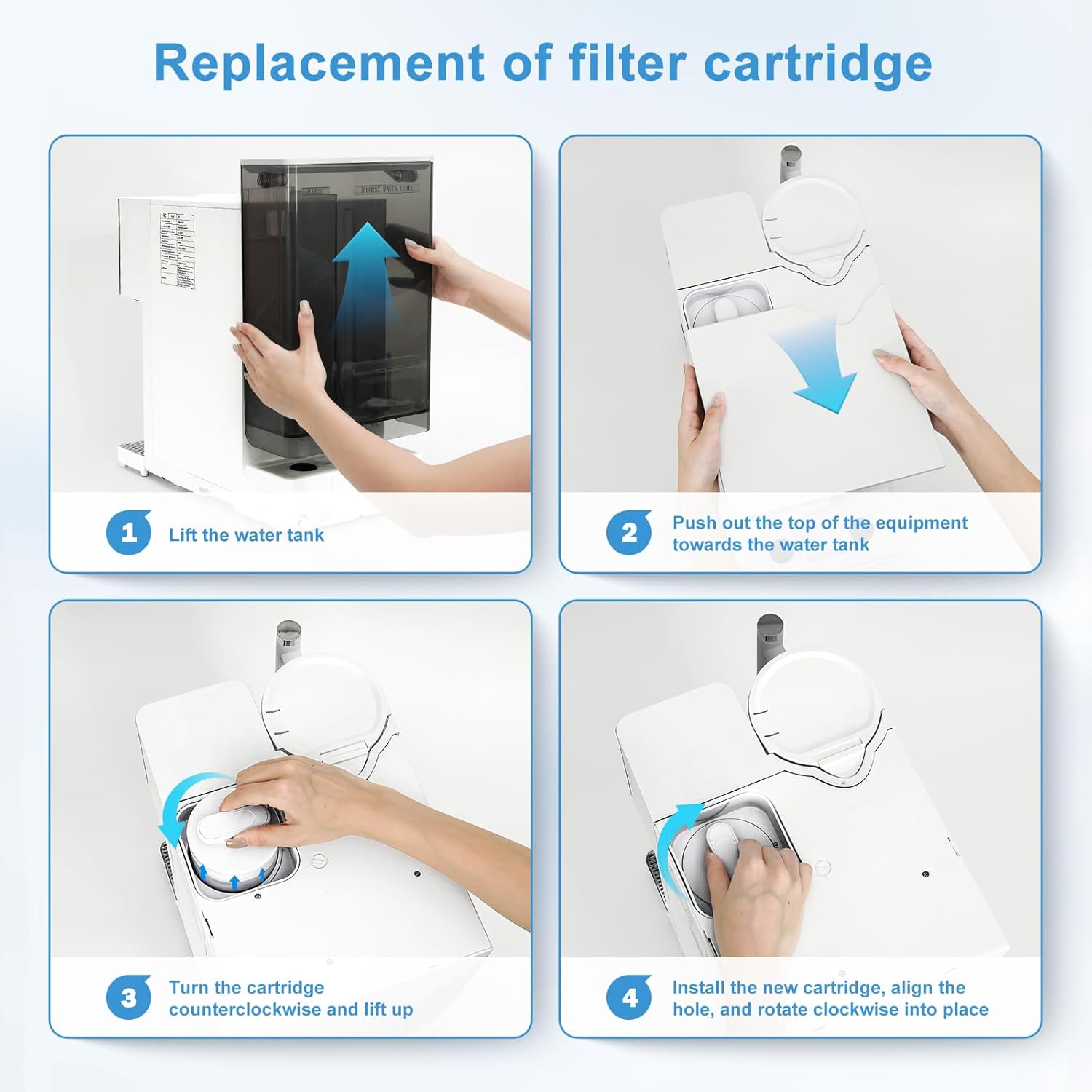
Image: Step-by-step guide illustrating the process of replacing the filter cartridge, ensuring continued high-quality water purification.
Video: This video provides a detailed demonstration on how to replace the filter and use the reset function on the unit's display.
3.2 Cleaning the System
Periodically clean the raw water tank and the wastewater tray to prevent buildup and maintain hygiene. Use mild soap and water, rinse thoroughly, and ensure all parts are dry before reassembling.
The unit also has an internal cleaning function accessible via the intelligent display. Refer to the 'Operating' section for details on initiating this cycle.
3.3 Wastewater Management
The system produces wastewater with an efficient 4:1 pure to drain ratio. This wastewater can be safely retained and used for non-potable purposes such as watering plants or mopping floors, reducing overall water waste.
4. Troubleshooting
If you encounter any issues with your BEATYL Reverse Osmosis Water Filter, please refer to the following common troubleshooting tips:
- Water Dribbles Outside Kettle/Glass: Ensure the cup or kettle is positioned directly under the water outlet. Some initial dribbling may occur as the system starts; a small mat can be placed underneath the dispensing area to catch any drips.
- Inaccurate Dispensing Volume: The unit dispenses based on preset volumes. If using clear containers, the sensor may have difficulty detecting the water level. Try using opaque cups or adjusting the container's position closer to the sensor. For larger volumes, you may need to initiate a second dispensing cycle.
- Unit is Noisy During Operation: A certain level of pump noise is normal as the system draws water and performs filtration. If the noise is excessive or unusual, ensure the unit is on a stable, level surface and that no components are loose.
- Touchscreen/Buttons Unresponsive: Ensure the unit is properly powered on. If the display panel appears misaligned, gently press on the right side of the display (when facing the machine) to ensure it is seated correctly.
- Filter Life Indicator Not Resetting: After replacing the filter, ensure you press the 'Reset' button on the intelligent display to clear the indicator.
- No Water Dispensing: Check if the raw water tank is empty and refill if necessary. Ensure the power cord is securely plugged in and the unit is turned on.
- Difficulty Finding Replacement Filters: Ensure you are searching for the correct model-specific replacement filter cartridges. Contact BEATYL customer support or authorized retailers for assistance in locating genuine replacement parts.
If these steps do not resolve the issue, please contact BEATYL customer support for further assistance.
5. Specifications
| Brand | BEATYL |
| Model Number | Y9S |
| Color | White |
| Product Dimensions | 17.75 x 9.06 x 15.75 inches |
| Item Weight | 18.76 pounds |
| Installation Type | Countertop |
| Power Source | Corded Electric |
| Filtration Stages | 8-Stage RO Filtration |
| Pure to Drain Ratio | 4:1 |
6. Warranty & Support
BEATYL is committed to providing high-quality products and customer satisfaction.
6.1 Product Warranty
For specific warranty details and duration, please refer to the warranty card included with your product packaging or contact BEATYL customer support directly. Keep your proof of purchase for warranty claims.
6.2 Extended Protection Plans
Extended protection plans may be available for purchase to provide additional coverage beyond the standard manufacturer's warranty. Options may include 3-Year Protection Plan, 4-Year Protection Plan, or a Complete Protect plan with monthly renewal.
6.3 Customer Support
If you have any questions, require technical assistance, or need to order replacement parts, please contact BEATYL customer support. Contact information can typically be found in your product manual, on the BEATYL official website, or through the retailer where you purchased the product.
When contacting support, please have your product model number (Y9S) and purchase date available to expedite the process.