
1. Introduction
This manual provides essential instructions for the safe operation, setup, and maintenance of your Wipkviey T6 Drone with Camera. Please read this manual thoroughly before operating the drone to ensure proper function and to prevent damage or injury. This drone is designed for beginners and offers an accessible entry into drone piloting.
2. Package Contents
Verify that all items listed below are included in your package:
- Wipkviey T6 Drone
- Remote Control Transmitter
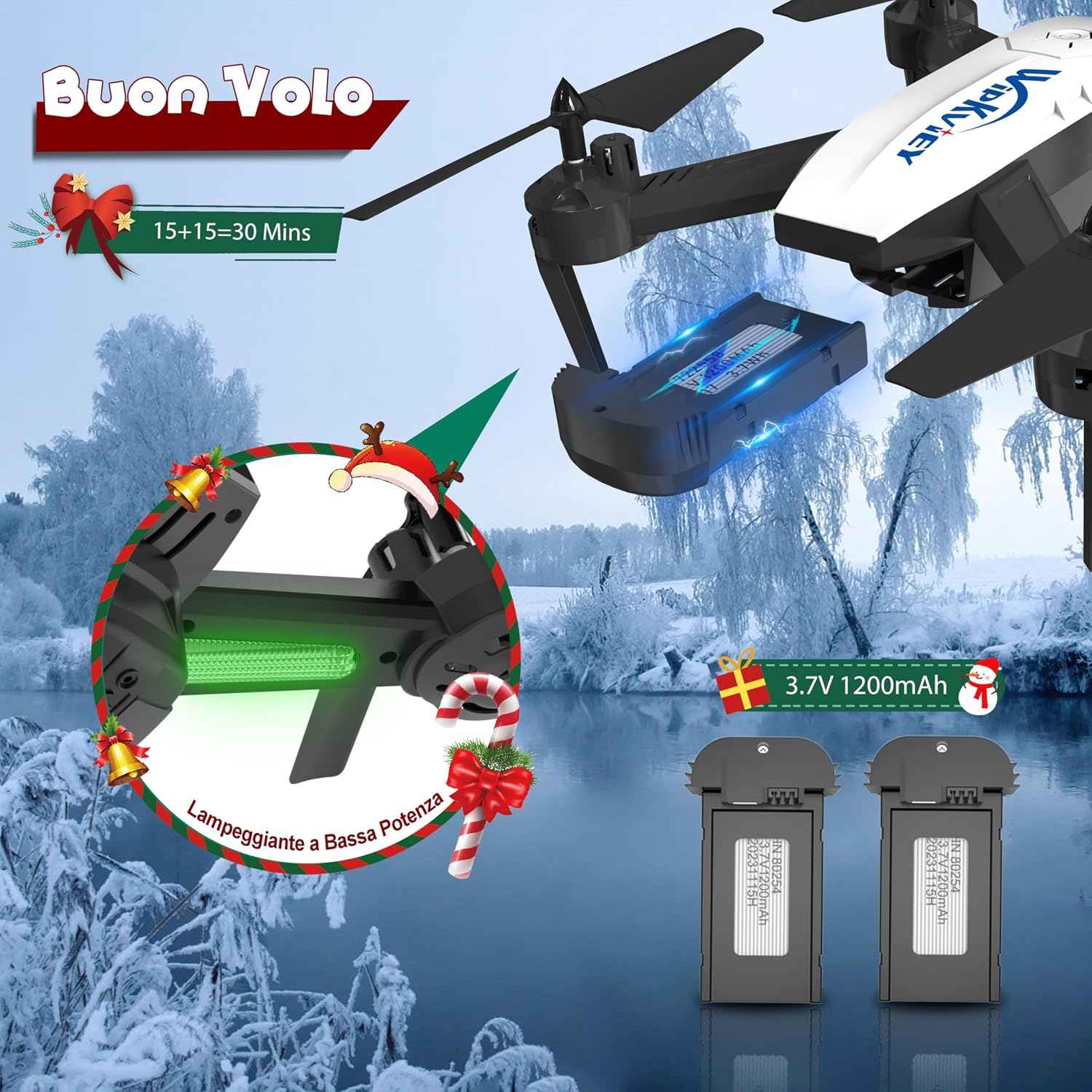
- 2 x 3.7V/1200mAh Drone Batteries
- Mobile Phone Holder
- USB Charging Cable
- Screwdriver
- 2 x Spare Propeller Blades
- 4 x Propeller Protectors
- User Manual (this document)
- Mobile Phone Control Software Manual
3. Product Overview
The Wipkviey T6 Drone is a lightweight quadcopter equipped with a 1080P HD camera, suitable for capturing aerial photos and videos. It features a compact design and user-friendly controls, making it ideal for new pilots.

4. Setup
4.1 Battery Installation and Charging
- Drone Battery: Insert the provided 3.7V/1200mAh battery into the drone's battery compartment. Ensure it clicks securely into place.
- Charging: Connect the drone battery to the USB charging cable and plug it into a USB power source (e.g., computer, USB wall adapter). The charging indicator will show the charging status.
- Remote Control Batteries: Install 2 AA batteries (included) into the remote control.
4.2 Propeller and Protector Installation
Attach the propeller protectors to the drone's arms. Ensure propellers are correctly installed according to their markings (A and B) on the corresponding motor shafts.
4.3 Mobile App Installation
Download and install the dedicated control software for your mobile phone. Refer to the 'Mobile Phone Control Software Manual' for detailed instructions and QR codes.
4.4 Initial Calibration
Before each flight, especially for beginners, proper calibration is crucial:
- Place the drone on a flat, horizontal surface.
- Turn on the drone and the remote control.
- Push the left joystick on the remote control up and then down to connect the drone.
- Simultaneously pull both the left and right joysticks down diagonally at a 45° angle. The drone's indicator lights will flash and then become solid, indicating successful calibration.

5. Operating Instructions
5.1 Basic Flight Controls
The Wipkviey T6 Drone offers multiple control modes:
- Remote Control: Use the physical joysticks and buttons on the transmitter.
- Mobile App Control: Connect your smartphone to the drone's Wi-Fi network and use the app interface.
- Gravity Control: Tilt your smartphone to control the drone's direction (via app).
- Voice Control: Use voice commands through the app (refer to app manual for specific commands).
One-Button Takeoff/Landing: Press the designated button on the remote or app for automatic takeoff and landing.
Headless Mode: Activates a mode where the drone's orientation is relative to the pilot, simplifying control regardless of the drone's front direction.
Emergency Stop: A dedicated button or command to immediately stop the drone's motors in an emergency.
5.2 Camera Operation and FPV
The drone is equipped with a 1080P HD camera with a 90° adjustable lens. Use the mobile app to view real-time FPV (First Person View) footage and to capture photos and videos.

5.3 Advanced Flight Features
3D Flip: Execute aerial stunts with a single button press (refer to remote control or app manual for specific instructions).

Trajectory Flight: Draw a flight path on your smartphone screen, and the drone will automatically follow it.

5.4 Flight Environment Considerations
- Indoor/Outdoor Use: The drone can be flown indoors or outdoors. Beginners are recommended to practice indoors before outdoor flights.
- Wind Conditions: Avoid flying in windy conditions. If flying outdoors, adjust the drone's speed to a high setting to increase wind resistance. If the wind is too strong, reduce flight altitude or cancel the flight.
- Open Area: When flying outdoors, choose an open area free from obstacles and potential interference.
- Battery Level: Always ensure the drone battery is fully charged before flight. The drone is equipped with a low power flashing indicator.
6. Maintenance
- Cleaning: Regularly clean the drone body and propellers with a soft, dry cloth. Avoid using water or solvents.
- Battery Care: Store batteries in a cool, dry place. Do not overcharge or over-discharge. If not used for extended periods, charge them to about 50% capacity.
- Propeller Replacement: If propellers are damaged, replace them immediately using the provided spare blades and screwdriver. Ensure correct A/B propeller placement.
- Storage: When not in use, store the drone and its components in a safe, dry environment away from direct sunlight and extreme temperatures.
7. Troubleshooting
- Drone not responding: Ensure both drone and remote control are powered on and properly paired. Re-calibrate the drone. Check battery levels.
- Unstable flight: Perform a full calibration on a flat surface. Check for damaged propellers and replace if necessary. Avoid flying in windy conditions.
- Camera not working/FPV issues: Ensure the mobile app is correctly installed and connected to the drone's Wi-Fi. Check for sufficient light.
- Short flight time: Ensure batteries are fully charged. Battery performance can degrade over time; consider replacing old batteries.
- Lost control: Use the emergency stop function. Ensure you are flying within the remote control's range and in an open area free from interference.
8. Specifications
| Brand | Wipkviey |
| Model Name | TY-T6 |
| Colour | Black / White |
| Video Capture Resolution | 1080p |
| Effective Still Resolution | 2.07 MP |
| Connectivity Technology | Wi-Fi |
| Skill Level | Beginner |
| Battery Capacity | 1200 mAh (per battery) |
| Video Capture Format | MP4 |
| Control Type | Remote Control, Mobile App |
| Material | Carbon Fibre, Nylon, Plastic |
| Product Dimensions | 32L x 32W x 8.8H Centimeters |
| Item Weight | 600 g |
| Batteries Included | 2 x 3.7V/1200mAh Drone Batteries, 2 x AA Remote Control Batteries |
9. Safety Guidelines
- Always operate the drone in an open area, away from people, animals, and obstacles.
- Maintain a safe distance from the drone during flight.
- Do not fly near airports, restricted airspace, or sensitive areas.
- Avoid flying in adverse weather conditions (strong winds, rain, snow).
- Ensure all propellers are securely attached and undamaged before each flight.
- Do not touch the propellers when they are spinning.
- Supervise children when they are operating the drone.
- Follow all local laws and regulations regarding drone operation.
10. Warranty and Support
For technical support, troubleshooting assistance, or inquiries regarding your Wipkviey T6 Drone, please refer to the contact information provided with your purchase or visit the official Wipkviey website. Specific warranty details may vary by region and retailer.