
1. Introduction and Overview
The Tornado Deluxe CVD 30 is a professional-grade upright vacuum cleaner designed for efficient and thorough cleaning. It features a 12-inch cleaning path, a single motor, and a comprehensive HEPA filtration system to ensure high performance and improved indoor air quality. This manual provides essential information for the safe and effective use, maintenance, and troubleshooting of your vacuum.

Figure 1: Front view of the Tornado Deluxe CVD 30 Upright Vacuum.
Key features include:
- True HEPA Certified Filtration: A sealed, three-stage system captures 99.97% of particles down to 0.3 microns, including smoke, mold, dust, pollen, and bacteria.
- User-Friendly Design: Features like a fingertip power switch, indicator lights for bag full/clog, ergonomic handle, and adjustable handle height reduce operator fatigue.
- On-Board Tools: Includes a telescopic wand, upholstery tool, crevice tool, and dusting brush for detailed cleaning, conveniently stored on the vacuum.
- Reduced Downtime: Designed for easy maintenance with tool-less brush roll and belt removal, a quick-change pigtail cord, and a patented filter removal system.
- Green Cleaning Standards: CRI Gold certified and meets LEED standards with a quiet operation at 66 dB(A).
2. Safety Information
Read all instructions before using this appliance. Always follow basic safety precautions to reduce the risk of fire, electric shock, or injury.
- Do not leave the vacuum cleaner unattended when plugged in. Unplug from outlet when not in use and before servicing.
- Do not use outdoors or on wet surfaces.
- Do not allow to be used as a toy. Close attention is necessary when used by or near children.
- Use only as described in this manual. Use only manufacturer's recommended attachments.
- Do not use with damaged cord or plug. If appliance is not working as it should, has been dropped, damaged, left outdoors, or dropped into water, return it to a service center.
- Do not pull or carry by cord, use cord as a handle, close a door on cord, or pull cord around sharp edges or corners. Do not run appliance over cord. Keep cord away from heated surfaces.
- Do not unplug by pulling on cord. To unplug, grasp the plug, not the cord.
- Do not handle plug or appliance with wet hands.
- Do not put any object into openings. Do not use with any opening blocked; keep free of dust, lint, hair, and anything that may reduce air flow.
- Keep hair, loose clothing, fingers, and all parts of body away from openings and moving parts.
- Do not pick up anything that is burning or smoking, such as cigarettes, matches, or hot ashes.
- Do not use to pick up flammable or combustible liquids, such as gasoline, or use in areas where they may be present.
- Do not use without dust bag and/or filters in place.
- Turn off all controls before unplugging.
- Use extra care when cleaning on stairs.
3. Package Contents
Upon unpacking, verify that all components are present and undamaged:
- Main Vacuum Unit
- Instruction Manual
- Handle Assembly
- Power Cord (Pigtail design for quick change)
- Dusting Brush
- Upholstery Tool
- Crevice Tool
- Telescopic Wand
- Tool Holder

Figure 2: Close-up view of the on-board tools, including the dusting brush and hose connection.
4. Setup
Follow these steps to assemble your Tornado Deluxe CVD 30 vacuum:
- Attach the Handle: Insert the handle assembly into the designated slot on the main vacuum unit until it clicks securely into place. Ensure the handle is firmly seated.
- Connect the Power Cord: The vacuum features a quick-change pigtail cord. Connect the main power cord to the pigtail connector on the vacuum.
- Install On-Board Tools: Attach the tool holder to the vacuum body as instructed in the assembly diagram (refer to the included manual for specific diagram if available). Place the dusting brush, upholstery tool, crevice tool, and telescopic wand into their respective storage slots on the tool holder.
- Check Filter and Bag: Before first use, ensure the disposable filter bag and HEPA filter are correctly installed. Refer to the "Maintenance" section for details on filter and bag installation.

Figure 3: The vacuum fully assembled with handle and on-board tools.
5. Operating Instructions
Operating your Tornado Deluxe CVD 30 is designed to be straightforward and efficient.
- Powering On/Off:
Plug the power cord into a suitable electrical outlet. The vacuum is equipped with a fingertip power switch located on the handle. Press the switch to turn the vacuum ON, and press it again to turn it OFF.

Figure 4: Location of the fingertip power switch on the handle.
- Adjusting Carpet Height:
The vacuum features a height adjustment dial on the front of the cleaning head to optimize performance on different carpet pile heights. Rotate the dial to select the appropriate setting (e.g., lower settings for low pile carpet, higher settings for thick carpet or bare floors). Ensure the vacuum is off when adjusting the height.

Figure 5: Carpet height adjustment dial on the vacuum head.
- Using On-Board Tools:
For detailed cleaning of upholstery, crevices, or hard-to-reach areas, detach the hose from its main connection point and attach the desired on-board tool (telescopic wand, upholstery tool, crevice tool, or dusting brush). Ensure the tool is securely attached before use. Reattach the hose to its main connection point when finished.

Figure 6: The vacuum in operation on a carpeted surface.
6. Maintenance
Regular maintenance ensures optimal performance and extends the life of your vacuum. Always unplug the vacuum before performing any maintenance.
- Changing the Disposable Filter Bag:
The vacuum is equipped with indicator lights that signal when the dust bag is full. To change the bag, open the front access panel. The patented filter removal system allows for a nearly dust-free bag change. Carefully remove the full bag and dispose of it. Insert a new genuine Tornado replacement bag, ensuring it is properly seated.

Figure 7: Removing the disposable filter bag.
- Replacing the HEPA Filter:
The HEPA filter should be checked periodically and replaced as needed, typically every 6-12 months depending on usage. Access the HEPA filter compartment, usually located near the dust bag. Remove the old HEPA filter and insert a new one, ensuring a tight seal.
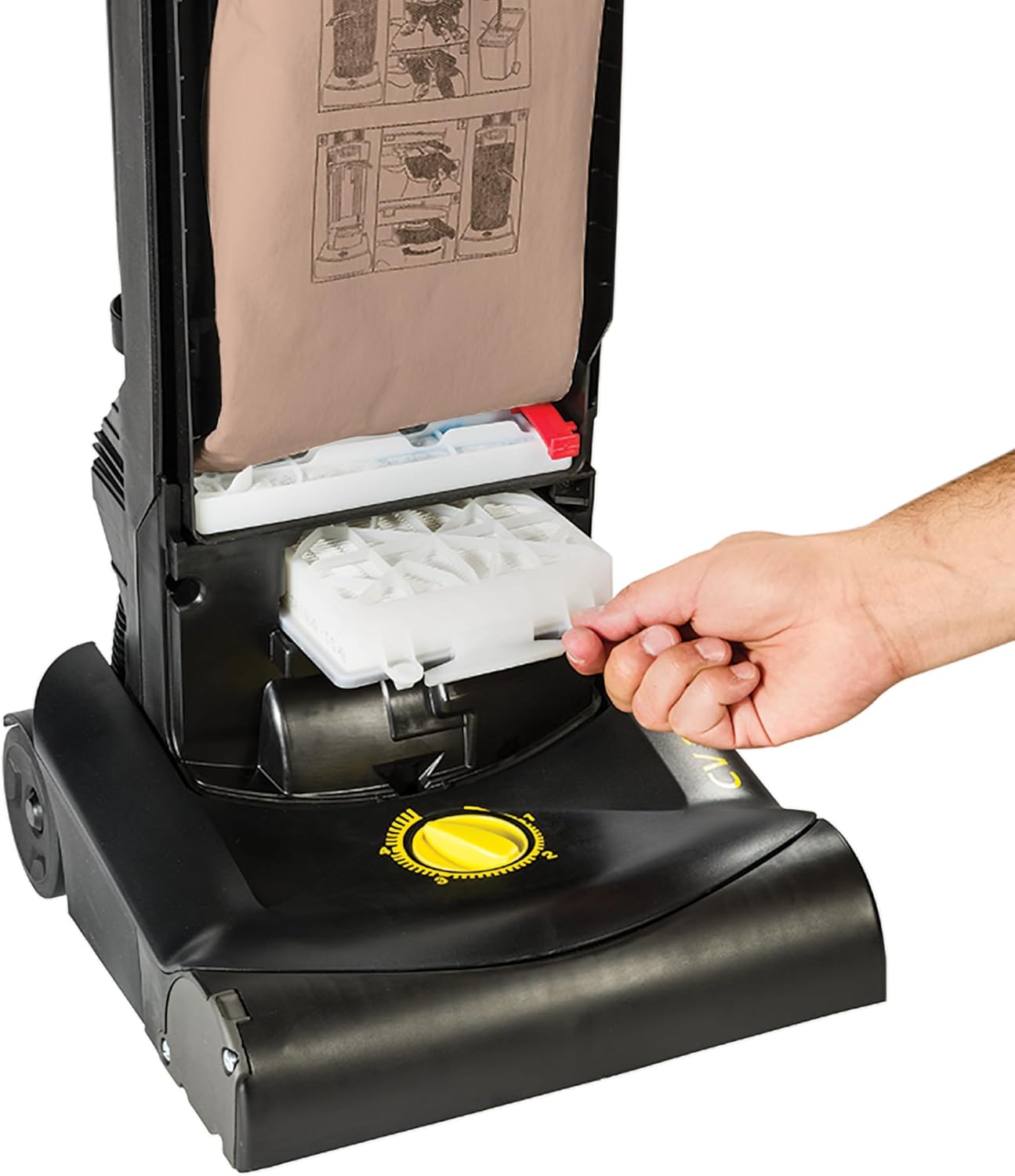
Figure 8: Accessing and replacing the HEPA filter.
- Cleaning/Replacing the Brush Roll:
The brush roll can accumulate hair and debris, affecting performance. The vacuum features a tool-less brush roll access port. Open the quick-release base plate to access the brush roll. Remove any tangled hair or debris. If the brush roll is worn or damaged, replace it with a genuine Tornado replacement part. The mechanical clutch system protects the belt and motor if the brush roll becomes jammed.
- Clearing Clogs:
If suction decreases or the clog indicator light illuminates, check the hose and brush roll access ports for obstructions. The vacuum hose and brush roll access ports are designed for easy clearing of clogs without tools.
- Power Cord Replacement:
The pigtail cord design allows for quick replacement of the 40-foot power cord, reducing downtime if the cord becomes damaged.
7. Troubleshooting
Refer to the following table for common issues and their solutions:
| Problem | Possible Cause | Solution |
|---|---|---|
| Vacuum does not turn on. | No power to outlet; Power cord not fully plugged in; Thermal protector activated. | Check power outlet; Ensure cord is fully plugged in; Unplug, wait 30 minutes, then plug in again. |
| Loss of suction or poor cleaning performance. | Dust bag full; Clog in hose or brush roll; Filters are dirty or improperly installed; Brush roll worn or jammed. | Change dust bag; Clear any clogs; Clean or replace filters; Inspect and clear/replace brush roll. |
| Brush roll not spinning. | Brush roll jammed with debris; Belt broken or dislodged; Mechanical clutch engaged. | Clear debris from brush roll; Inspect and replace belt if necessary; Check for excessive load on brush roll. |
| Unusual noise. | Object caught in brush roll or fan; Motor issue. | Turn off and unplug, inspect brush roll and air pathways for foreign objects. If noise persists, contact service. |
| Bag full indicator light is on, but bag is not full. | Clog in hose or intake. | Check and clear any clogs in the hose or intake path. |
8. Specifications
| Feature | Specification |
|---|---|
| Brand | Tornado |
| Model Name | CVD 30/1 (91430) |
| Filter Type | HEPA Filter (3-stage sealed system) |
| Wattage | 1080 watts |
| Motor Horsepower | 1.4 Horsepower |
| Maximum Suction | 81.5 Inches (Waterlift) |
| Capacity | 5.8 Quarts (Dust Bag) |
| Noise Level | 66 dB(A) |
| Cleaning Path Width | 12 Inches |
| Hose Length | 6.5 Feet |
| Product Dimensions (L x W x H) | 12.75"L x 12"W x 45"H |
| Item Weight | 17.5 pounds |
| Certifications | CRI Gold certified, Meets LEED standards |
| Included Components | Machine, Manual, Handle, Cord, Dusting Brush, Tool Holder |
9. Warranty and Support
For warranty information and customer support, please refer to the warranty card included with your product or visit the official Tornado website. Keep your purchase receipt as proof of purchase for any warranty claims.
For technical assistance or to order replacement parts, contact Tornado customer service. Contact details can typically be found on the manufacturer's website or in the included documentation.
Online Resources: For additional support, product registration, and FAQs, visit the official Tornado website: www.tornadoindustries.com


