
Monster 2MNTW1003
Monster DNA Fit 2.0 Wireless Bluetooth Earbuds User Manual
Model: 2MNTW1003
Introduction
Thank you for choosing the Monster DNA Fit 2.0 Wireless Bluetooth Earbuds. These earbuds are designed to provide a superior audio experience with features like Active Noise Cancellation, Transparency Mode, and IPX5 water resistance, making them ideal for active lifestyles. This manual will guide you through the setup, operation, and maintenance of your new earbuds.

Image: Monster DNA Fit 2.0 Wireless Bluetooth Earbuds in their open white charging case, showcasing the earbuds and the case's interior.
Setup
1. Unboxing and Components
Upon opening the package, ensure all components are present:
- Monster DNA Fit 2.0 Wireless Bluetooth Earbuds (Left and Right)
- Wireless Charging Case
- USB-C Charging Cable
- Multiple sizes of silicone eartips (12 included for a snug fit)
- User Manual (this document)
2. Charging the Earbuds and Case
Before first use, fully charge the earbuds and the charging case.
- Via USB-C Cable: Connect the provided USB-C cable to the charging port on the case and to a compatible USB power source.
- Via Qi Wireless Charging: Place the charging case on a Qi-compatible wireless charging pad.
The charging case provides up to 34 hours of additional playtime, while the earbuds themselves offer up to 7.5 hours on a single charge. A rapid 15-minute charge can provide up to 2 hours of playback time.

Image: The Monster DNA Fit 2.0 charging case resting on a glowing wireless charging pad, illustrating the rapid 15-minute charge feature.

Image: The Monster DNA Fit 2.0 earbuds and their charging case, with visual indicators showing 7.5 hours of music playback and 34 hours with the charging case.
3. Bluetooth Pairing
To pair your earbuds with a device:
- Ensure the earbuds are in the charging case and the case lid is open.
- On your device (smartphone, tablet, etc.), enable Bluetooth.
- Select "Monster DNA Fit 2.0" from the list of available Bluetooth devices.
- Once connected, a voice prompt will confirm successful pairing.
The earbuds will automatically reconnect to the last paired device when removed from the case, if Bluetooth is enabled on the device.
4. Achieving a Secure Fit
The Monster DNA Fit 2.0 earbuds come with 12 silicone eartips and a secure ear loop design to ensure a comfortable and stable fit, especially during intense workouts. Experiment with different eartip sizes to find the best seal for optimal sound quality and noise cancellation.
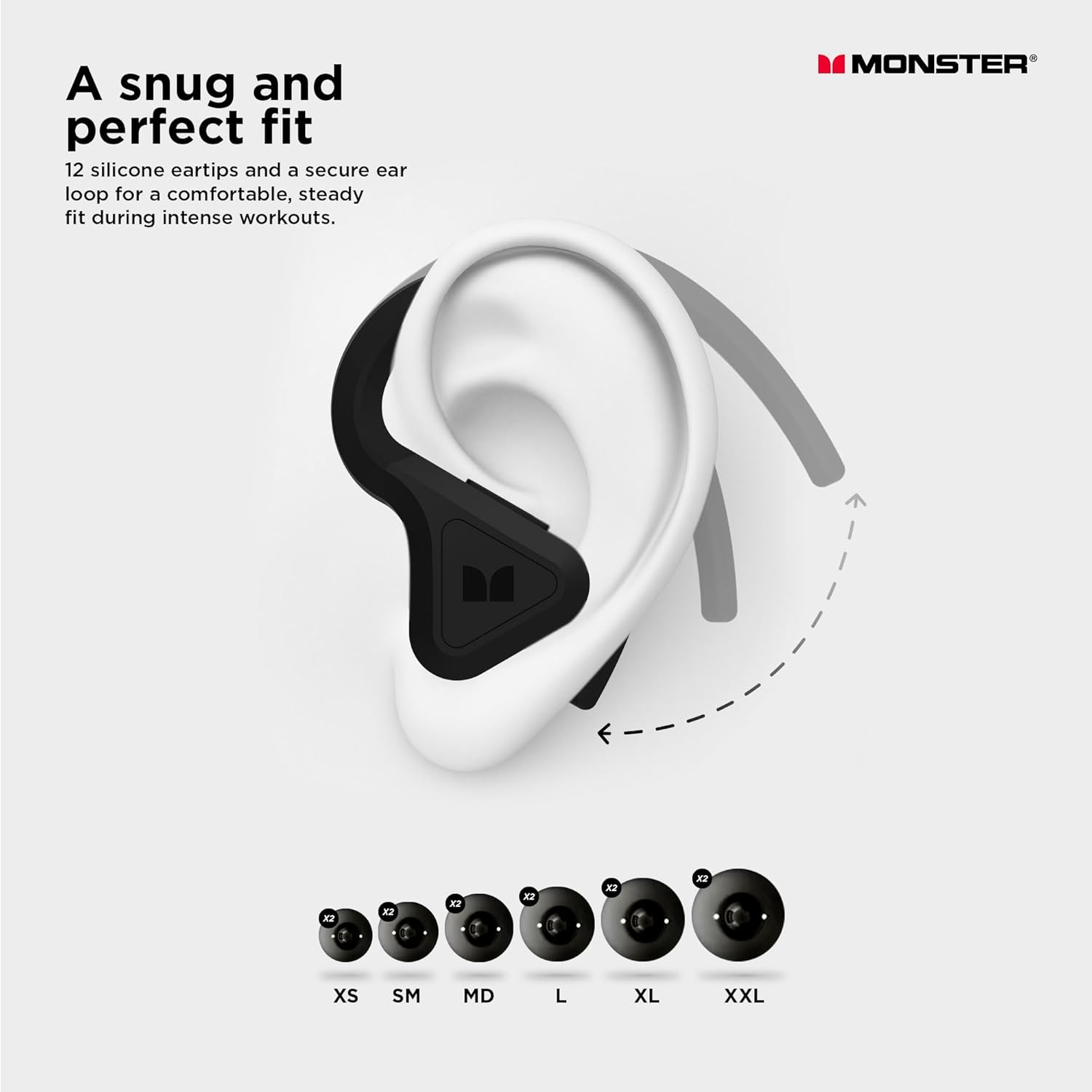
Image: A diagram illustrating how the earbud fits securely in the ear with an ear loop, alongside a selection of different sized silicone eartips (XS, SM, MD, L, XL, XXL) to ensure a perfect fit.
Operating Instructions
1. Controls
The earbuds feature intuitive touch controls for media playback and call management. Specific gestures (taps, long presses) will control functions such as:
- Play/Pause music
- Skip tracks (Next/Previous)
- Answer/End calls
- Activate voice assistant
- Switch between ANC and Transparency modes
Refer to the quick start guide included in your packaging for detailed touch control gestures.
2. Active Noise Cancellation (ANC)
The DNA Fit 2.0 earbuds utilize 6 built-in microphones to detect and eliminate external noise, providing an immersive listening experience. To activate or deactivate ANC, use the designated touch control gesture on the earbuds.

Image: A man wearing the Monster DNA Fit 2.0 earbuds, with a visual overlay demonstrating how Active Noise Cancellation blocks out surrounding sounds like an ambulance.
3. Transparency Mode
Transparency Mode allows you to hear your surroundings without removing the earbuds, enhancing situational awareness. This is useful for conversations or when you need to be aware of traffic. Activate or deactivate Transparency Mode using the touch control gesture.

Image: A man wearing the Monster DNA Fit 2.0 earbuds during a workout, with a visual overlay indicating sound waves passing through, representing Transparency Mode.
4. Call Functionality
The earbuds feature a built-in microphone with clear voice capture technology, ensuring crystal-clear call clarity regardless of your environment.
5. Water Resistance (IPX5)
The Monster DNA Fit 2.0 earbuds are IPX5 water resistant, making them suitable for use during workouts, in rainy conditions, or for sweat-intensive activities. They are designed to withstand splashes and sweat, but should not be submerged in water.

Image: A woman wearing the Monster DNA Fit 2.0 earbuds, with text highlighting the IPX5 Water Resistant feature, suitable for rainy weather or intense workouts.
Maintenance
Proper maintenance ensures the longevity and optimal performance of your earbuds.
- Cleaning: Regularly clean the earbuds and charging case with a soft, dry cloth. For the earbuds, especially after workouts, you can clean them under running water due to their IPX5 rating, but ensure they are completely dry before placing them back in the charging case.
- Storage: When not in use, store the earbuds in their charging case to protect them and keep them charged.
- Battery Care: Avoid fully draining the battery frequently. For long-term storage, charge the case and earbuds to about 50% to preserve battery health.
Troubleshooting
If you encounter issues with your Monster DNA Fit 2.0 earbuds, try the following steps:
| Problem | Possible Solution |
|---|---|
| Earbuds not pairing |
|
| No sound or low volume |
|
| ANC not effective |
|
| Earbuds not charging |
|
If problems persist, please refer to the official Monster support website or contact customer service.
Specifications
| Feature | Detail |
|---|---|
| Model Name | 2MNTW1003 |
| Connectivity Technology | Wireless, Bluetooth |
| Noise Control | Active Noise Cancellation |
| Water Resistance Level | IPX5 Water Resistant |
| Earbud Playtime | Up to 7.5 Hours |
| Total Playtime (with case) | Up to 34 Hours |
| Rapid Charge | 2 hours playback from 15 minutes charge |
| Charging Case | High-Speed Qi Wireless Charging Case |
| Microphone | Built-in, with Clear Voice Capture |
| Frequency Range | 20 Hz - 20,000 Hz |
| Impedance | 32 Ohm |
| Color | White |
| Item Weight | 1.13 pounds (package weight) |
| UPC | 810131226411 |
Warranty and Support
Monster provides various protection plans for your product. For detailed information regarding warranty coverage, terms, and conditions, please refer to the documentation included with your purchase or visit the official Monster website.
For technical support, troubleshooting assistance, or warranty claims, please contact Monster customer service. Contact information can typically be found on the manufacturer's website or in your product packaging.
- 2-Year Protection Plan: Available for extended coverage.
- 3-Year Protection Plan: Available for extended coverage.
- Complete Protect: A monthly renewable plan covering eligible past and future purchases.
Please retain your proof of purchase for warranty purposes.
Related documents2MNTW1003


Ask a question about this manual
Ask about setup, troubleshooting, compatibility, parts, safety, or missing instructions. Manuals+ will review the question and use this page’s manual context to help answer it.