
1. Introduction
The Kiprim LD70E Laser Distance Meter is a precise and versatile tool designed for accurate measurements in various applications. It offers a maximum range of 70 meters (229 feet) with an accuracy of ±1/16 inch (±2mm). This device features a large backlit LCD for clear readings, multiple measurement modes including distance, area, volume, and Pythagorean calculations, and the ability to store up to 99 sets of data. Its durable, compact, and IP54-rated design ensures reliability for both professional and DIY use.
Safety Information
WARNING: This device uses a Class II laser. Do not stare directly into the laser beam or direct it at other people. Laser radiation can cause eye injury. The laser type is 650 nm with an output power of less than 1 mW.
- Always read the user manual carefully before operating the device.
- Do not attempt to modify or disassemble the device.
- Keep the device out of reach of children.
- Use only as described in this manual.
2. Package Contents
Verify that all items are present in the package:
- 1 x Kiprim LD70E Laser Distance Meter
- 2 x AAA 1.5V Batteries
- 1 x Carrying Bag
- 1 x Hand Strap
- 1 x Multi-language User Manual

3. Device Layout and Controls
Familiarize yourself with the buttons and display of the Kiprim LD70E.

- READ Button: Powers on the device, initiates measurement.
- Function/Mode Button: Cycles through measurement modes (Area, Volume, Pythagorean, etc.).
- Addition & Subtraction / Sound Button: Performs calculations or toggles sound.
- Reference Point / Unit Switch Button: Changes measurement reference point or units.
- OFF / CLEAR Button: Powers off the device, clears current measurement.
- LCD Screen: Displays measurements, battery status, and mode indicators.
- Bubble Levels: Two integrated bubble levels for horizontal and vertical alignment.

4. Setup
4.1 Battery Installation
- Locate the battery compartment cover on the back of the device.
- Slide or unclip the cover to open it.
- Insert two 1.5V AAA batteries, ensuring correct polarity (+/-).
- Close the battery compartment cover securely.
4.2 Power On/Off
- Power On: Press the READ button once to activate the laser.
- Power Off: Press and hold the OFF / CLEAR button for a few seconds. The device will also automatically power off after 150 seconds of inactivity to save battery.
4.3 Changing Measurement Units
To switch between measurement units (meters, inches, feet, feet+inches):
- When the device is on, long press the Reference Point / Unit Switch button.
- The unit displayed on the screen will change. Cycle through the available units until your desired unit is selected.
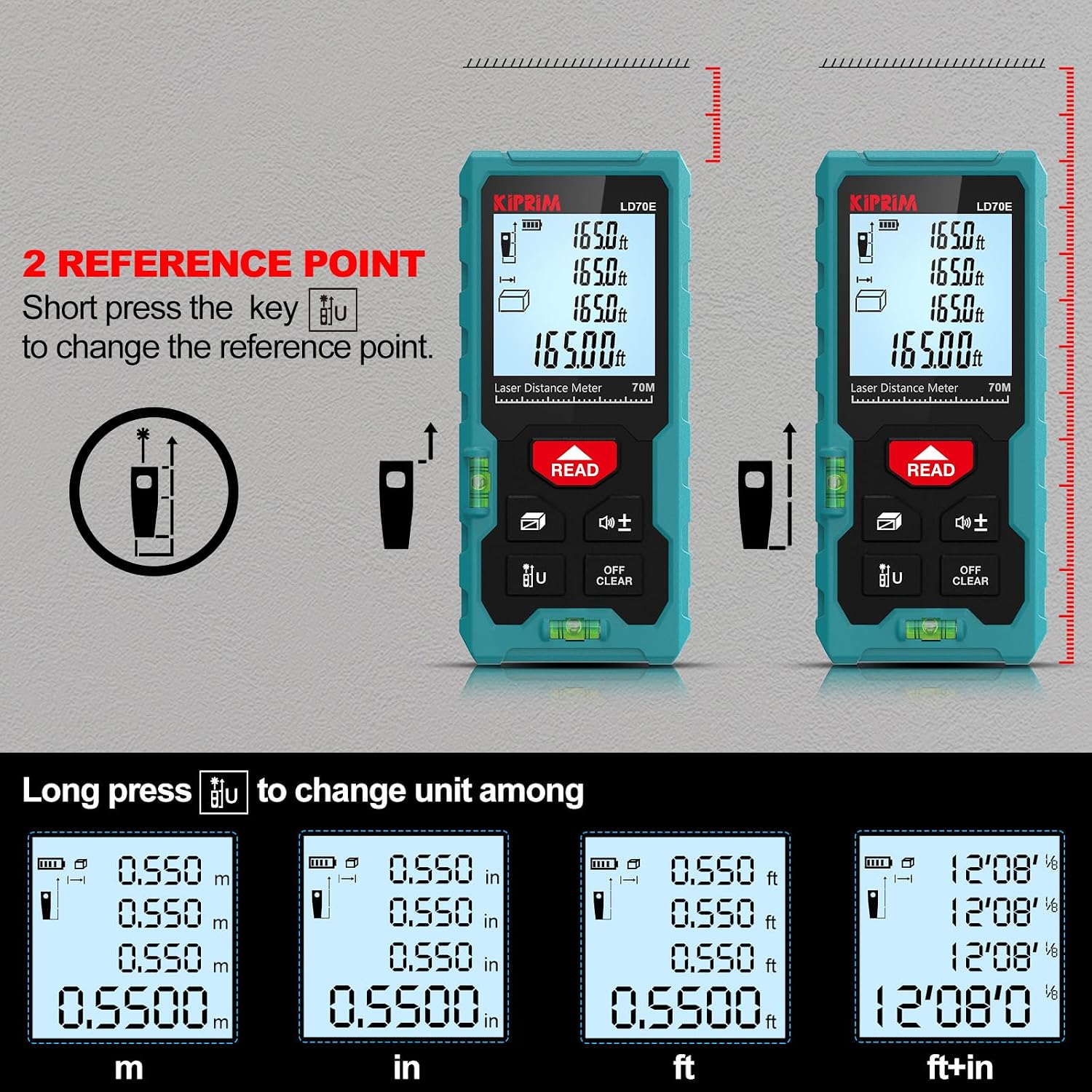
4.4 Adjusting Reference Point
The device can measure from the front or rear edge. To change the reference point:
- When the device is on, short press the Reference Point / Unit Switch button.
- An icon on the display will indicate whether the measurement is taken from the front or rear of the device.
5. Operating Instructions
The Kiprim LD70E offers multiple measurement modes for various applications.

5.1 Single Distance Measurement
- Press the READ button once to activate the laser.
- Aim the laser dot at the target point.
- Press the READ button again to take the measurement. The result will be displayed on the screen.
5.2 Continuous Measurement (Tracking)
- Press the Function/Mode button until the continuous measurement icon appears (often a running person or similar).
- Press the READ button. The device will continuously measure and display the current distance as you move it.
- Press READ again to stop continuous measurement.
5.3 Area Measurement
- Press the Function/Mode button until the area measurement icon (a square) appears.
- Measure the first side (e.g., length) by pressing READ.
- Measure the second side (e.g., width) by pressing READ.
- The device will automatically calculate and display the area.
5.4 Volume Measurement
- Press the Function/Mode button until the volume measurement icon (a cube) appears.
- Measure the length by pressing READ.
- Measure the width by pressing READ.
- Measure the height by pressing READ.
- The device will automatically calculate and display the volume.
5.5 Pythagorean Measurement (Indirect Measurement)
This mode is used to measure heights or distances indirectly using the Pythagorean theorem.
- Press the Function/Mode button until the desired Pythagorean mode icon appears (e.g., for single indirect height, double indirect height).
- Follow the on-screen prompts to take the required measurements (e.g., hypotenuse, base).
- Ensure the device remains level and stable during measurements for accuracy.
- The device will calculate and display the indirect measurement.
5.6 Addition and Subtraction
- Take a measurement.
- Press the Addition & Subtraction / Sound button. A "+" or "-" sign will appear.
- Take another measurement.
- The device will display the sum or difference of the measurements.
- Repeat for multiple additions/subtractions.
5.7 Data Storage and Recall
The LD70E can store up to 99 sets of measurement data.
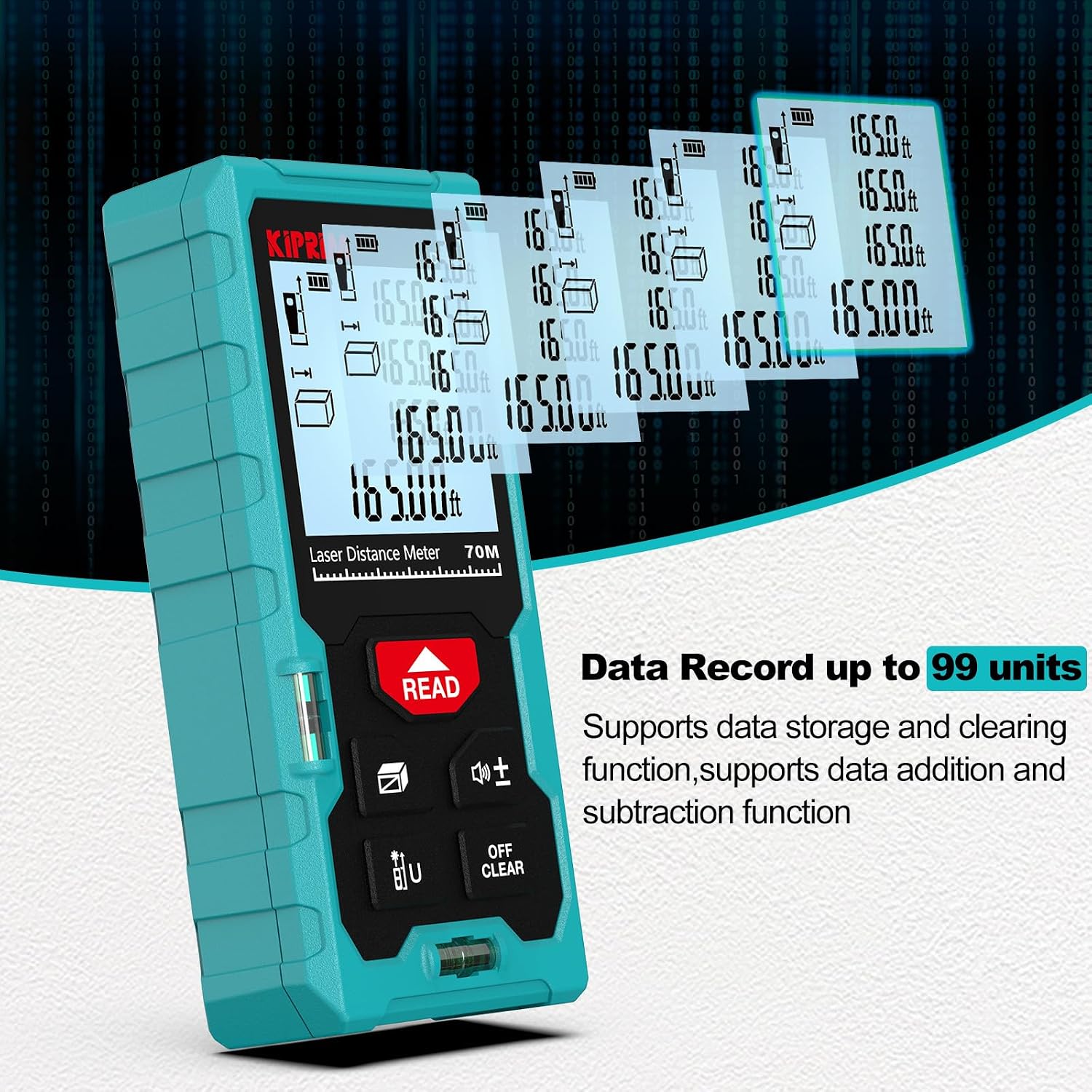
- Measurements are automatically stored.
- To recall stored data, press the Function/Mode button repeatedly until the memory icon appears.
- Use the Addition & Subtraction / Sound button to scroll through stored data.
- To clear data, use the OFF / CLEAR button.
6. Maintenance
- Cleaning: Use a soft, damp cloth to clean the device. Do not use abrasive cleaners or solvents. Clean the optical lens carefully with a soft cloth, similar to cleaning camera lenses.
- Storage: Store the device in its carrying bag in a cool, dry place when not in use. Remove batteries if storing for extended periods to prevent leakage.
- Battery Replacement: Replace batteries when the low battery indicator appears on the screen.
7. Troubleshooting
| Problem | Possible Cause | Solution |
|---|---|---|
| Device does not power on. | Batteries are dead or incorrectly inserted. | Replace batteries or check polarity. |
| Inaccurate measurements. | Unstable surface, laser obstructed, incorrect reference point, or strong sunlight. | Ensure stable positioning, clear laser path, verify reference point, or use in shaded areas. The device features auto-calibration for consistent accuracy. |
| Laser not visible. | Too bright environment, or laser malfunction. | Use in lower light conditions. If issue persists, contact support. |
| Display is dim or blank. | Low battery or device malfunction. | Replace batteries. If issue persists, contact support. |
8. Specifications
| Feature | Detail |
|---|---|
| Brand | Kiprim |
| Model Number | LD70E |
| Measuring Range | 0.05m - 70m (0.16ft - 229ft) |
| Accuracy | ±1/16 inch (±2mm) |
| Measurement Units | m / in / ft / ft+in |
| Laser Type | Class II, 650nm, <1mW |
| Data Memory | 99 sets |
| Auto-off Laser | 30 seconds |
| Auto-off Device | 150 seconds |
| Water/Dust Resistance | IP54 |
| Batteries | 2 x AAA 1.5V (Alkaline) |
| Material | Acrylonitrile Butadiene Styrene |
| Item Weight | 158 Grams |
| Color | Petroleum Green |
| Special Features | 2 Bubble Levels, Backlit LCD, Auto-calibration |
9. Warranty and Support
Kiprim offers a 24-month warranty for the LD70E Laser Distance Meter. Additionally, friendly lifetime customer service is provided to assist with any questions or issues you may encounter.
For support, please refer to the contact information provided in the original product packaging or on the official Kiprim website.
