1. Introduction
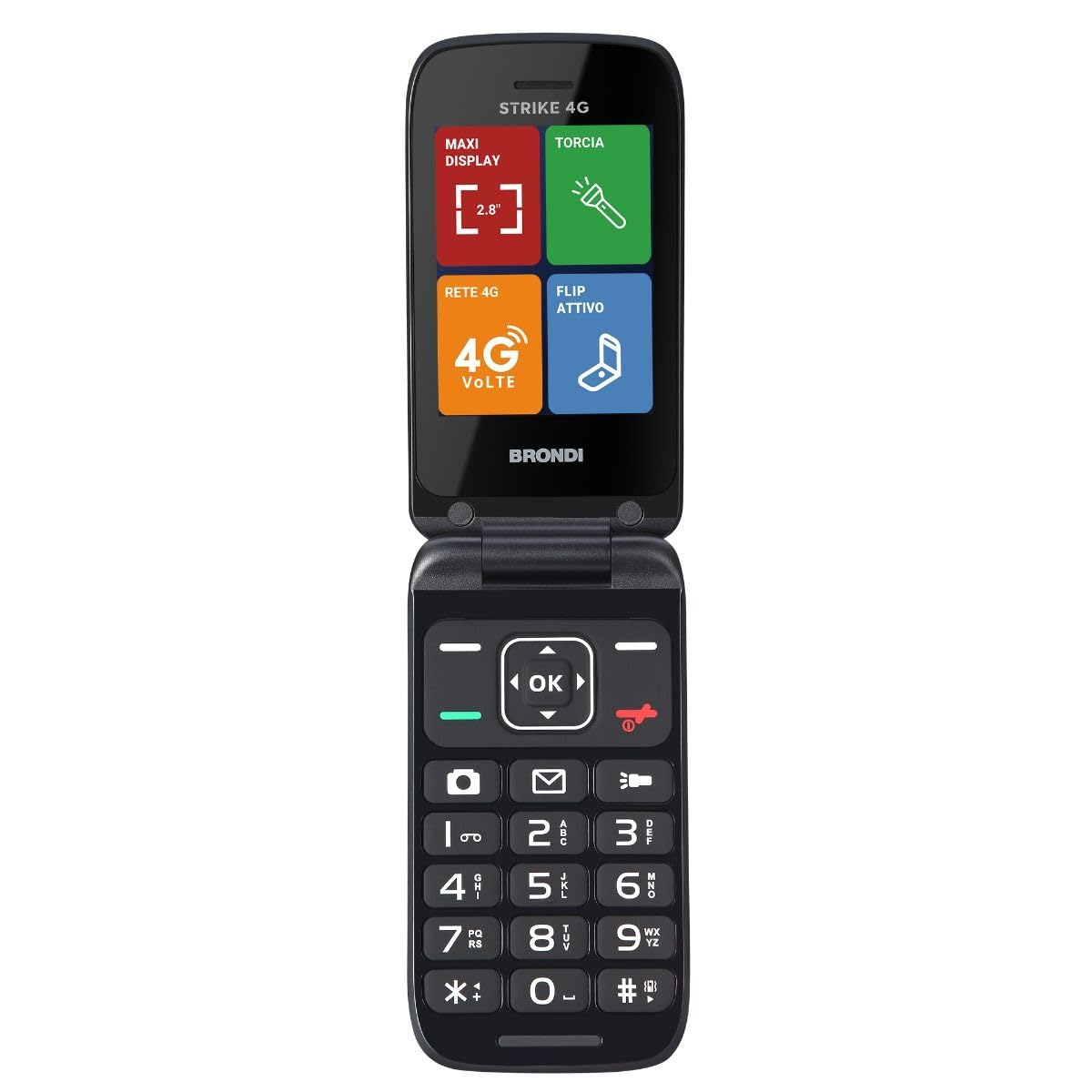
The BRONDI Strike 4G is an essential mobile phone designed for clear communication and ease of use. It features 4G (VoLTE) network capability for high-quality calls, a large 2.8-inch color screen for clear viewing, and an active flip design for intuitive call management. This manual provides detailed instructions to help you get started and make the most of your device.
2. Package Contents
Please check the box for the following items:
- BRONDI Strike 4G Mobile Phone
- Battery
- Type-C Connector (Charger)
- User Manual
3. Device Overview
Familiarize yourself with the physical components of your BRONDI Strike 4G phone.
This image displays the rear of the BRONDI Strike 4G mobile phone. Visible are the camera lens and flash module at the top, and the BRONDI brand logo towards the bottom.
Key features include a 2.8-inch display, backlit keys for easy typing, a camera, and a Type-C charging port.
4. Setup
4.1. Installing the Battery
- Open the back cover of the phone.
- Align the battery contacts with the phone's terminals.
- Gently press the battery into place.
- Replace the back cover, ensuring it clicks securely.
4.2. Inserting SIM Cards
The BRONDI Strike 4G supports Dual SIM 4G functionality.
- With the back cover and battery removed, locate the SIM card slots.
- Insert your SIM card(s) into the designated slots, ensuring the gold contacts face downwards and the cut corner is correctly aligned.
- Reinstall the battery and back cover.
4.3. Charging the Phone
- Connect the Type-C connector to the charging port on your phone.
- Plug the other end of the charger into a power outlet.
- The phone will indicate that it is charging. Allow the battery to fully charge before first use.
5. Operating Instructions
5.1. Power On/Off
- To power on: Press and hold the Power/End Call button until the screen lights up.
- To power off: Press and hold the Power/End Call button, then select 'Power off' from the options.
5.2. Making and Receiving Calls
- To make a call: Enter the phone number using the keypad and press the Call button.
- To answer a call: Open the flip cover or press the Call button.
- To end a call: Close the flip cover or press the Power/End Call button.
5.3. Sending and Receiving Messages
- Navigate to the 'Messages' menu.
- Select 'New Message' to compose a text.
- Enter the recipient's number or select from contacts, then type your message using the backlit keypad.
5.4. Using Direct Memories
The phone features 11 direct memories for quick access to your favorite contacts.
- To set a direct memory: Go to 'Contacts' or 'Settings' and assign a contact to a direct memory key.
- To use: Press and hold the assigned direct memory key to dial the contact.
5.5. Quick Access Buttons
Three dedicated buttons provide quick access to essential functions:
- Flashlight: Press the dedicated button to turn the flashlight on/off.
- Messages: Press the dedicated button to quickly access your message inbox.
- Camera: Press the dedicated button to launch the camera application.
5.6. Bluetooth Connectivity
The phone supports Bluetooth 5.0 for connecting to external devices.
- Go to 'Settings' > 'Bluetooth'.
- Turn Bluetooth on.
- Search for available devices and select the device you wish to pair with.
6. Maintenance
- Keep the phone dry. Moisture can damage electronic circuits.
- Do not expose the phone to extreme temperatures.
- Clean the phone with a soft, dry cloth. Avoid using harsh chemicals or cleaning agents.
- Handle the phone with care to prevent drops or impacts.
7. Troubleshooting
If you encounter issues with your BRONDI Strike 4G, refer to the following common solutions:
- Phone not turning on: Ensure the battery is correctly installed and charged. Try connecting the charger.
- Cannot make/receive calls: Check if the SIM card is properly inserted and activated. Verify network signal strength.
- Battery not charging: Ensure the charger and cable are not damaged and are properly connected. Try a different power outlet.
- Poor call quality: Move to an area with better network coverage.
- Keypad unresponsive: Restart the phone. If the issue persists, contact support.
8. Specifications
| Feature | Specification |
|---|---|
| Brand | BRONDI |
| Model Name | Strike |
| Color | Dark Grey |
| Product Type | Flip Phone |
| Operating System | Proprietary |
| Screen Size | 2.8 Inches |
| Resolution | 480 x 800 |
| Cellular Technology | 4G |
| Connectivity Technology | Bluetooth 5.0 |
| Memory Storage Capacity | 8 GB |
| Special Features | Camera, Backlit Keys, Direct Memories, Quick Access Buttons |
| Battery Life (Talk Time) | Up to 240 minutes |
| Battery Life (Standby) | Up to 170 hours |
9. Warranty and Support
For warranty information and technical support, please refer to the documentation provided with your purchase or visit the official BRONDI website. Keep your proof of purchase for warranty claims.


