1. Safety Warnings
Please read all instructions carefully before assembly and use. Keep this manual for future reference.
- Maximum Weight Capacity: The recommended maximum weight for this chair is 180 kg (396 lbs). Exceeding this limit may compromise the chair's stability, safety, and durability.
- Assembly: Ensure all components are correctly assembled and tightened before use. Periodically check all bolts and screws to ensure they remain secure.
- Usage: Use the chair only for its intended purpose. Avoid standing on the chair or using it as a step stool.
- Children: Keep children away from the assembly area. Small parts may pose a choking hazard.
- Maintenance: Do not use abrasive cleaners or harsh chemicals on the chair's surfaces. Refer to the maintenance section for cleaning instructions.
- Moving the Chair: When moving the chair, lift it rather than dragging it to prevent damage to the base or floor.
2. Product Overview
The ALFORDSON Palmer Series Ergonomic Office Chair is designed for comfort and support during extended periods of sitting. It features a double-layer seat, high backrest, and a retractable footrest, making it suitable for various uses from work to relaxation.
Key Features:
- Ergonomic Design: S-curved seat and 5-point ergonomic support zones for optimal spinal alignment (Cervical, Thoracic, Lumbar, Sacral, Coccyx).
- Adjustable Recline: Backrest reclines from 90° to 150° for working, resting, or napping.
- Height Adjustment: Gas lift allows for up to 10 cm (4 inches) of height adjustment.
- Retractable Footrest: Integrated footrest for enhanced relaxation.
- Synchronized Armrests: Armrests move with the recline for continuous support.
- Durable Construction: Reinforced steel base, SGS-certified gas lift, and TUV-certified casters.
- Comfortable Materials: Premium sponge foam padding with durable synthetic leather upholstery.
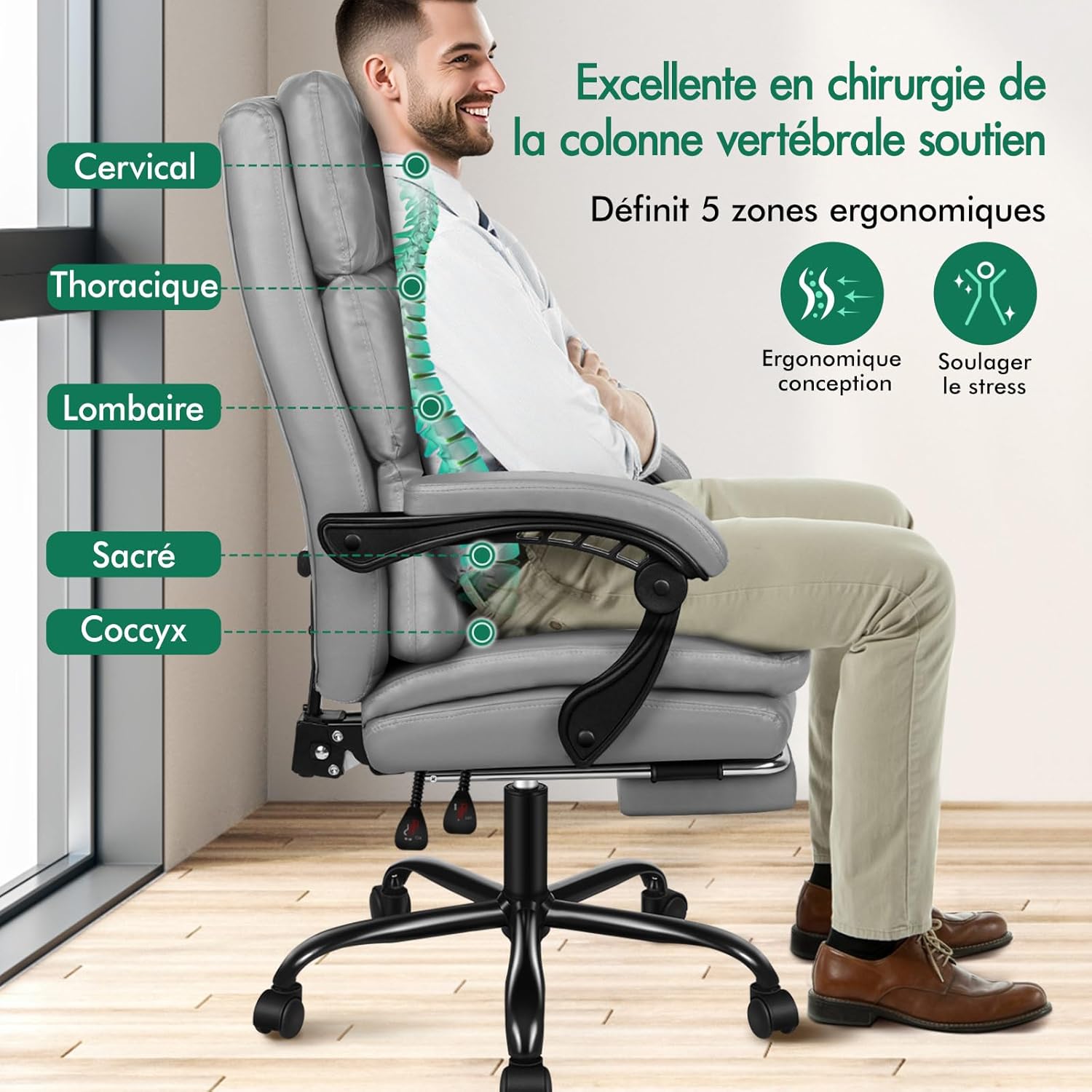
Figure 2.1: Ergonomic Support Zones
This chair is designed to provide comfort and support for various body types, with a wider and higher backrest and a double-layer seat for enhanced cushioning.

Figure 2.2: Chair Dimensions
3. Setup (Assembly Instructions)
Assembly typically requires two people. Ensure all parts are present before beginning. Refer to the included assembly diagram for detailed steps.
- Unpack Components: Carefully remove all parts from the packaging and lay them out on a clean, soft surface to prevent scratches. Verify all parts are present against the parts list.
- Attach Casters to Base: Insert the five casters into the holes on the star base until they click securely into place.
- Insert Gas Lift: Place the gas lift cylinder into the center hole of the star base. Place the gas lift cover over the gas lift.
- Attach Mechanism to Seat: Secure the seat mechanism to the underside of the seat cushion using the provided screws. Ensure the front of the mechanism faces the front of the seat.
- Connect Seat to Gas Lift: Carefully place the assembled seat onto the gas lift cylinder.
- Attach Armrests: Secure the armrests to both the seat and the backrest using the designated screws. Do not overtighten initially.
- Attach Backrest: Connect the backrest to the seat and armrests. Tighten all screws for the armrests and backrest securely once aligned.
- Install Footrest: Slide the retractable footrest into its designated slot under the seat.
- Final Check: Ensure all screws are tightened and the chair is stable before use.
4. Operating Instructions
Familiarize yourself with the chair's adjustment features to optimize your comfort and support.
Height Adjustment:
- To raise the seat, lift the lever on the right side of the chair while taking your weight off the seat.
- To lower the seat, lift the lever while seated on the chair.
Backrest Recline:
- To recline the backrest, pull the lever on the left side of the chair upwards and lean back to your desired angle (between 90° and 150°). Release the lever to lock the position.
- To return to an upright position, pull the lever upwards and lean forward.
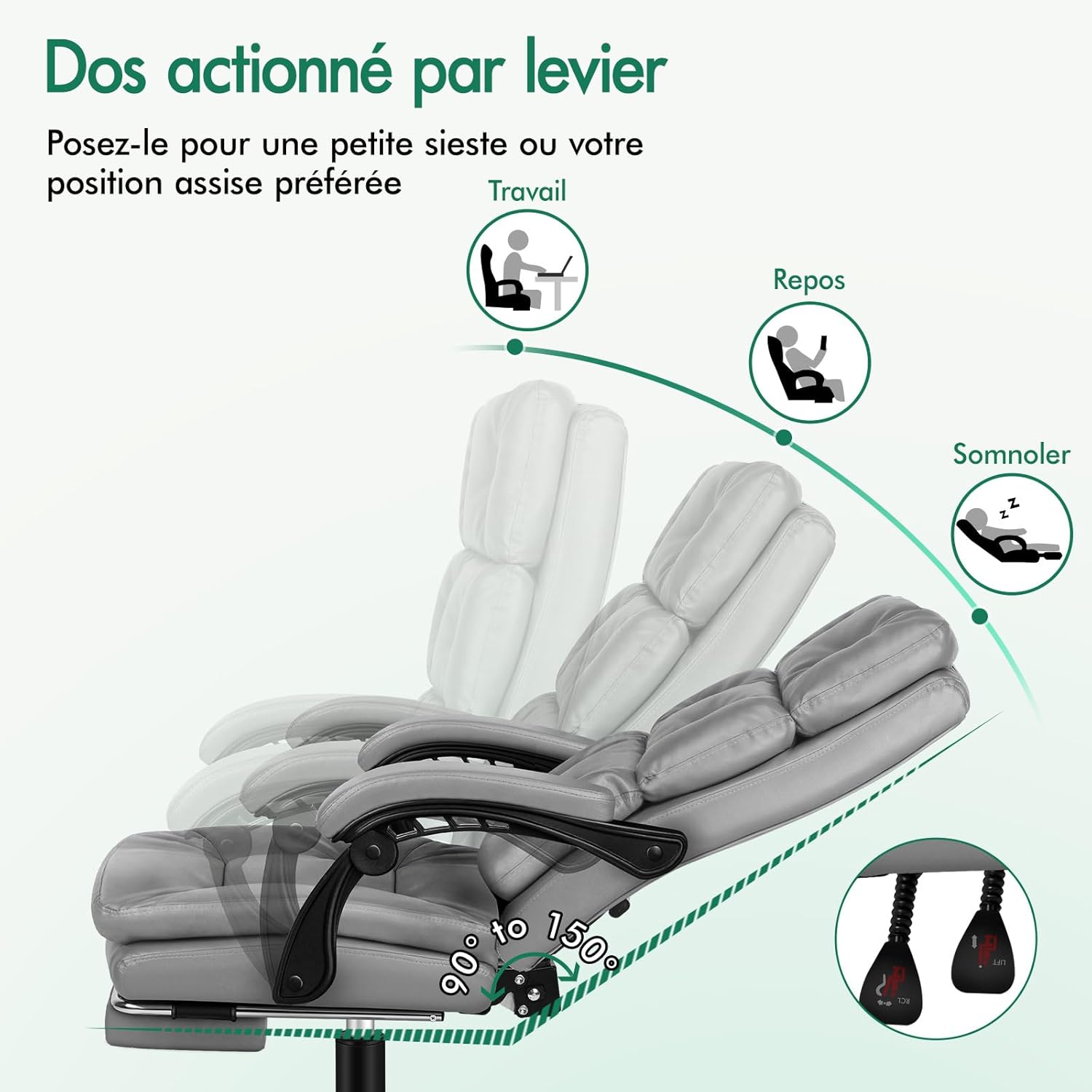
Figure 4.1: Backrest Recline Mechanism
Retractable Footrest:
- To extend the footrest, pull it outwards from underneath the seat.
- To retract the footrest, push it back underneath the seat until it is fully stored.

Figure 4.2: Synchronized Armrests and Retractable Footrest
5. Maintenance
Regular maintenance will help prolong the life and appearance of your ALFORDSON office chair.
- Cleaning the Synthetic Leather: Wipe the synthetic leather surfaces with a soft, damp cloth. For stubborn stains, use a mild soap solution and wipe dry immediately. Avoid using harsh detergents, solvents, or abrasive cleaners.
- Cleaning the Base and Casters: Wipe the metal base and plastic casters with a damp cloth. Remove any hair or debris from the casters to ensure smooth movement.
- Checking Fasteners: Periodically (e.g., every 3-6 months) check all screws and bolts to ensure they are tight. Retighten if necessary to maintain stability and safety.
- Avoid Direct Sunlight: Prolonged exposure to direct sunlight can cause the synthetic leather to fade or crack. Position the chair away from direct sunlight if possible.
- Avoid Sharp Objects: Keep sharp objects away from the chair's upholstery to prevent punctures or tears.
6. Troubleshooting
If you encounter any issues with your chair, refer to the following common problems and solutions.
| Problem | Possible Cause | Solution |
|---|---|---|
| Chair wobbles or is unstable | Loose screws or bolts | Check and tighten all assembly screws and bolts, especially those connecting the seat, backrest, and armrests. |
| Chair does not adjust height | Gas lift malfunction or lever not engaged | Ensure the height adjustment lever is fully engaged. If the issue persists, the gas lift may need replacement. Contact customer support. |
| Backrest does not recline or lock | Recline mechanism jammed or lever not engaged | Check the recline lever for obstructions. Ensure the lever is fully pulled or released to engage/disengage the lock. |
| Casters do not roll smoothly | Debris caught in casters or damaged casters | Turn the chair over and remove any hair, dust, or debris from the caster wheels. If casters are damaged, they may need replacement. |
| Footrest is difficult to extend/retract | Mechanism obstruction or misalignment | Check for any obstructions in the footrest's sliding mechanism. Ensure it is aligned correctly. Do not force it. |
7. Specifications
Detailed specifications for the ALFORDSON Palmer Series Ergonomic Office Chair.
| Feature | Detail |
|---|---|
| Brand | ALFORDSON |
| Model Number | 3974786e-a1a3-4ffe-94c8-1487f470d19a |
| Color | Palmer - Grey |
| Material | Synthetic Leather (Simili cuir) |
| Frame Material | Stainless Steel (Acier inoxydable) |
| Seat Material Type | Foam (Mousse) |
| Product Dimensions (L x W x H) | 92 x 62 x 122 cm (36.2 x 24.4 x 48 inches) |
| Item Weight | 18.5 Kilograms (40.8 lbs) |
| Maximum Weight Recommendation | 180 Kilograms (396 lbs) |
| Back Style | Full Back (Dossier plein) |
| Recline Angle | 90° to 150° |
| Gas Lift Certification | SGS Certified |
| Caster Certification | TUV Certified |
8. Warranty and Support
ALFORDSON is committed to providing high-quality products. For specific warranty information, please refer to the warranty card included with your purchase or visit the official ALFORDSON website.
If you have any questions, require assistance with assembly, or need to report a missing/damaged part, please contact ALFORDSON customer support through the retailer where you purchased the product or via the contact information provided on the official ALFORDSON website.
When contacting support, please have your model number (Palmer Series) and purchase details readily available.