
Litime 51.2V 100Ah LiFePO4 Battery User Manual
Model: 51.2V100Ah
1. Introduction
This manual provides essential information for the safe and efficient operation of your Litime 51.2V 100Ah LiFePO4 Battery. This battery is designed for home energy storage, offering a 5.12 kWh capacity with EV-grade LiFePO4 cells and an integrated Battery Management System (BMS). It features a 3.5-inch touchscreen and LED indicators for real-time monitoring and control. Please read this manual thoroughly before installation and use.
2. Safety Information
WARNING: Failure to follow these safety instructions may result in fire, electric shock, injury, or damage to the battery and other property.
- Do not open, disassemble, or modify the battery.
- Do not drop, crush, bend, puncture, or incinerate the battery.
- Keep the battery away from heat sources and direct sunlight.
- Do not expose the battery to water or other liquids.
- Ensure proper ventilation during operation and charging.
- Use only compatible chargers and inverters.
- Always wear appropriate personal protective equipment (PPE) when handling batteries.
- In case of fire, use a Class D fire extinguisher. Water can exacerbate lithium battery fires.
3. Product Overview
The Litime 51.2V 100Ah LiFePO4 battery is a high-performance energy storage solution. Key features include:
- EV-Grade LiFePO4 Cells: Provides enhanced safety, longevity, and efficiency.
- Integrated BMS: Offers comprehensive protection against overcharge, over-discharge, over-current, overheating, low temperature, and short circuits.
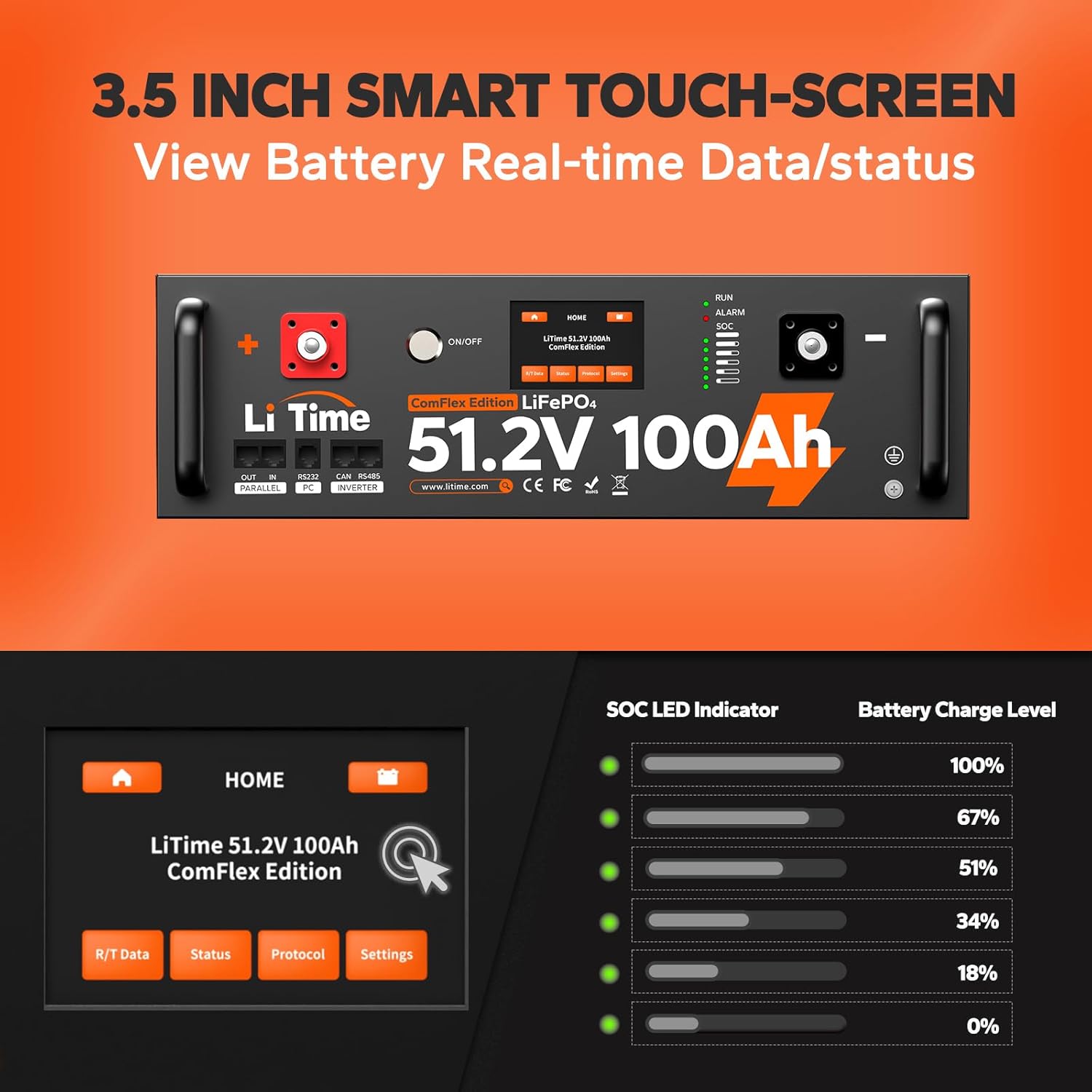
- 3.5-inch Touchscreen: Allows real-time data viewing, status checks, inverter protocol selection, and system adjustments.
- LED Indicators: Displays battery State of Charge (SOC), alarms, and operating status.
- Communication Ports: Supports CAN/RS485 for compatibility with various solar inverter chargers.
- Durable SPCC Enclosure: Provides robust protection and aids in heat dissipation.


4. Setup and Installation
The Litime 51.2V 100Ah LiFePO4 battery offers flexible installation options:
4.1. Installation Options
- 3U Standard Server Rack Cabinet: The battery is designed to fit into a standard 3U server rack for a plug-in installation.
- Customized Integrated Stacking Components: Utilize Litime's specific stacking components for a secure, integrated stacked setup.
4.2. Connections
Ensure all connections are secure and correctly polarized. Refer to the labeled diagram (Figure 3.2) for port identification.
- Power Connections (OUT/IN Port): Connect the battery to your inverter/charger system using appropriate cables. Ensure correct positive (+) and negative (-) terminals are used.
- Communication Connections (CAN/RS485 Port): For seamless communication with compatible solar inverter chargers (e.g., Victron, SMA, DEYE, GoodWe, Growatt), connect the CAN/RS485 port.
- Grounding: Connect the grounding point to a suitable ground.
Important: Up to 16 batteries can be connected in parallel to create a larger energy storage system. Consult a qualified electrician for complex installations.

5. Operating Instructions
5.1. Powering On/Off
Locate the ON/OFF switch on the front panel (refer to Figure 3.2). Press the switch to power the battery on or off.
5.2. Touchscreen Interface
The 3.5-inch smart touchscreen provides access to various battery parameters and settings.
- Real-time Data/Status: View current voltage, current, State of Charge (SOC), and other operational data.
- Single Battery Data: Access detailed information for individual batteries in a parallel system.
- Inverter Protocol Selection: Choose the appropriate communication protocol for your connected inverter.
- System Settings: Adjust various system parameters as needed.
5.3. LED Indicators
The front panel features LED indicators to provide quick visual status updates:
- RUN LED: Indicates the battery's operational status.
- ALARM LED: Illuminates to signal an alarm condition or fault.
- SOC LED Indicator: Displays the approximate State of Charge of the battery.

6. Maintenance
6.1. General Care
- Keep the battery clean and free from dust and debris.
- Ensure proper ventilation around the battery to prevent overheating.
- Regularly check all connections for tightness and corrosion.
6.2. Charging Practices
The integrated BMS provides protection during charging and discharging:
- Low-Temperature Cut-Off: Charging will stop if the battery temperature drops below 32°F (0°C) and resume when it reaches 41°F (5°C). Discharging will stop below -4°F (-20°C).
- Overcharge Protection: The BMS prevents overcharging to protect cell longevity.

7. Troubleshooting
This section addresses common issues you might encounter with your Litime LiFePO4 battery.
7.1. Battery Shuts Down During Charging
The battery's BMS is designed to protect the cells. If the battery reaches full charge, the BMS may initiate an "over voltage" protection, causing the battery to shut down temporarily. This is a normal protective function. The battery will typically reactivate after 2-3 hours as the voltage naturally stabilizes.
7.2. Inaccurate State of Charge (SOC) Reading
The BMS may not accurately detect or calculate small power draws over extended periods. If you are drawing minor power for several days, the indicated SOC might not reflect the true charge level. For precise SOC, consider a full charge cycle or an external shunt-based battery monitor.
7.3. Communication Issues with Inverter
Ensure the correct inverter protocol is selected on the battery's touchscreen. Verify that the CAN/RS485 cables are securely connected and compatible with both the battery and the inverter. Refer to your inverter's manual for specific communication setup instructions.
7.4. Alarm LED Illuminated
If the ALARM LED is illuminated, check the touchscreen for specific error codes or messages. This indicates a protective event triggered by the BMS (e.g., over-current, over-temperature, low voltage). Address the underlying cause before continuing operation.
8. Specifications
| Feature | Specification |
|---|---|
| Model Number | 51.2V100Ah |
| Nominal Voltage | 51.2V |
| Capacity | 100Ah (5.12 kWh) |
| Battery Cell Composition | Lithium-Phosphate (LiFePO4) |
| Max. Continuous Charge/Discharge Current | 100A |
| Peak Current | 500A (15 seconds) |
| Cycle Life | 4000+ cycles @ 100% DOD (Depth of Discharge) |
| Lifespan | 10+ years |
| Operating Temperature (Charge) | 32°F to 113°F (0°C to 45°C) |
| Operating Temperature (Discharge) | -4°F to 140°F (-20°C to 60°C) |
| Parallel Connection | Up to 16 batteries |
| Communication | CAN/RS485 |
| Certifications | UL, FCC, CE, RoHS, UN38.3 |
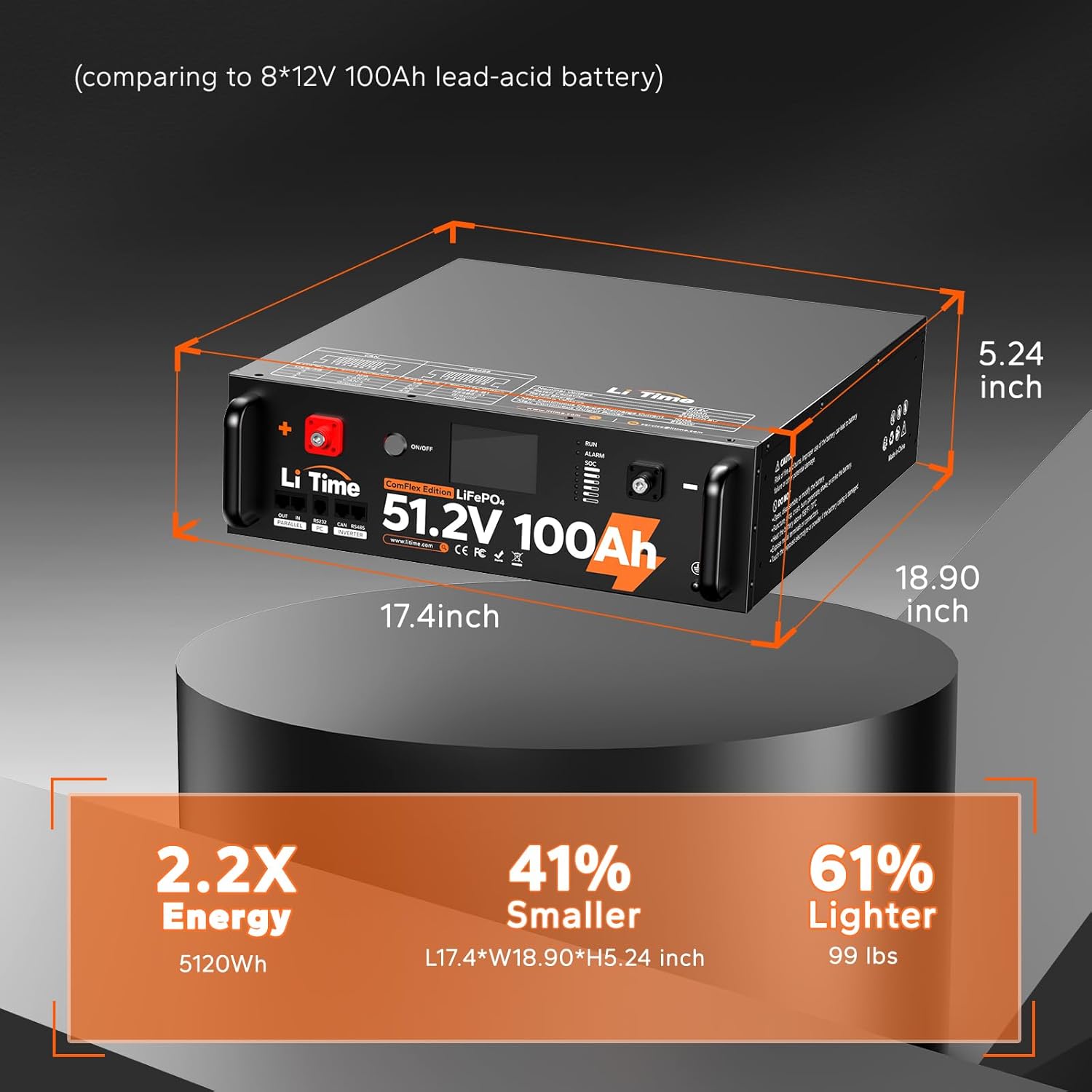
| Dimensions (L x W x H) | 17.4 x 18.9 x 5.24 inches (approximate) |
| Weight | 99 lbs (approximate) |
9. Warranty and Support
Litime provides a hassle-free warranty for this product. For specific warranty terms, registration, or technical support, please refer to the official Litime website or contact their customer service directly. Contact information can typically be found on the product packaging or the manufacturer's website.
For further assistance, you may visit the Litime Store on Amazon: Litime Store