
SONRU S57
SONRU Wireless Earbuds Bluetooth 5.3 Headphones
Model: S57
Instruction Manual
1. Introduction
Thank you for choosing the SONRU Wireless Earbuds. These in-ear headphones are designed to provide a superior audio experience with Hi-Fi stereo sound, stable Bluetooth 5.3 connectivity, and extended battery life. This manual will guide you through the setup, operation, and maintenance of your new earbuds to ensure optimal performance and longevity.
2. What's in the Box
Please check the package contents to ensure all items are present:
- Charging box x1
- Earbud (L&R) x1 pair
- Charging Cable x1
- Extra Ear Caps x2 Pair (S-M-L sizes)
- User Manual x1

Image: Package contents of the SONRU S57 Wireless Earbuds.
3. Product Overview
Familiarize yourself with the components of your SONRU Wireless Earbuds:

Image: SONRU Wireless Earbuds in their charging case, displaying the battery level.
The earbuds feature a 13mm dynamic driver for rich audio and are designed for a comfortable, secure fit. The compact charging case includes an LED display to show battery levels for both the case and individual earbuds.

Image: Internal components of the earbud, showing the 13mm driver and Bluetooth 5.3 technology.

Image: Compact design and dimensions of the earbuds and charging case.
4. Setup and Pairing
First-Time Pairing:
- Ensure the charging case is sufficiently charged.
- Open the charging case. The earbuds will automatically power on and enter pairing mode.
- On your device (smartphone, tablet, laptop), enable Bluetooth.
- Search for available Bluetooth devices and select "S57" from the list.
- Once connected, you will hear a voice prompt indicating successful pairing.
After the initial pairing, the earbuds will automatically connect to the last paired device when taken out of the charging case.
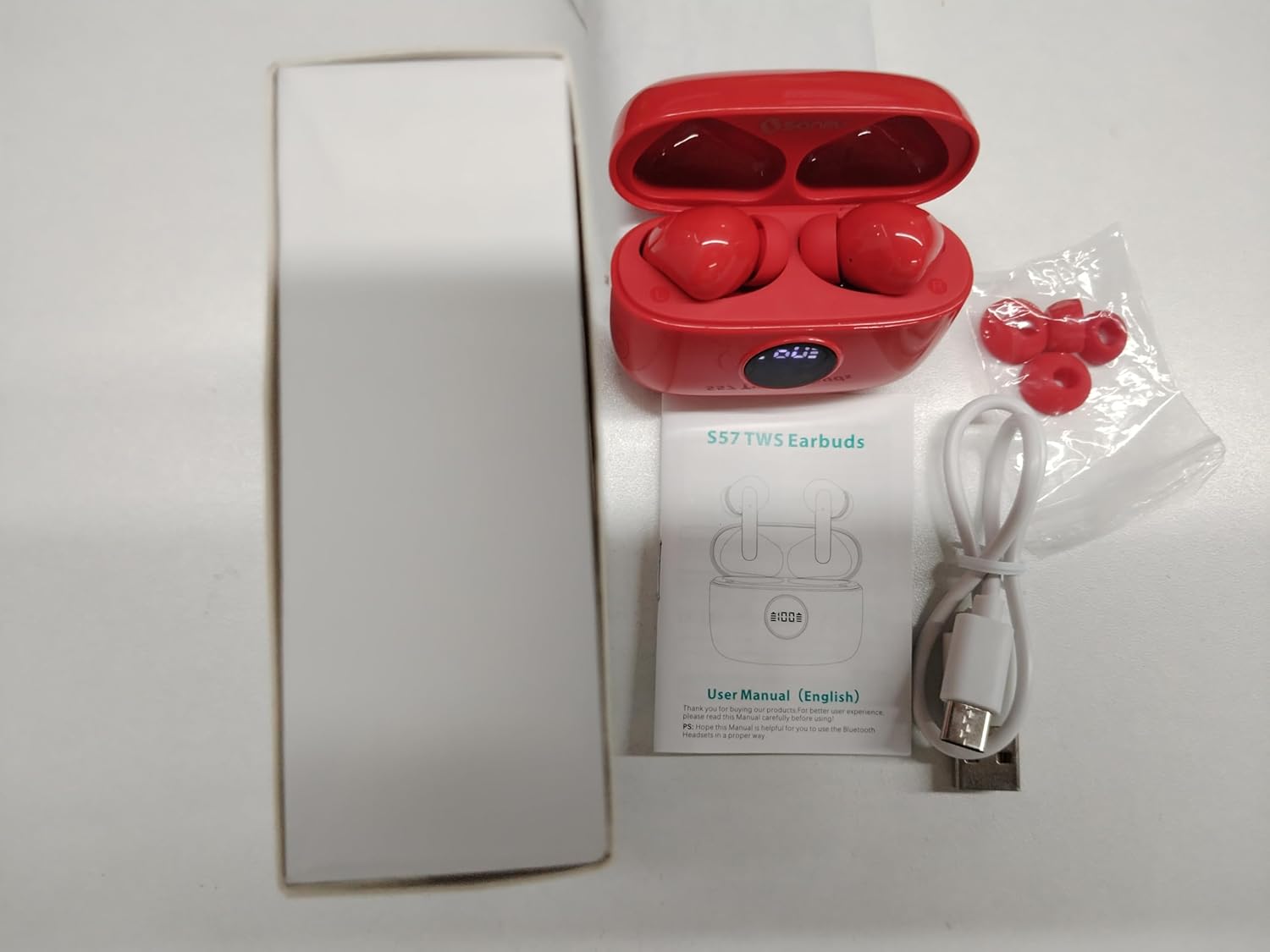
Image: One-step auto pairing process with a smartphone.
Wearing the Earbuds:
Choose the ear tips that provide the most comfortable and secure fit for optimal sound quality and noise isolation. Gently insert the earbuds into your ears and rotate them slightly to ensure a snug fit.

Image: Guide for comfortable in-ear fit with various ear tip sizes.
5. Operating Instructions
Smart Touch Controls:
The SONRU S57 earbuds feature intuitive touch controls on each earbud. Refer to the table below for common functions:

Image: Overview of touch control functions.
| Function | Action (L/R Earbud) |
|---|---|
| Play/Pause | Touch 2 Times |
| Previous Track | Long Tap 2s (Left) |
| Next Track | Long Tap 2s (Right) |
| Volume Up | Touch 1 Time (Right) |
| Volume Down | Touch 1 Time (Left) |
| Answer/Hang Up Call | Touch 2 Times |
| Reject Call | Long Tap 2s |
| Activate Voice Assistant | Touch 3 Times |
| Power On | Long Tap 3-4s |
| Power Off | Long Tap 5-8s |
Making Calls:
The earbuds feature a built-in microphone for clear calls. Use the touch controls to manage incoming and outgoing calls as described above.
6. Charging
The SONRU S57 earbuds offer extended playback time with their charging case:
- Earbud Playback Time: Up to 8 hours on a single charge.
- Total Playback Time (with charging case): Up to 40 hours.
- Charging Case Battery Capacity: 300mAh.
- Charging Case Charging Time: Approximately 1.5 hours.

Image: Battery life and charging details.
LED Power Display:
The digital LED display on the charging case shows the current charge level of the case (0-100%). When the earbuds are charging inside the case, the L and R bars on the display will flash, indicating their individual charging status.

Image: Digital power display on the charging case.
Charging the Case:
Connect the provided USB-C charging cable to the charging port on the case and to a compatible USB power source. The LED display will flash from 1 to 100 during charging and remain solid when fully charged.
Video: Demonstration of placing earbuds into the charging case and closing the lid, showing the LED display update.
7. Maintenance and Care
- Cleaning: Regularly clean the earbuds and charging case with a soft, dry, lint-free cloth. Do not use harsh chemicals or abrasive materials.
- Water Resistance: The earbuds are IPX7 waterproof, meaning they can withstand submersion in up to 1 meter of water for 30 minutes. However, the charging case is not waterproof. Ensure earbuds are dry before placing them back in the case.
- Storage: Store the earbuds and charging case in a cool, dry place when not in use. Avoid extreme temperatures.
- Battery Longevity: To prolong battery life, charge the case regularly and avoid fully draining the battery for extended periods.
8. Troubleshooting
| Problem | Possible Solution |
|---|---|
| Earbuds not pairing | Ensure earbuds are charged. Turn off Bluetooth on other nearby devices. Forget 'S57' from your device's Bluetooth list and re-pair. |
| No sound from one earbud | Check battery level of both earbuds. Place both earbuds back in the case, close the lid, then take them out again. Re-pair if necessary. |
| Charging case not charging | Ensure the USB-C cable is properly connected to both the case and the power source. Try a different cable or power adapter. |
| Low volume or poor sound quality | Adjust volume on your device and earbuds. Ensure ear tips are correctly sized and sealed in your ear. Clean earbud mesh if blocked. |
| Earbuds disconnect frequently | Ensure you are within the Bluetooth range (approx. 33 feet) without significant obstacles. Avoid strong electromagnetic interference. |
9. Specifications
| Feature | Detail |
|---|---|
| Model Name | S57 |
| Connectivity Technology | Wireless (Bluetooth 5.3) |
| Audio Driver Size | 13 mm |
| Battery Life (Earbuds) | Up to 8 Hours |
| Total Playback Time (with Case) | Up to 40 Hours |
| Charging Case Battery Capacity | 300 mAh |
| Charging Case Charging Time | Approx. 1.5 Hours |
| Water Resistance Level | IPX7 (Earbuds only) |
| Control Type | Touch Control |
| Bluetooth Range | 33 Feet (10 meters) |
| Frequency Range | 20 Hz - 20,000 Hz |
| Item Weight | 3.2 ounces (earbuds + case) |
10. Warranty and Support
SONRU provides a 12-month warranty and lifetime technical support for this product. If you encounter any issues or have questions regarding your SONRU Wireless Earbuds, please do not hesitate to contact our customer support team. We are committed to providing the most convenient shopping experience and ensuring your satisfaction.
For support, please refer to the contact information provided on the product packaging or the official SONRU website.
Ask a question about this manual
Ask about setup, troubleshooting, compatibility, parts, safety, or missing instructions. Manuals+ will review the question and use this page’s manual context to help answer it.