
Introduction
This manual provides detailed instructions for the assembly, operation, and maintenance of your Cada C51008W Sports Racing Car building block set. Please read this manual thoroughly before beginning assembly or operation to ensure proper use and enjoyment of your product.
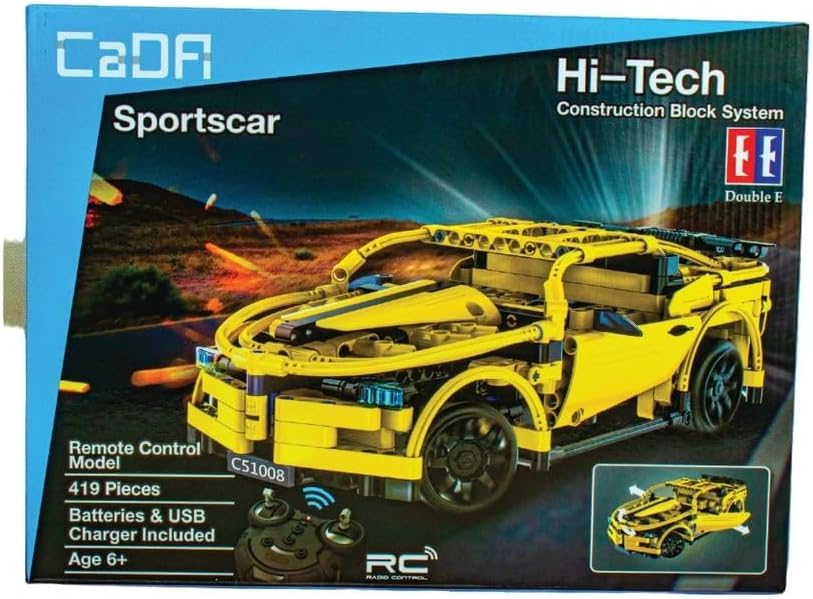
Image: The product packaging for the Cada C51008W Sports Racing Car, displaying the assembled yellow car model, the remote control unit, and key product information such as the model number, piece count (419 pieces), and age recommendation (6+).
Package Contents
Verify that all components are present before starting assembly.
- 419 Building Block Pieces (for C51008W Sports Racing Car)
- 1 Remote Control Unit
- 1 USB Charger
- Instruction Manual (this document)
- Required Batteries (for car and remote control)
Setup and Assembly
Follow these steps to assemble your Cada C51008W Sports Racing Car.
- Unpack Components: Carefully remove all building blocks and electronic components from the packaging. Organize pieces by type or color to facilitate assembly.
- Battery Installation (Car): Locate the battery compartment on the car chassis. Insert the specified batteries, ensuring correct polarity. Close the compartment securely.
- Battery Installation (Remote Control): Open the battery compartment on the remote control. Insert the required batteries, observing polarity. Close the compartment.
- Charging: Use the provided USB charger to fully charge the car's battery before first use. Refer to the charging indicator for status.
- Building the Car: Follow the step-by-step pictorial instructions provided in the separate building guide (if included, otherwise refer to the main manual's assembly section). Ensure all connections are firm and secure. The car consists of 419 pieces.
- Initial Pairing: Once the car and remote control have batteries installed and the car is charged, turn on both devices. They should automatically pair. If not, refer to the troubleshooting section.
Operating Instructions
Once assembled and powered, you can operate your Cada C51008W Sports Racing Car using the remote control.
- Power On/Off: Use the power switch on the car and remote control to turn them on or off.
- Forward/Backward: Use the designated joystick or buttons on the remote control to move the car forward or backward.
- Turn Left/Right: Use the steering control (joystick or buttons) to turn the car left or right.
- Door Operation: The car features opening doors. These may be manually operated or controlled via the remote, depending on the specific model's design.
- Range: Operate the car within the effective range of the remote control for optimal performance.
Important: Always operate the car on a clean, flat surface. Avoid water, sand, or extreme temperatures.
Maintenance
Proper maintenance ensures the longevity and performance of your Cada C51008W Sports Racing Car.
- Cleaning: Use a dry, soft cloth to clean the car and remote control. Do not use water or chemical cleaners.
- Storage: When not in use, store the car and remote control in a cool, dry place, away from direct sunlight. Remove batteries if storing for extended periods.
- Battery Care: Recharge the car's battery as needed. Do not overcharge. Replace remote control batteries when performance degrades.
- Component Check: Periodically inspect all building block connections to ensure they are secure. Reattach any loose pieces.
Troubleshooting
If you encounter issues with your Cada C51008W Sports Racing Car, refer to the following common solutions:
| Problem | Possible Cause | Solution |
|---|---|---|
| Car does not respond to remote control. |
|
|
| Car moves slowly or erratically. |
|
|
| Missing or loose building blocks. |
|
|
Specifications
| Model Number | C51008W |
| Number of Pieces | 419 |
| Product Dimensions | 42 x 25 x 28 cm |
| Item Weight | 1.04 kg |
| Material Type | Plastic |
| Recommended Age | 6+ years (Manufacturer recommended: 36 months - 15 years) |
| Power Source | Battery Powered |
| Control Type | Remote Control (R/C) |
Warranty and Support
For warranty information or technical support, please refer to the contact details provided with your purchase documentation or visit the official Cada website. Keep your proof of purchase for warranty claims.
For further assistance, you may contact the retailer where the product was purchased.


