
1. Product Overview
The SEBRUANC 200W COB LED Stage Light is a versatile lighting fixture designed for various applications including stage performances, events, weddings, parties, and theatrical productions. It features advanced COB (Chip on Board) technology for uniform brightness and adjustable color temperature between warm white (3200K) and cool white (5600K).
1.1. What's in the Box
- COB Par light *2
- Power cord *2
- Knob *4, Spacer *4
- Carrying handle *4
- Instruction manual *2
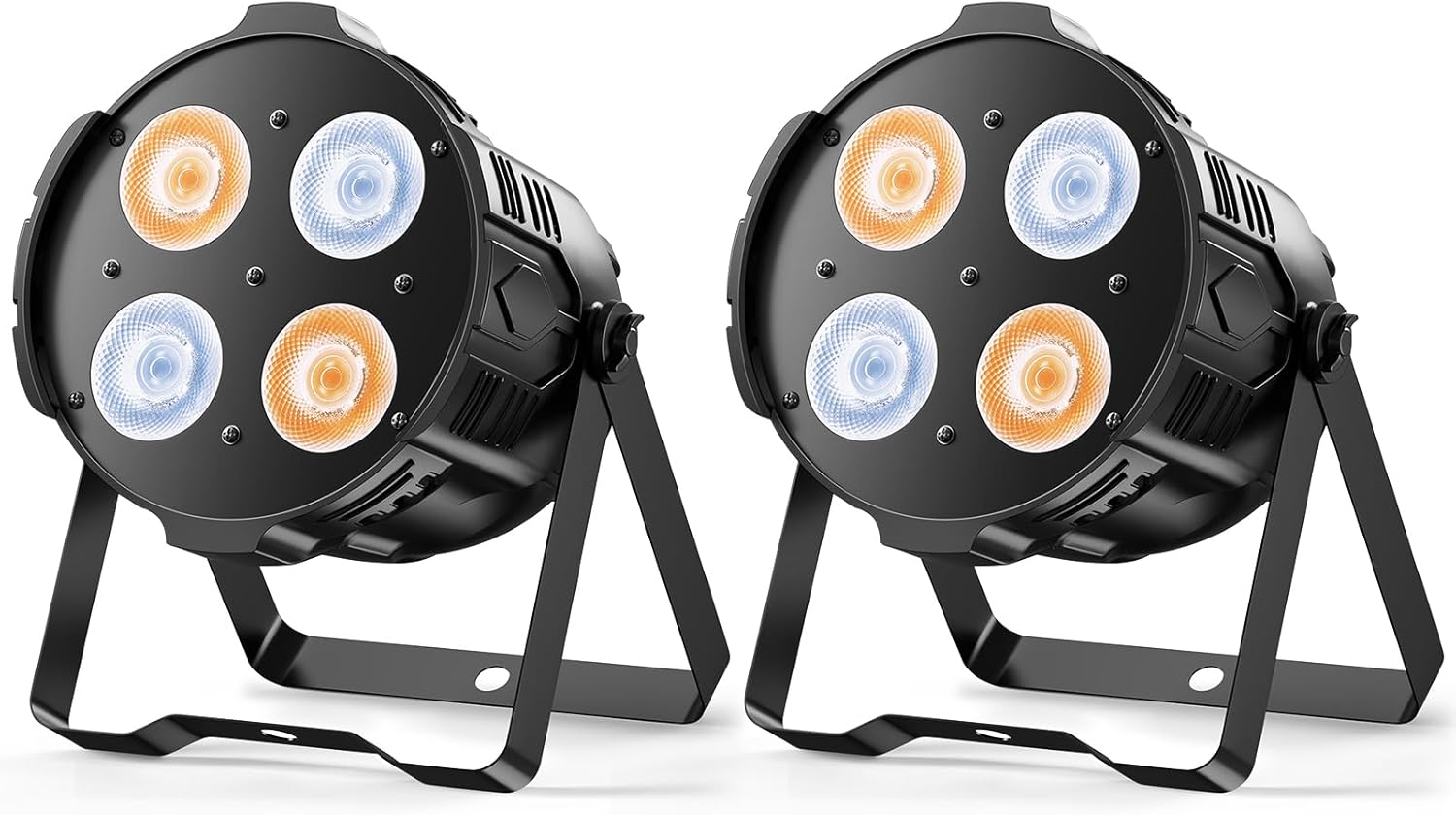
Image 1.1: Two SEBRUANC 200W COB LED Stage Lights. These lights feature four COB LEDs each, providing both warm and cool white illumination, mounted on adjustable stands.
2. Setup Instructions
2.1. Unpacking and Inspection
Carefully remove all components from the packaging. Inspect each item for any signs of damage during transit. If any damage is found, contact customer support immediately.
2.2. Mounting the Light
The COB LED Stage Light can be mounted in several configurations: floor mount, wall mount, or truss mount. Use the provided carrying handles, knobs, and spacers to secure the light in your desired position.
- Floor Mount: Position the light on a stable, flat surface using its integrated stand.
- Wall/Truss Mount: Attach the carrying handles to the sides of the light using the provided knobs and spacers. Securely fasten the handles to a wall bracket or lighting truss using appropriate clamps (not included) and hardware. Ensure the mounting surface or truss can support the weight of the fixture.

Image 2.1: The COB LED Stage Light shown with its adjustable mounting bracket, power cord, and additional hardware for installation.
2.3. Power Connection
Connect the provided power cord to the power input on the back of the light fixture. Plug the other end into a standard 110V AC power outlet. Ensure the power source is stable and meets the light's power requirements.
3. Operating Instructions
The SEBRUANC 200W COB LED Stage Light offers multiple control modes for versatile operation.
3.1. Control Panel Overview
The control panel, typically located on the rear of the unit, features a digital display and control buttons for navigating menus and selecting modes. Refer to the specific button functions in the detailed manual for precise operation.

Image 3.1: Rear view of the stage light, highlighting the control panel with its digital display and navigation buttons for mode selection and settings adjustment.
3.2. Operating Modes
- Sound-Activated Mode: The light responds to ambient sound, changing patterns and intensity based on audio input. This mode is ideal for dynamic party or event settings.
- DMX Mode: For professional control, connect the light to a DMX controller. This allows for precise manipulation of color temperature, brightness, and effects via DMX channels. Consult the DMX channel chart in the full manual for specific assignments.
- Master-Slave Mode: Link multiple lights together. One unit acts as the "Master" and controls all other "Slave" units, ensuring synchronized lighting effects across all fixtures.
- Auto Mode: The light cycles through pre-programmed internal shows and patterns automatically. This mode is suitable for continuous, unattended operation.

Image 3.2: Visual representation of the four primary control modes available for the stage light, including DMX512, Auto, Sound Activated, and Master-Slave.
4. Features and Functions
4.1. Adjustable Color Temperature
Equipped with a 4x50W COB LED chip, this light offers a color temperature range from 3200K (Warm White) to 5600K (Cool White). This allows for creating diverse atmospheres, from warm and inviting to bright and energetic.

Image 4.1: A visual demonstrating the adjustable color temperature, ranging from warm white to cool white, and a comparison highlighting the uniform output of COB technology versus standard LED.
4.2. Advanced COB Technology
The Chip on Board (COB) technology integrates multiple LEDs into a single module, providing exceptionally even and concentrated beam distribution. This results in higher brightness and smoother lighting without dark spots or uneven patches.
4.3. High Brightness and Cooling
The 200W COB LED delivers powerful illumination. A built-in fan ensures superior heat dissipation, allowing the light to operate at lower temperatures for an extended lifespan and consistent performance.

Image 4.2: The stage light projecting a bright, warm white beam. The image also highlights the integrated cooling fan, crucial for maintaining optimal operating temperature and extending the product's lifespan.
4.4. Durable Construction and Energy Efficiency
Constructed with die-cast aluminum housing, the fixture offers superior heat dissipation and shock resistance. This robust design contributes to a longer product lifespan. The LED technology also ensures lower power consumption compared to traditional lighting, reducing energy costs.
5. Specifications
| Feature | Specification |
|---|---|
| Brand | SEBRUANC |
| Model Number | ZQ01442 |
| Light Source Type | Light Emitting Diode (COB) |
| Wattage | 200 Watts |
| Color Temperature | 3200K (Warm White) to 5600K (Cool White) |
| Voltage | 110 Volts (AC) |
| Material | Aluminum |
| Product Dimensions | 9.84"L x 9.84"W x 13.7"H |
| Item Weight | 1 pounds |
| Mounting Type | Floor Mount, Wall Mount, Truss Mount |
| Bulb Features | Dimmable |
| Number of Light Sources | 4 |
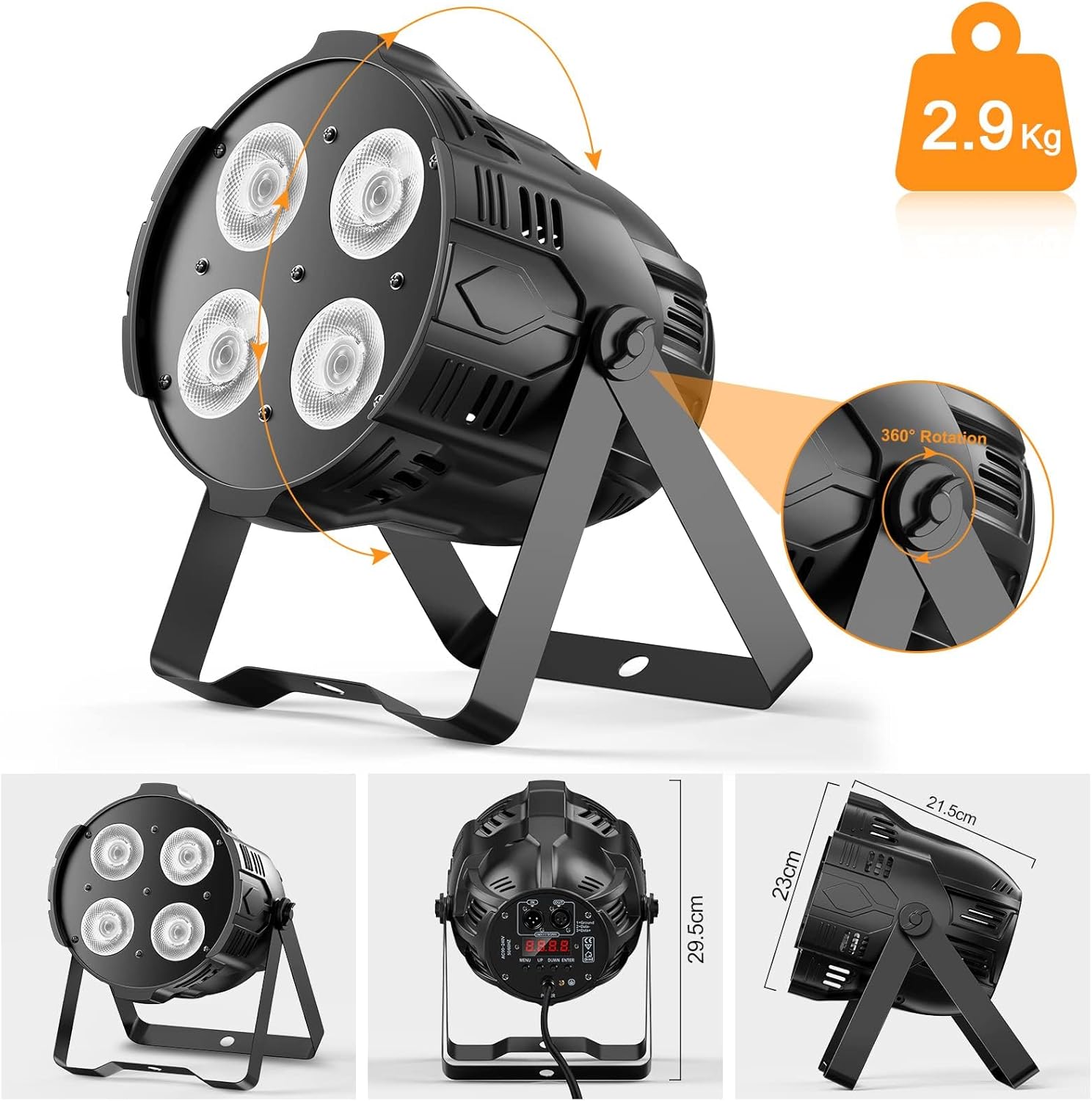
Image 5.1: Detailed diagram illustrating the physical dimensions of the stage light and its 360-degree rotational capability for flexible positioning.
6. Troubleshooting
This section provides solutions to common issues you may encounter with your SEBRUANC 200W COB LED Stage Light.
- Light does not turn on:
- Ensure the power cord is securely connected to both the fixture and a working power outlet.
- Verify the power outlet is supplying electricity. Test with another device.
- Check for any tripped circuit breakers.
- No DMX control:
- Confirm DMX cables are correctly connected (DMX In to DMX Out).
- Ensure the DMX address on the light matches the address set on your DMX controller.
- Verify the DMX controller is functioning correctly.
- Check for proper DMX termination if using a long chain of fixtures.
- Light output is dim or inconsistent:
- Check the selected operating mode and brightness settings.
- Ensure the lens is clean and free from dust or obstructions.
- If in Master-Slave mode, verify the Master unit is functioning correctly.
- Fan noise is noticeable:
- The fan operates to dissipate heat and is a normal function. Ensure adequate ventilation around the fixture.
- If the noise is excessive or unusual, contact customer support.
7. Maintenance
Regular maintenance ensures optimal performance and extends the lifespan of your stage light.
- Cleaning:
- Periodically clean the exterior casing and lens with a soft, dry cloth.
- Do not use abrasive cleaners or solvents, as they may damage the finish or optical components.
- Ensure the light is unplugged and cool before cleaning.
- Ventilation:
- Ensure that the ventilation openings are clear of dust and debris to allow for proper airflow and heat dissipation.
- Do not block the fan or air vents during operation.
- Storage:
- When not in use, store the light in a dry, dust-free environment.
- Consider using the original packaging or a padded case for protection during storage and transport.
8. Warranty and Support
For warranty information, technical support, or service inquiries, please contact SEBRUANC customer support. Keep your purchase receipt as proof of purchase.
You can visit the official SEBRUANC store for more information and support: SEBRUANC Store