
1. Introduction
The Retekess TT128B is an automated tour guide system designed to provide self-guided audio experiences for visitors in various settings such as museums, scenic areas, and exhibitions. This system allows users to select content based on their personal interests, offering flexibility and an enhanced understanding of their surroundings. It supports 41 languages, features 16GB of internal storage, and includes Bluetooth connectivity for personal headphones.

Image: The Retekess TT128B Automated Tour Guide System, a compact black device with a screen and numerical keypad.

Image: The Retekess TT128B device held in a hand, illustrating its portable size and lightweight design.
2. Package Contents
Verify that all items listed below are included in your package:
- 5x Transmitter (TT128B device)
- 5x In-Ear binaural headphones
- 5x Lanyard
- 30x Sponge cover
- 5x USB recharging cable
- 5x User's manual
- Power cable

Image: A visual representation of the Retekess TT128B package contents, detailing each included accessory.
3. Setup
3.1 Charging the Device
Before first use, fully charge the TT128B device. Connect the provided USB recharging cable to the device's USB port and a compatible USB power adapter (not included) or computer USB port. The device features a 1500mAh battery, providing up to 40 hours of continuous operation on a full charge.

Image: The TT128B device highlighting its 1500mAh battery capacity and 40-hour endurance.
3.2 Loading Audio Content
The TT128B comes with 16GB of internal memory, capable of storing a large amount of audio content (approximately 3000-5000 MP3 files with a bitrate less than 128kbps). To load audio files:
- Connect the TT128B to your computer using the USB cable.
- The device will appear as a removable storage drive.
- Drag and drop your MP3 audio files into the device's storage. Organize files into folders as needed for easier navigation.
- Safely eject the device from your computer before disconnecting the USB cable.

Image: The TT128B device with a visual representation of its 16GB memory, capable of storing thousands of audio files.
3.3 Initial Power On
Slide the power switch to the 'ON' position. The device display will light up, indicating it is ready for use.
4. Operation
4.1 Power On/Off
- To power on: Slide the side switch to the ON position.
- To power off: Slide the side switch to the OFF position.
4.2 Language Selection
The TT128B supports 41 diverse languages. To change the language:
- Press the SET button to enter the settings menu.
- Navigate to the language option using the navigation buttons.
- Select your desired language from the list.

Image: The TT128B device illustrating its multi-language support, showing English as the current language and other options.
4.3 Content Playback
The system offers self-guided audio playback with several options:
- Self-Service On-Demand: Visitors can choose specific audio content based on their interests. Use the numerical keypad to input the desired track number.
- Manual Sequence Number Input: Directly enter the serial number of a scenic spot to listen to its corresponding audio content.
- Loop Modes: The device supports both single loop (repeating the current track) and repeat all (playing all content in a loop) modes.
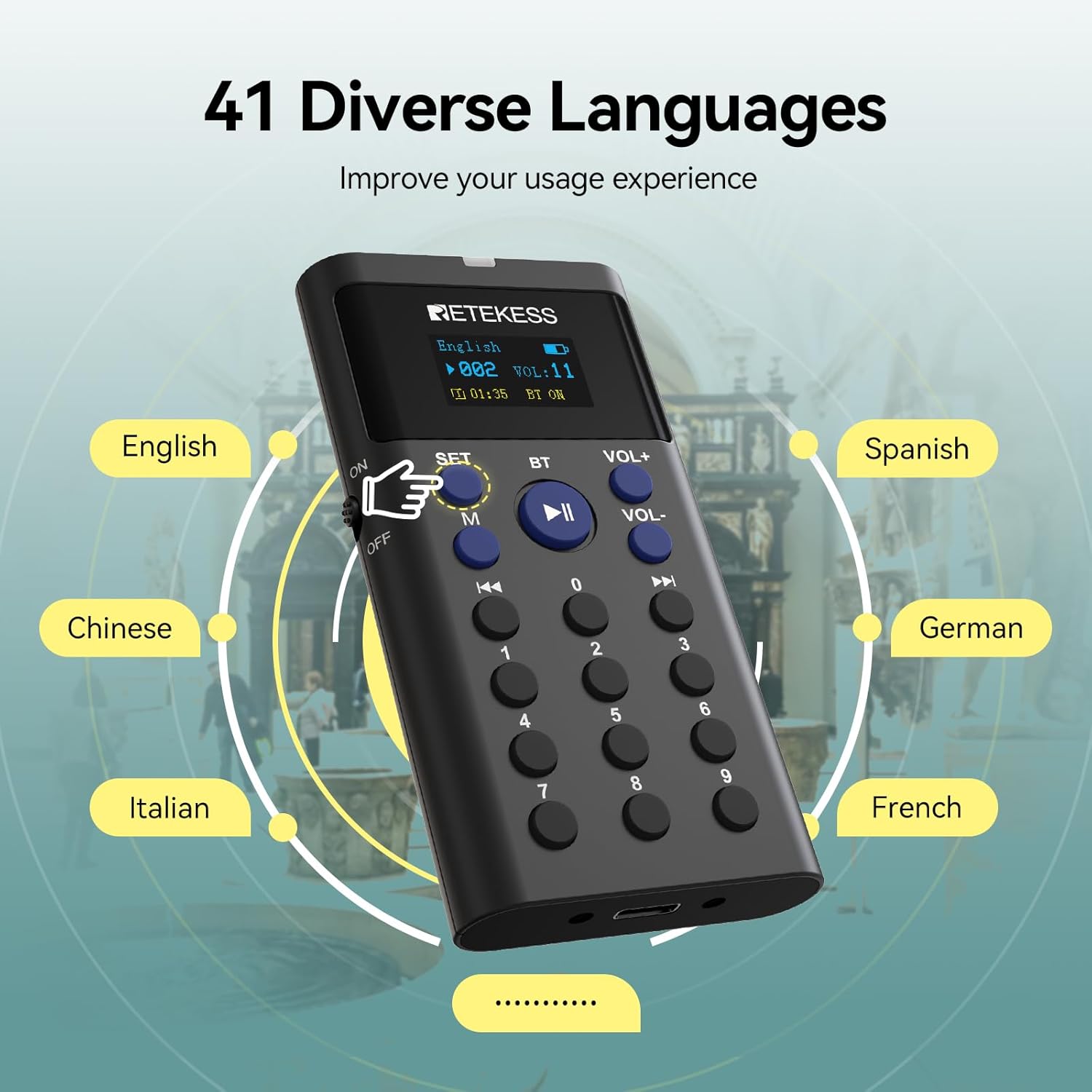
Image: Demonstrates the self-service on-demand feature, allowing users to select content by entering a number.

Image: Illustrates the manual sequence number input feature for selecting specific audio explanations.

Image: Visual representation of the device's loop playback modes, including single track and repeat all options.
4.4 Volume Adjustment
The device offers 16 levels of volume adjustment to suit individual preferences and environmental noise levels.
- Press VOL+ to increase the volume.
- Press VOL- to decrease the volume.

Image: The TT128B device demonstrating the 16-level adjustable volume control.
4.5 Bluetooth Connection
The TT128B supports Bluetooth connectivity, allowing you to connect personal Bluetooth headphones for a more private listening experience.
- Ensure your Bluetooth headphones are in pairing mode.
- On the TT128B, press the BT button to activate Bluetooth.
- The device will search for available Bluetooth devices. Select your headphones from the list to pair.

Image: Illustrates the use of the TT128B with wireless headphones, enabling two people to listen simultaneously.
5. Maintenance
- Cleaning: Use a soft, dry cloth to clean the device. Avoid using liquid cleaners or solvents.
- Storage: Store the device in a cool, dry place away from direct sunlight and extreme temperatures.
- Battery Care: To prolong battery life, avoid fully discharging the battery frequently. Charge the device regularly, even if not in use for extended periods.
- Sponge Covers: Replace the headphone sponge covers regularly for hygiene and comfort.
6. Troubleshooting
6.1 Device Not Powering On
- Ensure the battery is charged. Connect the device to a power source and allow it to charge for at least 30 minutes before attempting to power on again.
- Verify the power switch is fully in the 'ON' position.
6.2 No Sound from Headphones
- Check the volume level. Increase the volume using the VOL+ button.
- Ensure headphones are properly connected to the audio jack or correctly paired via Bluetooth.
- Test with different headphones to rule out a headphone issue.
6.3 Bluetooth Pairing Issues
- Ensure both the TT128B and your Bluetooth headphones are in pairing mode and within close proximity.
- Turn off and on the Bluetooth function on both devices and try pairing again.
- Clear previous Bluetooth connections on both devices if possible.
6.4 Low Battery Alert
The device will display a low battery alert when power is critically low. Recharge the device immediately to avoid interruption of service.

Image: The TT128B device showing a low battery warning on its screen.
7. Specifications
| Feature | Detail |
|---|---|
| Model Number | TT128B |
| Manufacturer Part Number | EUF9661FX5 |
| Brand | Retekess |
| Connectivity Technology | AUX, USB |
| Connector Type | USB |
| Number of Channels | 5 |
| Number of Products | 1 (per unit) |
| Battery | 5 AAA batteries required (included) |
| Battery Capacity | 1500mAh (up to 40 hours continuous operation) |
| Internal Storage | 16 GB |
| Product Dimensions | 52 x 102 x 14.5 mm |
| Product Weight | 60 g |
| Country of Origin | China |
8. Warranty and Support
8.1 Product Warranty
Retekess offers a 2-year warranty for this product. Additionally, a 30-day no-reason return policy is provided. Beyond the warranty period, maintenance services are still available, though buyers will be responsible for the associated costs.
8.2 Customer Support
For any inquiries or support needs, please contact us through Amazon. We aim to respond to all queries within 12 hours.