
FUNMILY B0FL2C64GY
FUNMILY Treadmill with Incline User Manual
Model: B0FL2C64GY
1. Introduction
This manual provides essential information for the safe and effective operation, assembly, maintenance, and troubleshooting of your FUNMILY 3.25HP Heavy Duty Folding Treadmill. Please read this manual thoroughly before initial use and retain it for future reference.

Image: The FUNMILY Treadmill in use, showcasing its design and incline capability.
2. Safety Information
Your safety is paramount. Adhere to all warnings and instructions to prevent injury or damage to the equipment.
- Always consult with a physician before starting any new exercise program.
- Keep children and pets away from the treadmill during operation.
- Ensure the safety key is properly attached to your clothing before starting the treadmill. In case of emergency, the safety key will stop the machine.
- Place the treadmill on a flat, stable surface with adequate clearance around it.
- Do not operate the treadmill if it is damaged or malfunctioning.
- Wear appropriate athletic footwear.
- Maximum user weight capacity: 300 lbs. Do not exceed this limit.
3. Setup and Assembly
The FUNMILY treadmill comes 95% pre-assembled. Follow these steps for final setup:
- Unpacking: Carefully remove all components from the packaging. Retain packaging materials for potential future transport or storage.
- Positioning: Place the treadmill on a level surface. Ensure there is at least 6 feet of clear space behind the treadmill and 2 feet on each side.
- Unfolding: Gently lower the running deck from its folded position. The hydraulic system will assist in a soft drop.
- Secure Upright Posts: Raise the console and secure the upright posts using the provided screws and tools. (Typically 6 screws are required).
- Connect Console Cables: Connect any remaining cables from the upright posts to the console, ensuring a secure fit.
- Power Connection: Plug the power cord into a grounded electrical outlet.
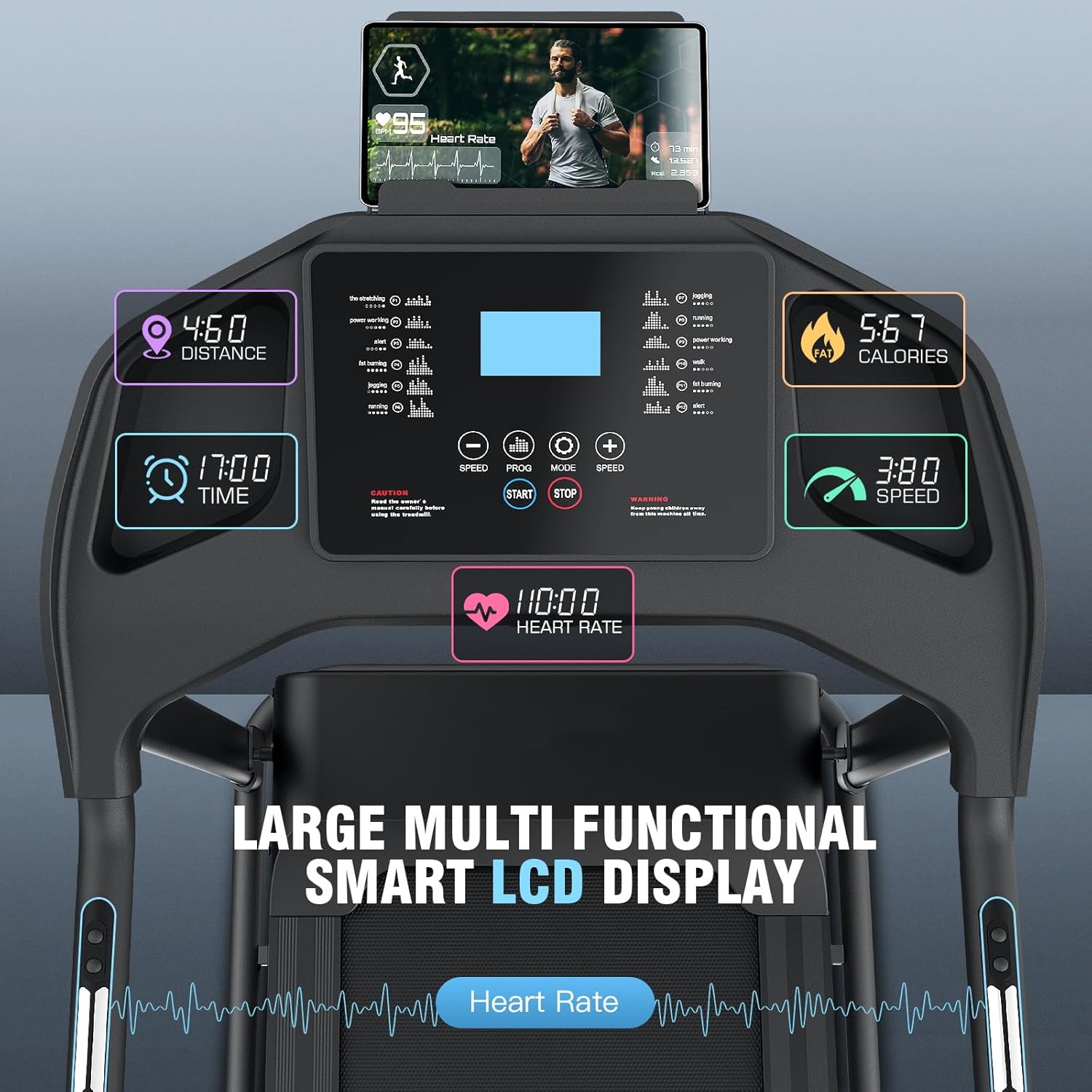
Image: The treadmill demonstrating its soft-drop folding system and transport wheels for easy movement and storage.
4. Operating Instructions
4.1 Console Overview

Image: Detailed view of the large multi-functional smart LCD display, indicating various metrics like distance, time, calories, speed, and heart rate.
The multi-functional LCD display provides real-time workout data. It shows speed, distance, time, calories burned, and heart rate. Handlebar buttons and the touchscreen allow for easy adjustments.
4.2 Starting a Workout
- Attach the safety key clip to your clothing and insert the safety key into its designated slot on the console. The treadmill will not operate without the safety key.
- Step onto the treadmill's side rails.
- Press the START button. The belt will begin moving at a low speed.
- Gradually increase speed using the SPEED + button or quick speed buttons on the console/handlebars.
4.3 Adjusting Incline
The treadmill features a 3-level manual incline (0-9° gradient). To adjust the incline:
- Stop the treadmill and step off the running belt.
- Manually adjust the incline mechanism located at the rear of the treadmill to your desired level (0°, 3°, 6°, or 9°).
- Ensure the mechanism is securely locked in place before resuming your workout.

Image: Illustration of the 3-level manual incline settings and their corresponding training benefits.
4.4 Preset Programs
The treadmill includes 12 preset programs designed for various fitness goals, including HIIT, endurance, and fat-burn modes. To select a program:
- From the standby screen, press the PROG button to cycle through the available programs.
- Once your desired program is displayed, press START to begin. The treadmill will automatically adjust speed and time according to the program's profile.
4.5 Heart Rate Monitoring
Grasp the pulse sensors on the handlebars with both hands to display your heart rate on the LCD screen. For accurate readings, ensure your hands are clean and firmly placed on the sensors.
4.6 Stopping a Workout
To stop the treadmill, press the STOP button. The belt will gradually slow down and come to a complete stop. Alternatively, pulling the safety key will immediately stop the treadmill.
5. Maintenance
Regular maintenance ensures the longevity and optimal performance of your treadmill.
5.1 Cleaning
- Wipe down the console and other surfaces with a damp cloth after each use. Avoid abrasive cleaners.
- Vacuum underneath the treadmill regularly to prevent dust and debris buildup.
5.2 Lubrication
The running belt requires periodic lubrication to reduce friction and extend its lifespan. Use the provided lubricant or a 100% silicone treadmill lubricant.
- Turn off and unplug the treadmill.
- Loosen the rear roller bolts slightly to lift the belt.
- Apply a thin line of lubricant evenly under the center of the running belt.
- Tighten the rear roller bolts.
- Plug in the treadmill and run it at a low speed (e.g., 2 MPH) for 5 minutes to distribute the lubricant.
5.3 Belt Adjustment
If the running belt slips or drifts to one side, it may need adjustment. Refer to the detailed instructions in the full manual for proper belt tensioning and centering.
6. Troubleshooting
| Problem | Possible Cause | Solution |
|---|---|---|
| Treadmill does not start. | Power cord not plugged in; Safety key not inserted; Circuit breaker tripped. | Ensure power cord is securely plugged in. Insert safety key fully. Check household circuit breaker. |
| Running belt slips. | Belt too loose; Belt needs lubrication. | Adjust belt tension (refer to full manual). Lubricate the running belt. |
| Unusual noise during operation. | Loose components; Motor issue; Belt misalignment. | Check all bolts and screws for tightness. If noise persists, contact customer support. |
| Inaccurate heart rate reading. | Hands not firmly on sensors; Dry hands. | Ensure firm contact with both sensors. Lightly moisten hands if too dry. |
7. Specifications
- Brand: FUNMILY
- Model: B0FL2C64GY
- Color: All Black
- Product Dimensions (LxWxH): 57"D x 28"W x 49"H
- Material: Alloy Steel
- Maximum Speed: 7.5 Miles per Hour
- Maximum Horsepower: 3.25 HP
- Maximum Weight Recommendation: 300 Pounds
- Noise Level: Under 60dB
- Incline: 3-level Manual Incline (0-9°)
- Programs: 12 Preset Programs
- Folding Dimensions: 29" x 25" x 49"
8. Warranty and Support
For warranty information, technical support, or to purchase replacement parts, please contact FUNMILY customer service. Refer to your purchase documentation for specific warranty terms and contact details.
You can also visit the official FUNMILY store on Amazon for more information and support: FUNMILY Store
Ask a question about this manual
Ask about setup, troubleshooting, compatibility, parts, safety, or missing instructions. Manuals+ will review the question and use this page’s manual context to help answer it.