
Introduction
Thank you for purchasing the NISSEI WS-10J Wrist Digital Blood Pressure Monitor. This device is designed for convenient and accurate blood pressure measurement at home. Please read this instruction manual thoroughly before use to ensure correct operation and to maintain the device's longevity. Keep this manual in a safe place for future reference.
Important Safety Information
This product is a medical device. For hygiene and safety reasons, returns or exchanges are not accepted after the product has been opened, except in cases of initial defects. Please confirm the product contents before purchase.
- Consult your physician before using this device if you have any medical conditions.
- Do not use this device for diagnosis or treatment. Always consult a medical professional for interpretation of results.
- Keep out of reach of children.
- Do not disassemble or modify the device.
- Avoid strong shocks or vibrations.
- Do not use in environments with high humidity or extreme temperatures.
Package Contents
Verify that all the following items are included in your package:
- NISSEI WS-10J Wrist Digital Blood Pressure Monitor
- Carrying Case
- AAA Alkaline Batteries (2)
- Instruction Manual (this document)
- Quick Guide (English, Chinese)
Product Overview
The NISSEI WS-10J is a compact and easy-to-use wrist blood pressure monitor. It features a clear display and stores up to 60 measurement results.
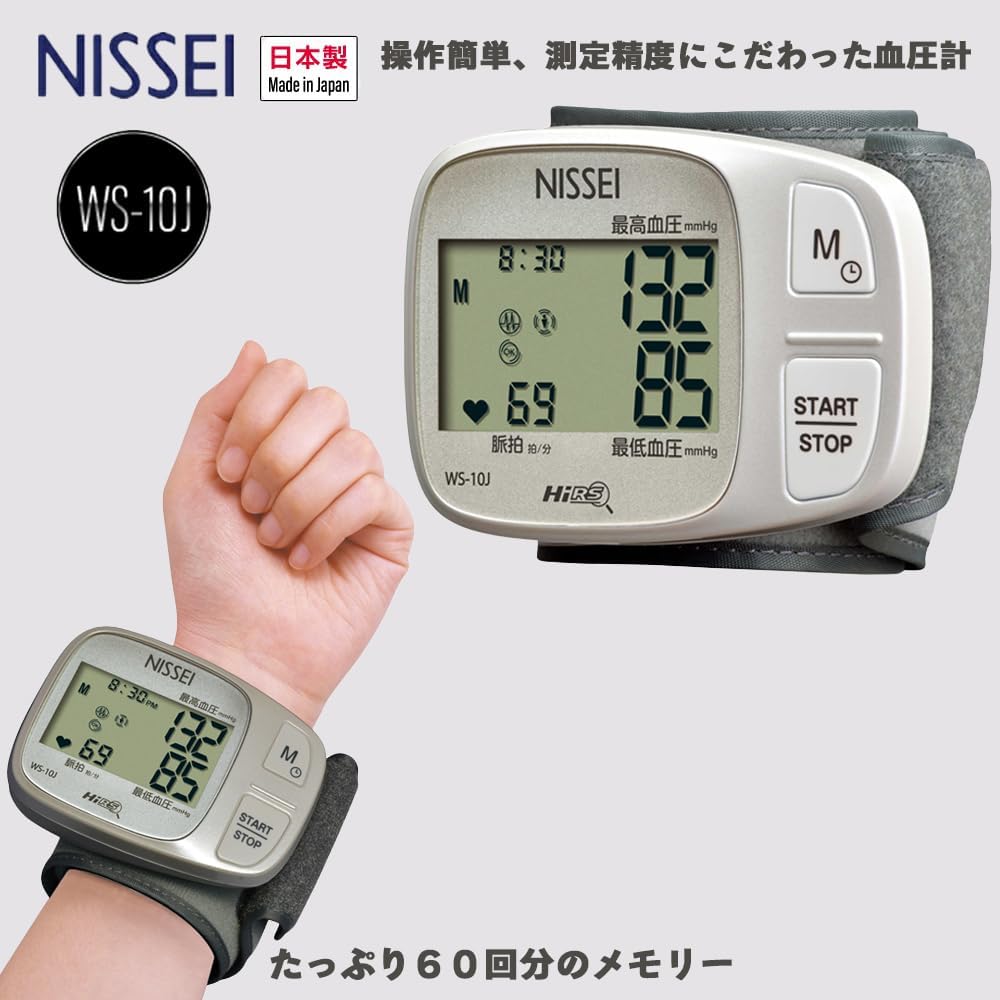
Image: The NISSEI WS-10J monitor, displaying blood pressure readings and pulse rate, shown both standalone and worn on a wrist.
Key Features:
- Easy-to-Read Display: Large characters for individual display of measurement results.
- Comfortable Cuff: "PITTARIKAFU" (snug-fit cuff) for easy wrapping.
- Memory Function: Stores up to 60 measurement results.
- High Accuracy: Equipped with an M-cuff for precision and a new "High Resolution System" engine.
- Other Features: Pressurization during measurement, cuff status display, body movement check during measurement, irregular pulse rhythm check function.

Image: Visual representation of the monitor's features, including a 13mm character size for readings, simple operation with a START/STOP button, and the "PITTARIKAFU" wrist cuff design.

Image: Icons depicting advanced features such as measurement during pressurization, wristband status display, body movement detection during measurement, and irregular pulse rhythm check function.
Setup
1. Battery Installation
Open the battery compartment cover on the back of the device. Insert two AAA alkaline batteries, ensuring the correct polarity (+/-). Close the cover securely.
2. Initial Settings (Time/Date)
Refer to the Quick Guide for instructions on setting the current time and date. Accurate time and date settings are important for tracking measurement history.
Operating Instructions
Correct Measurement Posture
Maintaining the correct posture is crucial for accurate blood pressure readings. Incorrect posture can lead to inaccurate results.

Image: Illustration of the correct measurement posture: sitting with feet flat on the floor, back supported, relaxed, palm facing up, elbow on a table, and a towel under the wrist to ensure the cuff is at heart level.
- Sit on a chair with both feet flat on the floor.
- Rest your back against the chair backrest and relax.
- Place your left palm facing upwards and rest your elbow on a table or stand.
- Place a towel or cushion under your wrist to ensure the cuff is at the same height as your heart.
Measurement Precautions
Pay close attention to the following points to ensure accurate readings:

Image: Visual warnings against common measurement errors: cuff position too low or too high relative to the heart, applying force to the hand, and bending the wrist during measurement.
- Cuff Position Relative to Heart:
- If the measurement position is higher than the heart, the measured value tends to be lower.
- If the measurement position is lower than the heart, the measured value tends to be higher.
- For accurate measurement, always align the cuff position with the height of your heart.
- Wrist and Hand Position:
- Do not apply force to your hand or wrist.
- Ensure your wrist is not bent during measurement.
Alternative Measurement Postures (If no table is available)

Image: Illustrations demonstrating how to measure blood pressure when a table is not available: sitting with the left arm gently placed on the chest at heart level, supported by the right hand; and lying down with a towel under the wrist to elevate the cuff to heart level.
- When no table is available: Sit on a chair, gently place your left arm against your chest, ensuring the cuff is at the same height as your heart. Lightly support your left arm with your right hand during measurement.
- When measuring while lying down: Lie on your back and use a towel or similar item to ensure the cuff is at the same height as your heart.
Note: Measured values may vary slightly depending on the measurement posture.
Taking a Measurement
- Wrap the cuff snugly around your wrist, ensuring it is positioned correctly as described in the "Correct Measurement Posture" section.
- Press the START/STOP button. The device will automatically inflate the cuff and begin measurement.
- Remain still and silent during the measurement.
- Once the measurement is complete, your systolic pressure, diastolic pressure, and pulse rate will be displayed.
- The measurement results will be automatically stored in the device's memory.
- Press the START/STOP button again to turn off the device, or it will power off automatically after a period of inactivity.
Maintenance
Cleaning
- Wipe the main unit and cuff with a soft, dry cloth.
- If necessary, lightly dampen the cloth with water or a mild detergent and wipe, then dry thoroughly.
- Do not use abrasive cleaners, solvents, or immerse the device in water.
Storage
- Store the device in its carrying case when not in use to protect it from dust and damage.
- Store in a cool, dry place, away from direct sunlight, high temperatures, and humidity.
- If the device will not be used for an extended period, remove the batteries to prevent leakage.
Troubleshooting
| Problem | Possible Cause | Solution |
|---|---|---|
| Device does not power on. | Batteries are depleted or incorrectly inserted. | Replace batteries with new ones, ensuring correct polarity. |
| Inaccurate readings. | Incorrect measurement posture, cuff position, or movement during measurement. | Review "Correct Measurement Posture" and "Measurement Precautions" sections. Ensure the cuff is at heart level and remain still. |
| Cuff does not inflate or inflates too little/much. | Cuff is not properly wrapped or air leakage. | Re-wrap the cuff snugly. Check for any damage to the cuff. |
| Error message displayed. | Specific error condition (e.g., excessive movement, irregular pulse). | Refer to the full instruction manual for specific error codes. Re-measure after resting. |
Specifications
| Feature | Detail |
|---|---|
| Model | WS-10J |
| Medical Device Certification No. | 230AGBZX00020000 |
| Measurement Method | Oscillometric method |
| Pressure Display Range | 3-300 mmHg (cuff pressure) |
| Measurement Range (Systolic) | 50-250 mmHg |
| Measurement Range (Diastolic) | 40-180 mmHg |
| Cuff Pressure Display Error | Within ±3 mmHg |
| Pulse Measurement Range | 30-199 beats/minute |
| Pulse Measurement Accuracy | ±5% |
| Inflation | Automatic (air pump) |
| Exhaust | Automatic rapid exhaust valve |
| Power Supply | 2 AAA alkaline batteries |
| Electrical Rating | DC3V/2W |
| Memory | 60 measurement results and average value |
| Operating Environment | Temperature: 10-40°C, Relative humidity: 15-85%RH (non-condensing) |
| Transport/Storage Environment | Temperature: -20-60°C, Relative humidity: 10-95%RH (non-condensing) |
| Cuff Type | M cuff |
| Measurable Wrist Circumference | Approx. 12.5-22.5 cm |
| Main Unit Dimensions | Approx. 64.0 (H) × 88.0 (W) × 26.4 (D) mm (excluding cuff) |
| Main Unit Weight | Approx. 100 g (excluding batteries) |
| Electric Shock Protection | Internal power supply equipment, BF type applied part |
| Ingress Protection (IP) Rating | IP20 (Protected against ingress of fingers. No protection against ingress of water.) |
| Operation Mode | Continuous operation equipment |
| Origin | Japan |
Warranty and Support
For warranty information, please refer to the warranty card included with your product or contact the retailer where you purchased the device. For technical support or inquiries, please contact NISSEI customer service. Contact details can typically be found on the manufacturer's official website or in the included documentation.