
1. Introduction
Thank you for choosing the Pride Mobility PX4 Scooter. This manual provides essential information for the safe and effective operation, maintenance, and care of your new mobility device. The PX4 scooter is designed to offer comfort and reliable performance for adults requiring mobility assistance, featuring a robust 500 lbs weight capacity and advanced keyless ignition.
Please read this manual thoroughly before operating your scooter to ensure proper understanding of all features and safety guidelines. Keep this manual for future reference.

Figure 1: Front-side view of the Pride Mobility PX4 Scooter in Camo finish.
2. Important Safety Information
The Pride Mobility PX4 Scooter is an FDA Class II Medical Device, designed to aid individuals with mobility impairments. Adherence to all safety instructions is crucial for preventing injury and ensuring proper function.
- Weight Capacity: Do not exceed the maximum weight capacity of 500 lbs. Overloading can affect stability and performance.
- Operation Environment: Operate the scooter on stable, level surfaces. Avoid steep inclines, uneven terrain, or hazardous conditions.
- Pre-Operation Checks: Always check battery charge, tire pressure, and brake function before each use.
- Visibility: Utilize the full LED lighting package, especially in low-light conditions, to enhance visibility to others.
- Children and Pets: Keep children and pets away from the scooter during operation and charging.
3. Setup and Initial Preparation
3.1 Unpacking and Assembly
Carefully remove all components from the packaging. Refer to the separate assembly guide for detailed instructions on attaching the seat, tiller, and other accessories. Ensure all connections are secure before proceeding.
3.2 Battery Installation and Initial Charge
The PX4 scooter requires two 12V sealed lead-acid batteries (included). Install them according to the instructions in the assembly guide. Before first use, fully charge the batteries for at least 8-12 hours. Connect the charger to the charging port, typically located near the battery compartment or on the tiller. The charging port may also include access to fuses and a USB port for convenience.

Figure 2: USB charging port and fuse access panel.
3.3 Seat Adjustment
The PX4 features a memory foam seat with multiple size options (18" to 22") and a 6" depth-adjustable slider for optimal comfort. Adjust the seat height, depth, and armrests to your preferred position before operation. Ensure the seat is securely locked in place.
3.4 Keyless Ignition Setup
The PX4 utilizes Near-field Communication (NFC) technology for its keyless ignition. To activate the scooter, simply wave an NFC key fob near the designated receiver on the tiller. Your scooter comes with pre-paired key fobs. If additional fobs are needed or if a fob needs re-pairing, refer to the specific instructions provided with the NFC system.

Figure 3: Pride Mobility NFC key fobs for keyless ignition.
4. Operating Your PX4 Scooter
4.1 Starting and Stopping
- To Start: Wave your NFC key fob over the receiver. The LCD console will illuminate, indicating the scooter is ready for operation.
- To Stop: Wave the NFC key fob over the receiver again, or press the power button on the console. The scooter will power down.
4.2 Controls Overview
The PX4 features a user-friendly delta steering wheel and an intuitive LCD console. The water-resistant user interface provides clear information and easy access to controls.
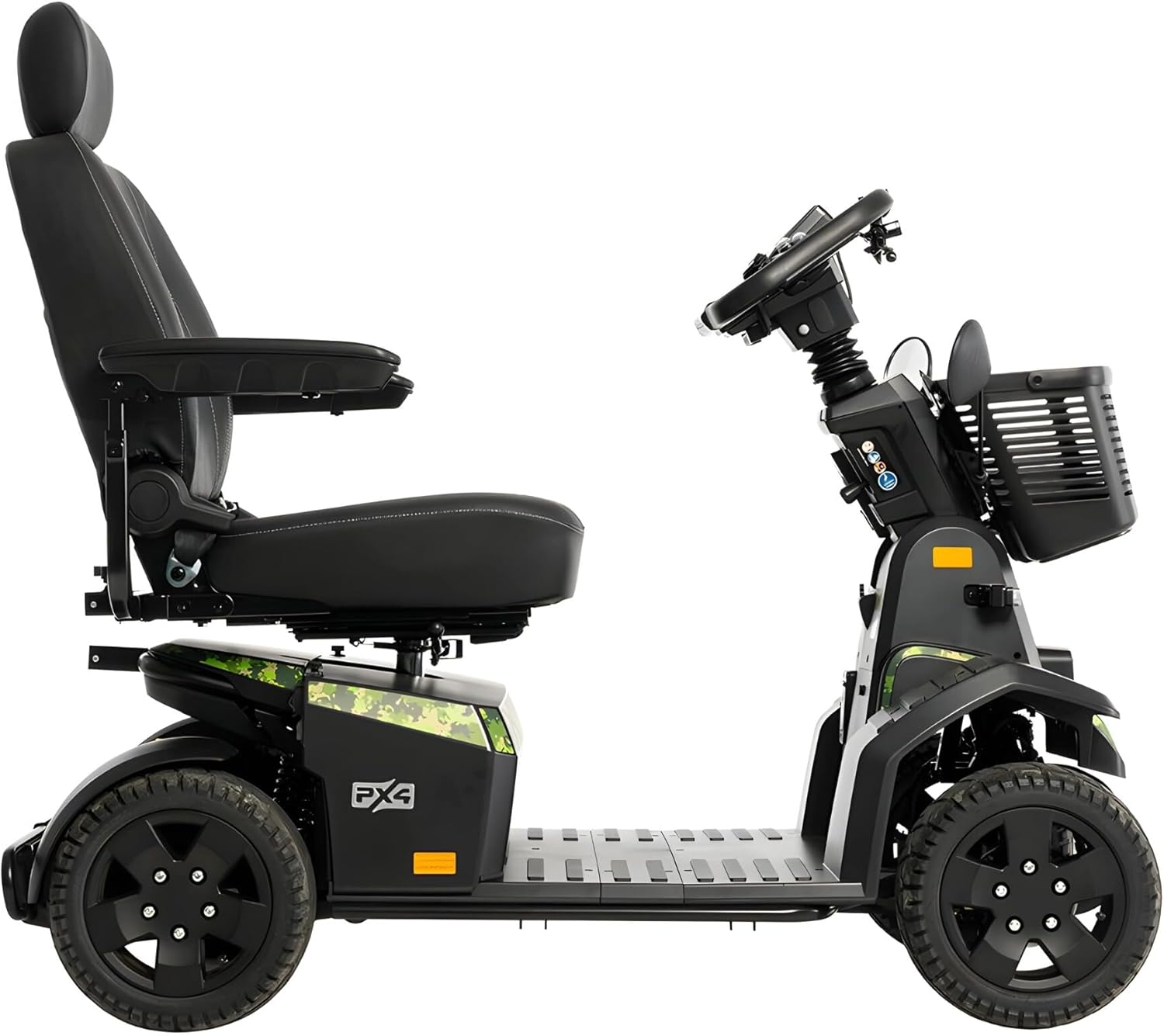
Figure 4: LCD console with speed, battery, and control indicators.
- Speed Control: Use the throttle levers on the delta tiller to control forward and reverse motion.
- Braking: Release the throttle for automatic electromagnetic braking. A supplemental hand brake is also provided for additional stopping power.
- Lighting: Activate the full LED lighting package (headlights, taillights, turn signals) using the controls on the console for enhanced visibility.
- Horn: Use the horn button to alert others.
4.3 Driving Your Scooter
The PX4 offers a top speed of 9.3 mph and a cruising range of up to 23.4 miles on a single charge. Its full suspension system and pneumatic front and rear tires provide a smooth ride. Always drive cautiously, especially when turning or navigating obstacles.

Figure 5: User operating the PX4 Scooter in an outdoor setting.
5. Maintenance and Care
5.1 Battery Care
To maximize battery life and performance, always charge the batteries fully after each use. Avoid completely draining the batteries. Store the scooter with fully charged batteries if it will not be used for an extended period, and recharge them monthly.
5.2 Cleaning
The PX4 features durable color-through shrouds that resist scratches and maintain their vibrant appearance. Clean the scooter regularly with a damp cloth and mild detergent. Avoid using abrasive cleaners or high-pressure washers. Ensure all electrical components remain dry.
5.3 Tire Care
Check the pressure of the pneumatic front and rear tires regularly. Maintain the recommended tire pressure as specified in the assembly guide to ensure optimal ride quality, range, and safety.
6. Troubleshooting Common Issues
This section addresses common issues you might encounter with your PX4 scooter. For problems not listed here, or if issues persist, contact customer support.
| Problem | Possible Cause | Solution |
|---|---|---|
| Scooter does not power on. | Low battery charge; NFC fob not detected; power switch off. | Charge batteries; ensure NFC fob is correctly presented; check power switch. |
| Reduced speed or range. | Low battery charge; underinflated tires; heavy load. | Fully charge batteries; check and inflate tires to recommended pressure; reduce load. |
| Motor makes unusual noise. | Loose connections; foreign object; motor issue. | Inspect for loose parts or obstructions; contact service if noise persists. |
7. Technical Specifications
| Specification | Detail |
|---|---|
| Product Dimensions | 55.9 x 27.5 x 24.6 inches |
| Item Weight | 351.4 Pounds |
| Item Model Number | Pride Mobility PX4 |
| Batteries | 2 x 12V batteries (included) |
| Weight Capacity | 500 Lbs |
| Top Speed | 9.3 mph |
| Cruising Range | Up to 23.4 miles |
| Seat Material | Memory Foam, Vinyl |
| Ignition System | NFC Keyless |
| Tires | Pneumatic Front and Rear |
8. Warranty and Customer Support
8.1 Warranty Coverage
Your Pride Mobility PX4 Scooter comes with comprehensive warranty coverage:
- Lifetime Limited Warranty on Frame
- 2-Year Limited Warranty on Electronics
- 2-Year Limited Warranty on Drivetrain
Additionally, a 1-Year In-Home Service is provided. If you experience any issues with your item within the first twelve months, contact HV Supply to arrange for a technician to visit your home for diagnosis and repair.
8.2 Return and Replacement Policy
- If the item is received damaged, please notify HV Supply within 3 business days to arrange a free replacement.
- For order refusals or return requests unrelated to damage, customers are responsible for a 25% restocking fee of the original item price, plus a $115.00 back freight charge.
8.3 Customer Support
For further assistance, technical support, or warranty claims, please contact HV Supply, the seller. You can also visit the official Pride Mobility Store for more product information.


