1. Product Overview
The Olodumare Power Recliner Chair is designed to provide ultimate comfort and style for adults. Featuring a plush, oversized design, this recliner is perfect for relaxation, reading, or enjoying your home theater. It includes convenient amenities such as a built-in USB port for charging devices, spacious arm storage, and integrated cup holders.
Crafted with durability in mind, this chair boasts a sturdy construction and is upholstered in a soft, skin-friendly microfiber fabric that is easy to clean. The smooth power reclining mechanism allows for effortless adjustment from 105° to 135° with simple button controls.

Image 1.1: The Olodumare Power Recliner Chair in Slate, showcasing its comfortable design and integrated features.
2. Safety Information
WARNING: This product includes a reclining mechanism and is intended for adults. Ensure the user's weight does not exceed the maximum weight recommendation of 300 pounds. Improper use may result in injury.
- Keep hands and feet clear of the reclining mechanism during operation.
- Do not allow children to play on or around the recliner unsupervised.
- Ensure the power cord is not pinched or damaged.
- Only use the recliner on a flat, stable surface.
- Avoid spilling liquids near electrical components.
3. Package Contents
Before assembly, please ensure all parts are present and undamaged. If any parts are missing or damaged, contact customer support immediately.
- Recliner Base (1)
- Backrest (1)
- Armrests (2) - Note: Armrests may be pre-attached to the base.
- Power Adapter (1)
- User Manual (1)
4. Assembly Instructions
The Olodumare Power Recliner Chair is designed for easy assembly. Typically, assembly involves connecting the backrest to the base and plugging in the power supply.
- Unpack Components: Carefully remove all parts from the packaging and lay them out on a soft, clean surface to prevent scratching.
- Attach Backrest: Align the metal brackets on the backrest with the corresponding receivers on the recliner base. Slide the backrest down firmly until it clicks securely into place. You may need to apply gentle pressure.
- Connect Power: Locate the power cable extending from the recliner base. Connect it to the provided power adapter, then plug the adapter into a standard wall outlet.
- Test Functionality: Once assembled and powered, test the reclining mechanism using the control buttons on the armrest. Ensure smooth operation and full range of motion.
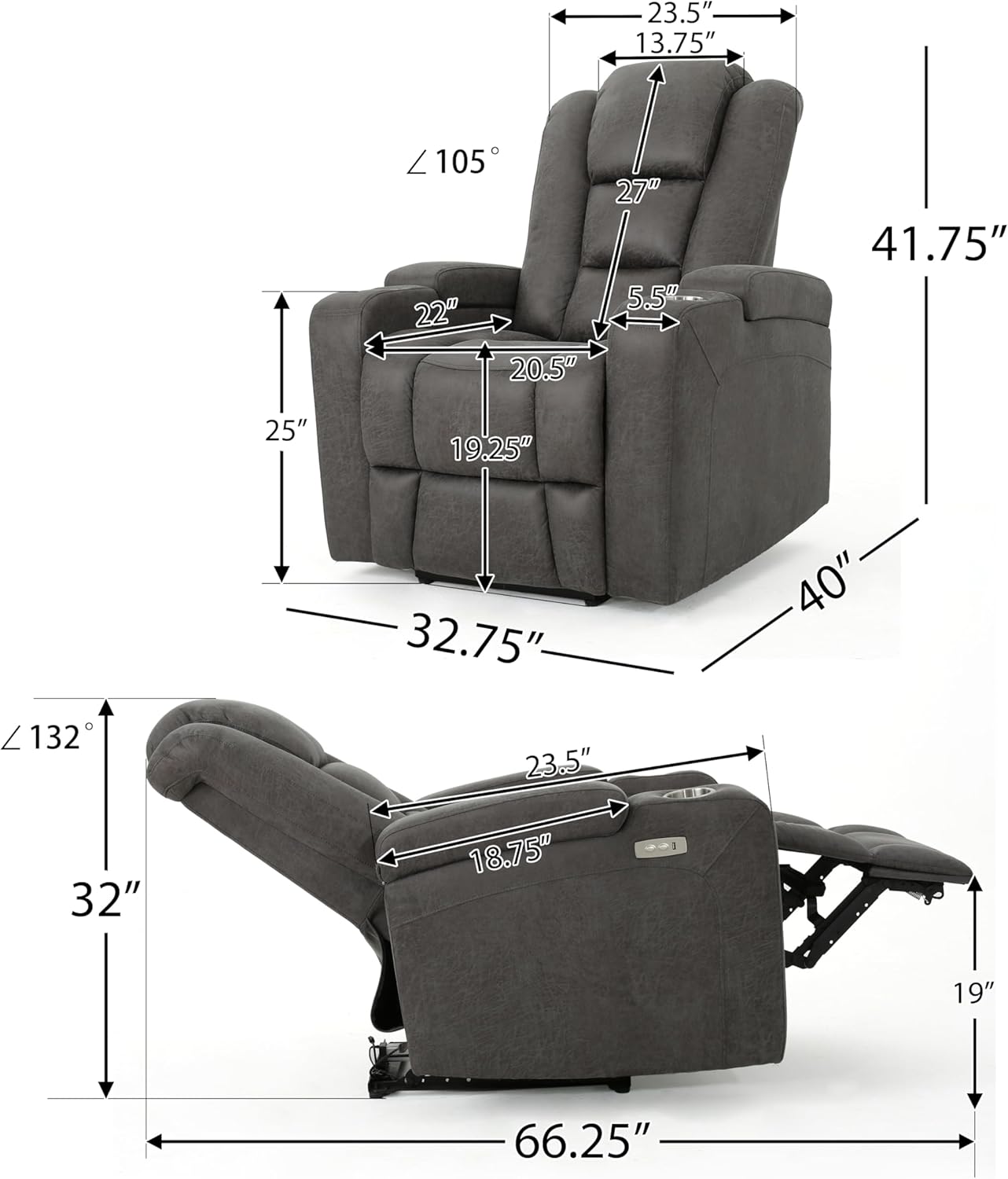
Image 4.1: Product dimensions for planning placement and ensuring proper fit.
5. Operating Instructions
Your power recliner chair offers simple electronic controls for a personalized comfort experience.
- Reclining: Locate the control buttons on the right armrest. Press the forward button to recline the chair backward and extend the footrest. Press the backward button to bring the chair back to an upright position and retract the footrest. The chair can recline from 105° to 135°.
- USB Charging Port: A USB charging port is integrated into the control panel on the armrest. Simply plug your USB charging cable into the port to charge compatible electronic devices.
- Arm Storage: The armrests feature hidden storage compartments. Lift the top of the armrest to access space for remotes, books, or other small items.
- Cup Holders: Integrated cup holders are located on the armrests, providing a convenient place for beverages.

Image 5.1: The control panel with recline buttons and USB charging port.
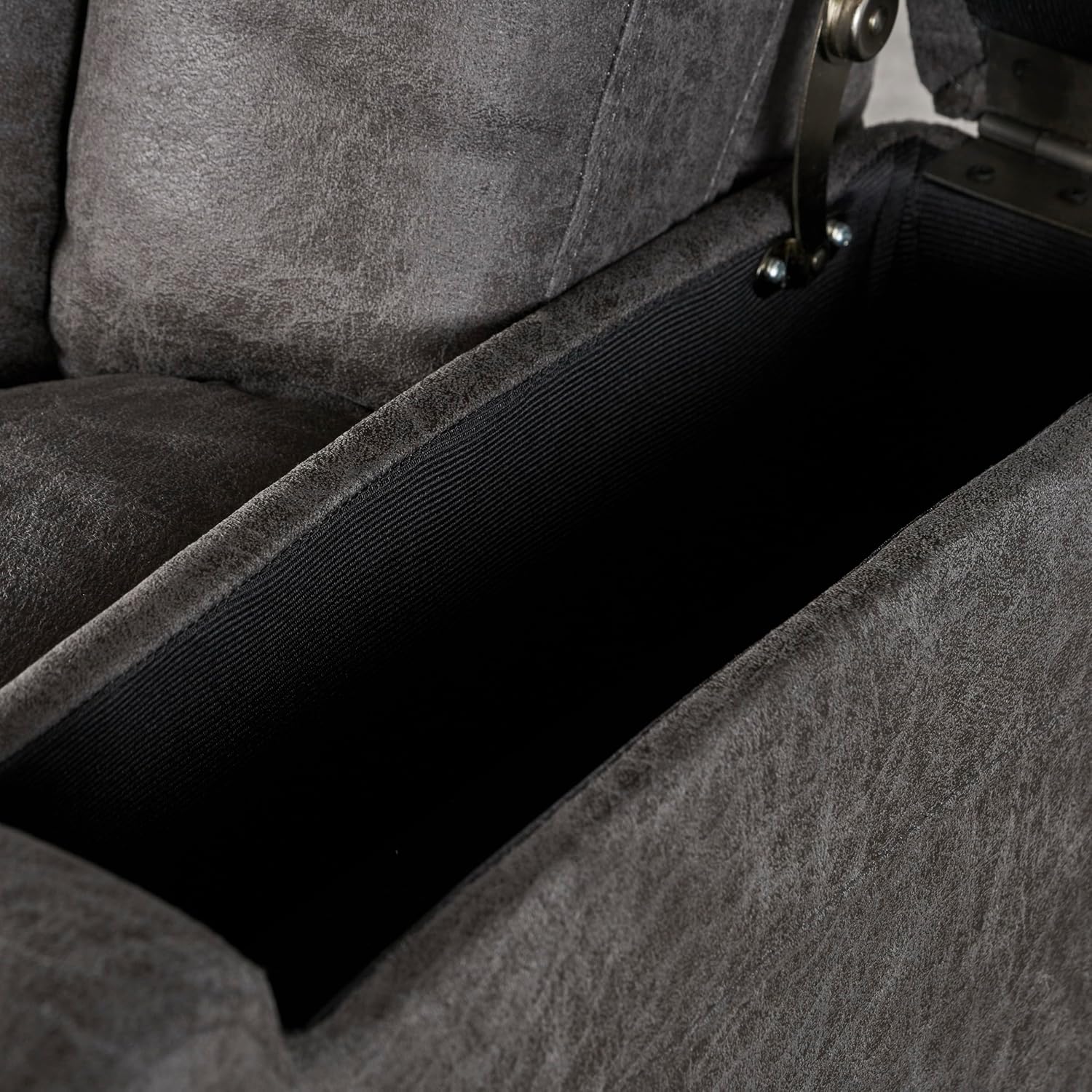
Image 5.2: The convenient arm storage compartment for keeping essentials close at hand.

Image 5.3: The integrated cup holder for your convenience.
6. Maintenance and Care
Proper care will ensure the longevity and appearance of your Olodumare Power Recliner Chair.
- Cleaning: For general cleaning, simply wipe clean with a soft, damp cloth. For spills, blot immediately with a clean, dry cloth. Avoid harsh chemicals or abrasive cleaners.
- Vacuuming: Regularly vacuum the chair using a soft brush attachment to remove dust and debris from the fabric.
- Mechanism Care: The reclining mechanism is designed for low maintenance. Avoid forcing the mechanism. If you notice any stiffness or unusual noises, ensure no obstructions are present.
- Power Cord: Periodically inspect the power cord for any signs of wear or damage.
7. Troubleshooting
If you encounter any issues with your recliner, refer to the following common problems and solutions:
| Problem | Possible Cause | Solution |
|---|---|---|
| Chair does not recline | No power; Power cord disconnected; Mechanism obstructed. | Check power outlet and connections; Ensure no objects are blocking the mechanism. |
| USB port not charging | Chair not powered; Device cable faulty. | Ensure chair is plugged in and powered; Try a different USB cable or device. |
| Reclining motion is not smooth | Obstruction in mechanism; Loose connection. | Inspect for obstructions; Contact customer support if issue persists. |
| Unusual noises during operation | Loose bolts; Mechanism friction. | Check and tighten any visible loose bolts; Contact customer support. |
If the problem persists after attempting these solutions, please contact Olodumare customer support for further assistance.
8. Specifications
| Feature | Detail |
|---|---|
| Brand | Olodumare |
| Model Number | 7dfb06a9-16ba-4f3f-a9df-679a852a579f |
| Color | Slate |
| Product Dimensions (D x W x H) | 40"D x 32.75"W x 41.75"H |
| Maximum Weight Recommendation | 300 Pounds |
| Material (Fill) | Foam |
| Furniture Finish | Microfiber |
| Special Features | Arm Rest, Arm Storage, Cup Holders, Ergonomic, USB port |
| Reclining Position Count | 1 Position (adjustable from 105° to 135°) |
| Item Weight | 82.2 pounds |
| Manufacturer | Olodumare |
9. Warranty and Support
For warranty information and customer support, please refer to the purchase documentation or contact Olodumare directly. Our responsive customer service team is dedicated to ensuring your satisfaction.
You can visit the official Olodumare store for more information and contact details: Olodumare Store on Amazon
No official product videos are available for this model at this time.


