
1. Introduction
This manual provides detailed instructions for the installation, operation, and maintenance of your SODSEA 62 Inch Ceiling Fan with Light and Remote. Please read this manual thoroughly before installation and retain it for future reference. This ceiling fan is designed for both indoor and outdoor use, featuring a quiet DC motor, 6-speed settings, a reversible function, and an integrated dimmable LED light with adjustable color temperature.
2. Safety Information
WARNING: To reduce the risk of fire, electric shock, or personal injury, always turn off the main power at the circuit breaker or fuse box before installation or servicing.
Observe the following safety precautions:
- All electrical connections must be in accordance with local codes, ordinances, and the National Electrical Code. If you are unfamiliar with wiring, consult a qualified electrician.
- Ensure the installation site allows the fan blades to rotate without obstruction. A minimum clearance of 7 feet from the floor to the blade trailing edge is recommended.
- The mounting structure must be capable of supporting the weight of the fan (approximately 24.4 pounds) plus the dynamic load of the fan in motion.
- Do not connect the fan to a dimmer switch or variable speed control unless specifically designed for ceiling fans.
- Do not insert objects into the path of the fan blades while the fan is operating.
- Always ensure the fan is securely mounted before operation.
3. Package Contents
Verify that all components listed below are included in your package:
- Ceiling Fan Motor Assembly
- Fan Blades (7, two-sided: Matte Black and Walnut Color)
- Light Kit with Dimmable LED
- Remote Control
- Mounting Bracket
- Downrod
- Hardware Pack (screws, wire nuts, washers)
- Instruction Manual

Image: Main components of the SODSEA 62 Inch Ceiling Fan, showing the black fan body, a sample of the two-sided blades (matte black and walnut), and the remote control.
4. Setup and Installation
Professional installation is recommended. Ensure power is disconnected at the circuit breaker before beginning.
4.1 Choosing Blade Color
The fan blades are reversible, offering two aesthetic options: Matte Black and Walnut Color. Select your preferred side before attaching the blades to the motor assembly.

Image: Illustration of the two-sided fan blades, one side in matte black and the other in a walnut wood finish, allowing for customizable aesthetics.
4.2 Mounting the Fan
- Turn off Power: Locate the circuit breaker for the fan location and turn off the power.
- Install Mounting Bracket: Secure the mounting bracket to the ceiling junction box. Ensure the junction box is adequately supported (at least 24.4 lbs).
- Assemble Downrod and Motor: Feed the electrical wires from the fan motor through the downrod. Secure the downrod to the motor assembly.
- Hang Fan: Carefully lift the fan assembly and hang it from the mounting bracket.
- Wire Connections: Connect the fan's electrical wires to the household wiring according to the wiring diagram provided in the full installation guide (not included in this summary). Ensure all connections are secure.
- Attach Blades: Securely attach the 7 fan blades to the motor housing.
- Install Light Kit: Connect the light kit wiring and attach the light kit to the bottom of the fan motor assembly.
- Restore Power: Once all connections are secure and the fan is fully assembled, restore power at the circuit breaker.
4.3 Remote Control Pairing
The remote control may need to be paired with the fan after installation or if it loses connection. To pair:
- Ensure the fan and light are both turned OFF.
- Turn off the main power to the fan at the wall switch or circuit breaker.
- Restore power to the fan.
- Within 30 seconds of restoring power, press and hold the '6H' button on the remote control until the fan light blinks, indicating successful pairing.
5. Operating Instructions
Your SODSEA ceiling fan is operated using the included remote control.

Image: Diagram of the remote control, highlighting buttons for fan on/off, speed adjustment (1-6), LED on/off/color change, forward/reverse rotation, light brightness, and fan timer (1hr, 3hr, 6hr).
5.1 Fan Operation
- Fan On/Off: Press the dedicated fan power button to turn the fan on or off.
- Speed Control: Use buttons '1' through '6' to select the desired fan speed. Speed '1' is the lowest, and '6' is the highest. The fan features a silent DC motor for quiet operation across all 6 speeds.
- Reversible Function: Press the 'Forward/Reverse' button to change the direction of blade rotation. This allows for downward airflow in summer for cooling and upward airflow in winter to circulate warm air.
- Timer Function: Press the '1H', '3H', or '6H' button to set the fan to automatically turn off after 1, 3, or 6 hours, respectively.
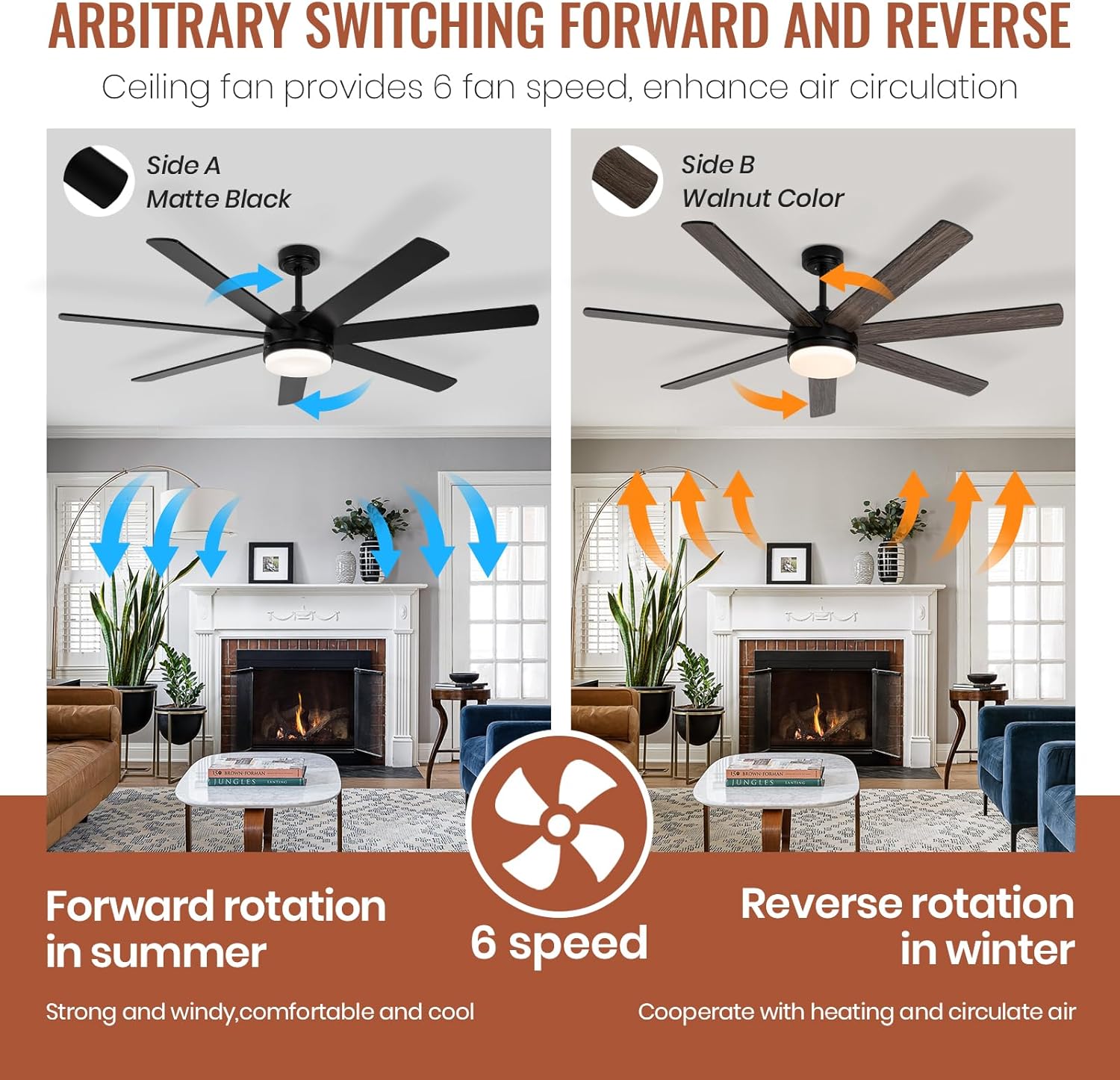
Image: Visual representation of the fan's reversible function, illustrating forward rotation for cooling in summer and reverse rotation for air circulation in winter.
5.2 Light Operation
- Light On/Off: Press the dedicated light power button to turn the light on or off.
- Color Temperature Change: Press the 'LED On/Off Colour Change' button to cycle through the three available color temperatures (3000K Warm Light, 4000K Natural Light, 6500K White Light).
- Brightness Adjustment: Use the '+' and '-' buttons to adjust the light brightness from 12% to 100%. The light features a memory function, retaining the last brightness and color temperature setting when turned off and on again.

Image: Visual guide showing the fan light's capability to adjust between three color temperatures (3000K, 4000K, 6500K) and stepless dimming from 12% to 100% brightness.
6. Maintenance
Regular maintenance ensures optimal performance and longevity of your ceiling fan.
- Cleaning: Periodically clean the fan blades and motor housing with a soft, damp cloth. Do not use abrasive cleaners or solvents that could damage the finish.
- Blade Inspection: Check the blade screws periodically to ensure they are tight. Loose blades can cause wobbling and noise.
- Light Kit: The integrated LED light is designed for long life and typically does not require replacement. If issues arise, contact customer support.
- Remote Control: Replace the remote control batteries when the range decreases or the remote becomes unresponsive.
7. Troubleshooting
If you experience issues with your fan, refer to the following common problems and solutions:
| Problem | Possible Cause | Solution |
|---|---|---|
| Fan does not start | No power to the fan; Loose wire connections; Remote control not paired or dead batteries. | Check circuit breaker; Verify all wire connections are secure; Re-pair remote control (see Section 4.3); Replace remote batteries. |
| Fan wobbles | Loose blade screws; Improperly balanced blades; Loose mounting bracket. | Tighten all blade screws; Ensure blades are installed correctly; Check mounting bracket for secure attachment. |
| Light does not work | Loose wire connections to light kit; Remote control not paired or dead batteries. | Check light kit wiring; Re-pair remote control; Replace remote batteries. |
| Remote control not responding | Dead batteries; Remote not paired with fan; Obstruction between remote and receiver. | Replace batteries; Re-pair remote control (see Section 4.3); Ensure clear line of sight to fan receiver. |
| Fan turns off unexpectedly | Timer function activated; Electrical interference; Motor malfunction. | Check if timer was set; Consult an electrician for electrical issues; If motor is suspected, contact customer support. |
8. Specifications
| Feature | Detail |
|---|---|
| Brand | SODSEA |
| Model Number | 62-1173-BK |
| Size | 62 Inch |
| Color | Black (Motor Housing) |
| Blade Material | Engineered Wood (Two-sided: Matte Black / Walnut Color) |
| Number of Blades | 7 |
| Motor Type | DC Brushless Motor |
| Motor Power | 55 Watts |
| Number of Speeds | 6 |
| Reversible Motor | Yes |
| Light Kit | Integrated Dimmable LED |
| Color Temperature Range | 3000K - 6500K (Adjustable) |
| Brightness Adjustment | 12% - 100% (Stepless Dimming) |
| Control Method | Remote Control |
| Timer Function | 1H, 3H, 6H |
| Indoor/Outdoor Usage | Outdoor rated |
| Airflow | 6538 CFM |
| Recommended Room Size | 300-400 SQ.FT |
| Product Dimensions | 62 x 62 x 20 inches |
| Item Weight | 24.4 pounds |
| Batteries Required | Yes (for remote control) |

Image: Diagram illustrating the 62-inch diameter and 21.1-inch height of the fan, along with its airflow (6538 CFM), motor power (55W), and recommended use in spaces like bedrooms, courtyards, living rooms, and dining rooms (300-400 sq. ft.).
9. Warranty and Support
SODSEA is committed to providing high-quality products and excellent customer service.
- Warranty: This product includes a 12-month free warranty from the date of purchase.
- Customer Support: For any inquiries, technical assistance, or warranty claims, please contact SODSEA customer service. We aim to respond to all customer messages within 24 hours.