
Tineco Pure ONE Station 5
Tineco Pure ONE Station 5 Cordless Smart Vacuum User Manual
Model: Pure ONE Station 5
Introduction
Thank you for choosing the Tineco Pure ONE Station 5 Cordless Smart Vacuum. This manual provides essential information for the safe operation, maintenance, and troubleshooting of your new vacuum cleaner. Please read it thoroughly before first use and keep it for future reference.
The Tineco Pure ONE Station 5 is designed for efficient and convenient cleaning, featuring a 2.5L auto dust base, full-path self-cleaning capabilities, powerful 175W suction, ZeroTangle technology, and an iLoop Smart Sensor for optimized cleaning on both hard floors and carpets.
Product Overview and Components
Familiarize yourself with the main components of your Tineco Pure ONE Station 5 vacuum.

Image: The Tineco Pure ONE Station 5 vacuum, showing the main unit, the auto dust base, and a crevice tool.
What's Included:

Image: A visual representation of the components included with the Tineco Pure ONE Station 5.
- Main Vacuum Unit: The handheld portion with motor and dustbin.
- Extension Tube: Connects the main unit to the brush head.
- ZeroTangle Brush Head: Designed to prevent hair tangling, suitable for various floor types.
- Clean Station (Auto Dust Base): Automatically empties the vacuum's dustbin and self-cleans components.
- 2-in-1 Crevice Brush: For cleaning tight spaces and upholstery.
- Power Adapter: For charging the Clean Station and vacuum.
Setup
- Unpacking: Carefully remove all components from the packaging. Retain packaging for future storage or transport.
- Assembly:
- Insert the extension tube into the main vacuum unit until it clicks into place.
- Attach the ZeroTangle brush head to the other end of the extension tube, ensuring it locks securely.
- Place the Clean Station on a flat, stable surface near a power outlet.
- Initial Charge:
- Connect the power adapter to the Clean Station and plug it into a wall outlet.
- Place the assembled vacuum onto the Clean Station. The vacuum will begin charging automatically.
- Allow the vacuum to fully charge before first use. The charging indicator lights on the vacuum and/or station will indicate charging status.
Operating Instructions
Powering On/Off:
- To turn on the vacuum, press the power button located on the main unit.
- To turn off, press the power button again.
iLoop Smart Sensor Technology:

Image: The iLoop Smart Sensor dynamically adjusts suction power based on the amount of dust detected, optimizing cleaning efficiency.
The Tineco Pure ONE Station 5 features an iLoop Smart Sensor that intelligently detects the amount of dust and debris on your floor. It automatically adjusts the suction power in real-time, providing optimal cleaning performance while conserving battery life. No manual adjustment of suction modes is typically required.
ZeroTangle Brush Head:
The V-shaped bristle design of the ZeroTangle brush efficiently picks up hair, fur, dust, and particles. Its dual comb design helps untangle and straighten hair, significantly reducing hair wrap around the brush roller. This makes it ideal for homes with pets.
ClogLess System:

Image: The ClogLess System features a unique brush head design with a wider tube and larger connection port, allowing it to pick up large debris without clogging.
The unique brush head design, combined with a wider tube and a larger connection port inside the vacuum, allows the Pure ONE Station 5 to effortlessly pick up large debris without clogging, ensuring consistent cleaning performance.
120° Wide-Angle Headlight (LightSense):

Image: The 120-degree wide-angle headlight illuminates a larger area, making hidden dust and debris clearly visible for thorough cleaning.
The integrated 120° wide-angle headlight illuminates the cleaning path, revealing hidden dust and debris on hard floors and carpets, ensuring no spot is missed.
Using Attachments:
- To attach the 2-in-1 crevice brush, remove the extension tube and connect the attachment directly to the main vacuum unit.
- Use the crevice brush for cleaning corners, edges, and upholstery.
Maintenance
Full-Path Self-Cleaning and Auto Dust Collection:

Image: The Tineco Pure ONE Station 5 automatically handles dust collection and offers maintenance-free HEPA filtration, eliminating the need for frequent manual cleaning or dust bag replacements.
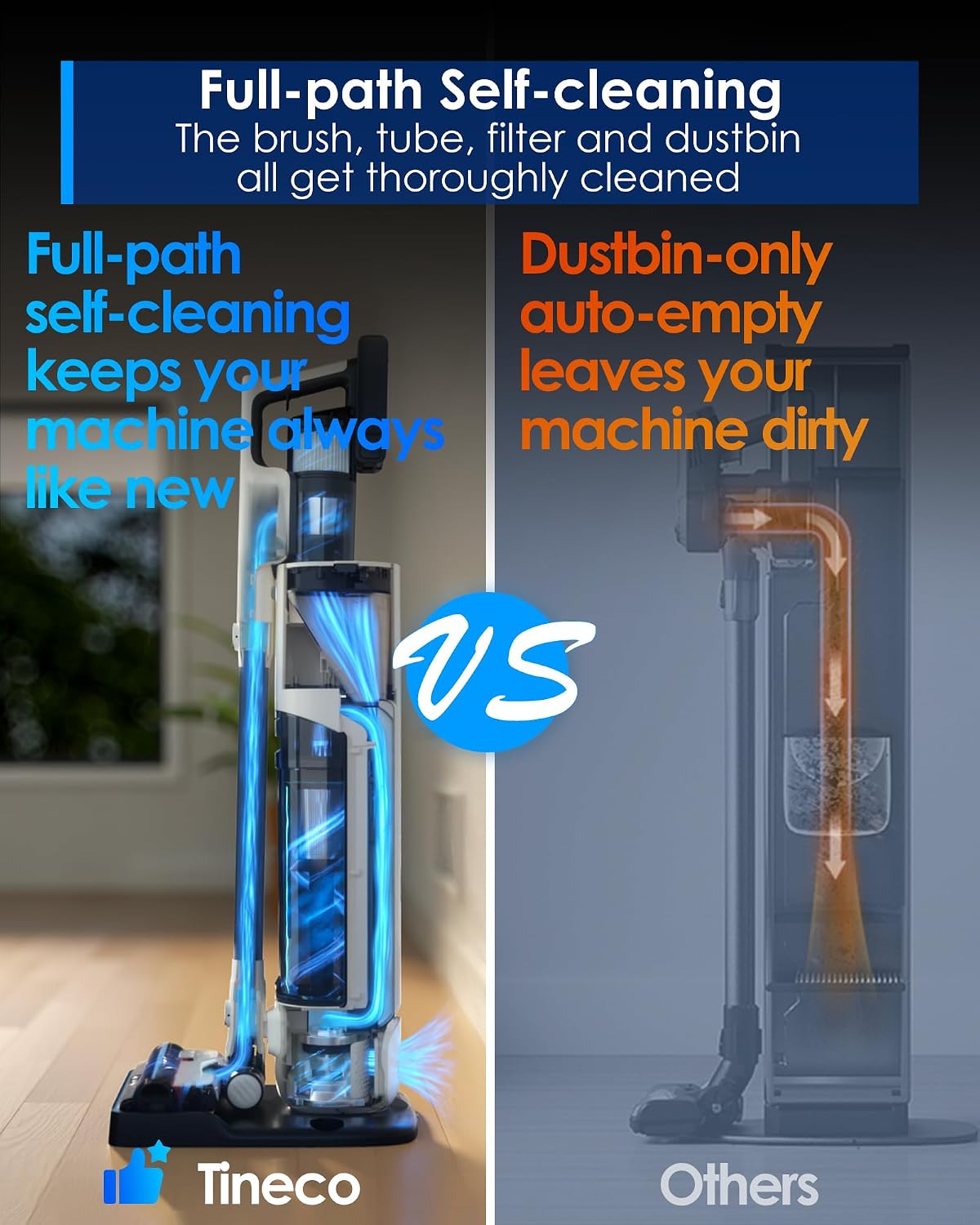
Image: A visual comparison highlighting Tineco's full-path self-cleaning system that cleans the brush, tube, filter, and dustbin, ensuring the machine remains like new.
After each cleaning session, simply return the vacuum to the Clean Station. The station will automatically perform a full-path self-cleaning process, thoroughly cleaning the brush, tube, filter, and the vacuum's internal dustbin. It also recharges the vacuum, ensuring it's ready for the next use.
The 2.5L eco dustbin in the Clean Station can hold debris and dust for an extended period (up to 45 days, depending on usage), significantly reducing the frequency of manual emptying.
Emptying the Clean Station Dustbin:
- When the Clean Station's dustbin is full, an indicator light will notify you.
- To empty, carefully remove the dustbin from the station.
- Dispose of the collected debris into a trash can.
- Reinsert the dustbin securely into the Clean Station.
Filter Maintenance:
The Station Dura-cyclone System includes a self-cleaning HEPA filter. While the full-path self-cleaning process maintains the filter, periodic manual inspection is recommended to ensure optimal performance. If necessary, gently tap the filter to dislodge any stubborn dust or rinse it with water if specified in the detailed manual (refer to the full manual for specific instructions on filter washing, if applicable).
Troubleshooting
| Problem | Possible Cause | Solution |
|---|---|---|
| Vacuum not turning on. | Battery is depleted; Power button not pressed correctly. | Charge the vacuum on the Clean Station; Ensure the power button is pressed firmly. |
| Low suction power. | Dustbin full; Filter clogged; Brush head obstructed; Tube clogged. | Allow the Clean Station to auto-empty; Check and clean the filter; Remove any obstructions from the brush head or tube. |
| Vacuum not charging. | Not properly docked; Power adapter not connected; Power outlet issue. | Ensure the vacuum is correctly seated on the Clean Station; Check power adapter connection; Try a different power outlet. |
| Brush head not spinning. | Obstruction in brush; Brush head not properly attached. | Clear any hair or debris from the brush roller; Reattach the brush head securely. |
For more detailed troubleshooting or issues not listed here, please refer to the comprehensive user manual or contact Tineco customer support.
Specifications
| Feature | Detail |
|---|---|
| Brand | Tineco |
| Model Name | Pure ONE Station 5 |
| Special Features | 175W Powerful Suction, 1L+2.5L Larger Dustbin, 45 Days Hassle-free, Cordless and Up to 70 Mins Runtime, Full-path Self-cleaning |
| Filter Type | HEPA Filter |
| Capacity | 2.5 Liters (Clean Station Dustbin) |
| Wattage | 175 watts |
| Runtime | Up to 70 minutes |
| Recommended Uses | Carpet, Hard Floor, Pet Hair |
| Product Dimensions | 29.2"L x 14.97"W x 12.77"H |
| Item Weight | 16.5 pounds |
| Battery Type | Lithium-Ion |
Warranty and Support
Tineco products are manufactured with high-quality materials and craftsmanship. For information regarding your product's warranty, please refer to the warranty card included in your product packaging or visit the official Tineco website.
For technical support, service, or inquiries, please contact Tineco Customer Service. You can find contact information on the official Tineco website or through your purchase platform.
Visit the official Tineco Store for more information and products: Tineco Official Store
Related Documents - Pure ONE Station 5
 |
Tineco CARPET ONE PRO SERIES Smart Carpet Cleaner: Instruction Manual & Guide Comprehensive instruction manual for the Tineco CARPET ONE PRO SERIES Smart Carpet Cleaner. Learn about setup, operation, maintenance, troubleshooting, and warranty information. |
 |
Tineco Carpet One Pro Series Smart Carpet Cleaner Instruction Manual Official instruction manual for the Tineco Carpet One Pro Series smart carpet cleaner. Includes setup, operation, maintenance, and troubleshooting guides for optimal performance. |
 |
Tineco CARPET ONE CRUISER Smart Powerful Carpet Cleaner Instruction Manual Explore the Tineco CARPET ONE CRUISER Smart Powerful Carpet Cleaner with this comprehensive instruction manual. It covers essential safety precautions, detailed operating instructions, maintenance procedures, troubleshooting tips, and warranty information to ensure optimal performance and longevity of your appliance. |
 |
Tineco iCARPET SERIES Powerful Carpet Cleaner Instruction Manual This instruction manual provides detailed information on the assembly, operation, maintenance, troubleshooting, and warranty for the Tineco iCARPET SERIES Powerful Carpet Cleaner. |
 |
Tineco iCARPET SERIES Powerful Carpet Cleaner User Manual Comprehensive user manual for the Tineco iCARPET SERIES Powerful Carpet Cleaner, covering safety instructions, specifications, assembly, operation, maintenance, troubleshooting, and warranty information. |
 |
Tineco iCARPET SERIES Powerful Carpet Cleaner Instruction Manual Comprehensive instruction manual for the Tineco iCARPET SERIES powerful carpet cleaner, covering setup, operation, maintenance, troubleshooting, and warranty information. |
Ask a question about this manual
Ask about setup, troubleshooting, compatibility, parts, safety, or missing instructions. Manuals+ will review the question and use this page’s manual context to help answer it.