
Introduction
This manual provides instructions for the safe and efficient operation, maintenance, and care of your Fellow Aiden Precision Drip Coffee Maker. Please read all instructions carefully before first use and retain this manual for future reference.
The Fellow Aiden is designed to deliver exceptional coffee through precise temperature control, optimized coffee-to-water ratios, and a built-in bloom cycle. It supports brewing capacities from a single serving up to 10 cups.

Figure 1: Front view of the Fellow Aiden Precision Drip Coffee Maker in Matte Black.
Safety Information
- Always place the coffee maker on a stable, level, heat-resistant surface.
- Do not immerse the appliance, cord, or plug in water or other liquids.
- Ensure the voltage rating on the appliance matches your local power supply.
- Keep out of reach of children.
- Unplug the coffee maker from the outlet when not in use and before cleaning.
- Do not operate any appliance with a damaged cord or plug, or after the appliance malfunctions or has been damaged in any manner.
- Avoid contact with moving parts.
- Do not use attachments not recommended by the manufacturer.
- Do not place on or near a hot gas or electric burner, or in a heated oven.
- Do not use outdoors.
- Do not let cord hang over edge of table or counter, or touch hot surfaces.
- The thermal carafe is designed for use with this appliance only. It must never be used on a range top.
- Do not clean carafe with abrasive cleaners, steel wool pads, or other abrasive materials.
- Do not use the appliance for other than intended use.
Components Overview
Familiarize yourself with the main components of your Aiden coffee maker:
- High-resolution full-color screen: Displays brew status, settings, and notifications.
- Control Knob: For navigating menus and adjusting settings.
- Removable Water Tank: For easy refilling.
- Shower Head: Ensures even water distribution over coffee grounds.
- Filter Baskets: Interchangeable for single-serve (1-3 cups) and batch brew (3-10 cups).
- Thermal Carafe: Double-walled to keep coffee warm for hours without a heating plate.
- Drip-Stop Filter Basket: Prevents mess.
- Silicone Seal: Protects cabinets from steam damage.
- Cord Wrap: For tidy countertop storage.

Figure 2: Key components of the Fellow Aiden, including the removable water tank, thermal carafe, and interchangeable single-serve and batch brew filter baskets.
Setup
- Unpack and Clean: Remove all packaging materials. Wash the thermal carafe, lid, and filter baskets with warm, soapy water. Rinse thoroughly and dry. Wipe the exterior of the coffee maker with a damp cloth.
- Position the Coffee Maker: Place the Aiden on a flat, stable surface near a power outlet. Ensure adequate clearance for steam release.
- Fill the Water Tank: Remove the water tank from the side of the unit. Fill it with fresh, filtered water up to the desired level (max 10 cups). Reinsert the water tank securely.
- Insert Filter Basket: Choose the appropriate filter basket (single-serve for 1-3 cups, batch brew for 3-10 cups) and place it into the brew chamber. Ensure the hose is correctly positioned for the selected basket type.
- Initial Rinse Cycle: Before first use, perform a rinse cycle without coffee grounds. Fill the water tank to the 10-cup mark, place the empty carafe, and initiate a brew cycle. Discard the water after completion. This cleans the internal components.
Operating Instructions
Standard Coffee Brewing (Hot)
- Prepare Grounds: Grind fresh coffee beans to a medium-fine consistency. Refer to the recommended coffee-to-water ratios (e.g., 1:16 for normal brew).
- Add Coffee Grounds: Place a paper filter in the chosen filter basket (single-serve or batch brew). Add the measured coffee grounds to the filter.
- Fill Water Tank: Fill the removable water tank with fresh, filtered water to the desired level.
- Place Carafe: Ensure the thermal carafe is empty and correctly positioned under the brew chamber.
- Select Brew Profile: Use the control knob to select a pre-set brew profile (Light Roast, Medium Roast, Dark Roast) or a custom profile. The machine will guide you through the process.
- Start Brewing: Press the control knob to start the brewing process. The Aiden will automatically execute a bloom cycle and precise water delivery.
- Serve: Once brewing is complete, carefully remove the carafe and serve. The thermal carafe will keep coffee warm for several hours.

Figure 3: The Aiden coffee maker demonstrating its high-resolution screen and one-button brewing, compatible with the Ode Brew Grinder.
Single Serve vs. Batch Brew
The Aiden features interchangeable filter baskets and a dual shower head to optimize brewing for different volumes:
- Single Serve Basket: Use for 1-3 cup servings. This basket ensures proper saturation and extraction for smaller quantities.
- Batch Brew Basket: Use for 3-10 cup servings. This larger basket accommodates more grounds for full carafe brewing.
The machine will prompt you to switch baskets and adjust the internal hose as needed for optimal performance.
Cold Brew Setting
- Prepare Coarse Grounds: Use coarsely ground coffee.
- Add Grounds and Water: Follow the cold brew recipe instructions on the display or via the app for specific coffee-to-water ratios.
- Select Cold Brew Profile: Navigate to the cold brew setting using the control knob.
- Start Cold Brew: Initiate the cold brew cycle. The machine will manage the process, which typically takes several hours.
- Serve: Once complete, the cold brew is ready to serve or store.

Figure 4: Demonstrating the cold brew capability of the Aiden, allowing for fast, full-flavored cold brew concentrates or ready-to-drink coffee.
Scheduling and App Integration
The Aiden coffee maker can be scheduled to brew at a specific time, ensuring your coffee is ready when you need it. This feature can be set directly on the machine or through the companion mobile application.
- Companion App: Download the Fellow app to customize, save, share, and download coffee recipes. The app provides a larger interface for setting up brew profiles and scheduling.
- Customizable Settings: Adjust variables such as temperature, bloom time, and flow rate to fine-tune your brew.
- Scheduled Brews: Set the machine to start brewing at a desired time. The Aiden will ensure the coffee is brewed and ready by your specified time, not just when it starts.

Figure 5: The Aiden offers built-in brew guidance and app integration for customized coffee recipes and scheduling.
Maintenance
Regular maintenance ensures optimal performance and longevity of your Fellow Aiden coffee maker.
Daily Cleaning
- Carafe and Filter Baskets: After each use, wash the thermal carafe, lid, and filter baskets with warm, soapy water. Rinse thoroughly and dry.
- Exterior: Wipe down the exterior of the coffee maker with a soft, damp cloth. Do not use abrasive cleaners.
Descaling
Mineral buildup from water can affect performance and flavor. Descale your Aiden regularly.
- Frequency: Descale every 3-4 weeks if using hard water. For softer water, follow the smart reminders provided by the Aiden or the companion app.
- Process:
- Empty the water tank and carafe.
- Follow the descaling instructions provided on the machine's display or in the app, using a manufacturer-recommended descaling solution.
- After descaling, run several rinse cycles with fresh water to ensure all descaling solution is removed.
- Important Note: Do not use distilled water for regular brewing as it can interfere with the machine's water level sensors and may not be recommended by the manufacturer for long-term use.
Troubleshooting
| Problem | Possible Cause | Solution |
|---|---|---|
| Coffee not brewing / Machine not starting |
|
|
| "Add Water" message despite full tank |
|
|
| Coffee tastes weak or bitter |
|
|
| Coffee not hot enough |
|
|
Specifications
| Brand | Fellow |
| Model Name | Aiden Coffee Maker |
| Model Number | EBRMB-NA |
| Color | Matte Black |
| Product Dimensions | 9"D x 11.8"W x 9"H |
| Item Weight | 15.67 pounds |
| Coffee Maker Type | Drip Coffee Machine |
| Special Features | Adjustable Brew Strength, Auto Shut-Off, Programmable, Timer, Water Filter |
| Included Components | Carafe |
| UPC | 840228806134 |
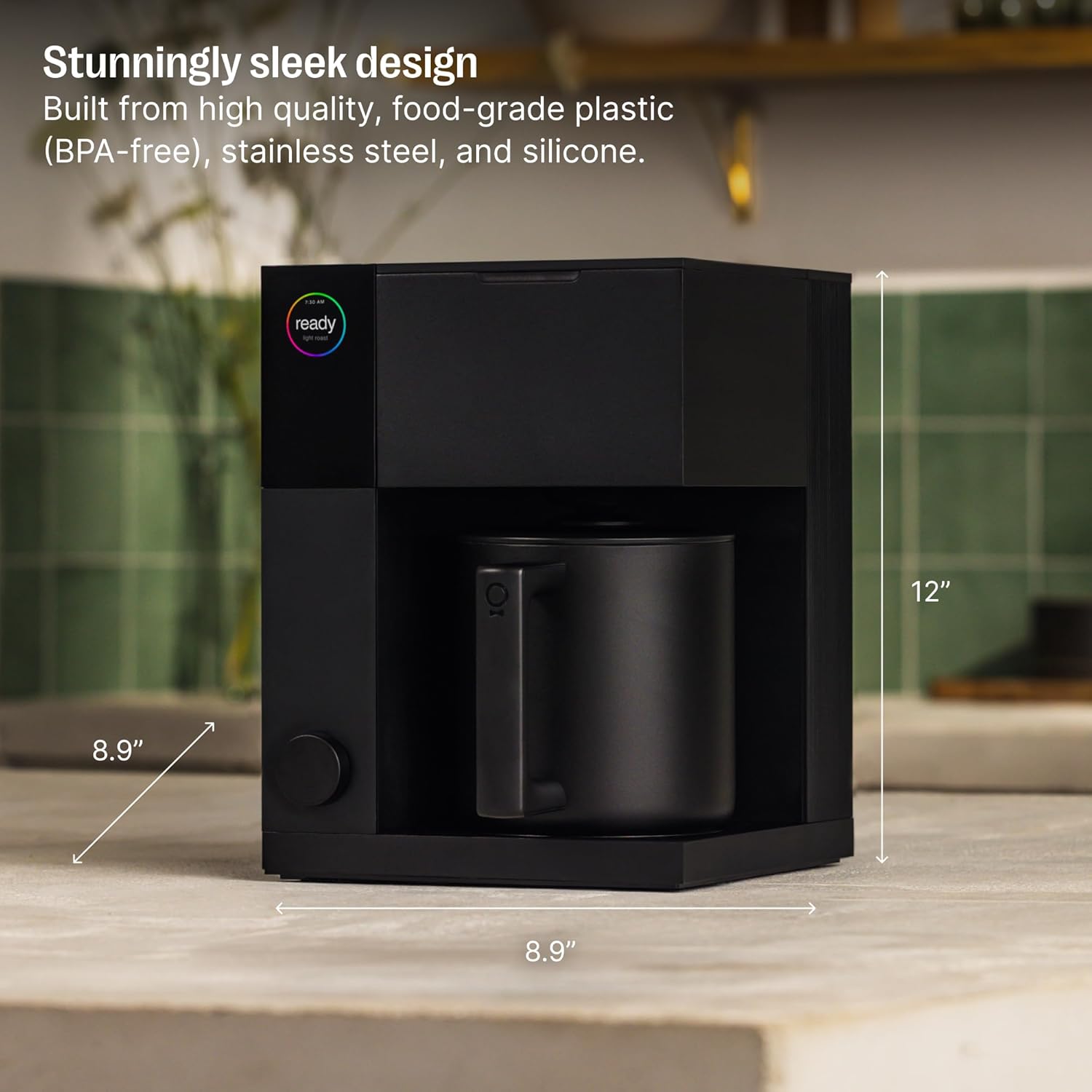
Figure 6: Physical dimensions of the Fellow Aiden Precision Drip Coffee Maker.
Warranty and Support
For warranty information, please refer to the documentation included with your product or visit the official Fellow website. Standard warranty terms typically cover manufacturing defects for a specified period from the date of purchase.
For technical support, troubleshooting assistance, or to inquire about replacement parts, please contact Fellow customer service through their official website or the contact information provided in your product packaging.
Extended protection plans may be available for purchase separately. Refer to the details of any purchased protection plan for coverage specifics.