
1. Introduction
This manual provides detailed instructions for the installation, operation, maintenance, and troubleshooting of your keepLiNK 16-Port Gigabit PoE Switch Unmanaged. This high-performance network switch features 16 PoE+ ports, 2 Gigabit uplink ports, and 1 SFP slot, designed for reliable and efficient network connectivity.

Figure 1: Front view of the keepLiNK 16-Port Gigabit PoE Switch, showing all ports and indicators.
2. Setup
2.1 Unboxing and Package Contents
Carefully unpack the switch and verify that all items are present and undamaged. The package should contain:
- 1 x keepLiNK 16-Ports Gigabit PoE Switch
- 1 x Power Cable
- 1 x User’s Manual
- 2 x Mounting Brackets (for rackmount installation)
2.2 Physical Installation
The keepLiNK 16-Port Gigabit PoE Switch can be installed on a desktop or mounted in a standard 19-inch rack. Ensure adequate ventilation around the device.
Desktop Installation:
Place the switch on a flat, stable surface. Ensure there is sufficient space for cable connections and airflow.
Rackmount Installation:
Attach the two included mounting brackets to the sides of the switch using the provided screws. Secure the switch into a standard 19-inch rack.

Figure 2: Rackmount installation showing the switch dimensions and mounting brackets.
2.3 Connecting Devices
Connect your network devices to the switch using standard Ethernet cables. The switch supports both PoE and non-PoE devices.
- PoE Ports (1-16): Connect PoE-compatible devices such as IP cameras, wireless access points, and IP phones. These ports automatically detect and supply power according to IEEE 802.3at/af standards.
- Uplink Ports (17-18): Connect to your router, NVR, or other network backbone devices for data transmission.
- SFP Slot (19): Use this slot for fiber optic connections to extend your network over longer distances.
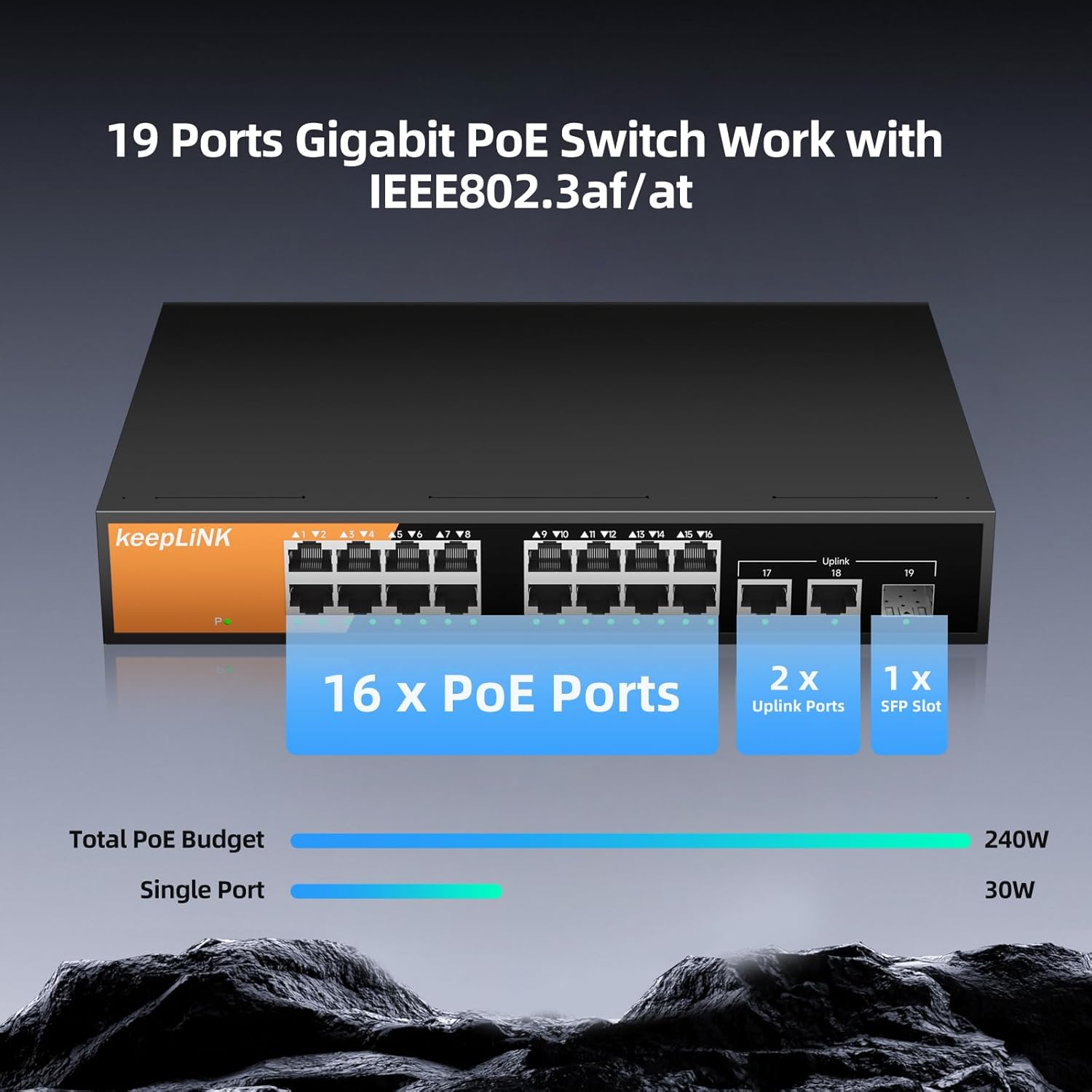
Figure 3: Detailed view of the switch ports, indicating PoE, Uplink, and SFP connections.
3. Operating Instructions
3.1 Powering On
Connect the power cable to the switch's AC input and then to a power outlet. The power indicator LED on the front panel will illuminate, indicating the switch is powered on.
3.2 Plug-and-Play Functionality
This is an unmanaged switch, requiring no configuration. Simply connect your devices, and the switch will automatically detect and establish network connections.
3.3 Power over Ethernet (PoE) Operation
The PoE ports (1-16) automatically detect if a connected device is PoE-compatible. If compatible, the switch supplies power (up to 30W per port, with a total power budget of 240W) along with data. For non-PoE devices, only data transmission occurs, protecting your equipment from damage.

Figure 4: Illustration of PoE+ support, showing power and data delivery to various devices.
3.4 Data Transfer Rates
All ports support Gigabit Ethernet (10/100/1000 Mbps) for high-speed data transfer. The switch offers a switching capacity of 38 Gbps.
4. Maintenance
4.1 Fanless Cooling Design
The switch features a fanless design, ensuring silent operation and preventing dust build-up. This design contributes to its reliability and suitability for various environments, including quiet offices and homes.

Figure 5: Fanless cooling design for silent operation and effective heat dissipation.
4.2 General Care
To ensure optimal performance and longevity, keep the switch in a clean, dry environment. Avoid exposing it to extreme temperatures or humidity. The robust metal casing provides durability.
5. Troubleshooting
5.1 Common Issues and Solutions
- No Power: Ensure the power cable is securely connected to both the switch and the power outlet. Check the power outlet for functionality.
- No Network Connection: Verify that Ethernet cables are properly connected to both the switch and the devices. Check the link/activity LEDs on the switch ports.
- PoE Device Not Powering On: Confirm the device is PoE-compatible (IEEE 802.3at/af). Ensure the total power consumption of all connected PoE devices does not exceed the switch's 240W power budget.
5.2 Lightning Protection
The switch is equipped with 6KV lightning protection to safeguard against electrical surges, enhancing its reliability in various environments.

Figure 6: Key features including 6KV lightning protection and high switching capacity.
6. Specifications
| Feature | Description |
|---|---|
| Brand | keepLiNK |
| Model Number | KP-9000-19GP-S-MAC |
| Number of Ports | 16 PoE+ Ports, 2 Gigabit Uplink Ports, 1 SFP Slot (Total 19) |
| PoE Standard | IEEE 802.3at/af Compliant |
| Max PoE Power Per Port | 30W |
| Total PoE Power Budget | 240W |
| Data Transfer Rate | 1 Gigabits Per Second (10/100/1000 Mbps) |
| Switching Capacity | 38 Gbps |
| Switch Type | Unmanaged |
| Case Material | Metal |
| Cooling | Fanless |
| Operating Temperature | 14°F to 122°F (-10°C to 50°C) |
| Dimensions (L x W x H) | 10.63" x 7.12" x 1.73" (270mm x 181mm x 44mm) |
| Item Weight | 2.4 Pounds (1.09 kg) |
| Lightning Protection | 6KV |
7. Warranty
This keepLiNK 16-Port Gigabit PoE Switch is covered by a 2-year manufacturer's warranty. Please retain your proof of purchase for warranty claims. For detailed warranty terms and conditions, refer to the warranty card included with your product or contact keepLiNK customer support.
8. Support
For technical assistance, product inquiries, or support, please visit the official keepLiNK website or contact our customer service team. You can find contact information on the product packaging or our website.
9. Product Video Overview
Video 1: An overview of the keepLiNK 16-Port Gigabit PoE Switch Unmanaged, showcasing its features and design.