
1. Introduction
This manual provides essential information for the safe and efficient operation of your Amana Distinctions Model DHP153A35AA Packaged Terminal Heat Pump (PTHP) unit. This unit is designed to provide both cooling (14,700 BTU) and heating (13,500 BTU with 3.5 kW Electric Heat Kit) for your space. Please read all instructions carefully before installation and use.
2. Setup
2.1 Physical Dimensions
The Amana Distinctions DHP153A35AA unit measures approximately 42 inches wide, 21 inches deep, and 16 inches tall. Ensure adequate space is available for proper installation and airflow around the unit.
2.2 Electrical Requirements
This unit requires a 200-240 volt electrical supply. It is crucial to verify that your electrical outlet matches the unit's plug configuration. If the appropriate outlet is not available, professional electrical installation is required to ensure safety and proper function.

Figure 1: Front view of the Amana Distinctions DHP153A35AA PTHP unit.
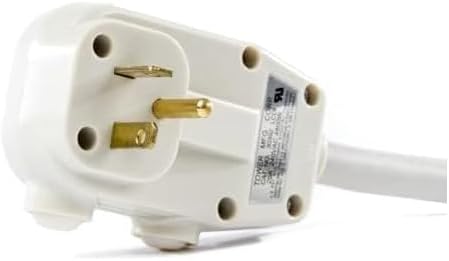
Figure 2: Power plug for the Amana Distinctions PTHP unit, indicating 200-240V requirement.
2.3 Placement
Install the unit into a properly sized and secured wall sleeve. Ensure the area around the unit is clear of obstructions to allow for optimal airflow and performance. Do not block the air intake or exhaust vents.
3. Operating Instructions
The control panel for the Amana Distinctions PTHP unit is conveniently located on the top right side, beneath a protective cover. Lift the cover to access the controls.
3.1 Control Panel Overview
- Heat Button: Activates the heating function.
- Cool Button: Activates the cooling function.
- Off Button: Turns the unit off.
- Temperature Adjustment Buttons (Up/Down): Adjusts the desired temperature setting.
- Fan Speed Button: Cycles through High, Low, and Auto fan speeds.
- Constant Fan Button: Engages the fan to run continuously, circulating air even when heating or cooling is not active.
3.2 Setting Temperature and Fan Speed
- Press the Cool or Heat button to select the desired mode.
- Use the Temperature Adjustment buttons (up/down arrows) to set your preferred temperature. The display will show the set temperature.
- Press the Fan Speed button to cycle through High, Low, or Auto settings. For continuous air circulation, press the Constant Fan button.
- To turn the unit off, press the Off button.
Video 1: Demonstration of the Amana Distinctions PTHP unit's control panel and basic operation for cooling and heating functions.
4. Maintenance
Regular maintenance ensures optimal performance and longevity of your PTHP unit.
4.1 Filter Cleaning
The unit is equipped with two air filters located behind the front grille. It is recommended to clean these filters regularly, especially during periods of heavy use, to maintain air quality and unit efficiency. To access the filters, gently open the front grille. Remove the filters, rinse them with water, and allow them to dry completely before reinserting. Do not operate the unit without filters.
Video 2: Shows the location and removal of the air filters for cleaning, highlighting the quiet operation of the fan motor.
4.2 General Cleaning
Wipe the exterior of the unit with a soft, damp cloth. Avoid using harsh chemicals or abrasive cleaners that could damage the finish.
5. Troubleshooting
If your Amana Distinctions PTHP unit is not functioning as expected, refer to the following common issues and solutions:
- Unit does not turn on: Check if the unit is properly plugged into a 200-240V outlet. Verify that the circuit breaker has not tripped.
- Unit is not cooling/heating effectively: Ensure the correct mode (Cool/Heat) is selected and the temperature setting is appropriate. Check if the air filters are clean and not obstructed. Verify that the fan speed is set correctly.
- Unusual noises: Minor operational noises are normal. If you hear loud or unusual sounds, ensure the unit is securely installed and there are no loose parts. Clean the filters as dust buildup can sometimes cause increased noise.
For persistent issues or complex repairs, contact a qualified HVAC service technician. Do not attempt to repair the internal components yourself.
6. Specifications
| Brand | Goodman (Amana Distinctions) |
| Model Number | DHP153A35AA |
| Cooling Capacity | 14,700 BTU |
| Heating Capacity | 13,500 BTU (with 3.5 kW Electric Heat Kit) |
| Energy Efficiency Ratio (EER) | 10.6 |
| Product Dimensions (D x W x H) | 21" x 42" x 16" |
| Installation Type | Packaged |
| Power Source | Corded Electric (200-240V) |
| Refrigerant | R 410A |
| Wattage | 4308.14 watts |
7. Warranty and Support
Amana Distinctions PTHP units undergo rigorous quality control, including 100% run testing and leak checks during manufacturing and prior to shipment. For specific warranty terms and conditions, please refer to the documentation provided with your purchase or contact Goodman customer support directly. Keep your proof of purchase for warranty claims.

