
KOPIDOE X7
Contents
KOPIDOE Bone Conduction Swimming Headphones
User Manual - Model X7
1. Introduction
Thank you for choosing the KOPIDOE Bone Conduction Swimming Headphones, Model X7. These innovative headphones are designed to provide a superior audio experience for active lifestyles, especially for swimming and other water sports, thanks to their IPX8 waterproof rating and built-in MP3 player. With an open-ear design, they ensure comfort and environmental awareness, while Bluetooth 5.4 offers seamless wireless connectivity for daily use.

Image: KOPIDOE Bone Conduction Swimming Headphones, showing the main unit, magnetic charging cable, earplugs, and a goggle strap.
2. Product Features
- Bone Conduction Technology: Delivers sound through your cheekbones, keeping your ears open to ambient sounds.
- IPX8 Waterproof: Fully submersible, ideal for swimming and water sports.
- Built-in 32GB MP3 Player: Store up to 9000 songs directly on the device for use without a phone, especially underwater.
- Bluetooth 5.4: Provides stable and efficient wireless connection up to 10 meters.
- Long Battery Life: Up to 8 hours of continuous music playback and calls on a single charge.
- Magnetic Quick Charge: Fully charges in approximately 2 hours.
- Open-Ear Design: Ensures comfort and awareness of surroundings.
- Lightweight: Weighs only 4.9 ounces (approx. 139 grams) for comfortable wear.

Image: A swimmer underwater wearing the headphones, emphasizing the IPX8 waterproof rating and design for swimmers.
3. Getting Started: Setup
3.1. What's in the Box
- KOPIDOE Bone Conduction Swimming Headphones
- Magnetic Charging Cable
- Earplugs
- Swim Goggle Strap
3.2. Charging the Headphones
Before first use, fully charge your headphones. Connect the magnetic charging cable to the charging port on the headphones and plug the USB end into a standard USB power adapter (not included) or a computer USB port. The LED indicator will show charging status.
- Charging Time: Approximately 2 hours for a full charge.
- Battery Life: Up to 8 hours of playback.

Image: Close-up of the magnetic charging port on the headphones, illustrating the quick charge capability.
3.3. Power On/Off
- Power On: Press and hold the Power button for 3-5 seconds until the indicator light turns on.
- Power Off: Press and hold the Power button for 3-5 seconds until the indicator light turns off.
3.4. Wearing the Headphones
Place the headphones with the transducers resting on your cheekbones, just in front of your ears. The band should wrap around the back of your head. Adjust for a comfortable and secure fit. The open-ear design allows you to hear your surroundings.

Image: A person wearing the KOPIDOE headphones during a water activity, showcasing the secure and comfortable open-ear fit.
4. Operating Instructions
4.1. Bluetooth Mode
To connect your headphones to a device via Bluetooth:
- Ensure the headphones are powered on and in Bluetooth pairing mode (indicated by a flashing light).
- On your device (e.g., smartphone, tablet), go to Bluetooth settings and search for "KOPIDOE X7" (or similar name).
- Select the headphones to pair. Once connected, the indicator light will stop flashing.
The Bluetooth 5.4 chip provides a stable connection up to 10 meters (33 feet).

Image: The headphones shown connected wirelessly to a laptop and a smartphone, illustrating Bluetooth connectivity.
4.2. MP3 Mode (Internal Storage)
The headphones feature a built-in 32GB MP3 player, allowing you to store music directly on the device. This mode is essential for underwater use, as Bluetooth signals do not transmit effectively through water.
- Switching to MP3 Mode: Press the Mode button (refer to button diagram below) to switch between Bluetooth and MP3 modes.
- Uploading Songs: Connect the magnetic charging cable to your computer. The headphones will appear as a removable disk. Drag and drop your audio files (MP3, WAV, FLAC, etc.) into the device's storage.

Image: A swimmer using the headphones underwater, with a clear note stating that Bluetooth cannot transmit underwater and to switch to MP3 mode.
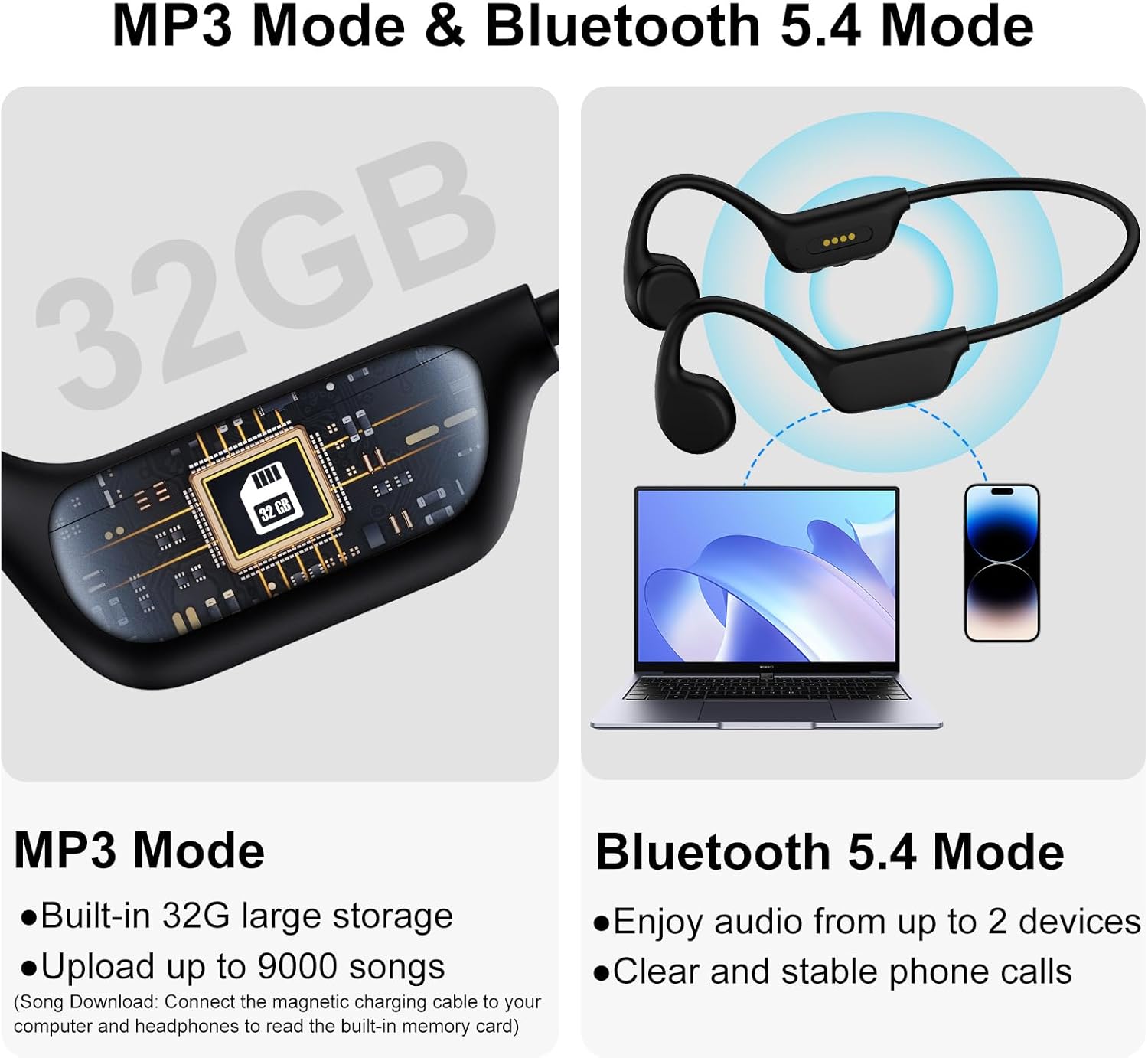
Image: A visual representation of the 32GB internal memory chip and a comparison between MP3 mode (for stored music) and Bluetooth 5.4 mode (for streaming).
4.3. Button Functions
The headphones feature intuitive buttons for easy control of music and calls:
- Power Button (Center):
- Press and hold for 3-5s: Power On/Off
- Click once: Music Play/Pause, Answer/Hang up call
- Press and hold for 2s (incoming call): Reject a call
- Volume Down / Previous Song Button (-):
- Click once: Volume Down
- Press and hold for 2s: Previous Song
- Volume Up / Next Song Button (+):
- Click once: Volume Up
- Press and hold for 2s: Next Song

Image: Detailed diagram illustrating the location and function of each button on the KOPIDOE headphones.
5. Maintenance
Proper maintenance ensures the longevity and optimal performance of your KOPIDOE headphones.
- Cleaning: After use, especially in chlorinated or saltwater, rinse the headphones with fresh water. Wipe them gently with a soft, dry cloth. Avoid using harsh chemicals or abrasive materials.
- Drying: Ensure the charging port is completely dry before connecting the magnetic charging cable to prevent corrosion.
- Storage: Store the headphones in a cool, dry place away from direct sunlight and extreme temperatures.
- Battery Care: To preserve battery life, avoid fully discharging the headphones frequently. Charge them regularly, even if not in use for extended periods.
6. Troubleshooting
If you encounter issues with your KOPIDOE headphones, refer to the following common problems and solutions:
| Problem | Possible Cause | Solution |
|---|---|---|
| Headphones won't power on. | Low battery. | Charge the headphones for at least 2 hours. |
| Cannot connect via Bluetooth. | Headphones not in pairing mode; device Bluetooth off; too far from device. | Ensure headphones are in pairing mode. Turn device Bluetooth off/on. Move closer to the device (within 10m). Forget device and re-pair. |
| No sound in MP3 mode. | No songs loaded; incorrect mode; corrupted files. | Ensure songs are loaded onto the 32GB internal memory. Verify headphones are in MP3 mode. Try re-uploading files. |
| Sound quality is poor or distorted. | Volume too high/low; improper fit; water in transducers (if recently used in water). | Adjust volume. Ensure transducers are properly placed on cheekbones. Allow headphones to dry completely if used in water. |
| Buttons are unresponsive. | Temporary software glitch; water ingress. | Try powering off and on. Ensure headphones are dry. If issue persists, contact customer support. |
7. Specifications
| Model Number | X7 |
| Brand | KOPIDOE |
| Water Resistance Level | IPX8 Waterproof |
| Audio Driver Type | Bone Conduction Driver |
| Internal Storage | 32GB |
| Bluetooth Version | 5.4 |
| Bluetooth Range | 10 Meters |
| Battery Life | 8 Hours |
| Charging Time | 2 Hours |
| Frequency Range | 20Hz - 20,000Hz |
| Earpiece Shape | Open-Ear |
| Item Weight | 4.9 ounces |
| Package Dimensions | 5.35 x 4.41 x 1.93 inches |
| UPC | 768771852630 |
| Manufacturer | KOPIDOE |
| Compatible Devices | Cellphones |
8. Warranty and Support
KOPIDOE is committed to providing high-quality products. For any warranty claims, technical support, or product inquiries, please contact KOPIDOE customer service through the retailer's platform or the official KOPIDOE website. Please have your purchase details and model number (X7) ready when contacting support.
For the most up-to-date information and support resources, please visit the official KOPIDOE store on Amazon: KOPIDOE Store
Documents and downloads
Ask a question about this manual
Ask about setup, troubleshooting, compatibility, parts, safety, or missing instructions. Manuals+ will review the question and use this page’s manual context to help answer it.