
1. Introduction
This manual provides essential instructions for the setup, operation, and maintenance of your Nikon Z6 III Mirrorless Camera. The Nikon Z6 III is designed for advanced photography and filmmaking, featuring a 24.5MP partially-stacked CMOS sensor and the EXPEED 7 image processor. It supports internal 6K60 and 4K120 video recording, a 493-point phase-detection autofocus system, a 5.76M-dot electronic viewfinder (EVF), and a four-axis tilting touchscreen LCD. Please read this manual thoroughly to ensure proper use and to maximize the camera's capabilities.
2. Setup Guide
2.1. Unboxing and Package Contents
Carefully unpack your Nikon Z6 III camera and verify that all included items are present. The bundle typically includes:
- Nikon Z6 III Mirrorless Camera Body
- Nikon FTZ II Mount Adapter
- Nikon EN-EL15c Rechargeable Battery
- 64GB SF-M Tough Series UHS-II SDXC Memory Card
- Wireless Remote Shutter Release
- USB-A to USB-C cable
- HDMI Cable
- Hand Strap
- Lens Cap Keeper
- Cleaning Kit
- Memory Card Wallet
- USB Card Reader (SD/microSD)
- Video Tripod 72-Inch
- Flexible Vlogging Tripod
- Travel Bag

2.2. Battery Installation and Charging
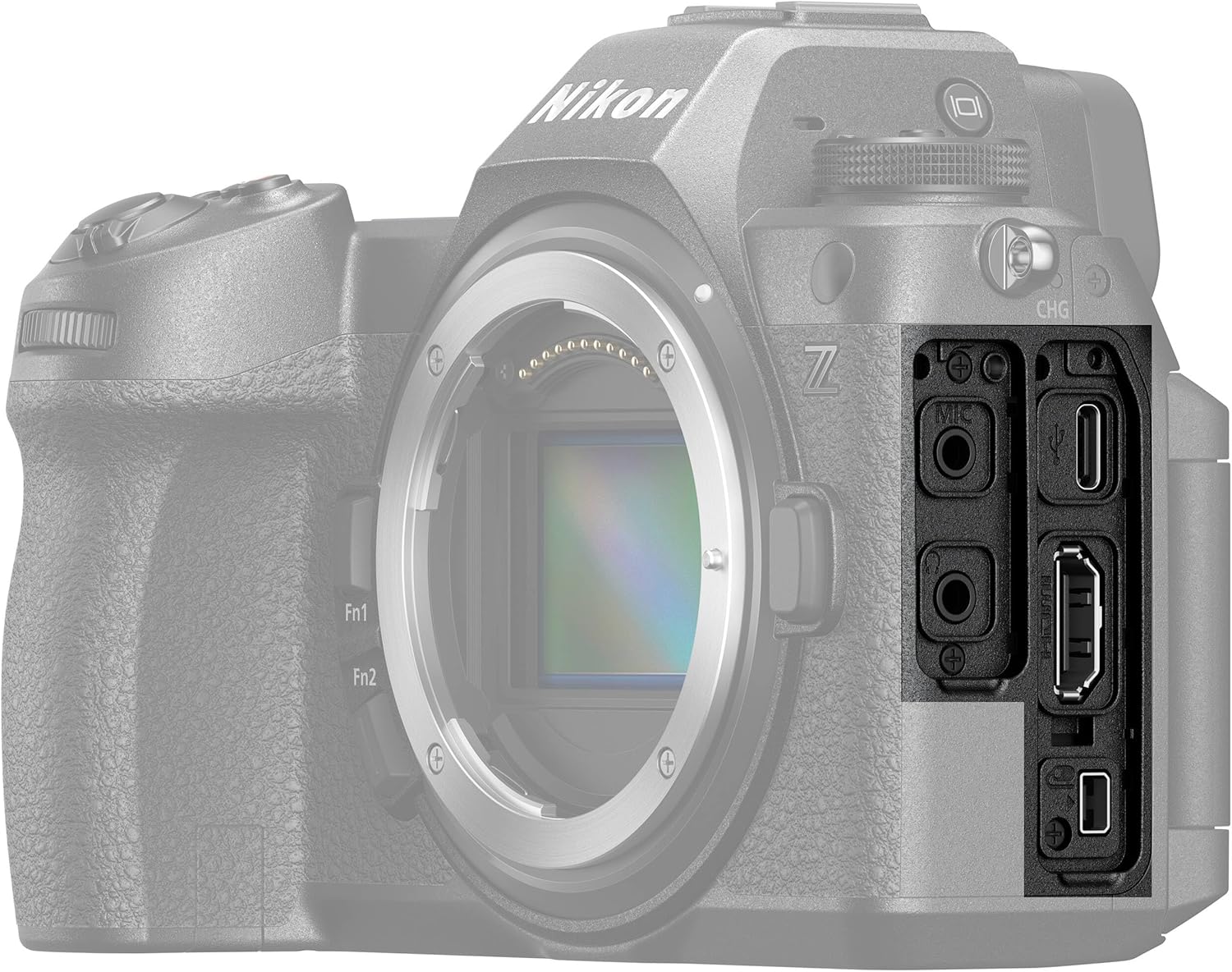
Insert the EN-EL15c battery into the battery compartment located at the bottom of the camera. Ensure it clicks into place. Charge the battery using the provided USB-A to USB-C cable connected to a compatible USB power source. The charging indicator light will show the charging status.
2.3. Memory Card Insertion
The Nikon Z6 III supports SDXC memory cards. Open the memory card slot cover on the side of the camera. Insert the 64GB SF-M Tough Series UHS-II SDXC card with the label facing the correct direction until it clicks into place. Close the cover securely.

2.4. Attaching a Lens
Align the mounting mark on the lens with the mounting mark on the camera body. Rotate the lens clockwise until it clicks into place. If using an F-mount NIKKOR lens, first attach the Nikon FTZ II Mount Adapter to the camera body, then attach the F-mount lens to the adapter.

2.5. Initial Power-On and Basic Settings
Turn the camera on using the power switch. Follow the on-screen prompts to set the date, time, and language. Refer to the camera's on-screen menu for further customization of settings.
3. Operating Instructions
3.1. Camera Controls Overview
Familiarize yourself with the camera's buttons, dials, and touchscreen interface for efficient operation.


3.2. Basic Photography Modes
The mode dial allows selection of various shooting modes:
- P (Programmed Auto): Camera sets shutter speed and aperture for optimal exposure.
- S (Shutter-Priority Auto): You set shutter speed, camera sets aperture.
- A (Aperture-Priority Auto): You set aperture, camera sets shutter speed.
- M (Manual): You control both shutter speed and aperture.
3.3. Autofocus System
The Z6 III features a 493-point phase-detection AF system. Select your desired AF mode (e.g., Single-point AF, Dynamic-area AF, Wide-area AF, Auto-area AF) and AF-area mode through the camera's menu or dedicated buttons. The camera also includes advanced subject detection capabilities.
3.4. Video Recording
To record video, switch to video mode. The Z6 III supports 6K60 and 4K120 recording, including N-RAW and ProRes RAW 12-bit internal formats. Adjust video settings such as resolution, frame rate, and picture control via the video menu. Press the dedicated video record button to start and stop recording.
3.5. Image Playback
Press the playback button to review captured photos and videos. Use the command dials or touchscreen to navigate through images, zoom in/out, and view shooting information.

3.6. Connectivity
The camera features USB-C and HDMI ports for data transfer and external display. It also includes Wi-Fi for wireless image transfer and remote control via a compatible smart device application.

4. Maintenance
4.1. Cleaning the Camera
Use a soft, lint-free cloth to clean the camera body. For the sensor, use a blower brush or consult a professional cleaning service. Avoid touching the sensor directly. Clean lenses with a lens cleaning solution and a microfiber cloth.
4.2. Battery Care
Store batteries in a cool, dry place. Avoid fully discharging lithium-ion batteries for extended periods. If storing for a long time, charge them to about 50% capacity.
4.3. Storage
When not in use, store the camera in a dry, dust-free environment, preferably in a camera bag. Remove the battery if the camera will not be used for an extended period.
5. Troubleshooting
This section addresses common issues you might encounter with your Nikon Z6 III.
- Camera Not Powering On: Ensure the battery is fully charged and correctly inserted. Check if the battery contacts are clean.
- Memory Card Error: Reinsert the memory card. If the error persists, try a different compatible memory card. Ensure the card is not locked.
- Autofocus Not Working: Check the AF mode settings. Ensure there is sufficient light and contrast in the scene. Clean the lens contacts.
- Images Are Blurry: Verify shutter speed is appropriate for the shooting conditions. Check lens focus and image stabilization settings.
- Video Recording Stops Unexpectedly: Ensure the memory card has sufficient free space and a high enough write speed (UHS-II V60 or higher recommended for 6K/4K).
For more complex issues, refer to the comprehensive digital manual available on the Nikon support website or contact customer support.
6. Technical Specifications
| Feature | Specification |
|---|---|
| Model Name | Nikon Z6III |
| Model Number | 1890-AG2 |
| Sensor Type | 24.5MP Partially-Stacked CMOS |
| Image Processor | EXPEED 7 |
| Lens Mount | Nikon Z |
| Image Stabilization | Sensor-shift |
| Autofocus Points | 493-point Phase Detection |
| Video Resolution | 6K60, 4K120 |
| Internal Video Formats | N-RAW, ProRes RAW 12-bit, ProRes, H.265 10-Bit |
| Continuous Shooting | Up to 20 fps (RAW), 60 fps (Full-frame JPEG), 120 fps (DX crop) |
| ISO Range (Expanded) | 50 |
| Viewfinder | 5.76M-dot Electronic Viewfinder |
| Display | 3.2-inch Tilting Touchscreen LCD (205479 dots) |
| Memory Card Slots | SDXC (UHS-II compatible) |
| Connectivity | USB-C, HDMI, Wi-Fi |
| Battery Type | Lithium Ion (EN-EL15c) |
| Weight | Approximately 5.4 Pounds (with battery and memory card) |
| Dimensions (H x W x D) | Approximately 4 inches (height) |
7. Warranty Information
This Nikon Z6 III Mirrorless Camera comes with a 90-day limited warranty. Please retain your proof of purchase for warranty claims. For detailed terms and conditions, refer to the warranty documentation included with your product or visit the official Nikon support website.
8. Customer Support
For further assistance, technical support, or service inquiries, please visit the official Nikon support website or contact their customer service department. You can find contact information and additional resources on the Nikon website.


