
Introduction
Thank you for choosing the hygger Aquarium Chiller Fan. This device is designed to provide a stable and comfortable temperature environment for your aquatic pets by effectively cooling your fish tank. With its intelligent temperature control, adjustable wind speeds, and quiet operation, it ensures optimal conditions, especially during warmer periods.
The fan features a built-in temperature probe that continuously monitors the aquarium temperature, automatically activating and deactivating the fan to maintain your desired setting. Its user-friendly digital display provides real-time information on water temperature, fan speed level, and operating mode.

The hygger Aquarium Chiller Fan effectively cools aquarium water.
Package Contents
- hygger Aquarium Chiller Fan Unit (Model: HG140)
- Temperature Probe (integrated)
- Power Adapter
- Mounting Clamp with Screws
- Optional Full Spectrum Spotlight
- Cleaning Brush
Setup and Installation
- Attach the Fan to the Aquarium: Use the adjustable jaws and strong screws of the mounting clamp to securely attach the fan unit to the tank wall. The clamp can accommodate tank glass thickness up to 1 inch (2.5cm).
- Position the Temperature Probe: Gently place the temperature probe into the aquarium water. Ensure it is fully submerged and positioned away from direct water flow for accurate readings.
- Connect Power: Plug the power adapter into the fan unit and then into a standard power outlet. The digital display will illuminate, indicating the device is powered on.
- Adjust Air Outlet Angle: The fan features a 0-45° adjustable air outlet. You can totally move this to make the air go to any direction that you want it or that you need it to go. This allows you to direct the cool air either directly onto the water surface for maximum evaporation or across the aquarium lights to dissipate heat generated by the lighting.
- Install Optional Spotlight: If desired, plug the full spectrum spotlight into its dedicated port on the fan unit. The spotlight is 360° rotatable, allowing for multi-angle illumination to promote plant growth or highlight aquarium features.
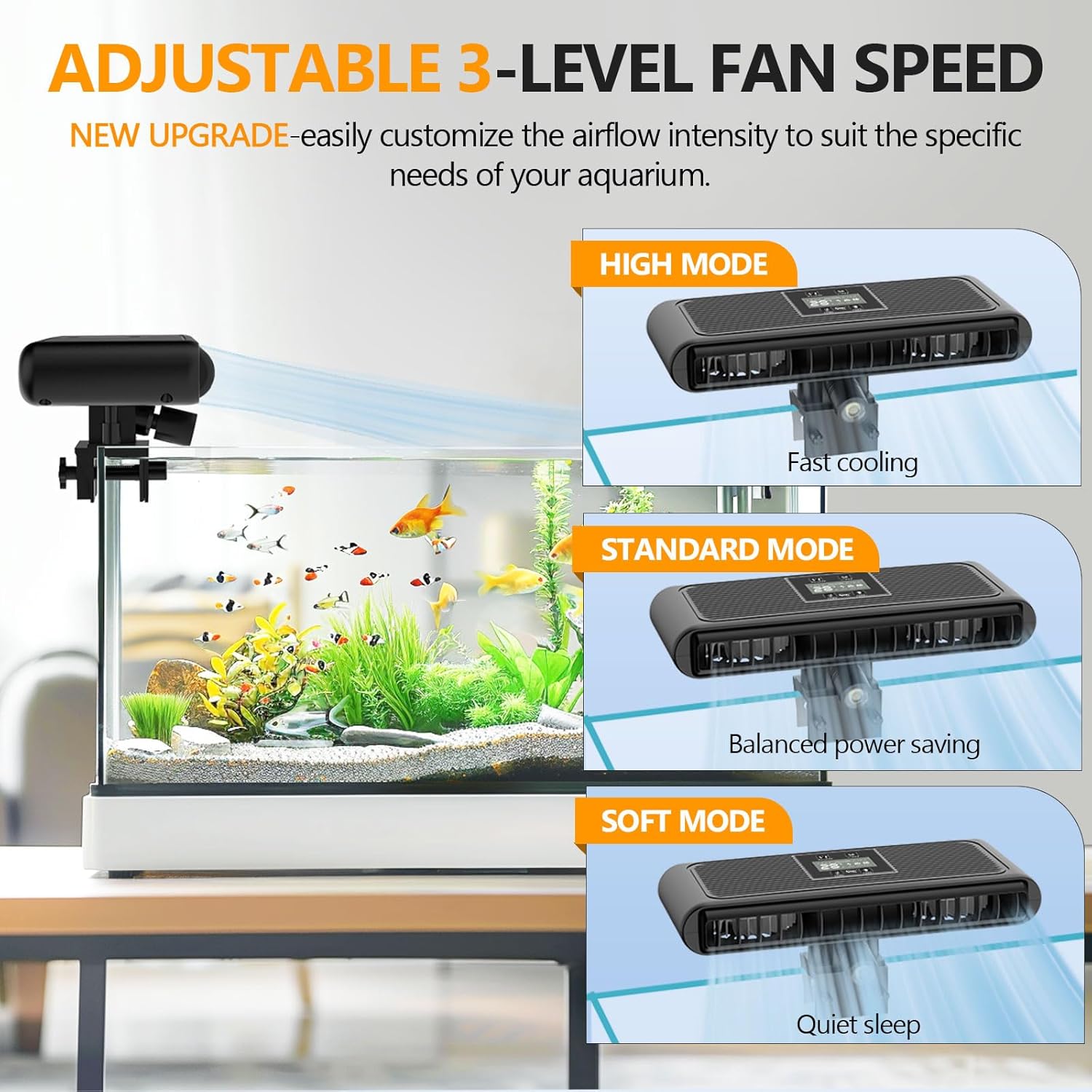
The fan easily clamps onto the aquarium rim.

Ensure proper placement to avoid water splashing onto the fan unit.
Official hygger video demonstrating the fan's features and installation process.
Operating Instructions
The hygger Aquarium Chiller Fan offers intuitive controls for easy operation.
- 1. On/Off Button: Press and hold the button for 3 seconds to turn the fan on or off.
- 2. Temperature Setting Button: Press and hold the button for 3 seconds to set the target temperature. Short press to switch between 68-93°F (20-34°C). The temperature probe continuously monitors the aquarium temperature and automatically starts and stops the fan to maintain the target temperature.
- 3. Airflow Mode Button: Press the button to switch between Soft, Standard, and High modes. Press and hold for 3 seconds to switch the temperature display between °F and °C.
- 4. Lighting On/Off Button: Press this button to turn the optional spotlight on or off.
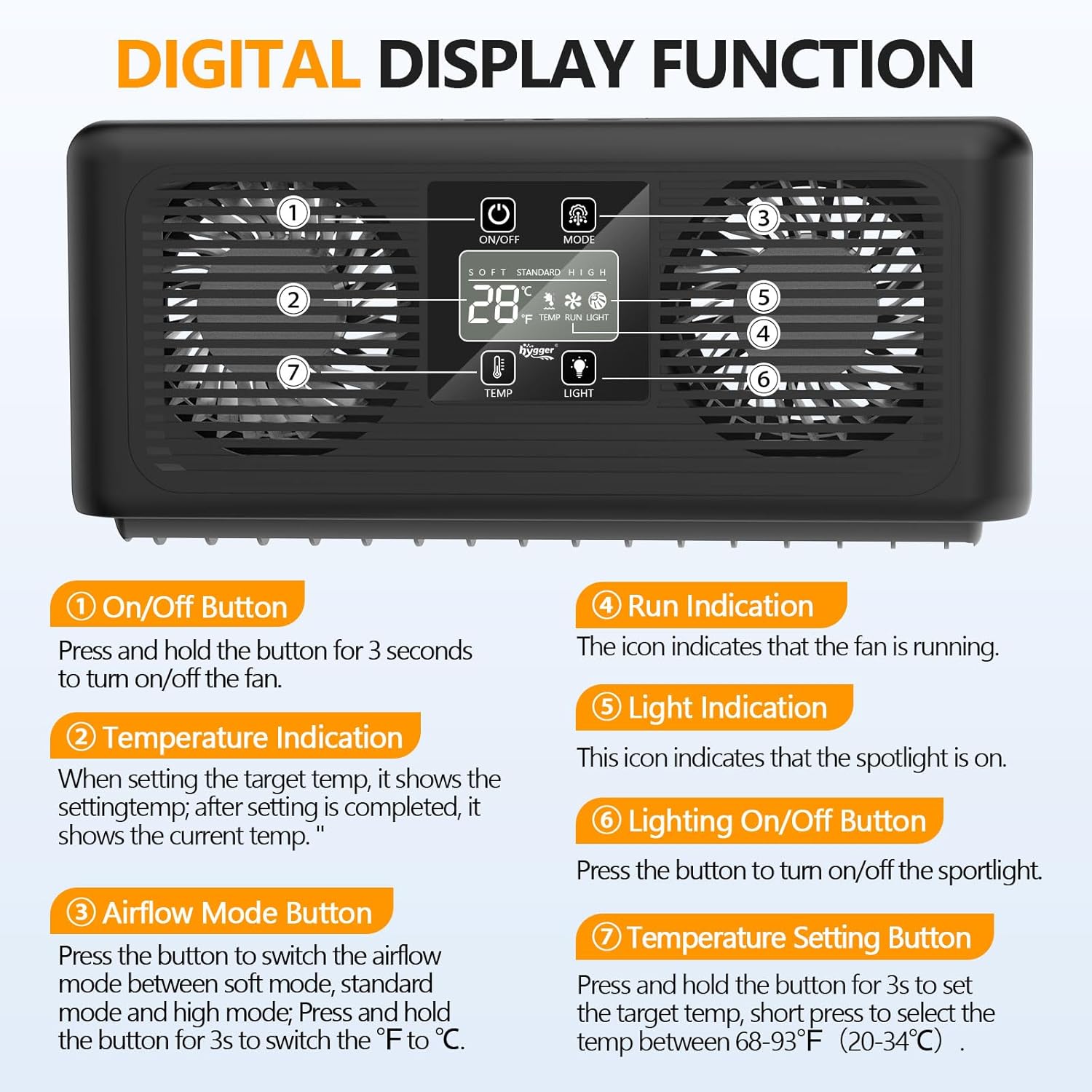
Digital display and control panel overview.

Choose from 3 adjustable fan speed modes for optimal cooling.
Maintenance
To ensure the longevity and optimal performance of your hygger Aquarium Chiller Fan, follow these maintenance guidelines:
- Cleaning: Regularly clean the fan grilles and blades to prevent dust and debris buildup, which can impede airflow. Use the provided cleaning brush or a soft, dry cloth.
- Water Exposure: This device is NOT waterproof. Do not submerge the fan unit in water. If it accidentally falls into the water, immediately unplug it and allow it to dry completely before attempting to reconnect it.
- Temperature Probe: Keep the temperature probe clean to ensure accurate readings. Wipe it gently with a soft cloth as needed.
Troubleshooting
If you encounter any issues with your hygger Aquarium Chiller Fan, please refer to the following common solutions:
- Fan Not Turning On: Ensure the power adapter is securely plugged into both the fan unit and a working power outlet. Press and hold the On/Off button for 3 seconds.
- Inaccurate Temperature Reading: Check that the temperature probe is fully submerged and clean. Ensure it is not positioned directly in front of a heater or strong water flow.
- Insufficient Cooling: Verify that the fan speed is set to an appropriate mode (Standard or High). Adjust the air outlet angle to direct airflow effectively over the water surface or lights. Ensure the tank size is within the recommended range for the fan's capacity.
- Excessive Noise: While designed for quiet operation, ensure the fan is securely mounted and not vibrating against the tank or other surfaces. Clean any debris from the fan blades.
For persistent issues, please contact hygger customer support.
Specifications
| Feature | Detail |
|---|---|
| Model Number | HG140 |
| Item Weight | 1 Pounds |
| Item Dimensions (LxWxH) | 8.46 x 3.54 x 1.37 inches |
| Input Voltage | 100-240V/50-60Hz |
| Output Voltage | DC5V 2A |
| Power | 7W |
| Adjustable Temperature Range | 68-93°F (20-34°C) |
| Suitable Glass Thickness | ≤ 1 inch (2.5cm) |
| Applicable Tank Size | Up to 80 Gallons / 300 Liters |
| Power Cord Length | ≤ 59 inches (4.9 ft) |
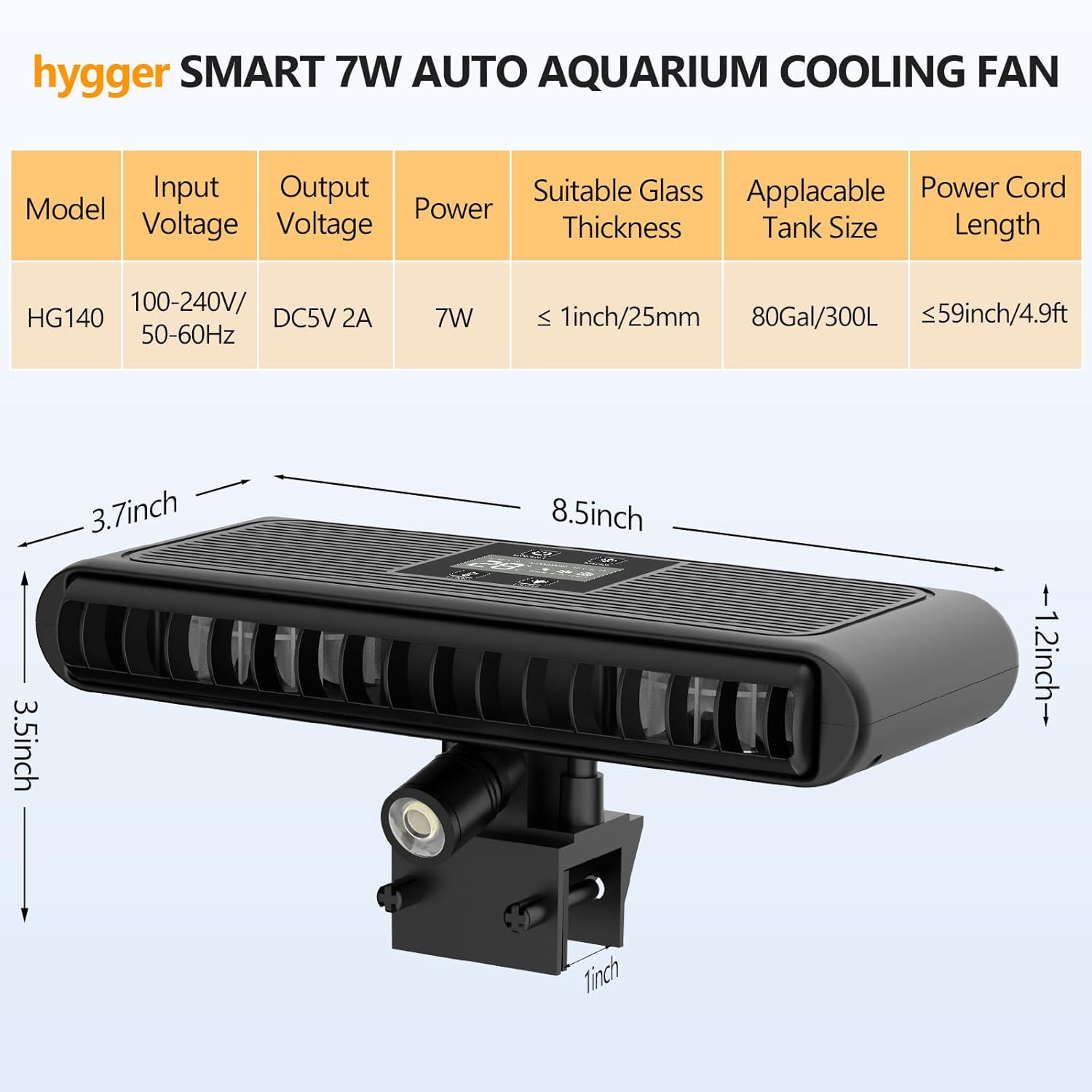
Detailed product dimensions and power specifications.
Warranty and Support
The hygger Aquarium Chiller Fan comes with a 2-Year Manufacturer Warranty.
For any questions, technical support, or warranty claims, please contact hygger customer service through their official channels or the retailer where you purchased the product.


