
Pyle PPHP822NSM
Pyle 480W Portable Bluetooth PA Speaker System
Model: PPHP822NSM
Introduction
Thank you for purchasing the Pyle 480W Portable Bluetooth PA Speaker System. This manual provides important information regarding the setup, operation, and maintenance of your new audio system. Please read this manual thoroughly before using the product to ensure proper function and to maximize your listening experience. This high-powered loudspeaker system is designed for versatile use, offering robust sound for both indoor and outdoor environments, complete with wireless connectivity and integrated party lights.
What's in the Box
- PA Speaker System
- Remote Control
- Power Adapter
- Wireless microphone
- Speaker stand

Image: The Pyle Portable Bluetooth PA Speaker System shown with its complete set of accessories, including the speaker unit, remote control, power adapter, wireless microphone, and speaker stand.
Features
- 480 Watt Power Output: High-powered PA speaker system with an 8" subwoofer and 1" tweeter for full-range surround stereo sound.
- Bluetooth Compatible: Supports wireless audio streaming from smartphones, tablets, and PCs using Bluetooth 5.0 technology.
- Digital LED Display: Features an FM radio, USB flash drive, and SD card reader for MP3 playback.
- Multiple Inputs: Includes 3.5mm AUX input and 6.5mm microphone input.
- Flashing DJ Lights: Multi-color flashing disco LED lights enhance the atmosphere for events.
- Rechargeable Battery: Built-in 3.7V, 3600mAh rechargeable battery for portability, offering up to 3 hours of playtime.
- True Wireless Stereo (TWS): Connect multiple speakers for an enhanced audio experience.
- Recording Function: Allows for audio recording.
- Microphone Priority Function: Automatically lowers music volume when the microphone is in use.
- Adjustable Sound Controls: Knobs for echo, bass, and treble.
- Portable Design: Rugged molded cabinet with trolley handle and wheels for easy transport.

Image: A detailed view of the speaker's 8-inch subwoofer and the vibrant multi-color flashing LED party lights, which illuminate the speaker grille.
Setup
- Unpacking: Carefully remove all components from the packaging. Verify that all items listed in the "What's in the Box" section are present.
- Initial Charging: Before first use, connect the power adapter to the speaker's DC 9V input and plug it into a power outlet. Charge the speaker fully (approximately 5 hours) until the LED battery indicator shows a full charge.
- Speaker Stand Assembly: Extend the legs of the speaker stand to a stable position. Adjust the height to your preference and secure it using the locking pin and knob.
- Mounting the Speaker: Carefully lift the speaker and place it onto the pole of the assembled speaker stand. Ensure it is securely seated. The speaker features a bottom-mounted pole insert for this purpose.
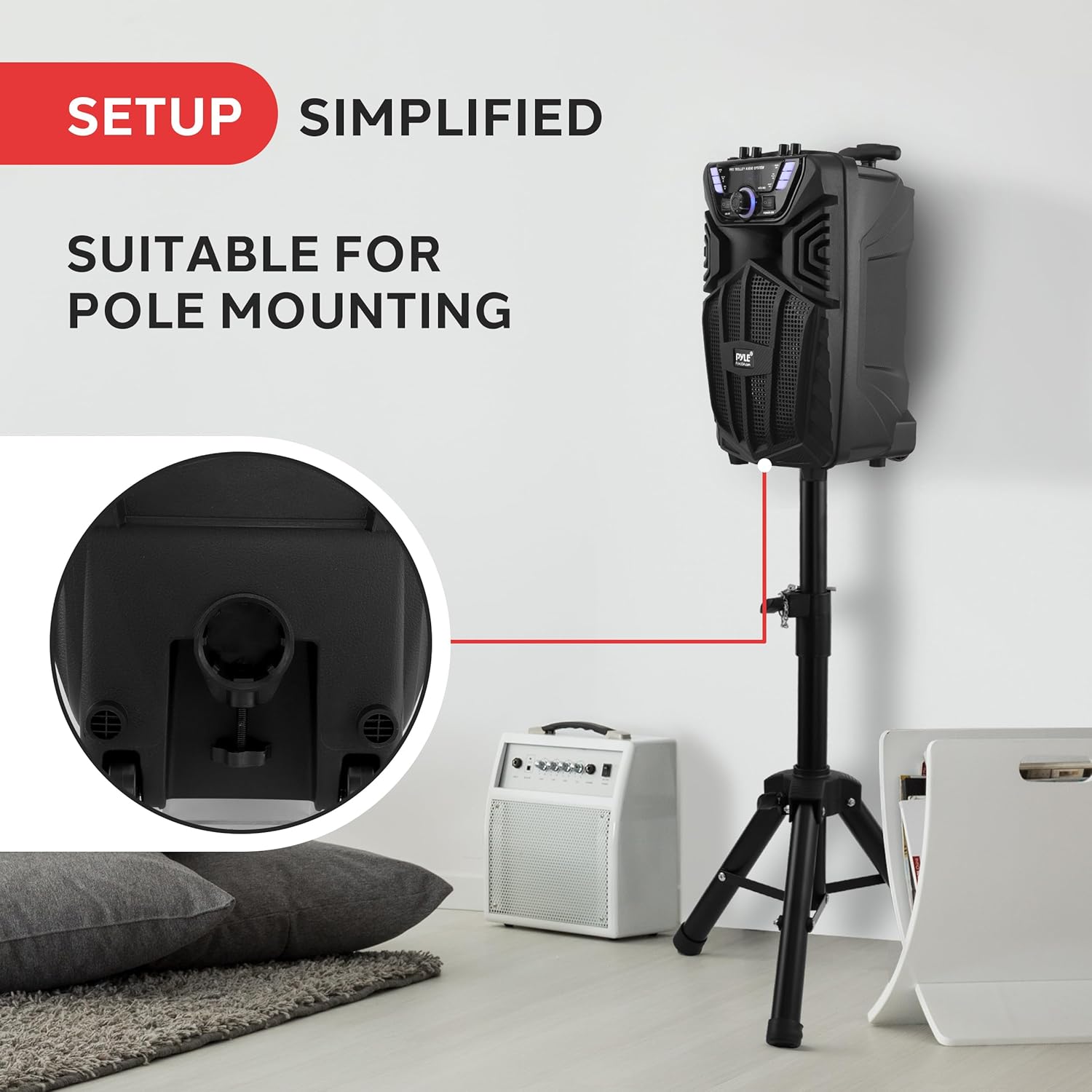
Image: The Pyle speaker is shown securely mounted on its included pole stand, demonstrating its suitability for elevated placement to optimize sound projection.
Operating
Power On/Off
Locate the POWER switch on the control panel. Press it to turn the speaker ON or OFF.
Bluetooth Pairing
- Turn on the speaker. The LED display will show "BLUE" indicating Bluetooth mode. If not, press the MODE button to select Bluetooth.
- Enable Bluetooth on your mobile device (smartphone, tablet, etc.).
- Search for Bluetooth devices and select "PYLEUSA" from the list.
- Once paired, the speaker will emit a confirmation tone. You can now stream audio wirelessly.
USB/SD Playback
Insert a USB flash drive or SD card (with MP3 audio files) into the respective port. The speaker will automatically switch to USB/SD mode and begin playing. Use the control panel or remote to navigate tracks and adjust volume.
FM Radio
Press the MODE button to select FM radio mode. Press the PLAY/PAUSE button to auto-scan and save available stations. Use the PREV/NEXT buttons to switch between saved stations.
AUX Input
Connect an external audio device (e.g., laptop, MP3 player) to the 3.5mm AUX input using an audio cable. The speaker will automatically switch to AUX mode. Adjust volume from both the speaker and the connected device.
Microphone Usage
Insert the wireless microphone's receiver into the 6.5mm MIC input. Ensure the microphone is powered on. Adjust the microphone volume and echo effect using the dedicated knobs on the control panel. The Microphone Priority function can be activated to automatically lower background music when speaking into the microphone.
True Wireless Stereo (TWS) Function
To pair two PPHP822NSM speakers for TWS:
- Ensure both speakers are powered on and in Bluetooth mode.
- On one speaker (this will be the master), press and hold the TWS button. It will search for the second speaker.
- Once connected, both speakers will play audio in stereo.
Sound Adjustments
Use the BASS, TREBLE, and ECHO knobs on the control panel to fine-tune the audio output to your preference.
Party Lights
Press the LED.SW button on the control panel to turn the multi-color flashing LED lights ON or OFF.
Recording Function
To record audio (e.g., microphone input to USB/SD):
- Insert a USB flash drive or SD card.
- Press the REC button to start recording.
- Press REC again to stop recording. The recorded file will be saved to the USB/SD device.

Image: The speaker's control panel highlighting various wireless music streaming options, including Bluetooth connectivity, microphone input, USB port, auxiliary input, and FM radio functionality.
Maintenance
- Cleaning: Use a soft, dry cloth to clean the exterior of the speaker. Do not use abrasive cleaners or solvents.
- Battery Care: To prolong battery life, avoid fully discharging the battery frequently. Recharge the speaker regularly, especially if it will not be used for an extended period. Store in a cool, dry place.
- Storage: When not in use, store the speaker in a dry, dust-free environment. If storing for a long period, ensure the battery is partially charged (around 50%) to prevent deep discharge.
- Avoid Extreme Conditions: Do not expose the speaker to extreme temperatures, direct sunlight, or excessive moisture.
Troubleshooting
| Problem | Possible Cause | Solution |
|---|---|---|
| No power | Battery is depleted; Power adapter not connected or faulty. | Charge the speaker fully. Ensure power adapter is securely connected and working. |
| No sound | Volume too low; Incorrect input mode; Device not connected properly. | Increase speaker volume and source device volume. Press MODE to select correct input. Reconnect audio cables or re-pair Bluetooth. |
| Bluetooth not connecting | Speaker not in Bluetooth mode; Device too far; Interference. | Ensure speaker is in Bluetooth mode. Move device closer to speaker. Turn off other Bluetooth devices. Try re-pairing. |
| Microphone not working | Microphone not powered on; Receiver not connected; Volume too low. | Ensure wireless microphone is powered on and has fresh batteries. Check if receiver is fully inserted into MIC input. Increase MIC volume knob. |
| LED lights not working | LED lights turned off. | Press the LED.SW button to turn the lights on. |
Specifications
| Feature | Specification |
|---|---|
| Power Output | 480 Watts (Peak) |
| Subwoofer Size | 8 inches |
| Tweeter Size | 1 inch |
| Bluetooth Version | 5.0 |
| Battery Type | Rechargeable 3.7V, 3600mAh |
| Charge Time | Approximately 5 hours |
| Playtime | Up to 3 hours (continuous) |
| Inputs | USB, Micro SD, AUX (3.5mm), MIC (6.5mm) |
| Material | Polypropylene (PP) |
| Product Dimensions (L x W x H) | 14.33'' x 9.29'' x 7.8'' inches |
| Item Weight | 10.7 pounds |
| Model Number | PPHP822NSM |

Image: An illustration emphasizing the speaker's 480W power output, with an exploded view showing the internal subwoofer component.
Warranty and Support
Pyle products are designed for reliability and performance. For specific warranty information, please refer to the warranty card included with your product or visit the official Pyle website. If you encounter any issues or require technical assistance, please contact Pyle customer support. You can also refer to the official User Manual PDF for additional details: Pyle PPHP822NSM User Manual PDF.
Related documentsPPHP822NSM


Ask a question about this manual
Ask about setup, troubleshooting, compatibility, parts, safety, or missing instructions. Manuals+ will review the question and use this page’s manual context to help answer it.