
iScooter iX4
Contents
iScooter iX4 Electric Scooter User Manual
Model: iX4
Brand: iScooter
1. Introduction
This user manual provides essential information for the safe operation, maintenance, and troubleshooting of your iScooter iX4 Electric Scooter. Please read this manual thoroughly before your first ride to ensure proper usage and to maximize the lifespan of your scooter.
The iScooter iX4 is designed for adult riders, featuring a robust aluminum frame, 10-inch off-road honeycomb tires, and a powerful 500W motor. It offers a long range of 40-45 km, multiple speed modes, and advanced safety features including dual braking and comprehensive lighting.

Figure 1: iScooter iX4 Electric Scooter overview, showing the scooter, a spare inner tube, and the companion mobile application interface.
2. Safety Guidelines
Your safety is paramount. Always adhere to the following guidelines:
- Always wear a helmet and appropriate protective gear (knee pads, elbow pads) when riding.
- Familiarize yourself with local laws and regulations regarding electric scooter usage.
- Do not ride under the influence of alcohol or drugs.
- Avoid riding in heavy rain, snow, or icy conditions.
- Maintain a safe distance from other vehicles and pedestrians.
- Regularly inspect your scooter for any signs of damage or wear before each ride.
- Ensure all lights are functional, especially when riding at night.
- The maximum weight capacity is 150 kg (330 lbs). Do not exceed this limit.

Figure 2: The iX4's super light system, including bright LED headlights, rear brake lights, and colorful sidelights, designed for enhanced visibility and safe night riding.
3. Setup and Assembly
Your iScooter iX4 comes partially assembled. Follow these steps to complete the setup:
- Unboxing: Carefully remove all components from the packaging. Verify that all parts listed in the packing list are present. The package includes the electric scooter, a user manual, a toolkit, a charging cable, and a charger.
- Handlebar Installation: Lift the handlebar stem until it clicks into place. Secure the folding mechanism. Attach the handlebars to the stem, ensuring all cables are properly connected and not pinched. Tighten any screws using the provided toolkit.
- Initial Charge: Before first use, fully charge the scooter's battery. Connect the charger to the charging port on the scooter and then to a power outlet. The charging indicator on the charger will change color (e.g., red to green) when fully charged. Charging time is approximately 6-8 hours for the 48V 15AH battery.
- Tire Check: Ensure the 10-inch off-road honeycomb tires are in good condition. While honeycomb tires are puncture-proof, inspect them for any debris or damage.

Figure 3: Contents of the iX4 package, including the scooter, user manual, toolkit, charging cable, and charger.
4. Operating Instructions
4.1 Power On/Off
Press and hold the power button on the multi-function LED dashboard to turn the scooter on or off.
4.2 Riding Modes
The iX4 features 3 speed modes. Use the menu button on the dashboard to cycle through the modes:
- Mode 1 (Eco): Lower speed for extended range and beginner riders.
- Mode 2 (Standard): Balanced speed and power for everyday commuting.
- Mode 3 (Sport): Maximum speed and power for experienced riders and challenging terrains.
4.3 Acceleration and Braking
Use the throttle lever to accelerate. The iX4 is equipped with a dual braking system. Apply the brake levers on the handlebars for controlled stopping. The rear brake lights will illuminate when braking.
4.4 LCD Display
The smart LCD meter provides real-time information:
- Current Speed
- Battery Level Indicator
- Headlight Indicator
- Cruise Control Indicator
- Current Gear/Speed Mode
- Total Mileage
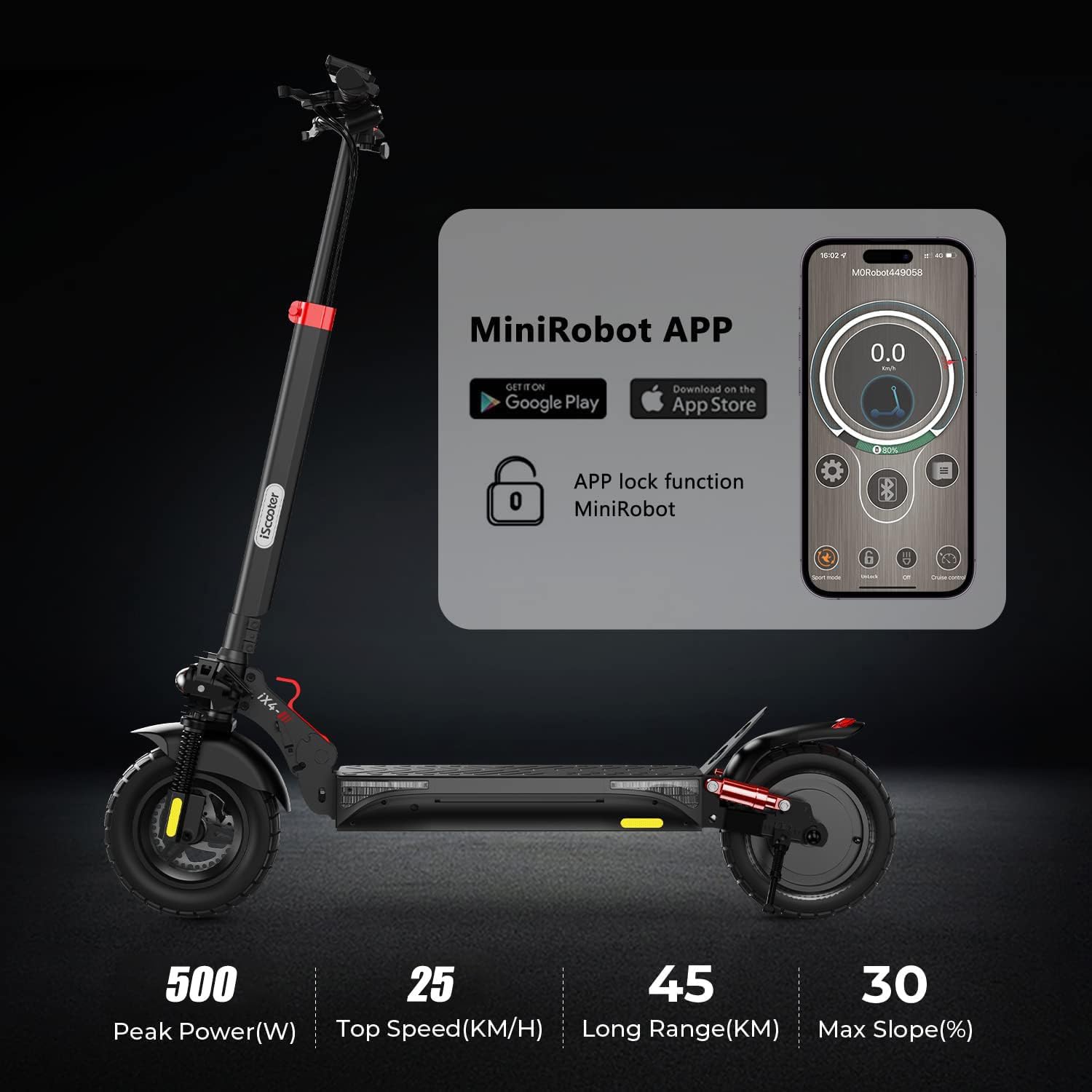
Figure 4: The multi-function LED dashboard, displaying key riding information and controls for power, menu, and brakes.
4.5 Folding and Storage
To fold the scooter for transport or storage, locate the folding key/mechanism on the stem. Follow the instructions to collapse the scooter. The iX4 is designed for quick 3-second folding.
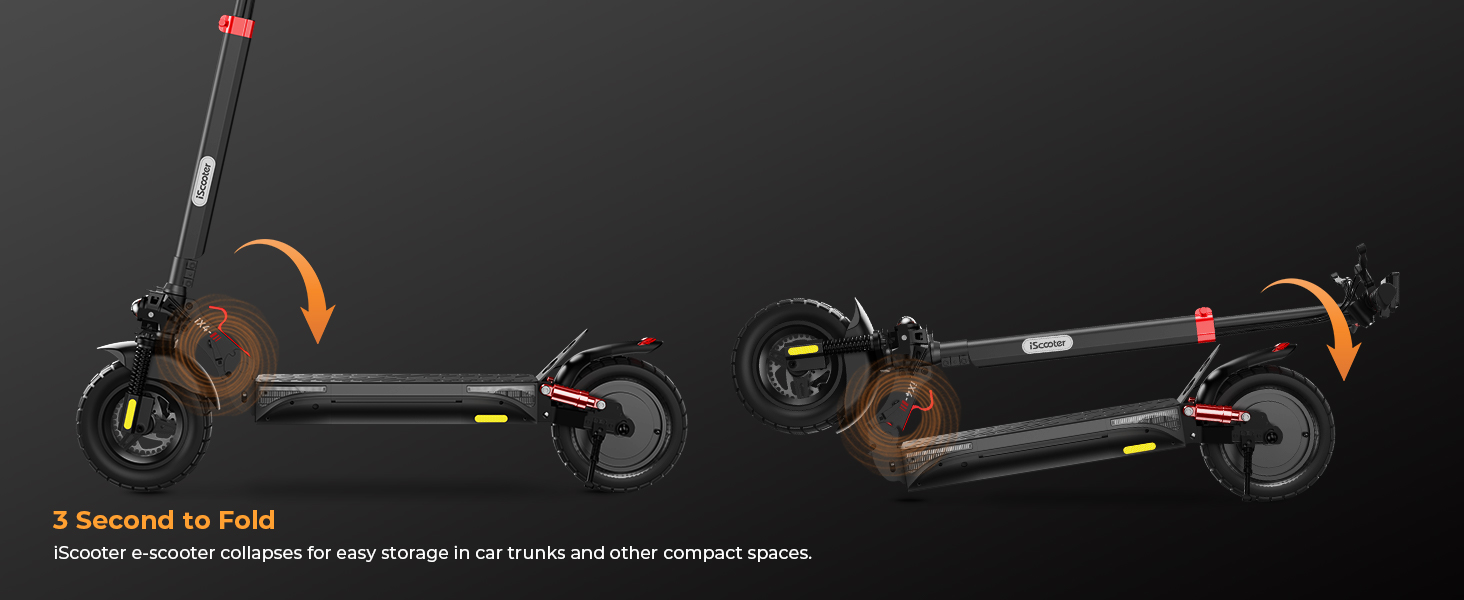
Figure 5: Illustration of the iX4's 3-second folding mechanism, allowing for compact storage and easy transport.
4.6 APP Control
The iX4 supports APP control via Bluetooth. Download the "MiniRobot" app from your smartphone's app store. Connect to your scooter to check riding speed, remaining battery, and other functions.

Figure 6: The iX4's Bluetooth connectivity with the MiniRobot app, enabling users to monitor riding data and control certain features from their smartphone.
4.7 Electronic Lock
Your scooter comes with an electronic lock and two keys. Use the key to start or lock the scooter, enhancing its anti-theft performance.
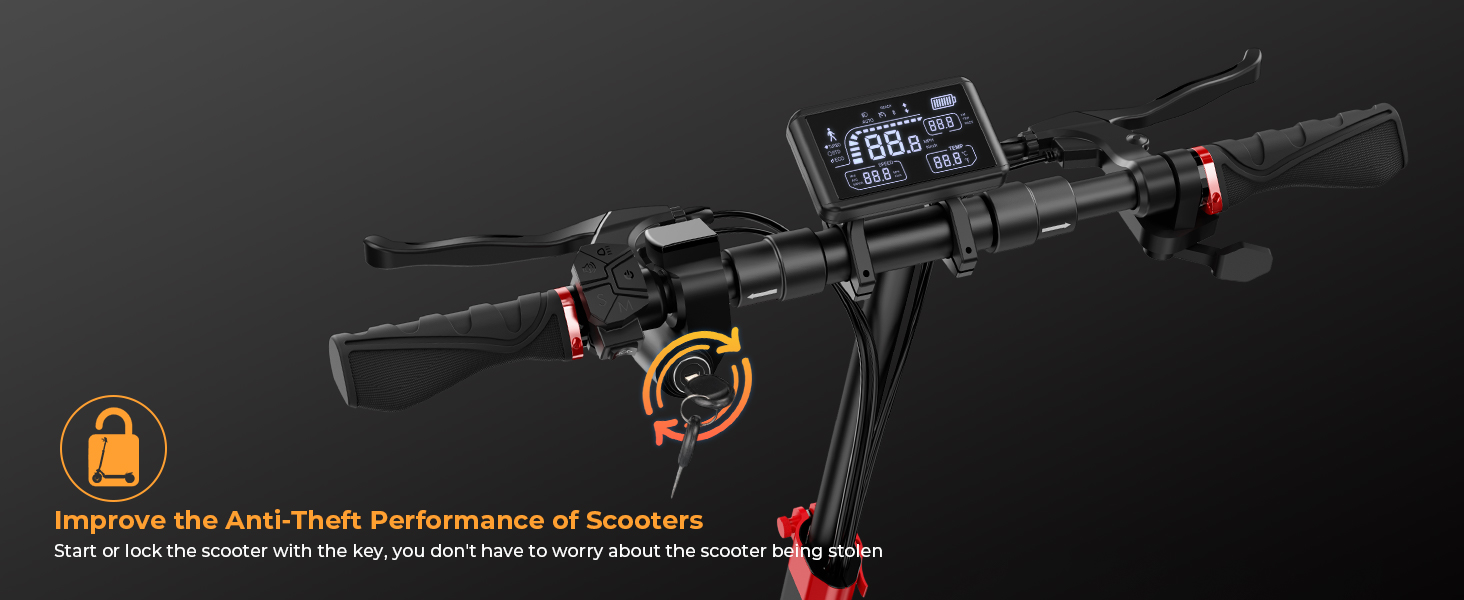
Figure 7: The electronic lock feature of the iX4, providing an additional layer of security against theft.
5. Maintenance
5.1 Cleaning
Clean the scooter regularly with a damp cloth. Do not use high-pressure water jets or corrosive cleaners. Ensure the charging port is dry before charging.
5.2 Battery Care
- Charge the battery fully before long-term storage.
- Recharge the battery at least once every three months, even if not in use, to prevent deep discharge.
- Store the scooter in a cool, dry place away from direct sunlight and extreme temperatures.
- The battery features overcharge, overdischarge, overvoltage, overcurrent, short circuit, and temperature protection.

Figure 8: The 48V 15Ah battery of the iX4, highlighting its multiple protection features for safe and reliable operation.
5.3 Tire Inspection
Although the iX4 uses honeycomb tires designed for durability and puncture resistance, regularly inspect them for embedded objects or excessive wear. The 10-inch off-road design provides excellent traction.

Figure 9: Close-up view of the iX4's 10-inch off-road honeycomb tire, engineered for durability and superior grip on various terrains.
5.4 Suspension System
The iX4 features front and rear quadruple hydraulic shock absorbers. Periodically check the suspension components for any signs of damage or excessive play to ensure a smooth ride.
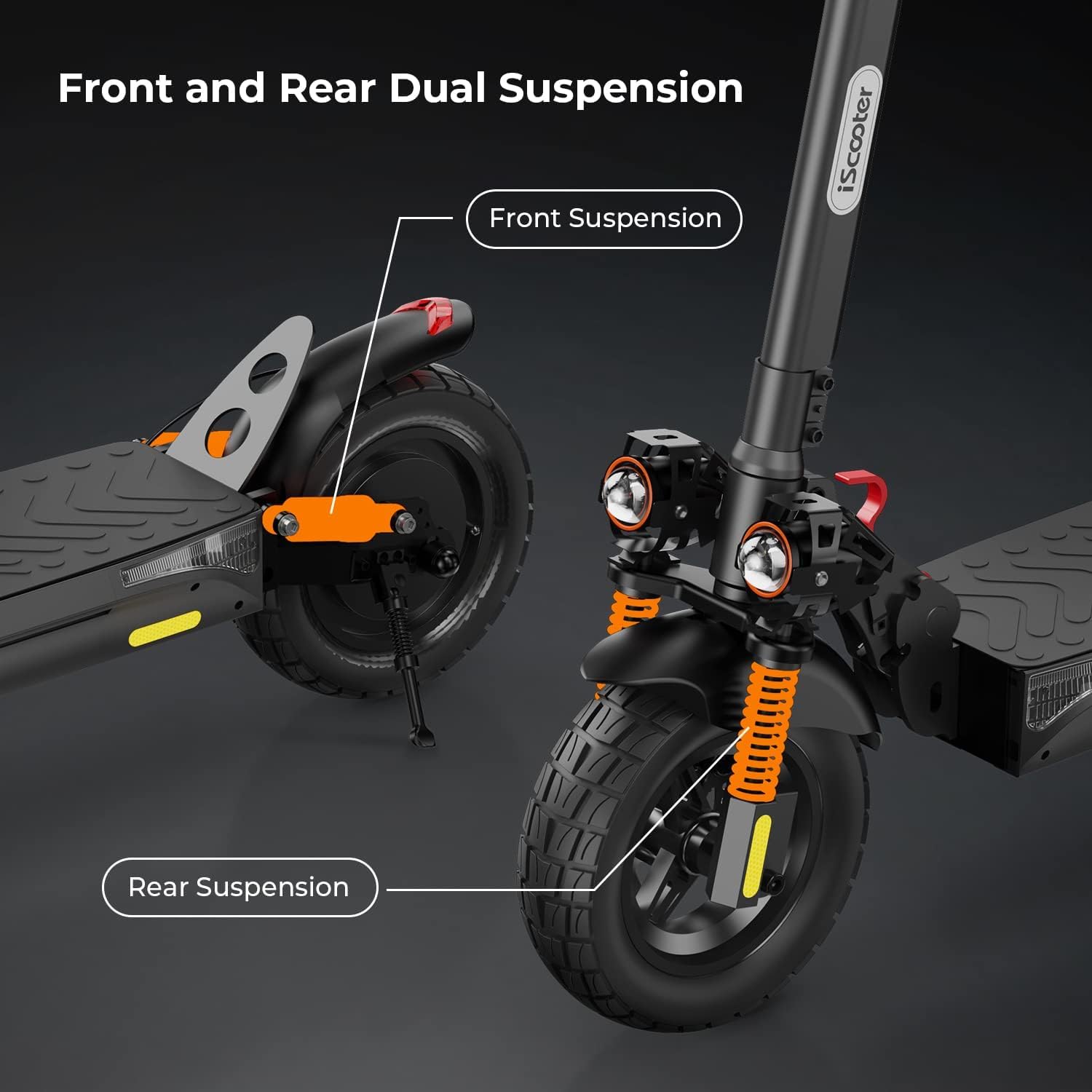
Figure 10: Detailed view of the iX4's front and rear dual suspension system, designed to provide a comfortable and stable ride over varied surfaces.
6. Troubleshooting
The iX4 has a built-in fault self-detection system, which may display error codes on the LCD. Refer to the table below for common issues and their solutions:
| Problem | Possible Cause | Solution |
|---|---|---|
| Scooter does not power on. | Low battery; Power button not pressed correctly; Loose connection. | Charge the battery; Press and hold the power button firmly; Check all visible connections. |
| Scooter loses power during ride. | Battery low; Overload protection activated. | Recharge battery; Reduce load (ensure rider weight is within 150 kg limit). |
| Error code displayed on LCD. | Internal system fault. | Note the error code and consult the full troubleshooting guide in the comprehensive manual or contact customer support. |
| Brakes feel loose or ineffective. | Brake cable adjustment needed; Worn brake pads. | Adjust brake cable tension; Inspect and replace brake pads if worn. |
7. Specifications
| Feature | Detail |
|---|---|
| Model | iX4 |
| Motor Power | 500W |
| Battery Capacity | 48V 15Ah |
| Max Range | 40-45 km |
| Max Speed | Up to 25 km/h (can be unlocked to 28 mph / ~45 km/h in some regions, check local laws) |
| Climbing Angle | Up to 30° |
| Tire Type | 10-inch Off-road Honeycomb Tires |
| Braking System | Dual Braking System |
| Suspension | Front and Rear Quadruple Hydraulic Shock Absorbers |
| Max Load | 150 kg (330 lbs) |
| Frame Material | Aluminium |
| Product Dimensions | 118 x 65 x 128 cm (L x W x H) |
| Net Weight | 29.5 kg |
| Lights | LED Headlights, Rear Brake Lights, Colorful Sidelights, Turn Lights |
| Connectivity | Bluetooth (MiniRobot APP) |
| Special Features | Foldable design, Electronic lock with keys, LCD display, Fault self-detection |
8. Warranty Information
iScooter products typically come with a manufacturer's warranty covering defects in materials and workmanship. The specific terms and duration of the warranty may vary by region and retailer. Please retain your proof of purchase for warranty claims.
For detailed warranty information, please refer to the warranty card included with your product or visit the official iScooter website.
9. Customer Support
If you encounter any issues or have questions not covered in this manual, please contact iScooter customer support. Have your model number (iX4) and purchase details ready when contacting support.
For the most up-to-date contact information, please visit the official iScooter website or refer to the contact details provided on your purchase receipt.
Note: This manual provides general guidelines. For comprehensive details and specific error codes, please refer to the full digital manual available on the manufacturer's website.
Ask a question about this manual
Ask about setup, troubleshooting, compatibility, parts, safety, or missing instructions. Manuals+ will review the question and use this page’s manual context to help answer it.