1. Introduction
This manual provides detailed instructions for the setup, operation, and maintenance of your Lixada DMX512 2.4G Wireless Transmitter Receiver Kit. This kit is designed to provide wireless DMX signal transmission for various lighting fixtures, eliminating the need for extensive cabling in stage, club, or event setups.
Package Contents
Please verify that all items listed below are included in your package:
- 1 x DMX Transmitter
- 7 x DMX Receivers
- 8 x Power Adapters
- 1 x Instruction Manual (this document)
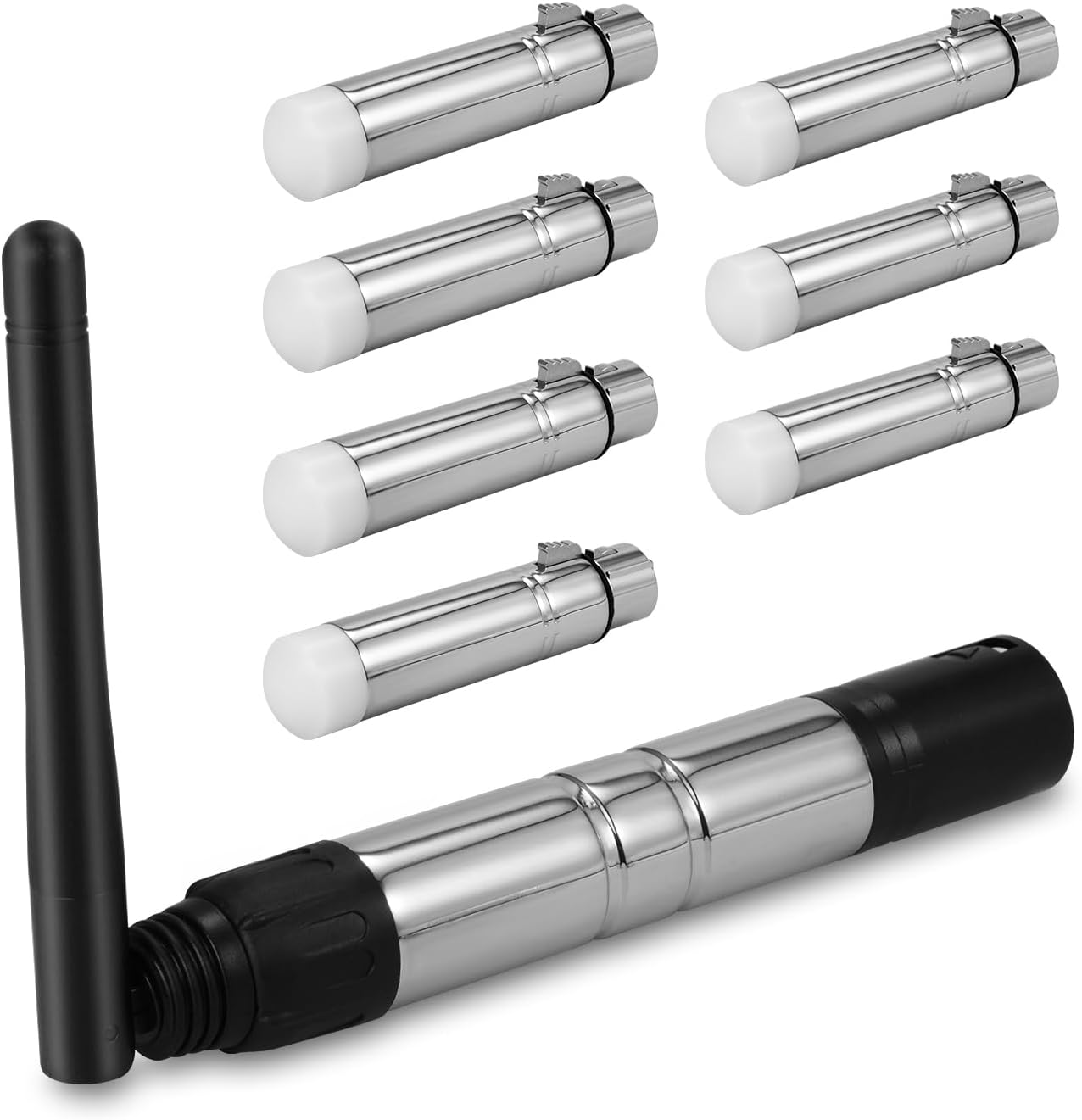
Figure 1.1: Overview of the Lixada DMX512 Wireless Transmitter Receiver Kit, showing one transmitter with an antenna and seven compact receivers.
2. Safety Information
To ensure safe operation and prolong the lifespan of your device, please observe the following safety precautions:
- Power Supply: Use only the provided power adapters. Ensure the input voltage matches the device's requirements (DC 5V 500mA min).
- Environment: Do not expose the devices to rain, moisture, extreme temperatures, or corrosive liquids. Operate in a dry, well-ventilated area.
- Handling: Avoid dropping or subjecting the devices to severe impact. Do not attempt to open or modify the units, as this will void the warranty and may cause damage or injury.
- Interference: While designed for interference-free communication, keep the devices away from strong electromagnetic fields or other 2.4G wireless devices that may cause signal disruption.
- Placement: Ensure the antenna on the transmitter is positioned for optimal signal transmission, ideally with a clear line of sight to receivers.
3. Product Overview and Components
The Lixada DMX512 Wireless Kit consists of one transmitter and multiple receivers, designed for robust and reliable DMX signal transmission.
Transmitter Features

Figure 3.1: Detailed view of the DMX512 Transmitter, highlighting its rotatable antenna, indicator lamp, 3-pin XLR male port, and power input interface.
- Rotatable Antenna: Allows for adjustment to optimize signal direction and range.
- Indicator Lamp: Provides visual feedback on power status and DMX signal transmission.
- 3-pin XLR Male Port: Connects to your DMX controller or other DMX signal source.
- Power Input Interface: For connecting the DC 5V power adapter.
Receiver Features

Figure 3.2: Close-up of a DMX512 Receiver, showing its compact design and power input. The white cap indicates the DMX signal indicator.
- Compact Design: Small form factor for easy integration into lighting setups.
- Indicator Lamp (White Cap): Indicates power and DMX signal reception.
- 3-pin XLR Female Port: Connects directly to DMX-compatible lighting fixtures.
- Power Input Interface: For connecting the DC 5V power adapter.
Dimensions

Figure 3.3: Dimensions of the DMX512 Transmitter (12cm / 4.72in length, 8.8cm / 3.46in antenna length) and Receiver (8cm / 3.14in length).
4. Setup Instructions
Follow these steps to set up your Lixada DMX512 Wireless Kit:
- Connect the Transmitter:
- Connect one of the provided power adapters to the power input interface of the DMX Transmitter.
- Plug the 3-pin XLR male port of the transmitter into the DMX output of your DMX controller or console.
- Ensure the antenna is securely attached and positioned vertically or adjusted for optimal line of sight.
- Connect the Receivers:
- For each DMX-compatible lighting fixture you wish to control wirelessly, connect one DMX Receiver.
- Plug the 3-pin XLR female port of the receiver directly into the DMX input of your lighting fixture.
- Connect a power adapter to the power input interface of each receiver.
- Power On:
- Plug all power adapters into appropriate power outlets.
- The indicator lamps on both the transmitter and receivers should illuminate, indicating power.

Figure 4.1: Illustration of the wireless DMX signal flow from a DMX controller (via transmitter) to multiple lighting fixtures (via receivers).
5. Operating Instructions
The Lixada DMX512 Wireless Kit operates on a plug-and-play principle, automatically establishing a wireless DMX connection.
- Automatic Pairing:
- Once the transmitter and receivers are powered on and the transmitter is receiving a DMX signal, they will automatically search for and pair with each other.
- The indicator lamps on both units will typically show a specific pattern (e.g., solid light or slow blink) to confirm a successful connection and DMX signal transmission/reception. Refer to the indicator lamp section for specific status meanings (if available, otherwise general).
- DMX Signal Transmission:
- The transmitter converts the wired DMX512 signal into a 2.4G wireless signal.
- Receivers pick up this wireless signal and convert it back into a wired DMX512 signal for your lighting fixtures.
- The system utilizes a 2.4G ISM 126-channel frequency section to minimize interference and ensure stable communication.
- Controlling Lights:
- Once connected, operate your DMX controller as usual. The wireless system acts as a transparent bridge for the DMX signal.
- Ensure your lighting fixtures are set to the correct DMX addresses as configured on your DMX controller.

Figure 5.1: Example setup showing the DMX wireless system integrated with a professional DJ console for controlling stage lighting.
6. Specifications
| Feature | Detail |
|---|---|
| Input Voltage | DC 5V 500mA min |
| Power Consumption | 0.2W/pcs |
| Wireless Protocol | 2.4G Wireless DMX512 T/R |
| Communication Distance | 400 meters / 1312.3 ft (visible distance) |
| Working Frequency Section | 2.4G ISM, 126 channels frequency section |
| Antenna Rotation Angle | 90 degrees |
| Max Transmitting Power Rate | 20dBm |
| Receive Sensitivity | -94dBm |
| DMX Connector | 3-pin male (Transmitter) and 3-pin female (Receiver) |
| Material | Iron & Zinc |
| Item Color | Silver |
| Antenna Length | 8.7 cm / 3.4 in |
| Transmitter Size (D x H) | 2 x 12 cm / 0.8 x 4.7 in |
| Receiver Size (D x H) | 2 x 8.5 cm / 0.8 x 3.3 in |
| Item Weight | Approximately 2.66 pounds (total kit) |
| Model Number | ZPZ6506756391819XJ |
7. Troubleshooting
If you encounter issues with your Lixada DMX512 Wireless Kit, refer to the following common problems and solutions:
- No DMX Signal / Lights Not Responding:
- Check Power: Ensure both the transmitter and all receivers are properly powered on and their indicator lamps are lit.
- Check DMX Connections: Verify that the transmitter is correctly connected to the DMX output of your controller and receivers are correctly connected to the DMX input of your fixtures.
- Signal Indicator: Observe the indicator lamps. If they are not showing a stable connection (e.g., rapidly blinking or off), there might be a pairing issue or signal loss.
- DMX Address: Confirm that your lighting fixtures are set to the correct DMX addresses as configured on your DMX controller.
- Wired Test: Temporarily connect a lighting fixture directly to your DMX controller with a wired DMX cable to confirm the controller and fixture are functioning correctly.
- Intermittent Signal / Lag:
- Line of Sight: Ensure there is a clear line of sight between the transmitter and receivers. Obstructions (walls, large metal objects, crowds) can degrade signal quality.
- Distance: While rated for 400m, actual range can vary. Reduce the distance between units if experiencing issues.
- Interference: The 2.4G band is shared with Wi-Fi, Bluetooth, and other wireless devices. Try to relocate the units away from other strong 2.4G transmitters. The 126-channel frequency hopping helps mitigate this, but extreme interference can still occur.
- Antenna Position: Adjust the transmitter's rotatable antenna for optimal reception.
- Device Not Powering On:
- Power Adapter: Ensure the power adapter is securely connected to both the device and a working power outlet. Test the outlet with another device.
- Adapter Functionality: If possible, test the power adapter with another compatible device or try a different adapter (ensuring correct voltage and current).
8. Maintenance
Proper maintenance ensures the longevity and reliable performance of your Lixada DMX512 Wireless Kit:
- Cleaning: Use a soft, dry cloth to clean the exterior of the devices. Do not use abrasive cleaners, solvents, or excessive moisture.
- Storage: When not in use, store the devices in a cool, dry place, away from direct sunlight and extreme temperatures. Keep them in their original packaging or a protective case to prevent physical damage.
- Cable Care: Regularly inspect power adapters and DMX cables for any signs of wear, cuts, or damage. Replace damaged cables immediately.
- Antenna: Handle the transmitter's antenna carefully to avoid bending or breaking it.
9. Warranty and Support
Warranty information for your Lixada DMX512 Wireless Transmitter Receiver Kit is typically provided at the point of purchase or within the product packaging. Please retain your proof of purchase for warranty claims.
For technical support, troubleshooting assistance beyond this manual, or warranty inquiries, please contact your retailer or the official Lixada customer support channels. Refer to the Lixada brand store on Amazon for potential support contact information: Lixada Store.


