
1. Product Overview
The EZVALO 6-Pack Under Cabinet Lighting system provides versatile and efficient illumination for various areas in your home. Featuring 2000mAh rechargeable batteries, wireless motion sensing, and multiple color temperature options, these lights are designed for convenience and energy saving. The system includes a charging station and remote control for comprehensive management of your lighting needs.

Figure 1: EZVALO Under Cabinet Lighting System with Charging Station and Remote Control.
2. What's Included
Your EZVALO Under Cabinet Lighting package includes the following components:
- 6 x 9-inch LED Closet Lights
- 12 x Adhesive Iron Sheet
- 1 x Multi-Device Charging Station
- 1 x Remote Control
- 1 x Instruction Manual
3. Key Features
3.1. Motion Sensing & Modes
The lights feature an upgraded, responsive motion sensor with a 120° detection angle and a range of 9–16 feet. They automatically turn off after 20 seconds of no motion. Three operational modes are available:
- Day Mode: Responds to motion in any lighting condition, suitable for areas like kitchens during daytime use.
- Night Mode: Activates only in dark environments, ideal for late-night use in closets or hallways.
- Always On Mode: Provides continuous illumination until the battery is depleted, useful for extended tasks.

Figure 2: Illustration of the three work modes: Always On, Day Mode, and Night Mode.
3.2. Adjustable Color Temperatures & Brightness
Customize your lighting with three color temperature options and adjustable brightness levels:
- Warm White (3000K): For a cozy and inviting ambiance.
- Natural White (4200K): Balanced light for everyday tasks.
- Cool White (5700K): Bright and crisp light for detailed work.
Brightness can be adjusted to 30%, 60%, or 100% (up to 100 Lumens) to suit your specific needs, reducing glare and protecting eye comfort.

Figure 3: Visual representation of Warm White (3000K), Natural White (4200K), and Cool White (5700K) light settings.
3.3. Long Battery Life & Smart Charging
Each light is equipped with a 2000mAh rechargeable battery, providing 20-45 days of use in Auto Mode or 11 hours on MAX brightness in Always-On Mode. The included 3-slot USB-C charging dock allows for simultaneous charging of multiple lights and can also charge other USB-C compatible devices.
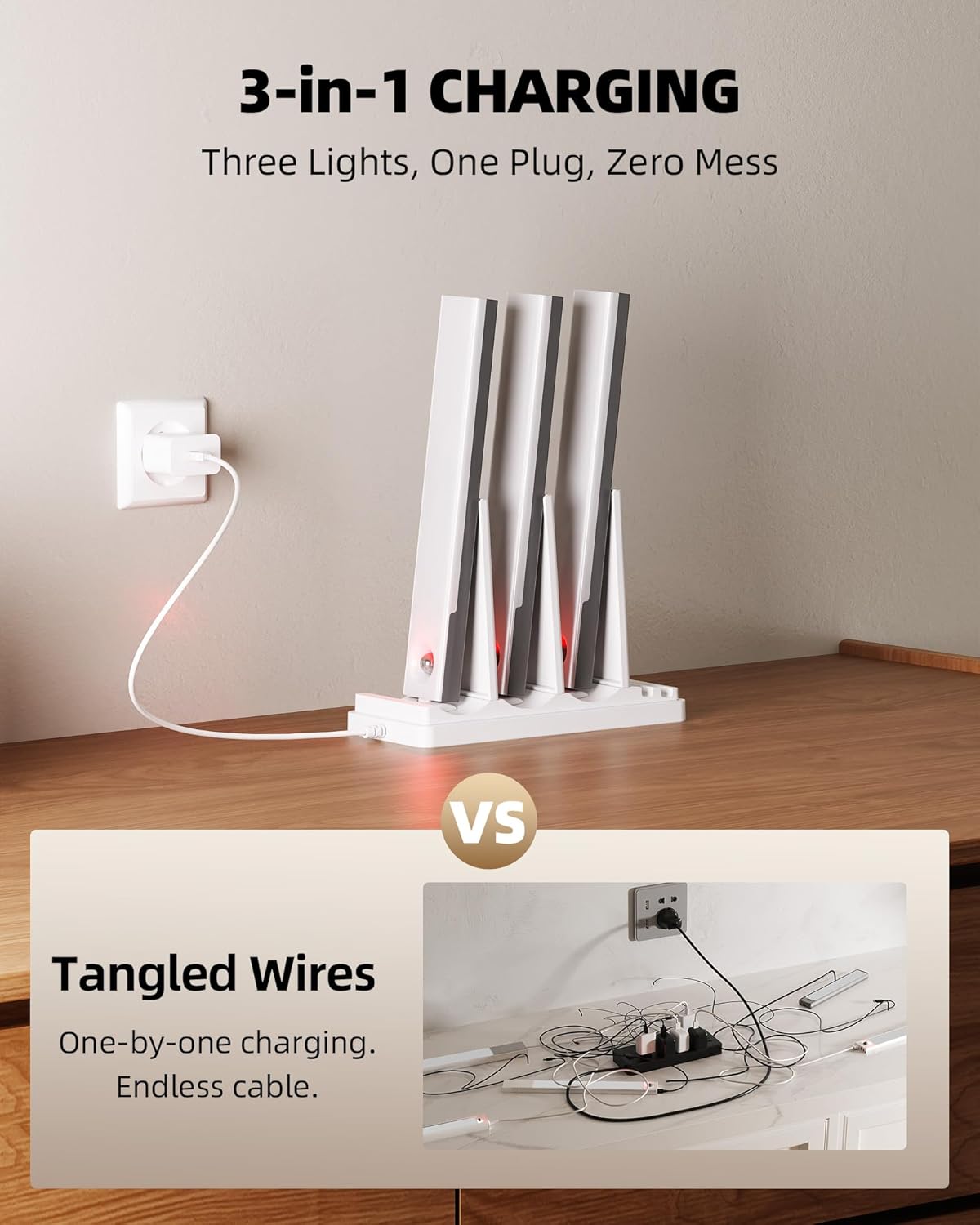
Figure 4: The 3-in-1 charging station, designed to charge three lights simultaneously and reduce cable clutter.
3.4. Remote Control Functionality
The included remote control allows for convenient adjustment of all lights at once. Functions include brightness adjustment, color temperature switching, mode toggling (Always On, Day, Night), and setting a timer for 15, 30, 45, 60, or 120 minutes. Each light also has built-in buttons for individual adjustments.

Figure 5: Detailed view of the light's controls and the remote control's functions, including dimming, color temperature, and timer settings.
4. Setup and Installation
The EZVALO lights offer two simple, tool-free installation methods:
- Magnetic Attachment: Use the built-in strong magnet to attach the light directly to any metal surface.
- Adhesive Mounting: For non-metal surfaces, peel off the 3M adhesive tape from the included iron sheets and stick them to the desired flat surface. Then, attach the light magnetically to the iron sheet. For optimal adhesion, ensure the surface is clean and dry.
For best performance, install the lights within 2 inches of the front edge of the cabinet or shelf.

Figure 6: Step-by-step guide for installing the lights using the snap-on mounting strip and adhesive.
5. Operating Instructions
The EZVALO lights can be operated using either the built-in buttons on each light or the included remote control.
5.1. Using the Remote Control
- Power On/Off: Press the "ON" or "OFF" button.
- Change Mode: Use the "Day", "Night", or "Always On" buttons to select the desired operating mode.
- Adjust Brightness: Use the "+" and "-" buttons under "Dimming" to increase or decrease brightness.
- Change Color Temperature: Press the sun icon buttons to cycle through Warm White, Natural White, and Cool White.
- Set Timer: Select 15min, 30min, 45min, 60min, or 120min to set an automatic shut-off timer. Press "Cancel" to disable the timer.
5.2. Using Built-in Buttons
- Each light has buttons for individual control of modes and brightness. Refer to the light unit for specific button functions.
6. Maintenance
To ensure optimal performance and longevity of your EZVALO lights, follow these maintenance guidelines:
- Cleaning: Wipe the lights and charging station with a soft, dry cloth. Avoid using abrasive cleaners or solvents.
- Charging: Recharge batteries when the indicator light on the charging station turns red. Ensure proper connection to the USB-C port.
- Storage: If storing the lights for an extended period, fully charge them and store in a cool, dry place.
7. Troubleshooting
If you encounter any issues with your EZVALO lighting system, refer to the following common solutions:
| Problem | Possible Cause | Solution |
|---|---|---|
| Light not turning on. | Low battery; Incorrect mode; Sensor obstructed. | Charge the light; Switch to "Always On" or "Day" mode; Clear sensor path. |
| Motion sensor not working. | Incorrect mode ("Always On"); Ambient light too high (in Night Mode); Sensor obstructed. | Switch to "Day" or "Night" mode; Ensure darkness for "Night" mode; Clear sensor. |
| Remote control not responding. | Battery low in remote; Obstruction between remote and light; Out of range. | Replace remote battery; Ensure clear line of sight; Operate within 10 ft. |
| Lights not charging. | Loose connection; Faulty cable/adapter; Charging station issue. | Check USB-C connections; Try a different cable/adapter; Contact support if issue persists. |
If the problem persists after attempting these solutions, please contact EZVALO customer support.
8. Specifications
| Feature | Detail |
|---|---|
| Brand | EZVALO |
| Model Name | EZL2414A_6S |
| Color | White |
| Material | Acrylonitrile Butadiene Styrene, Metal |
| Product Dimensions | 9.06"L x 1.5"W x 0.67"H |
| Power Source | Battery Powered |
| Battery Capacity | 2000mAh (per light) |
| Light Source Type | LED (62 LED beads) |
| Brightness | 100 Lumens (Max) |
| Color Temperatures | Warm White (3000K), Natural White (4200K), Cool White (5700K) |
| Control Method | Remote Control, Push Button |
| Motion Sensor Range | 120° angle, 9–16 ft distance |
| Auto-off Time | 20 seconds (after no motion) |
| Charging Interface | USB-C |
| Indoor/Outdoor Usage | Indoor |
| Special Features | Adjustable Color Temperature, Dimmable, Energy Efficient, Wireless, Charge Station, Motion Sensor, Rechargeable |
9. Warranty and Support
EZVALO is committed to providing excellent customer service and product satisfaction. While specific warranty details are not provided in this manual, please retain your proof of purchase for any warranty claims.
For any questions, concerns, or technical assistance regarding your EZVALO Under Cabinet Lighting, please do not hesitate to contact EZVALO customer support. Contact information can typically be found on the product packaging or the official EZVALO website.
We are dedicated to ensuring your satisfaction with our products.