
1. Product Overview
The ESR iPad Air 13 Inch Case Keyboard is a versatile accessory designed to enhance your iPad experience, transforming it into a powerful productivity tool. It features a detachable case, a responsive keyboard, and a multi-touch trackpad, offering multiple viewing angles and comprehensive protection.

Image 1.1: Overview of the ESR iPad Air 13 Inch Case Keyboard, showing the keyboard, detachable case, and iPad in different orientations.
2. Compatibility
This keyboard case is specifically designed for the following iPad models:
- iPad Air 13” (M3 2025): Models A3268, A3269, A3271
- iPad Air 13” (M2 2024): Models A2898, A2899, A2900
Please verify your iPad model number before use to ensure proper fit and functionality. The model number is typically found on the back of your iPad.
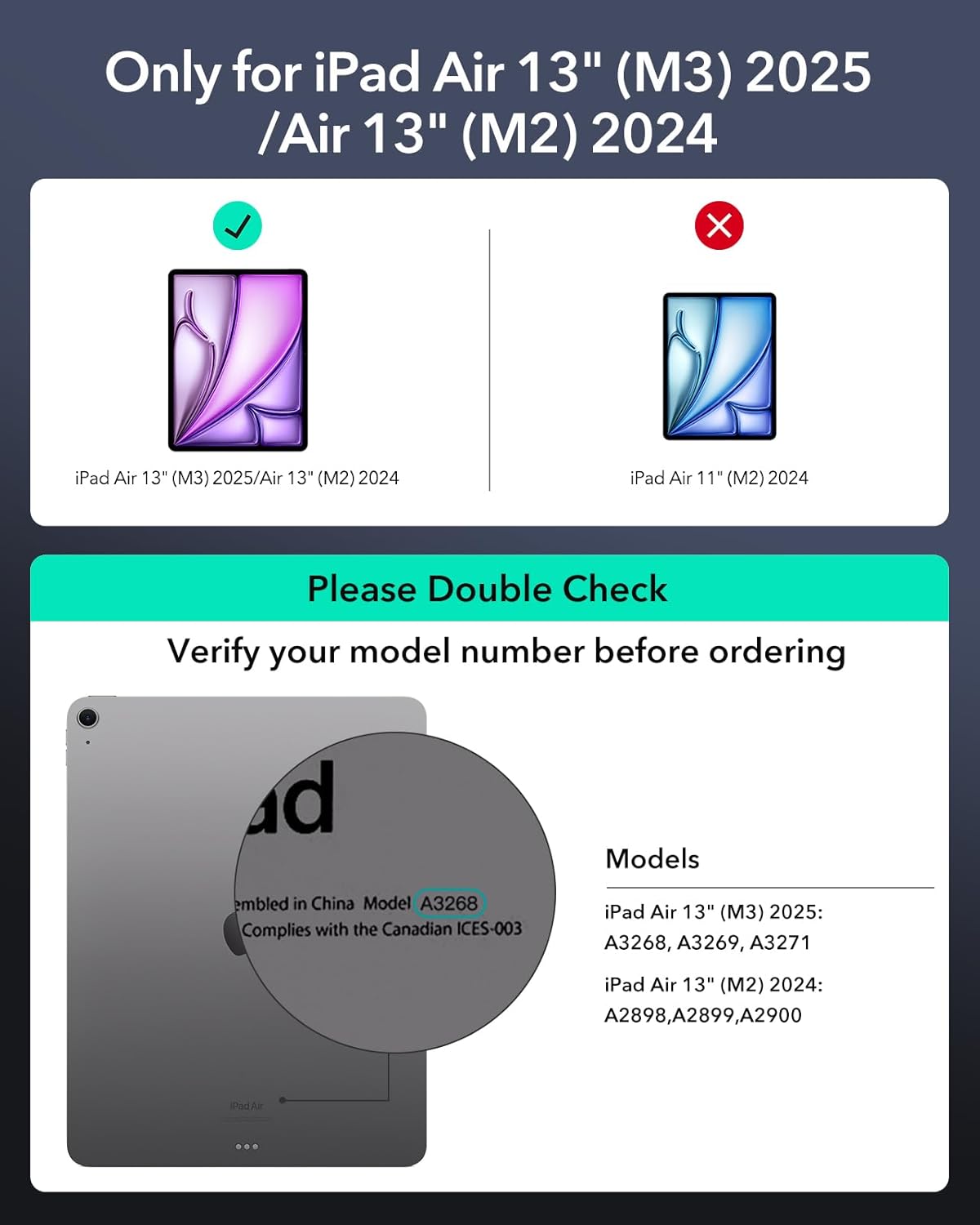
Image 2.1: Visual guide for checking iPad compatibility, highlighting the correct iPad Air 13" models.
3. What's in the Box
Your ESR iPad Air 13 Inch Case Keyboard package includes:
- ESR iPad Air 13 Inch Keyboard
- Removable Case
- Multi-Touch Trackpad (integrated into keyboard)
4. Setup
4.1 Attaching Your iPad
- Gently insert your iPad into the removable case, ensuring all edges are securely covered.
- Align the iPad (within its removable case) with the magnetic area on the keyboard stand. The strong magnets will securely attach the iPad to the stand.

Image 4.1: Illustration of the versatile detachable back case, showing how the iPad can be used with or without the keyboard.
4.2 Bluetooth Connection
- Ensure the keyboard is charged.
- Turn on the keyboard.
- On your iPad, go to Settings > Bluetooth.
- Turn on Bluetooth and select the ESR keyboard from the list of available devices.
- Follow any on-screen prompts to complete the pairing process.
4.3 Adjusting the Magnetic Stand
The quick-set magnetic stand allows for easy adjustment to various angles. Simply open the case and position your iPad to the desired angle for typing or browsing. The strong magnetic connection ensures stability.

Image 4.2: A user setting up the quick-set magnetic stand for optimal viewing and typing posture.
5. Operating Instructions
5.1 Keyboard Functions
The keyboard provides a comfortable and efficient typing experience. It includes standard keys and function keys for quick access to iPad features. Refer to the keyboard layout for specific key functions.
5.2 Multi-Touch Trackpad
The extended, ultra-sensitive multi-touch trackpad allows for precise navigation and gesture control. Common gestures include:
- Click: Single tap or press.
- Scroll: Two-finger swipe up or down.
- Zoom: Pinch with two fingers.
- Go Home: Three-finger swipe up.
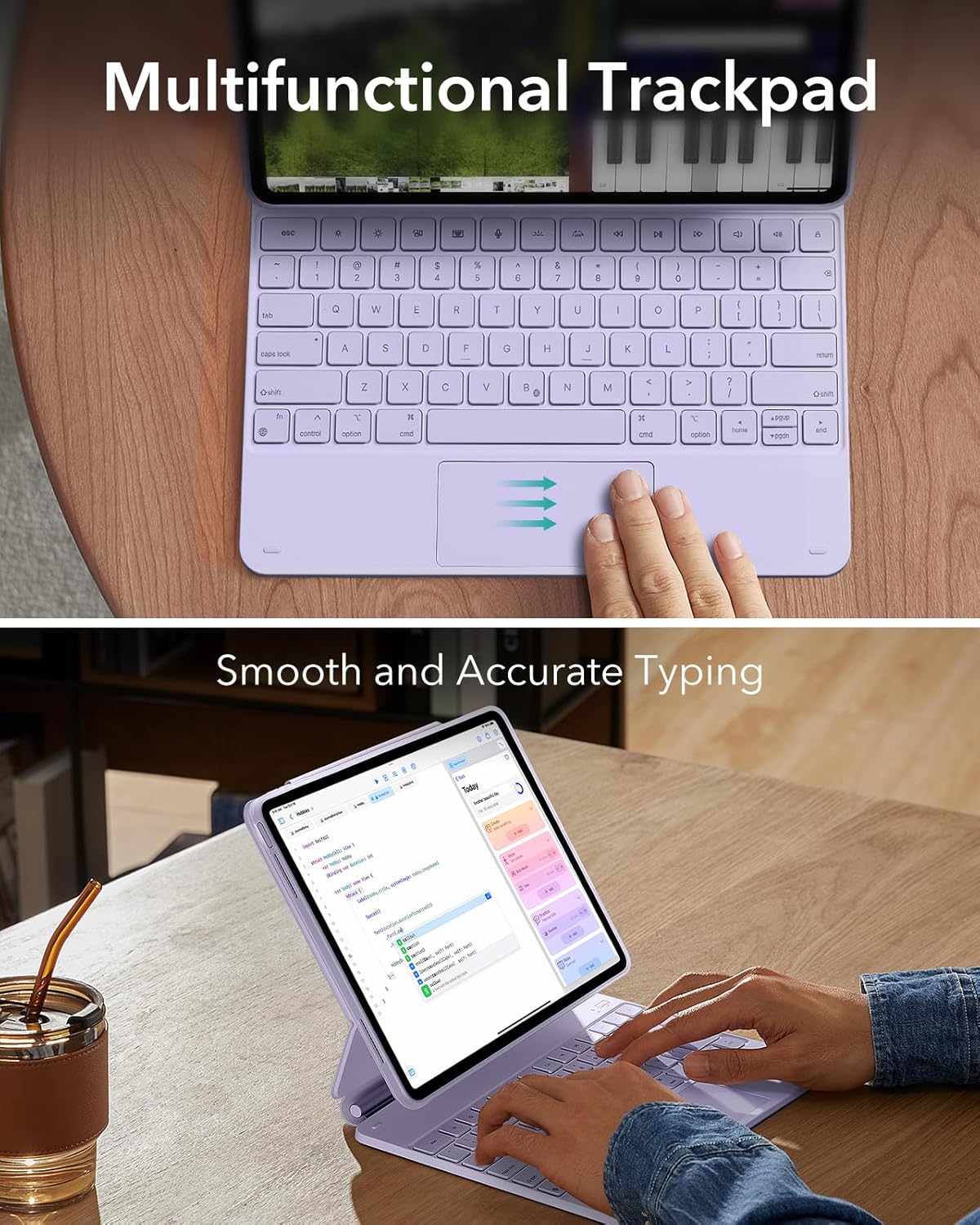
Image 5.1: Detailed view of the multifunctional trackpad, illustrating common multi-touch gestures.
5.3 Multiple View Modes
The case supports various view modes to suit your needs:
- Typing Mode: Position the iPad at an optimal angle for comfortable typing.
- Viewing Mode: Adjust the stand for hands-free media consumption.
- Portrait Mode: The back case detaches, allowing the iPad to be set up in portrait orientation, ideal for video calls or reading.

Image 5.2: Examples of the keyboard case's powerful versatility, demonstrating typing, viewing, and browsing modes.
5.4 Battery Life
The keyboard is designed for extended use on a single charge:
- Standby: Up to 1 year
- Day Use: Up to 3 months (based on 2 hours a day with backlit keys off)
- Night Use: Up to 1 week (based on 2 hours a day with backlit keys on)

Image 5.3: Information on the extended battery life of the keyboard, allowing for more work on a single charge.
6. Maintenance
6.1 Cleaning
To clean the case and keyboard, use a soft, damp cloth. Avoid harsh chemicals or abrasive materials that could damage the surface. Ensure the keyboard is powered off and disconnected from your iPad before cleaning.
6.2 Storage
When not in use, keep the keyboard case closed to protect both the iPad and the keyboard. The magnetic clasp helps keep the case closed and your Apple Pencil secure if stored within the case.

Image 6.1: The magnetic clasp ensures the case remains safely closed and secures your Apple Pencil.
7. Troubleshooting
If you encounter issues with your ESR iPad Air 13 Inch Case Keyboard, please refer to the common solutions below. Many issues can be quickly resolved by contacting customer service for model exchanges, technical support, or compatibility concerns.
7.1 Connectivity Issues
- Ensure the keyboard is charged and powered on.
- Verify Bluetooth is enabled on your iPad.
- Try unpairing and re-pairing the keyboard in your iPad's Bluetooth settings.
- Restart both your iPad and the keyboard.
7.2 Trackpad Glitches
- Ensure the trackpad surface is clean and free of debris.
- Check for any software updates for your iPad.
- If the trackpad becomes unresponsive after a period of inactivity, a slight movement or tap should re-activate it.
7.3 Incorrect Size/Fit Issues
If you have purchased the wrong size or are experiencing fit issues, please refer to the following video for guidance on contacting customer support:
Video 7.1: This video provides instructions on how to contact ESR Customer Service for issues such as incorrect size, fit problems, or order mistakes. It guides users through the steps to find product support via their Amazon orders page.
8. Specifications
| Feature | Detail |
|---|---|
| Model Number | 6B023 |
| Compatible Devices | iPad Air 13" (M3/M2 2025/2024); Models A2898, A2899, A2900, A3268, A3269, A3271 |
| Connectivity Technology | USB-C |
| Number of Keys | 78 |
| Special Features | Magnetic, Removable Case, Multi-Touch Trackpad |
| Color | Purple |
| Material | Aluminum, Polycarbonate, Polyurethane (PU), Thermoplastic Polyurethane (TPU) |
| Item Weight | 3.14 pounds |
| Package Dimensions | 13.19 x 9.65 x 1.18 inches |
| Manufacturer | Electronic Silk Road Corp |
9. Warranty and Support
ESR provides comprehensive customer support for your product:
- Warranty: A 12-month warranty covers manufacturing defects and issues.
- Lifetime Support: Access to lifetime support for product inquiries and assistance.
- Setup Videos & FAQs: Detailed setup videos and frequently asked questions are available to assist you.
- Personalized Help: For further assistance, please contact ESR customer service through your purchase platform or the official ESR support website.