
Alvar V800P
Alvar 4K Smart Projector User Manual
Model: V800P | Brand: Alvar
1. Introduction
Thank you for choosing the Alvar 4K Smart Projector. This manual provides essential information for setting up, operating, and maintaining your projector to ensure optimal performance and longevity. Please read this manual thoroughly before using the product and retain it for future reference.
The Alvar V800P is designed to deliver a premium home entertainment experience with its 1000 ANSI lumens brightness, native 1080P resolution with 4K support, integrated Netflix, Prime Video, and YouTube apps, and advanced audio features including Dolby Audio and DBX-TV Total Sonics. It also boasts AI-powered auto-focus, auto-keystone correction, auto-obstacle avoidance, and auto-screen alignment for effortless setup.
2. Safety Information
To prevent fire, electric shock, or injury, always follow these basic safety precautions:
- Do not expose the projector to rain or moisture.
- Do not open the projector casing. Refer all servicing to qualified personnel.
- Ensure proper ventilation. Do not block ventilation openings.
- Use only the power adapter supplied with the projector.
- Avoid direct eye exposure to the projector lens when the lamp is on.
- Keep the projector away from heat sources and direct sunlight.
- Unplug the projector during lightning storms or when unused for long periods.
3. Package Contents
Verify that all items are included in your package:
- 1 × Alvar Smart Projector
- 1 × Power Cord
- 1 × HDMI Cable
- 1 × Remote Control (Requires 2 AAA batteries, not included)
- 1 × User Manual (This document)
4. Product Overview
Familiarize yourself with the components of your Alvar V800P projector.

Figure 4.1: Front view of the Alvar 4K Smart Projector, showcasing the main lens and sleek design.

Figure 4.2: Rear view of the projector, highlighting the various connectivity ports including USB, HDMI (x2), and AV port.
4.1. Projector Components
- Projection Lens: Emits the image.
- Power Button: Turns the projector on/off.
- Control Panel: Touch-sensitive buttons for basic navigation.
- Ventilation Grilles: Essential for heat dissipation. Do not obstruct.
- Input Ports:
- HDMI (x2): Connects to external devices like laptops, gaming consoles, streaming sticks.
- USB: For connecting USB drives to play media.
- 3.5mm Headphone Jack: For external audio output.
- AV Port: For older analog devices.
- Built-in Speakers: 30W HiFi speakers with Dolby Audio and DBX-TV Total Sonics.
5. Setup
5.1. Placement
Choose a suitable location for your projector. The Alvar V800P supports various installation methods:
- Tabletop Mount: Place on a flat, stable surface.
- Ceiling Mount: Use the four holes on the bottom of the projector (covered by rubber fillers) for ceiling installation.
- Wall Mount: Securely mount to a wall.
For optimal viewing, ensure the projector is positioned perpendicular to the projection surface. The recommended projection distance for a 300-inch screen is approximately 19.6 feet (6 meters), and for a 50-inch screen, it's about 4.9 feet (1.5 meters).

Figure 5.1: The projector automatically adjusts the image for optimal display, even when placed at an angle.
5.2. Power Connection
- Connect the power cord to the projector's power input port.
- Plug the other end of the power cord into a wall outlet.
5.3. Initial Setup and Automatic Adjustments
Upon powering on, the Alvar V800P utilizes advanced AI features for quick and precise image adjustment:
- AI Auto Focus: Automatically sharpens the image within 3 seconds.
- Auto Keystone Correction: Corrects distorted images to a perfect rectangle.
- Auto Obstacle Avoidance: Adjusts the projection to avoid objects on the wall.
- Auto Screen Alignment: Automatically fits the image within your projection screen boundaries.

Figure 5.2: The projector's intelligent features ensure a perfect display with minimal effort.
6. Operating Instructions
6.1. Powering On/Off
- To Power On: Press the power button on the projector or the remote control.
- To Power Off: Press the power button again. A confirmation prompt may appear; select "Power Off".
6.2. Remote Control and Navigation
The projector comes with a Bluetooth/Infrared remote control and a touch pad for easy navigation.
- Use the directional buttons on the remote or touch pad to navigate menus.
- Press the "OK" or "Enter" button to confirm selections.
- The remote also features dedicated buttons for Netflix, Prime Video, and YouTube for quick access.
6.3. Connecting External Devices
The Alvar V800P offers extensive connectivity options:
- HDMI: Connect laptops, gaming consoles (PS5, Switch), Roku, Fire TV Stick, etc., using an HDMI cable. Select the corresponding HDMI input from the projector's source menu.
- USB: Insert a USB flash drive into the USB port to play local media files (videos, photos, music).
- Bluetooth 5.2 (Two-way):
- Transmitter Mode: Connect the projector to external Bluetooth speakers or headphones for enhanced audio.
- Receiver Mode: Connect your smartphone or tablet to the projector to use its powerful 30W speakers as a standalone Bluetooth speaker.
- WiFi 6: Connect to your home network for streaming content from built-in apps or mirroring your device screen.

Figure 6.1: The projector supports a wide range of external devices for versatile entertainment.

Figure 6.2: Bi-directional Bluetooth allows flexible audio configurations.
6.4. Using Built-in Smart Apps
The Alvar V800P comes preloaded with officially licensed streaming applications:
- Netflix
- Prime Video
- YouTube
Access these apps directly from the home screen. Ensure the projector is connected to a stable internet connection via WiFi 6 for optimal streaming performance.

Figure 6.3: Enjoy popular streaming services directly from your projector.
6.5. Adjusting Settings
Access the settings menu to customize your viewing and audio experience:
- Picture Settings: Adjust brightness, contrast, color temperature, and aspect ratio. The projector supports HDR10 for vibrant colors.
- Sound Settings: Control volume, activate DBX-TV Total Sonics for enhanced audio, and manage Dolby Audio settings.
- Zoom Function: Adjust the screen size from 100% down to 50% without moving the projector. This feature is accessible via the setup menu and remote control.
- Network Settings: Configure WiFi and Bluetooth connections.
- System Settings: Language, date/time, software updates, and factory reset options.

Figure 6.4: Experience ultra-bright and vibrant colors, even in well-lit environments.
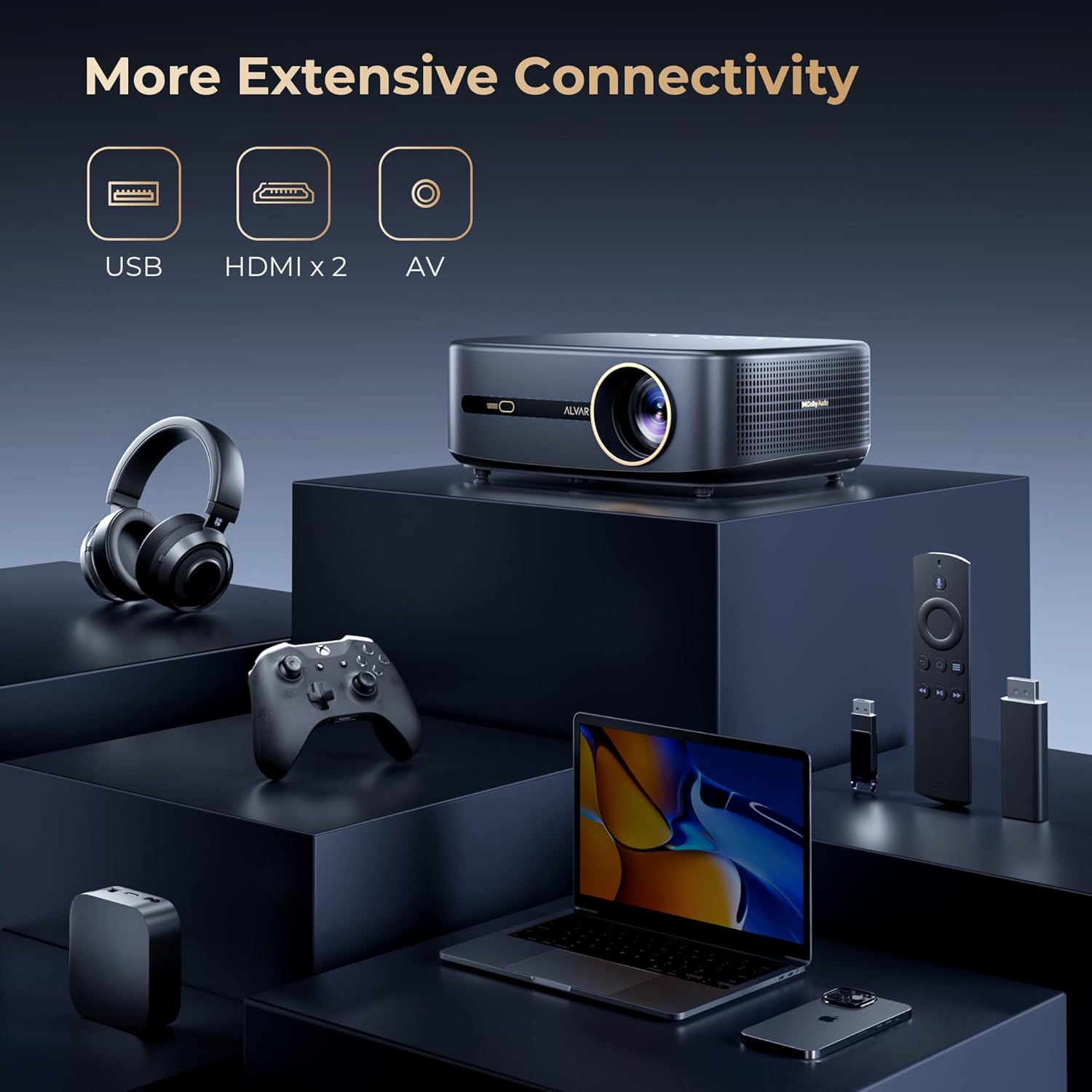
Figure 6.5: Adjust the projection size to fit any space, from 50 to 300 inches.
7. Maintenance
7.1. Cleaning
- Lens: Use a soft, lint-free cloth specifically designed for optical lenses. Do not use abrasive cleaners or solvents.
- Casing: Wipe the projector's exterior with a soft, dry cloth. For stubborn marks, slightly dampen the cloth with water.
- Ventilation: Periodically check and gently clean the ventilation grilles to prevent dust buildup, which can affect performance and lifespan.
7.2. Storage
When not in use for extended periods, store the projector in a cool, dry place, away from direct sunlight and extreme temperatures. It is recommended to use the original packaging or a protective case to prevent dust and damage.
8. Troubleshooting
If you encounter issues with your Alvar V800P projector, refer to the following common problems and solutions:
| Problem | Possible Cause | Solution |
|---|---|---|
| No image or blurry image | Power issue, incorrect input source, focus/keystone not adjusted. | Ensure power is connected. Select correct input source. Allow auto-focus/keystone to complete or manually adjust. |
| No sound | Volume too low, incorrect audio output, external device audio settings. | Increase volume. Check audio output settings on projector and connected device. Ensure Bluetooth audio is correctly paired. |
| Remote control not working | Batteries low/dead, remote not paired, obstruction. | Replace AAA batteries. Ensure remote is paired via Bluetooth. Remove any obstructions between remote and projector. |
| Cannot connect to WiFi/Bluetooth | Incorrect password, out of range, network issue. | Verify password. Move projector closer to router/device. Restart projector and router. |
| Apps not loading/crashing | Poor internet connection, app cache, outdated app version. | Check internet connection. Clear app cache in settings. Update apps if available. Restart projector. |
If the problem persists, please contact Alvar customer support.
9. Specifications
| Feature | Detail |
|---|---|
| Brand | Alvar |
| Model Number | V800P |
| Brightness | 1000 ANSI Lumens |
| Native Resolution | 1920 x 1080 (1080P) |
| Supported Resolution | Up to 4K (60Hz) |
| Color Gamut | 100% NTSC |
| HDR Support | HDR10 |
| Audio Technology | Dolby Audio, DBX-TV Total Sonics |
| Speakers | 30W HiFi Speakers |
| Connectivity | WiFi 6, Bluetooth 5.2 (Bi-directional), 2x HDMI, 1x USB, 1x 3.5mm Headphone Jack, AV Port |
| Smart Features | Netflix, Prime Video, YouTube (Officially Licensed), AI Auto Focus, Auto Keystone, Auto Obstacle Avoidance, Auto Screen Alignment |
| Projection Size | 50-300 inches (100%-50% Zoom) |
| Dimensions | 11.8 x 9 x 3.93 inches |
| Weight | 5.24 pounds |
10. Warranty and Support
Alvar offers comprehensive support for your projector:
- Warranty: 1-year replacement warranty and 3-year repair service.
- Customer Support: For any questions or issues, please contact Alvar customer service. Provide your order ID and a description (or image/video) of the issue for quicker assistance. Support typically replies within 12 business hours.
- Contact Information: Refer to the contact details provided on the product packaging or the official Alvar website.
For more information, visit the Alvar Store on Amazon.
Related documentsV800P


Ask a question about this manual
Ask about setup, troubleshooting, compatibility, parts, safety, or missing instructions. Manuals+ will review the question and use this page’s manual context to help answer it.