
ANRAN C3-500 Million
ANRAN C3-500 Million Solar Integrated Outdoor Security Camera User Manual
Model: C3-500 Million
1. Introduction
The ANRAN C3-500 Million Solar Integrated Outdoor Security Camera is a high-performance, easy-to-install surveillance solution designed for outdoor use. Featuring 5-megapixel high-definition video, advanced H.265+ compression, and integrated solar charging, this camera offers reliable and efficient monitoring. It includes PIR human detection, two-way audio, and instant notifications to your smartphone, ensuring comprehensive security for your property.
This manual provides detailed instructions for setting up, operating, and maintaining your ANRAN C3-500 Million camera. Please read it thoroughly before use to ensure proper functionality and safety.
2. Package Contents
- ANRAN C3-500 Million Security Camera (Integrated with Solar Panel)
- Mounting Screws and Anchors
- User Manual (This document)
- USB Charging Cable (for initial charging)
3. Product Overview
Familiarize yourself with the components of your ANRAN C3-500 Million camera:

Figure 3.1: Front view of the ANRAN C3-500 Million Security Camera, showing the lens, PIR sensor, and integrated solar panel on top.
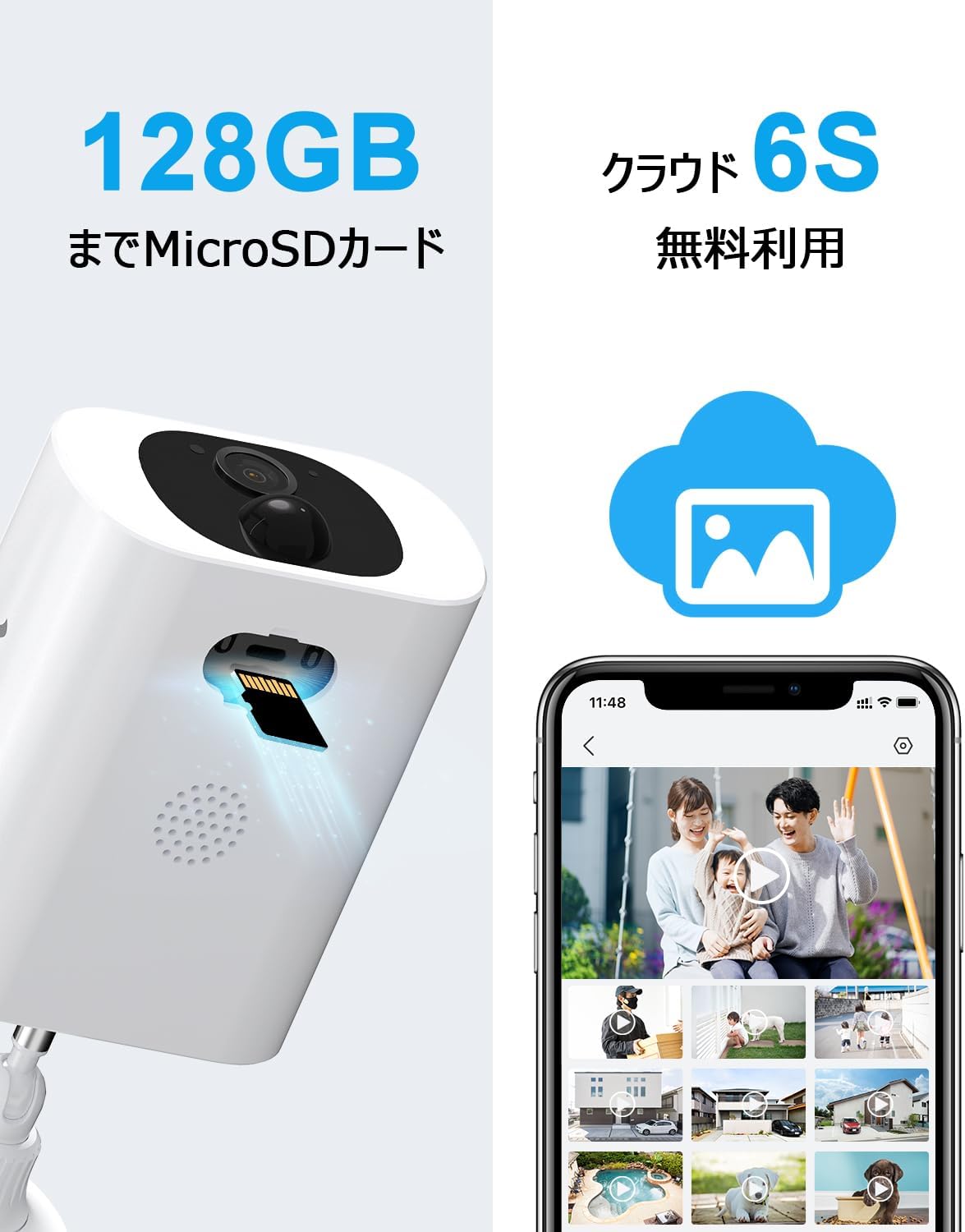
Figure 3.2: Side view of the camera highlighting the MicroSD card slot and speaker grille.
- Camera Lens: Captures video footage.
- PIR Motion Sensor: Detects human and large animal movement.
- Solar Panel: Charges the internal battery using sunlight.
- Microphone: Captures audio for two-way communication and recording.
- Speaker: Outputs audio for two-way communication and alarms.
- MicroSD Card Slot: For local video storage (supports up to 128GB).
- Mounting Base: For secure installation on walls or other surfaces.
4. Setup
4.1 Initial Charging
Before first use, fully charge the camera using the provided USB cable and a standard 5V/1A USB power adapter (not included). This ensures optimal battery performance. The charging port is typically located under a protective cover on the camera body.

Figure 4.1: Illustration of the camera's solar panel charging under sunlight, indicating power flow into the internal battery.
4.2 App Installation
Download the official ANRAN app from your smartphone's app store (iOS or Android). Search for "ANRAN" or scan the QR code provided in the quick start guide (if available).

Figure 4.2: A user comfortably using the ANRAN app on their smartphone, demonstrating the ease of interaction with the camera system.
4.3 Camera Pairing
- Open the ANRAN app and create an account or log in.
- Tap the "+" icon to add a new device.
- Follow the on-screen instructions to connect the camera to your 2.4GHz Wi-Fi network. Note: This camera only supports 2.4GHz Wi-Fi; 5GHz Wi-Fi is not supported.
- Ensure the camera is near your Wi-Fi router during the pairing process (within 10-15 meters) for a stable connection.
4.4 Mounting
Choose a suitable outdoor location for mounting. Consider areas with good sunlight exposure for the solar panel and a clear view of the area you wish to monitor. The camera is IP65 waterproof and dustproof, suitable for various weather conditions.

Figure 4.3: A woman easily installing the ANRAN C3-500 Million Security Camera on an exterior wall, demonstrating its simple, wire-free setup.
- Mark the drilling points using the mounting base as a template.
- Drill holes and insert the provided anchors.
- Secure the mounting base to the wall with screws.
- Attach the camera to the mounting base and adjust the angle for optimal coverage.
5. Operation
5.1 Live View
Open the ANRAN app and select your camera from the device list to access the live video feed. You can view real-time footage from anywhere with an internet connection.
5.2 Two-Way Audio
The camera features a built-in microphone and speaker, enabling two-way communication. Tap the microphone icon in the live view to speak through the camera, and listen to audio from the camera's surroundings.

Figure 5.1: Demonstrates the two-way audio feature, allowing communication with visitors or delivery personnel through the camera via a smartphone.
5.3 Recording & Playback
The camera supports both MicroSD card storage (up to 128GB) and cloud storage for recorded footage. Motion-triggered events are automatically recorded.
Figure 5.2: Visual representation of the camera's support for both local MicroSD card storage and cloud-based video recording, offering flexible storage solutions.
- MicroSD Card: Insert a compatible MicroSD card into the designated slot. Recordings will be saved locally.
- Cloud Storage: The camera offers free cloud recording. Refer to the app for details on accessing and managing cloud footage.
- Playback: Access recorded events through the app's playback timeline or event list.
5.4 Motion Detection & Alerts
The camera utilizes PIR human detection to minimize false alarms caused by rain, small animals, or insects. When motion is detected, you will receive instant notifications on your smartphone.
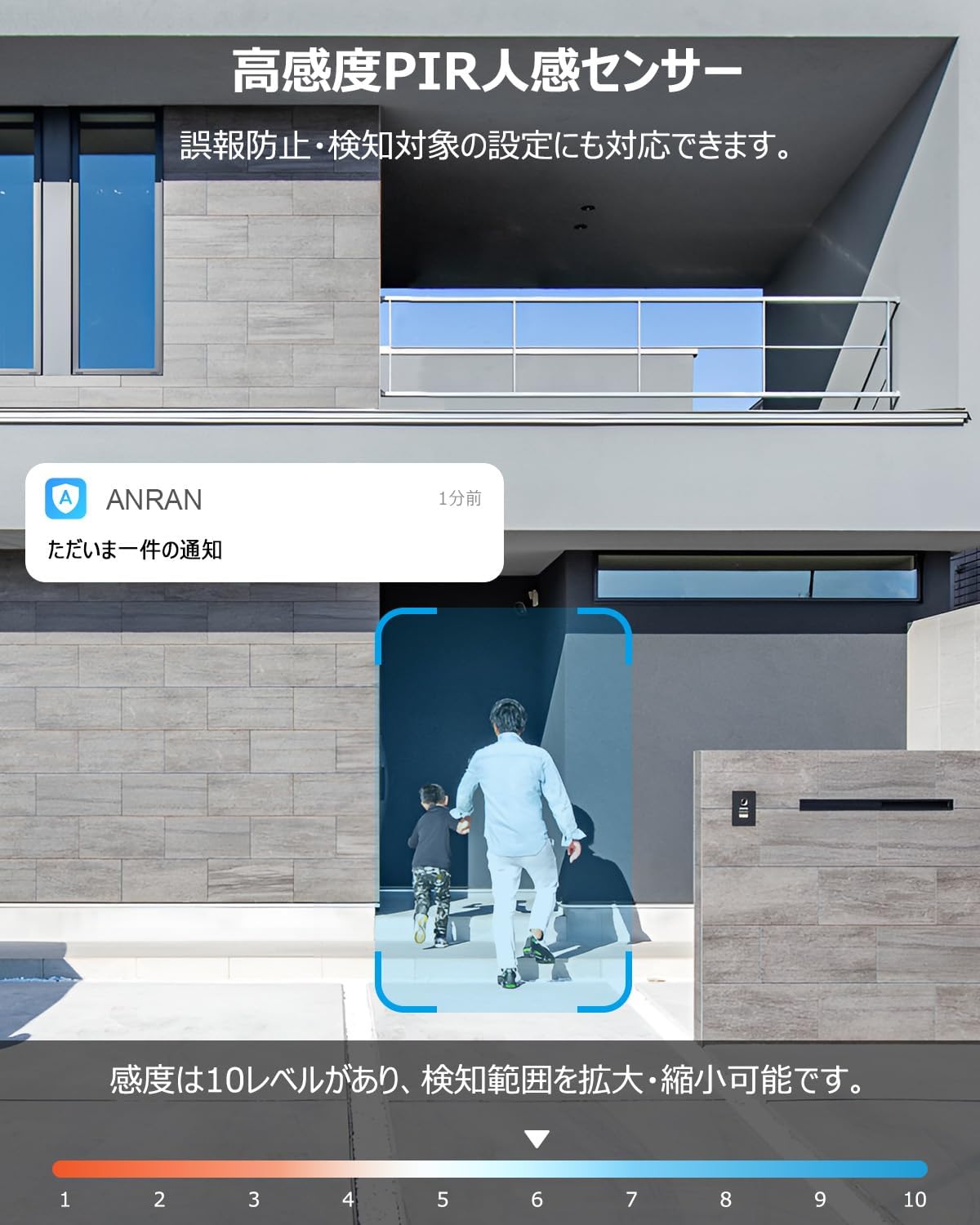
Figure 5.3: Illustrates the camera's PIR human detection feature, showing a notification on a smartphone when a person is detected.
- Sensitivity Adjustment: The app allows you to adjust the PIR sensor's sensitivity (10 levels) and define specific detection areas to suit your environment and reduce unwanted alerts.
- AI Detection: The camera's AI can differentiate between people, pets, vehicles, and packages, providing more accurate alerts.
- Sound and Light Deterrent: Upon detection, the camera can activate a bright LED light and an alarm siren to deter intruders.
5.5 Night Vision Modes
The camera offers multiple night vision modes for clear monitoring in low-light conditions:

Figure 5.4: Depicts the three available night vision modes: full-color night vision, infrared (black and white) night vision, and alarm mode with activated light and siren.
- Infrared Night Vision: Provides clear black and white images in complete darkness up to 10 meters.
- Color Night Vision: Utilizes built-in spotlights to provide full-color video even at night.
- Alarm Mode: Combines light and sound alerts with recording upon detection.
5.6 Device Sharing
You can share access to your camera with family members or trusted individuals through the ANRAN app. This allows multiple users to view live feeds and recorded footage simultaneously.
5.7 Alexa Integration
The ANRAN C3-500 Million camera is compatible with Alexa. Follow the instructions in the ANRAN app or Alexa app to link your camera and enable voice commands for live view on compatible Alexa devices.
6. Maintenance
6.1 Cleaning
Regularly clean the camera lens and solar panel with a soft, damp cloth to ensure optimal performance. Avoid using harsh chemicals or abrasive materials that could scratch the surfaces.
6.2 Battery Management
The integrated solar panel is designed to keep the camera's battery charged under normal sunlight conditions. If the camera is installed in a shaded area or during prolonged periods of low sunlight, the battery level may drop. You can manually recharge the camera using the USB cable if needed.
6.3 Firmware Updates
Periodically check the ANRAN app for available firmware updates. Updates often include performance improvements, new features, and security enhancements. Follow the in-app instructions to update your camera's firmware.
7. Troubleshooting
| Problem | Possible Cause | Solution |
|---|---|---|
| Camera won't power on. | Low battery; power button not pressed. | Fully charge the camera via USB. Press and hold the power button. |
| Cannot connect to Wi-Fi. | Incorrect Wi-Fi password; 5GHz network; camera too far from router. | Ensure correct 2.4GHz Wi-Fi password. Move camera closer to router (10-15m). Reset camera and try pairing again. |
| Frequent false alarms. | High PIR sensitivity; environmental factors (trees, traffic). | Adjust PIR sensitivity in the app. Define specific detection zones to exclude irrelevant areas. |
| Poor night vision quality. | Obstructions; dirty lens. | Ensure no obstructions block the view. Clean the camera lens. |
| Two-way audio not working. | Microphone/speaker muted in app; network issues. | Check app settings for audio mute. Ensure stable network connection. |
8. Specifications
| Feature | Detail |
|---|---|
| Model | C3-500 Million |
| Video Resolution | 5 Megapixels (1920p) |
| Video Compression | H.265+ |
| Connectivity | 2.4GHz Wi-Fi (5GHz not supported) |
| Power Source | Battery-powered with integrated Solar Panel |
| Night Vision Range | Up to 10 meters |
| Motion Detection | PIR Human Detection, AI Object Recognition |
| Audio | Two-way audio (built-in microphone and speaker) |
| Storage Options | MicroSD card (up to 128GB), Cloud Storage |
| Weather Resistance | IP65 Waterproof and Dustproof |
| Dimensions (LxWxH) | 21 x 10 x 13 cm |
| Weight | 530 g |
| Mounting Type | Wall Mount (Screw-in) |
| Certifications | PSE, Technical Conformity (Japan) |
9. Warranty and Support
ANRAN is committed to providing high-quality products. This product has undergone strict quality control, production management, and inspection processes.
The product has obtained Japanese PSE certification and Technical Conformity certification, ensuring its safety and reliability for use.
For any questions, issues, or malfunctions related to your surveillance camera, please feel free to contact our customer support. Contact details are typically printed on the last page of the physical instruction manual or available through the ANRAN app.
- Phone Support Hours: Monday - Friday, 10:00 - 13:00 and 14:30 - 19:30 (Japan time)
- Email Support: Available 24 hours a day.
For more information and support, please visit the official ANRAN store: ANRAN Official Store
Related documentsC3-500 Million


Ask a question about this manual
Ask about setup, troubleshooting, compatibility, parts, safety, or missing instructions. Manuals+ will review the question and use this page’s manual context to help answer it.