
1. Introduction
Thank you for choosing the Transformers TF-T18 Megatron Open Ear Earbuds. These wireless Bluetooth 5.4 headphones are designed to provide a comfortable and immersive audio experience while allowing you to remain aware of your surroundings. This manual provides detailed instructions for setup, operation, and maintenance to ensure optimal performance and longevity of your device.
2. Package Contents
Please verify that all items are present in your package:
- TF-T18 Wireless Earbuds x 1 pair
- Portable Charging Box x 1
- USB-C Charging Cable x 1
- User Manual x 1
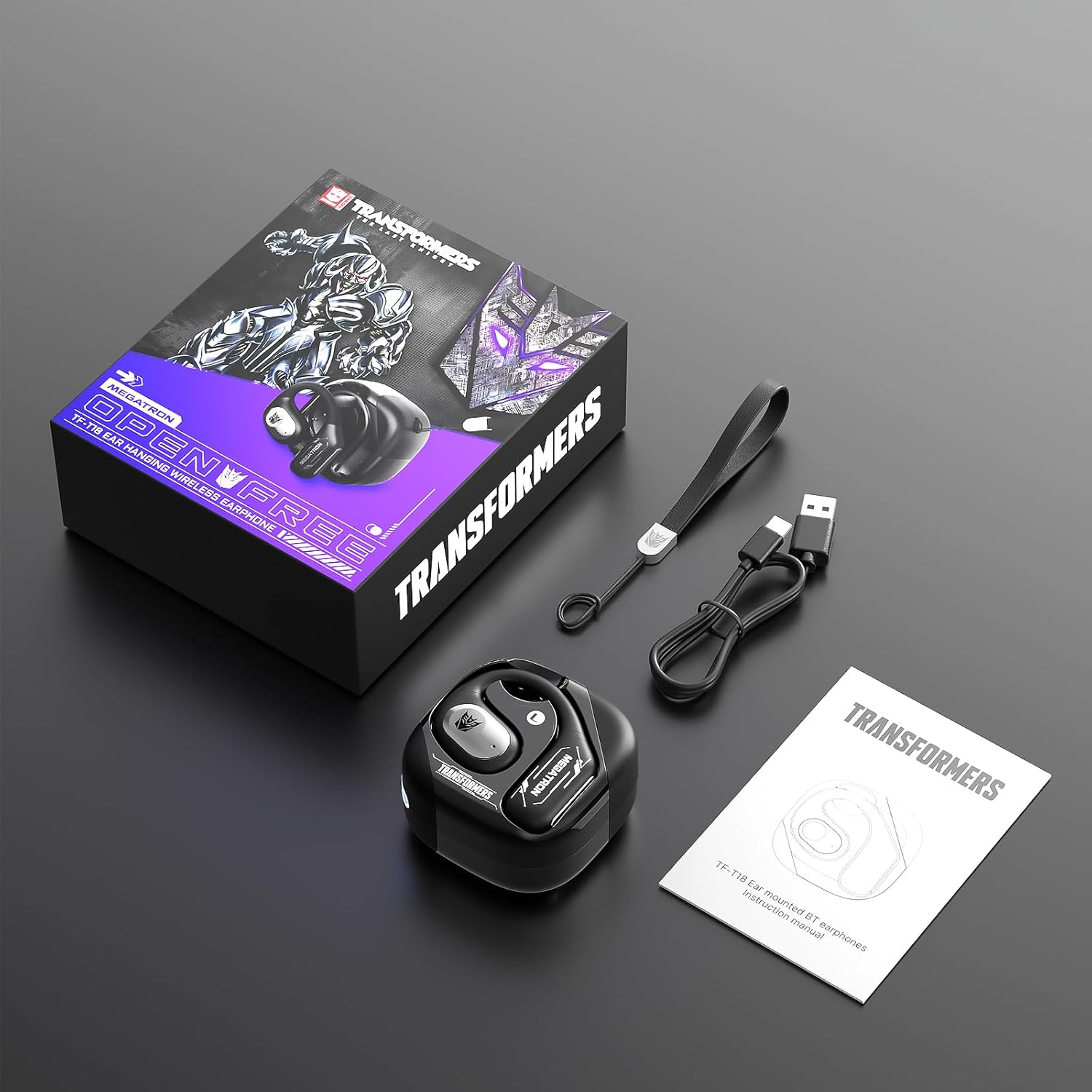
Image: Contents of the Transformers TF-T18 Megatron Open Ear Earbuds package.
3. Product Overview
The TF-T18 Megatron earbuds feature an open-ear design for comfort and situational awareness. Each earbud is equipped with touch controls for easy management of audio and calls.
Earbud Components
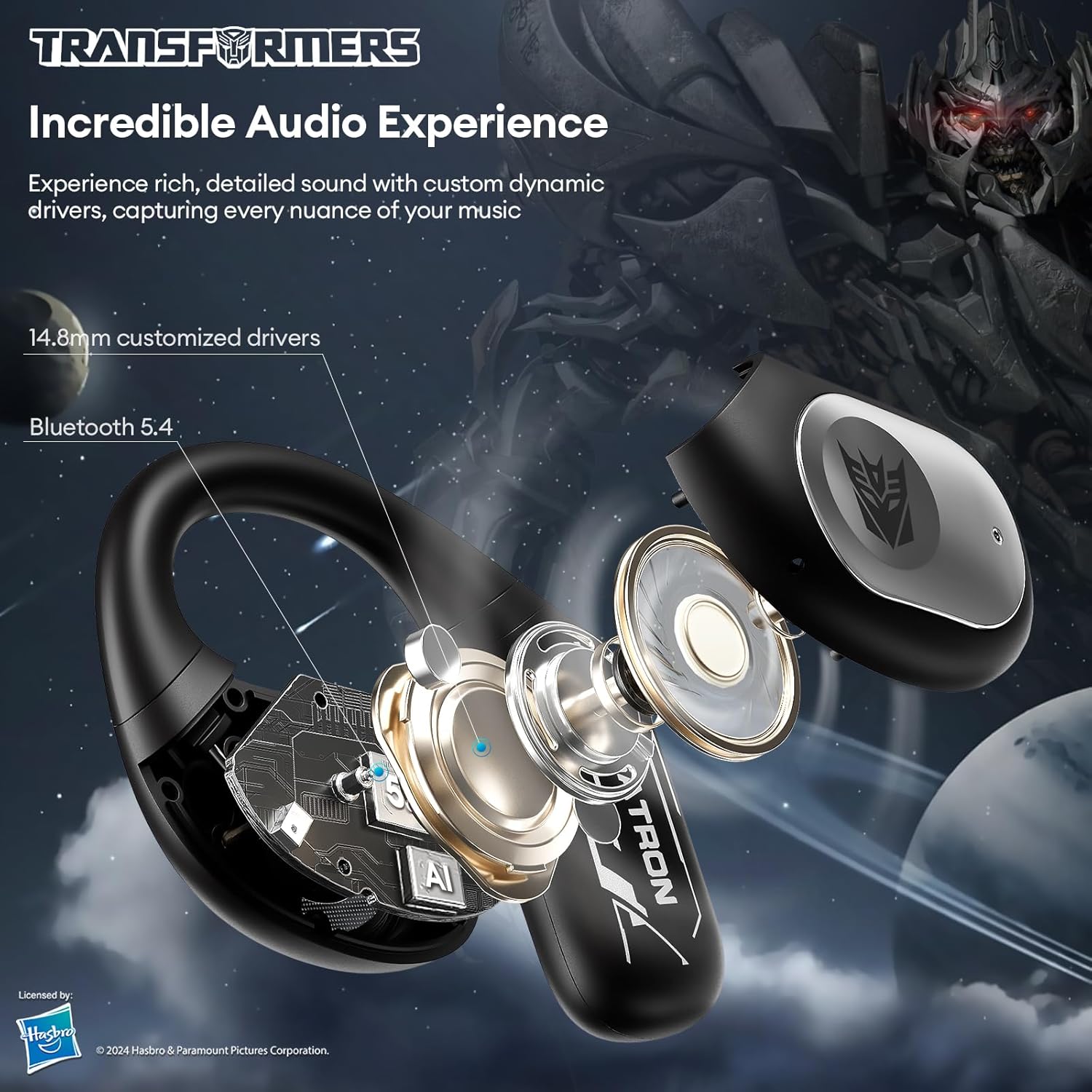
Image: Exploded view illustrating the internal components of the TF-T18 earbud, highlighting the 14.8mm customized drivers and Bluetooth 5.4 technology.
- Open-Ear Design: Allows ambient sound awareness.
- Touch Control Area: For managing playback, calls, and voice assistant.
- Microphone: For calls and voice commands.
- Charging Contacts: For charging within the case.
Charging Case
The portable charging case protects your earbuds and recharges them on the go. It features a USB-C charging port and LED indicators for battery status.

Image: The TF-T18 Megatron Open Ear Earbuds securely placed within their charging case.
4. Setup
4.1 Charging the Earbuds and Case
Before first use, fully charge the earbuds and charging case.
- Place the earbuds into the charging case, ensuring they are correctly seated.
- Connect the USB-C charging cable to the charging port on the case and to a power source (e.g., computer USB port, wall adapter).
- The LED indicator on the case will show charging status. A full charge takes approximately 1.5 hours.
- The earbuds provide up to 6 hours of playback on a single charge, with the charging case extending total playtime to approximately 60 hours.

Image: The TF-T18 Megatron earbuds and charging case, highlighting the impressive 60-hour total battery life.
4.2 Bluetooth Pairing
Follow these steps to pair your earbuds with a Bluetooth-enabled device:
- Open the charging case. The earbuds will automatically enter pairing mode, indicated by a flashing LED light on the earbuds.
- On your device (smartphone, tablet, etc.), enable Bluetooth.
- Search for available Bluetooth devices and select "TF-T18" from the list.
- Once connected, the LED indicator on the earbuds will stop flashing. You will hear an audio prompt confirming the connection.
- The earbuds will automatically reconnect to the last paired device when taken out of the case, if Bluetooth is enabled on the device.

Image: A smartphone displaying the Bluetooth pairing menu, with the TF-T18 earbuds ready for connection.
5. Wearing Instructions
For optimal comfort and sound quality, ensure the earbuds are worn correctly:
- Take out the earbuds from the charging case.
- Place the earbud above your ear, with the main body resting gently against your ear.
- Rotate the earbud backward along the auricle to achieve a secure and comfortable fit. The ear hook should rest over the top of your ear.
- Adjust the earbud slightly to ensure the sound outlet is positioned correctly for clear audio.

Image: Step-by-step guide on how to correctly wear the TF-T18 open-ear earbuds.

Image: A user demonstrating the comfortable and secure fit of the TF-T18 open-ear earbuds.
6. Operating Instructions
6.1 Touch Controls
The TF-T18 earbuds feature intuitive touch controls on each earbud. Refer to the diagram below for specific functions:

Image: Visual guide to the smart touch controls on the TF-T18 earbuds.
- Single Tap: Play/Pause music, Answer/End call.
- Double Tap (Left Earbud): Volume Down.
- Double Tap (Right Earbud): Volume Up.
- Triple Tap (Left Earbud): Previous Track.
- Triple Tap (Right Earbud): Next Track.
- Long Press (2 seconds): Reject call, Activate Voice Assistant.
- Long Press (5 seconds, when off): Power On.
- Long Press (5 seconds, when on): Power Off.
6.2 Multipoint Pairing
The TF-T18 earbuds support multipoint pairing, allowing connection to two devices simultaneously. This enables seamless switching between devices without manual re-pairing.
- Pair the earbuds with the first device as described in Section 4.2.
- Disable Bluetooth on the first device. The earbuds will re-enter pairing mode.
- Pair the earbuds with the second device.
- Re-enable Bluetooth on the first device. The earbuds should now be connected to both devices.
When a call comes in on one device, the earbuds will automatically switch to that device. When the call ends, they will revert to the audio from the other device.

Image: The TF-T18 earbuds connected to both a smartphone and a laptop simultaneously, illustrating multipoint pairing functionality.
6.3 Audio Modes (Music/Game)
The earbuds may offer different audio modes optimized for specific uses:
- Music Mode: Provides high-fidelity, balanced audio for a rich listening experience.
- Game Mode: Offers low-latency, immersive stereo sound for precise gameplay responses and heightened environmental awareness.
Refer to the specific touch control instructions for switching between modes, if available (typically a long press or specific tap sequence not detailed in the general product info).

Image: Comparison of Music Mode for detailed audio and Game Mode for low-latency, immersive sound.
7. Maintenance
Proper maintenance ensures the longevity and performance of your earbuds:
- Cleaning: Use a soft, dry, lint-free cloth to clean the earbuds and charging case. Do not use harsh chemicals or abrasive materials.
- Water Resistance: The earbuds are water-resistant. Avoid submerging them in water or exposing them to high-pressure water jets. Dry them thoroughly if they get wet.
- Storage: Store the earbuds in their charging case when not in use to protect them and keep them charged. Avoid extreme temperatures.
- Charging Port: Keep the USB-C charging port free of dust and debris.
8. Troubleshooting
If you encounter issues with your TF-T18 Megatron earbuds, refer to the following common solutions:
| Problem | Solution |
|---|---|
| Earbuds not pairing |
|
| No sound from one earbud |
|
| Earbuds not charging |
|
| Poor call quality |
|
9. Specifications
Key technical specifications for the Transformers TF-T18 Megatron Open Ear Earbuds:
- Model: TF-T18
- Bluetooth Version: 5.4
- Wireless Communication Technology: Bluetooth
- Audio Driver Type: Dynamic Driver
- Audio Driver Size: 16 Millimeters
- Frequency Range: 20 Hz - 20,000 Hz
- Impedance: 32 Ohm
- Battery Life (Earbuds): Up to 6 hours (single charge)
- Total Playtime (with Charging Case): Up to 60 hours
- Charging Time: Approximately 1.5 hours
- Charging Case Battery Capacity: 300 Milliamp Hours
- Control Type: Touch Control
- Special Features: Noise Cancellation (Environmental Noise Cancellation for calls), Open-Ear Design, Multipoint Pairing
- Water Resistance Level: Water Resistant
- Material: Plastic
- Item Weight: 0.17 Kilograms (earbuds + case)
- Product Dimensions (Charging Case): 2.27 x 2.26 x 1.39 inches
- Compatible Devices: Wide range of Bluetooth-enabled smartphones, tablets, and other audio devices (e.g., iPhone, Samsung Galaxy, Moto, Sony Xperia, Xiaomi, Huawei, OnePlus, LG).
10. Warranty and Support
For warranty information and customer support, please refer to the warranty card included in your package or visit the official Transformers product support website. If you experience any issues not covered in this manual, please contact customer service for assistance.
Manufacturer: TRANSFORMERS

