
1. Introduction
This manual provides instructions for the econtrolly GA248AWSA replacement infrared remote control. This remote is designed to be compatible with Sharp Soundbar HT-SB600 and HTSB600 Home Theater Systems, offering a direct replacement for the original remote control. No programming or pairing is required for operation.
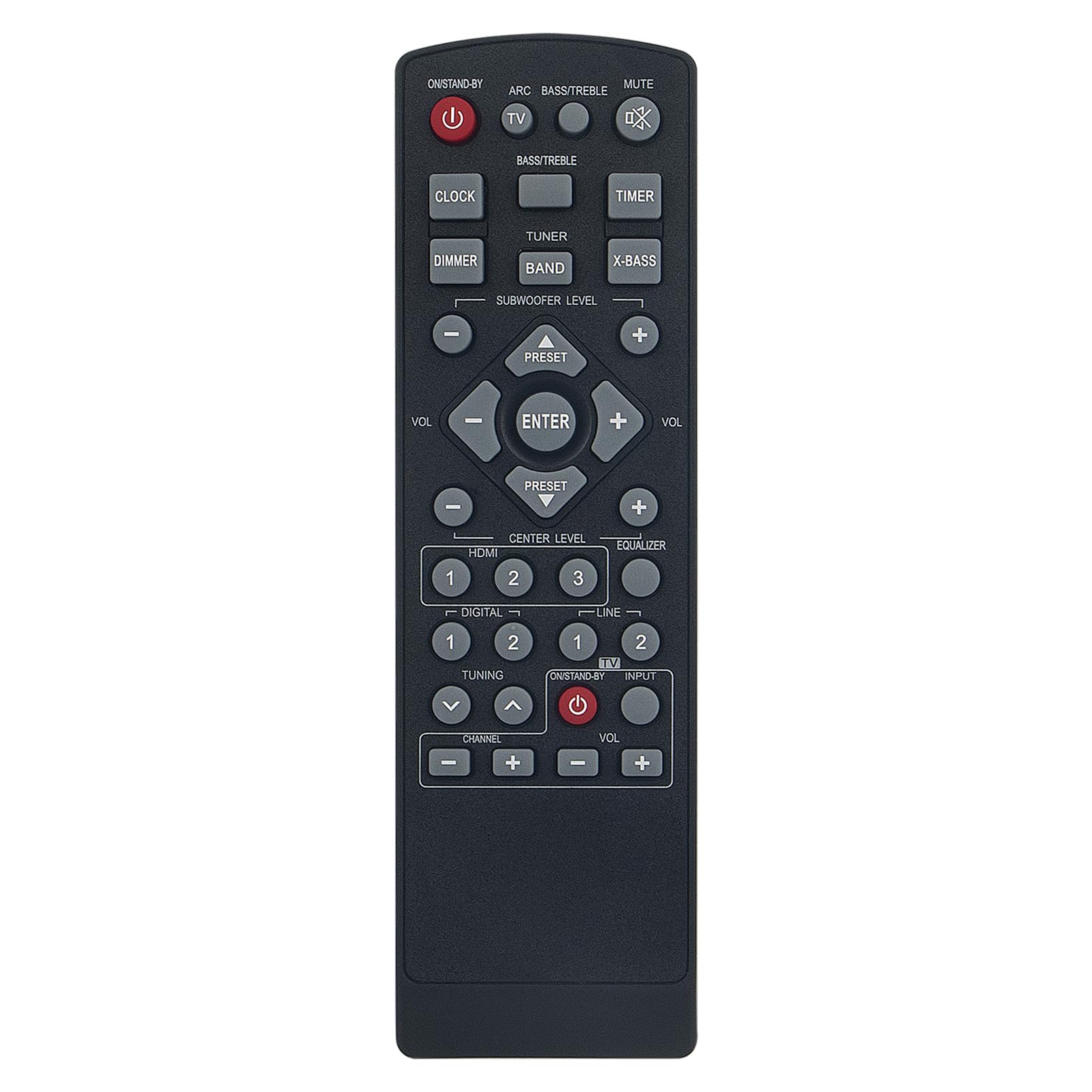
Image 1.1: Comparison of the econtrolly replacement remote (left) and the original Sharp remote (right). The replacement remote offers similar functionality and button layout.
2. Product Overview
The econtrolly GA248AWSA remote control is a dedicated replacement unit for specific Sharp Soundbar models. It operates using infrared technology and requires two AAA batteries (not included). Its ergonomic design ensures comfortable handling.
Package Contents:
- 1 x econtrolly GA248AWSA Infrared Remote Control
Compatibility:
- Sharp Soundbar HT-SB600
- Sharp Soundbar HTSB600
- Compatible Home Theater Systems

Image 2.1: Front view of the econtrolly GA248AWSA replacement remote control, showing all buttons.
3. Setup
Battery Installation:
The remote control requires two 1.5V AAA alkaline batteries. Ensure correct polarity when inserting the batteries.
- Locate the battery compartment cover on the back of the remote control.
- Slide the cover downwards or press the latch (if present) and lift to open the compartment.
- Insert two AAA batteries, matching the (+) and (-) terminals as indicated inside the compartment.
- Replace the battery compartment cover by sliding it back into place until it clicks securely.
Once batteries are installed, the remote is ready for use with compatible Sharp Soundbar models without any additional programming.
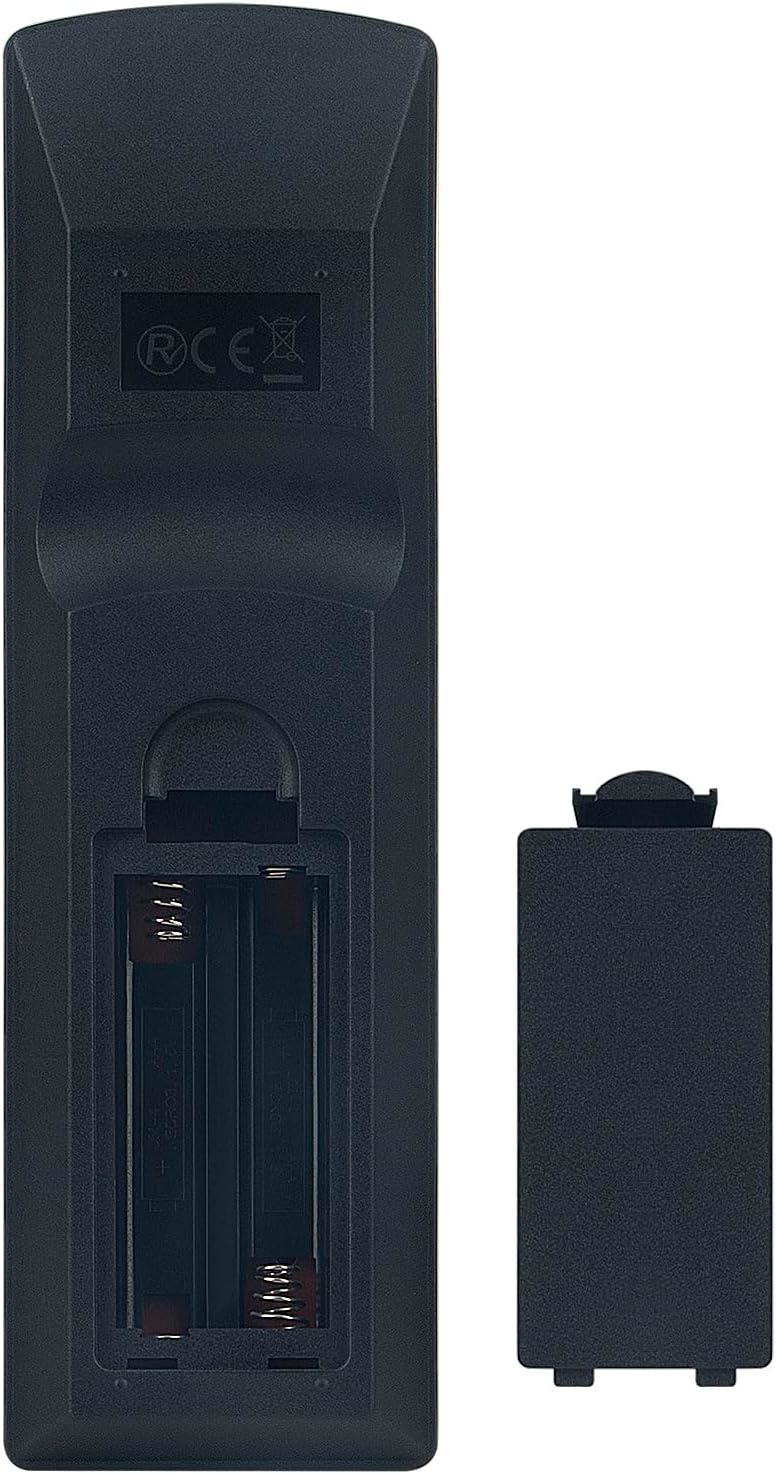
Image 3.1: Battery compartment open.

Image 3.2: Battery compartment closed.
4. Operating Instructions
Point the remote control directly at the infrared receiver on your Sharp Soundbar. Ensure there are no obstructions between the remote and the soundbar.
Key Button Functions:

Image 4.1: Angled view of the remote control, showing button layout.
- ON/STAND-BY (Red Button): Powers the soundbar on or puts it into standby mode.
- TV (Red Button): Powers the connected TV on or off.
- MUTE: Mutes or unmutes the sound.
- VOL (+/-): Increases or decreases the main volume.
- SUBWOOFER LEVEL (+/-): Adjusts the subwoofer volume level.
- CENTER LEVEL (+/-): Adjusts the center channel volume level.
- BASS/TREBLE: Accesses bass and treble settings.
- X-BASS: Enhances bass output.
- EQUALIZER: Cycles through equalizer presets.
- HDMI (1, 2, 3): Selects HDMI input sources.
- DIGITAL (1, 2): Selects digital audio input sources.
- LINE (1, 2): Selects analog audio input sources.
- INPUT: Cycles through available input sources.
- CLOCK: Accesses clock settings.
- TIMER: Sets or adjusts the sleep timer.
- TUNER: Selects tuner mode.
- BAND: Changes radio bands (e.g., FM/AM).
- PRESET (+/-): Navigates through radio presets or other stored settings.
- Navigation Buttons (Up, Down, Left, Right) & ENTER: Used for menu navigation and selection.
- CHANNEL (+/-): Changes TV channels (if TV control is enabled).
- DIMMER: Adjusts display brightness.
- ARC: Activates Audio Return Channel function.

Image 4.2: Typical usage of the remote control with a home theater system.
5. Maintenance
Battery Replacement:
Replace batteries when the remote control's response becomes sluggish or stops working. Always replace both batteries at the same time with new 1.5V AAA alkaline batteries. Do not mix old and new batteries, or different types of batteries.
Cleaning:
To clean the remote control, wipe it with a soft, dry cloth. Do not use liquid cleaners, abrasive pads, or chemical solvents, as these can damage the remote's surface or internal components.
Storage:
If the remote control will not be used for an extended period, remove the batteries to prevent leakage and potential damage to the device.
6. Troubleshooting
- Remote not responding:
- Check if the batteries are inserted correctly with the correct polarity.
- Replace old batteries with new 1.5V AAA alkaline batteries.
- Ensure there are no obstructions between the remote control and the soundbar's infrared receiver.
- Make sure the remote is pointed directly at the soundbar.
- Short operating range:
- Replace the batteries. Low battery power can reduce the remote's effective range.
- Ensure the infrared sensor on the soundbar is clean and not obstructed.
- Specific functions not working:
- Verify that your Sharp Soundbar model (HT-SB600/HTSB600) is compatible with this replacement remote.
- Some advanced functions might require specific settings on your soundbar. Refer to your soundbar's original manual for details.
7. Specifications
| Brand | econtrolly |
| Model Number | GA248AWSA RRMCGA248A RRMCGA248AWSA (SENUO-GA248AWSA-GAIX) |
| Connectivity Technology | Infrared (IR) |
| Compatible Devices | Sharp Soundbar HT-SB600, Home Theater Systems |
| Power Source | 2 x AAA 1.5V Batteries (not included) |
| Special Features | Ergonomic design |
| Color | Black |
| Product Dimensions | 15 x 4 x 1.5 cm (approximately 5.9 x 1.6 x 0.6 inches) |
| Product Weight | 90.7 g (approximately 3.2 ounces) |
8. Warranty and Support
Specific warranty details for this replacement remote control are not provided in this manual. For information regarding warranty coverage, returns, or technical support, please contact the seller or retailer from whom the product was purchased.
Extended protection plans may be available for purchase separately. Please refer to your purchase documentation for details on any extended warranties.
