
ZIZEV ZIZEV5127ysthcb
ZIZEV Motor Brushless Controller Kit User Manual
Model: ZIZEV5127ysthcb
Brand: ZIZEV
1. Introduction
This user manual provides detailed instructions for the installation, operation, and maintenance of your ZIZEV Motor Brushless Controller Kit. This kit is designed to enhance the performance of DIY electric bikes, electric scooters, electric folding bikes, and similar applications.
The controller features a sinewave 3-mode design for smooth and efficient power delivery. Its robust aluminum alloy shell ensures excellent heat dissipation, protecting internal components from overheating. The S866 panel, made of durable ABS material, offers lightweight, wear-resistant, and waterproof protection.
2. Package Contents
Please verify that all components listed below are included in your package:
- 1 x Controller
- 1 x S866 Panel
- 1 x Panel User Manual
- 1 x Thumb Throttle
- 1 x 2-in-1 Waterproof Cable
- 1 x Assist Sensor
- 1 x Assist Magnet
- 1 x User Manual (this document)

Image: Overview of the ZIZEV Motor Brushless Controller Kit components, including the controller unit, S866 display panel, thumb throttle, wiring harnesses, and pedal assist sensor with magnet.
3. Product Specifications
| Feature | Detail |
|---|---|
| Controller Voltage | DC24V, 36V, 48V (Auto-sensing) |
| Current | 17±1A |
| Controller Type | Sinewave 3-Mode Brushless DC Motor Controller |
| Compatible Motors | 24V250W, 24V350W, 36V250W, 36V350W, 48V250W, 48V350W (with or without Hall sensors) |
| Controller Material | Aluminum Alloy (grooved design for heat dissipation) |
| Panel Material | ABS Plastic (lightweight, wear-resistant, waterproof) |
| Item Weight | Approx. 593g / 20.9oz (1.31 pounds) |
| Package Dimensions | 7.87 x 5.51 x 3.94 inches |
| Model Number | ZIZEV5127ysthcb |
4. Setup and Installation
Proper installation is crucial for the safe and efficient operation of your electric bike or scooter. It is recommended that installation be performed by an experienced individual or professional.
4.1 Wiring Diagram Overview
The controller features various ports for connecting accessories. Refer to the specific wiring diagram provided with your kit (or the panel user manual) for detailed connection instructions. Below is a general guide:
- Motor Connection: Connect the motor phase wires (usually three thick wires) from the controller to your motor. If your motor has Hall sensors, connect the Hall sensor wires as well. The controller is compatible with motors both with and without Hall sensors.
- Battery Connection: Connect the main power wires (red for positive, black for negative) from the controller to your battery pack. Ensure correct polarity.
- S866 Panel Connection: Connect the S866 display panel to its designated port on the controller. This panel provides real-time data and allows for mode selection.
- Thumb Throttle Connection: Connect the thumb throttle to its corresponding port. This controls the motor speed.
- Pedal Assist Sensor (PAS) Connection: Install the assist sensor and magnet on your pedal crank. Connect the sensor wire to the PAS port on the controller. This enables pedal-assisted riding.
- Brake Lever Connection (Optional): If your brake levers have cut-off sensors, connect them to the brake signal ports on the controller. This will cut power to the motor when brakes are applied.
- Other Connections: Connect any other accessories such as headlights, taillights, or horn if supported by your controller and wiring harness.
Important: Always ensure the power is off before making any connections. Double-check all connections for secure fit and correct polarity to prevent damage to the components.
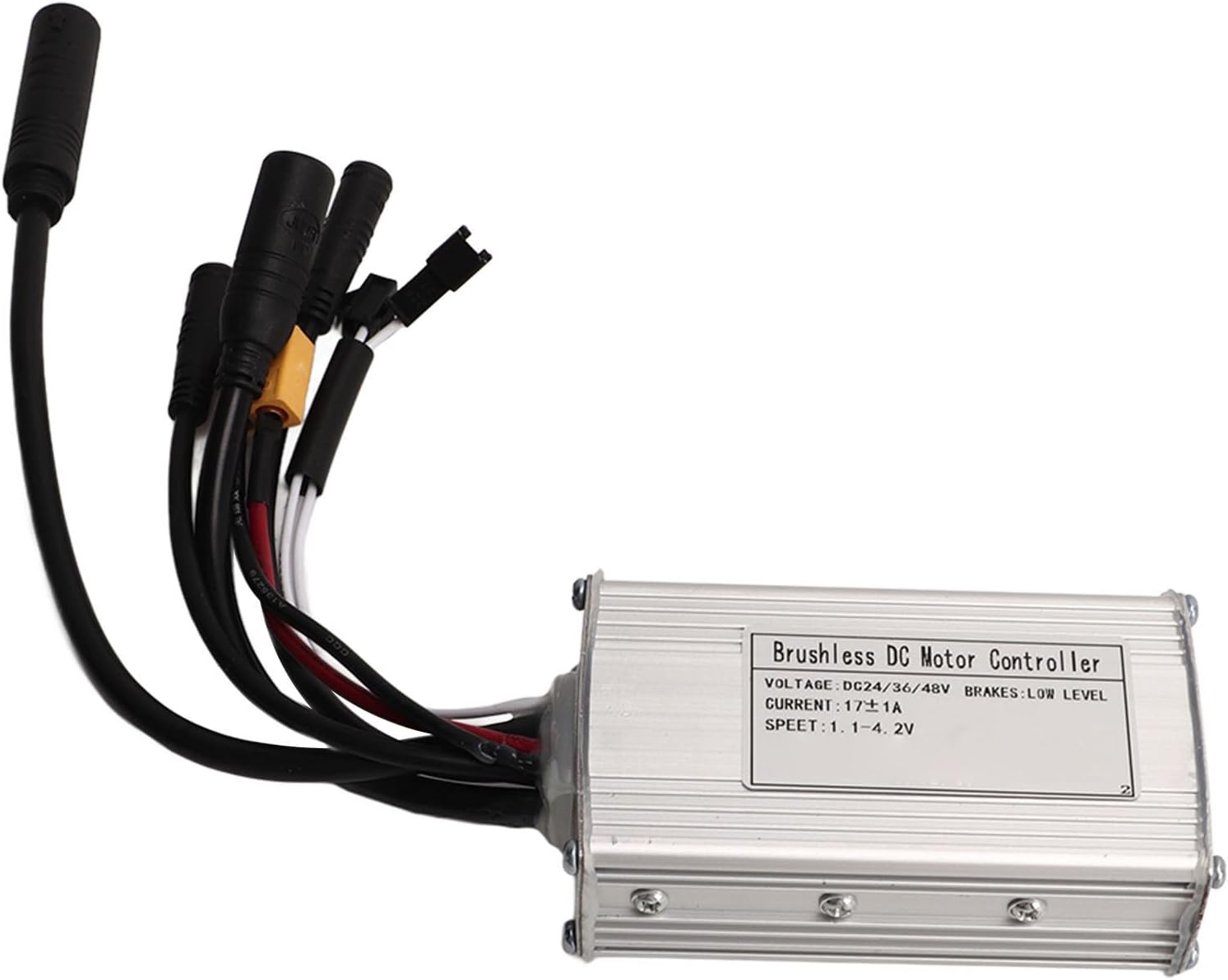
Image: A detailed view of the brushless DC motor controller, showing the various input and output wires for connecting to the motor, battery, display, and other peripherals.
5. Operating Instructions
Once all components are securely connected and verified, you can begin operating your electric bike or scooter.
5.1 S866 Panel Operation
The S866 panel is your primary interface for controlling the system:
- Power On/Off: Press and hold the power button on the S866 panel to turn the system on or off.
- Display Information: The panel displays essential information such as current speed, battery level, assist level, and trip distance.
- Assist Level Adjustment: Use the '+' and '-' buttons to cycle through different pedal assist levels. Higher levels provide more motor assistance.
- Mode Selection: The controller supports 3 modes. Refer to the S866 panel's specific user manual for details on how to switch between modes and adjust settings.
5.2 Riding Modes
The controller supports various riding modes to suit your preference:
- Pedal Assist Mode: The motor provides assistance based on your pedaling effort and the selected assist level.
- Throttle Mode: Use the thumb throttle to control the motor speed directly, without pedaling.
- Manual Mode: Ride without any motor assistance, similar to a traditional bicycle.

Image: An electric bike being ridden outdoors, demonstrating the practical application of the ZIZEV controller kit in enhancing the riding experience.
6. Care and Maintenance
Regular maintenance ensures the longevity and optimal performance of your ZIZEV controller kit.
- Keep Clean: Regularly wipe down the controller and panel with a dry or slightly damp cloth. Avoid using harsh chemicals or abrasive cleaners.
- Check Connections: Periodically inspect all wiring connections to ensure they are secure and free from corrosion. Loose connections can lead to intermittent operation or damage.
- Avoid Water Immersion: While the panel is waterproof, avoid submerging the controller or exposing it to heavy, direct water spray.
- Heat Dissipation: Ensure the controller's grooved casing is not obstructed, allowing for proper airflow and heat dissipation.
- Storage: When not in use for extended periods, store the kit in a dry, cool place, away from direct sunlight and extreme temperatures.
7. Troubleshooting
If you encounter issues with your ZIZEV controller kit, refer to the following common problems and solutions:
| Problem | Possible Cause | Solution |
|---|---|---|
| System does not power on. | Battery low or disconnected; loose power connection; faulty panel. | Charge battery; check battery and controller power connections; ensure panel cable is securely connected. |
| Motor not responding to throttle/PAS. | Loose motor/throttle/PAS connection; faulty sensor; incorrect motor type setting. | Check all relevant cable connections; consult S866 panel manual for motor settings; test throttle/PAS if possible. |
| Intermittent power or erratic behavior. | Loose wiring connections; water ingress; overheating. | Inspect all connections for tightness; ensure controller is dry; allow controller to cool down if hot. |
| Display shows error code. | Specific system fault. | Refer to the S866 Panel User Manual for a list of error codes and their corresponding solutions. |
If the problem persists after attempting these solutions, please contact customer support.
8. Warranty Information
ZIZEV products are manufactured to high-quality standards. Specific warranty terms and conditions, including coverage period and claim procedures, are typically provided at the point of purchase or within the product packaging. Please retain your proof of purchase for warranty claims.
For detailed warranty information, please refer to the documentation included with your product or contact ZIZEV customer support.
9. Customer Support
For technical assistance, troubleshooting beyond this manual, or warranty inquiries, please contact ZIZEV customer support through the following channels:
- Online: Visit the official ZIZEV store on Amazon: ZIZEV Store
- Email: Refer to your product packaging or purchase confirmation for direct email support.
When contacting support, please have your product model number (ZIZEV5127ysthcb) and purchase details ready.
Ask a question about this manual
Ask about setup, troubleshooting, compatibility, parts, safety, or missing instructions. Manuals+ will review the question and use this page’s manual context to help answer it.