
T.F.SKYWINDINTL TF850W
Contents
T.F.SKYWINDINTL TF850W 850W Power Supply Unit
User Instruction Manual
1. Introduction
This manual provides detailed instructions for the installation, operation, and maintenance of your T.F.SKYWINDINTL TF850W 850W Power Supply Unit (PSU). This non-modular 80 Plus Gold certified PSU is designed to provide stable and efficient power for desktop PCs and servers, supporting full voltage input from 100-240V. Please read this manual thoroughly before installation and use to ensure proper functionality and safety.
2. Product Features
- 850W Power Output: Standard ATX form factor, providing 850 watts of continuous power.
- 80 Plus Gold Certified: Achieves up to 90% efficiency under typical loads, reducing energy consumption and heat generation.
- Full Voltage Input (100-240V): Compatible with a wide range of electrical grids, providing stable and safe output.
- Active PFC Type: Enhances power factor correction for improved efficiency and stability.
- Supports Dual CPUs: Engineered with robust performance to support systems with two CPUs.
- Japanese Capacitors: Built with 100% Japanese Capacitors for enhanced reliability and durability.
- Ultra-Quiet Cooling: Features a 140mm hydraulic bearing fan designed for effective heat dissipation with lower noise and reduced vibration.
- Comprehensive Protections: Equipped with heavy-duty protections including Over Voltage Protection (OVP), Under Voltage Protection (UVP), Over Current Protection (OCP), Over Power Protection (OPP), Short Circuit Protection (SCP), and Over Temperature Protection (OTP).
- Upgraded Non-Modular Cables: Includes durable and efficient cables for various components:
- Motherboard: 20+4pin (540mm) x1
- CPU: 4+4pin (580mm) x2
- Graphics Card: 6+2pin (500mm) x4
- Hard Disk (SATA): (420+170+170mm) x6
- Fan (IDE): (400+190+190mm) x3
3. Safety Information
Please observe the following safety precautions to prevent injury and damage to your equipment:
- Always disconnect the power cord from the wall outlet before installing, removing, or cleaning the PSU.
- Do not open the PSU casing. High voltages are present inside, and there are no user-serviceable parts. Opening the casing will void the warranty.
- Ensure proper grounding to prevent electrical shock.
- Install the PSU in a well-ventilated area, away from direct sunlight, heat sources, and moisture.
- Do not force connectors. Ensure they are correctly oriented before plugging them in.
- Use only the cables provided with the PSU.
- Keep out of reach of children.
4. Package Contents
Verify that all items are present in the package:
- T.F.SKYWINDINTL TF850W 850W Power Supply Unit
- AC Power Cord (1.2m)
- Mounting Screws

Image 4.1: The TF850W Power Supply Unit as packaged, showing the unit, its attached cables, and the included AC power cord.
5. Physical Overview
Familiarize yourself with the different parts of your TF850W PSU.
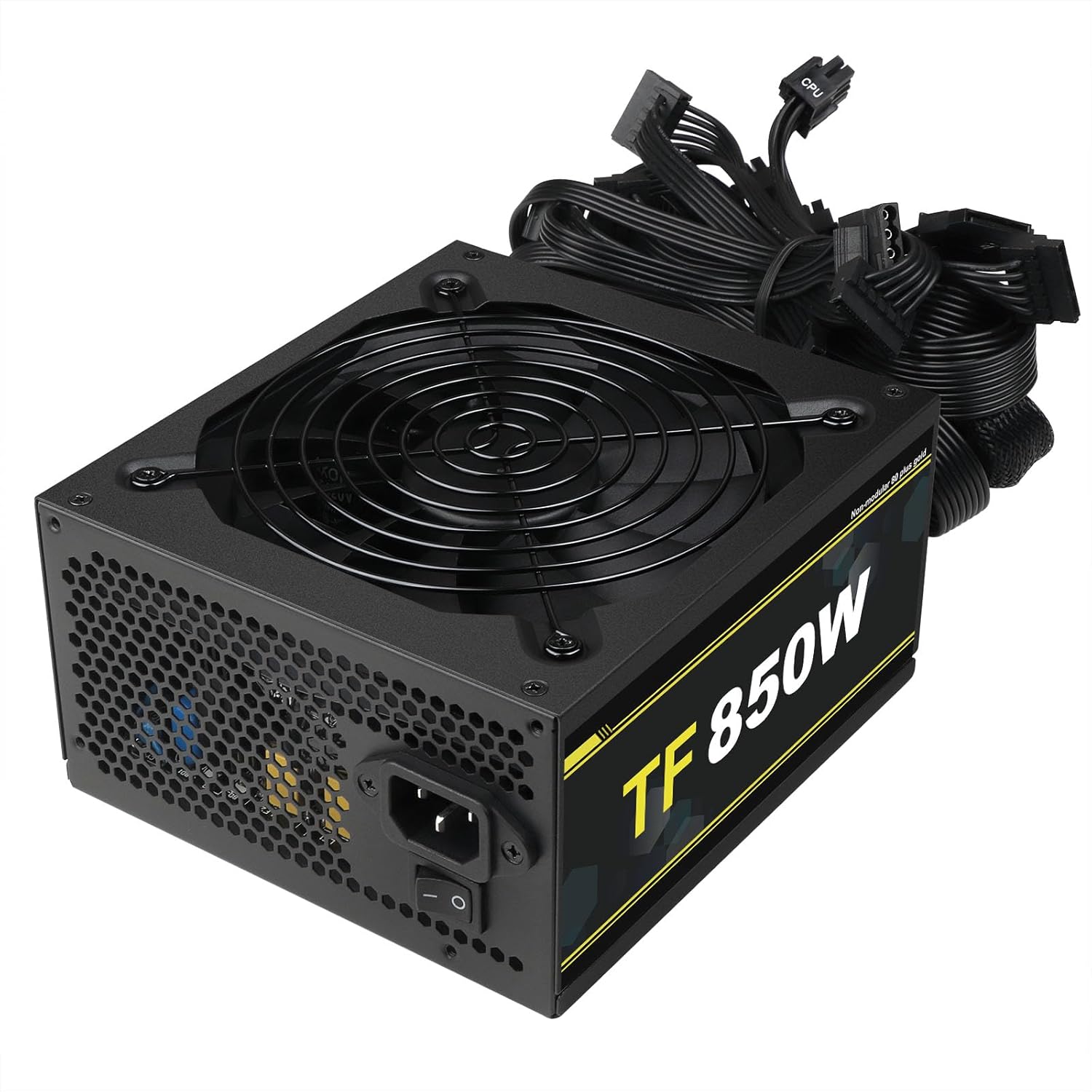
Image 5.1: Angled view of the TF850W PSU, highlighting the fan grill on top and the power input and switch at the rear.

Image 5.2: Close-up top view of the 140mm cooling fan and its protective grill.

Image 5.3: Rear panel of the PSU, featuring the AC power input socket and the main power ON/OFF switch.

Image 5.4: Diagram illustrating the physical dimensions of the TF850W PSU.
6. Installation Guide
Follow these steps to properly install the TF850W Power Supply Unit into your computer system.
6.1 Preparing for Installation
- Turn off your computer and disconnect the power cord from the wall outlet.
- Open your computer case. Refer to your computer case manual for specific instructions.
- If replacing an existing PSU, disconnect all cables from the old PSU to your components (motherboard, graphics card, drives, etc.) and remove the old PSU from the case.
6.2 Installing the PSU
- Carefully place the TF850W PSU into the designated PSU bay in your computer case. Ensure the fan is oriented correctly for optimal airflow (typically facing downwards if there's a bottom vent, or upwards if not).
- Secure the PSU to the case using the provided mounting screws.
6.3 Connecting Cables
Connect the necessary cables from the PSU to your computer components. Refer to your motherboard and component manuals for specific connector locations.

Image 6.1: Overview of the various non-modular cables and connectors included with the TF850W PSU.
- Motherboard Power: Connect the 20+4pin ATX cable to the main power connector on your motherboard. Ensure both parts of the connector are securely latched.
- CPU Power: Connect the 4+4pin CPU power cable(s) to the CPU power connector(s) on your motherboard. Modern motherboards may have one or two such connectors.
- Graphics Card Power: Connect the 6+2pin PCI-E power cable(s) to your graphics card(s). High-performance graphics cards often require multiple 6-pin or 8-pin connectors.
- SATA Power: Connect SATA power cables to your SATA hard drives, solid-state drives (SSDs), and optical drives.
- IDE Power: Connect IDE power cables to older IDE devices or case fans that use this connector type.
- Cable Management: Route cables neatly to improve airflow and aesthetics within your case.
6.4 Final Steps
- Close your computer case.
- Connect the AC power cord to the PSU's power input socket and then to a grounded wall outlet.
7. Operation
To power on your computer after PSU installation:
- Ensure the main power switch on the back of the PSU is in the 'I' (ON) position.
- Press the power button on your computer case.
To power off your computer:
- Shut down your operating system normally.
- For complete power disconnection, switch the main power switch on the back of the PSU to the 'O' (OFF) position and unplug the AC power cord from the wall outlet.
8. Maintenance
Proper maintenance can extend the lifespan of your PSU and ensure optimal performance.
- Cleaning: Periodically clean the PSU's fan grill and surrounding areas to prevent dust buildup, which can impede airflow and lead to overheating. Use compressed air to gently blow dust out of the fan and vents. Always disconnect the PSU from power before cleaning.
- Airflow: Ensure your computer case has adequate airflow. Avoid blocking the PSU's intake or exhaust vents.
- Environment: Operate the PSU in a cool, dry, and well-ventilated environment.
9. Troubleshooting
If you encounter issues with your TF850W PSU, refer to the following common problems and solutions.
| Problem | Possible Cause | Solution |
|---|---|---|
| PSU does not power on / Computer does not start. | Power cord not connected; PSU switch off; Loose internal connections; Faulty component; PSU failure. | Ensure power cord is securely plugged into PSU and wall outlet. Check PSU's ON/OFF switch is in 'I' position. Verify all internal cables (20+4pin, 4+4pin, PCI-E) are firmly connected. Test with minimal components (motherboard, CPU, RAM) to isolate issue. If still no power, PSU may be faulty. |
| Computer shuts down unexpectedly or reboots. | Overload; Overheating; Component short circuit; Unstable power input. | Ensure total power draw does not exceed 850W. Check for proper case ventilation and clean PSU fan. Verify all connections are secure and no cables are pinched. Ensure wall outlet provides stable power. |
| Fan makes unusual noise (e.g., ticking). | Dust buildup; Fan bearing issue. | Disconnect power and gently clean the fan blades and grill with compressed air. If the noise persists, it may indicate a fan bearing issue. |
| Burning smell or smoke. | Internal component failure; Short circuit. | Immediately disconnect power from the wall outlet. Do not attempt to use the PSU. Contact customer service. |
If the problem persists after attempting these solutions, please contact T.F.SKYWINDINTL customer service for further assistance.
10. Technical Specifications
Detailed specifications for the TF850W Power Supply Unit.

Image 10.1: Product label displaying electrical specifications and regulatory compliance marks.
| Specification | Value |
|---|---|
| Model Name | TF850W |
| Output Wattage | 850 Watts |
| Form Factor | ATX |
| Efficiency Certification | 80 Plus Gold |
| PFC Type | Active PFC |
| Input Voltage | 100-240V |
| Cooling Method | Air (140mm Hydraulic Bearing Fan) |
| Product Dimensions (L x W x H) | 6.5 x 5.91 x 3.35 inches (165 x 150 x 85 mm) |
| Item Weight | 4.4 pounds (2 Kilograms) |
| Compatible Devices | Desktop, Gaming PC, Micro ATX Case, Mid Tower PC Case, Personal Computer |
| Protections | OVP, UVP, OCP, OPP, SCP, OTP |
11. Warranty and Support
T.F.SKYWINDINTL is committed to providing high-quality products and customer satisfaction.
11.1 Warranty Information
Please refer to the product packaging or the official T.F.SKYWINDINTL website for specific warranty terms and conditions applicable to your region. Keep your proof of purchase for warranty claims.
11.2 Customer Support
If you encounter any problems or have questions regarding your TF850W Power Supply Unit, please do not hesitate to contact our customer service team. We are dedicated to resolving any inquiries you may have.
For support, please visit the T.F.SKYWINDINTL Store on Amazon or contact us through the platform where you purchased the product.
Documents and downloads
Ask a question about this manual
Ask about setup, troubleshooting, compatibility, parts, safety, or missing instructions. Manuals+ will review the question and use this page’s manual context to help answer it.