
BAOFENG UV-17H
BAOFENG UV-17H GPS Walkie Talkie User Manual
Model: UV-17H
1. Introduction
The BAOFENG UV-17H GPS Walkie Talkie is a high-performance, versatile two-way radio designed for reliable communication in various environments. Equipped with advanced features such as GPS functionality, USB-C charging, and NOAA weather channels, it is an ideal tool for outdoor enthusiasts, emergency responders, and professional users. This manual provides detailed instructions for the proper setup, operation, and maintenance of your UV-17H radio.
2. Package Contents
Please check the package carefully to ensure all items are present and in good condition. If any items are missing or damaged, please contact your retailer.
- 1x BAOFENG UV-17H Radio
- 1x USB-C Charging Battery
- 1x High Gain Antenna
- 1x Charger Dock
- 1x Belt Clip
- 1x Strap
- 1x USB-C Cable
- 1x Screwdriver
- 1x 771 Antenna
- 1x Headset
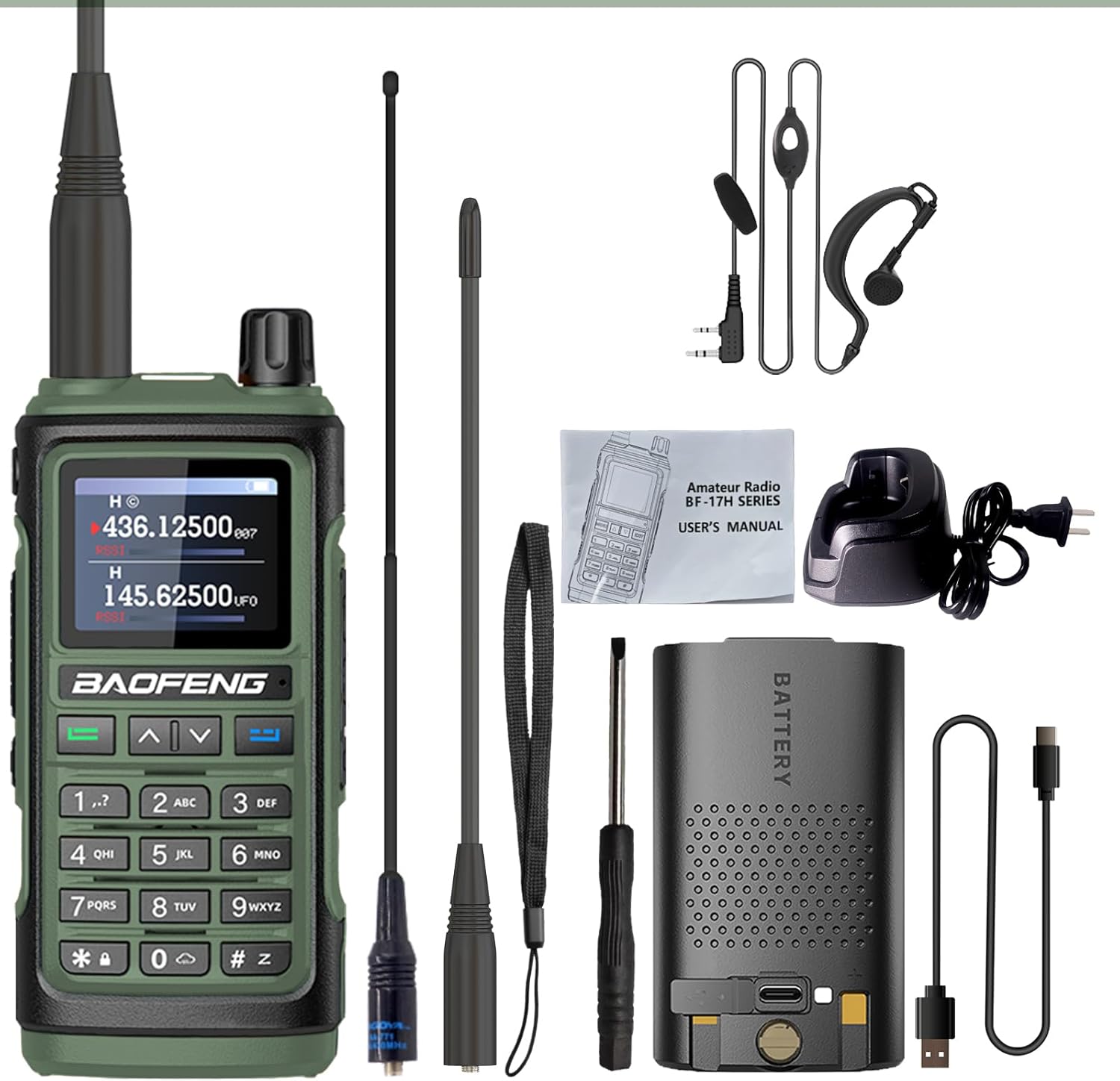
Figure 2.1: BAOFENG UV-17H Package Contents
3. Product Features
The BAOFENG UV-17H is equipped with a comprehensive set of features to enhance your communication experience:
- 1.77-inch Color LCD Screen: Provides clear display of operating information.
- 999 Memory Channels: Ample storage for your preferred frequencies.
- 5W Output Power: Ensures strong and clear transmissions.
- Dual Watch & Dual Standby: Monitor two frequencies simultaneously.
- Three Scan Modes: Time, Carrier, and Search for efficient frequency scanning.
- VOX (Voice Operated Transmission): Hands-free operation.
- Alarm Mode: Site, Code, and Tone alarms for emergency situations.
- Frequency Hopping & Scramble Functions: Enhances communication privacy.
- CTCSS/DCS Scan: For selective calling and interference reduction.
- Roger Beep: Audible tone indicating end of transmission.
- DTMF: Dual-Tone Multi-Frequency signaling.
- Two Lamp Beads Torch: Built-in flashlight for illumination.
- FM Radio Broadcast: Enjoy local FM radio stations.
- GPS Functionality: Advanced GPS for navigation and positioning.
- USB-C Charging: Convenient and versatile charging options.
- 10 NOAA Weather Channels: Access to real-time weather alerts.
- Water Repellent Design: Provides protection against splashes.
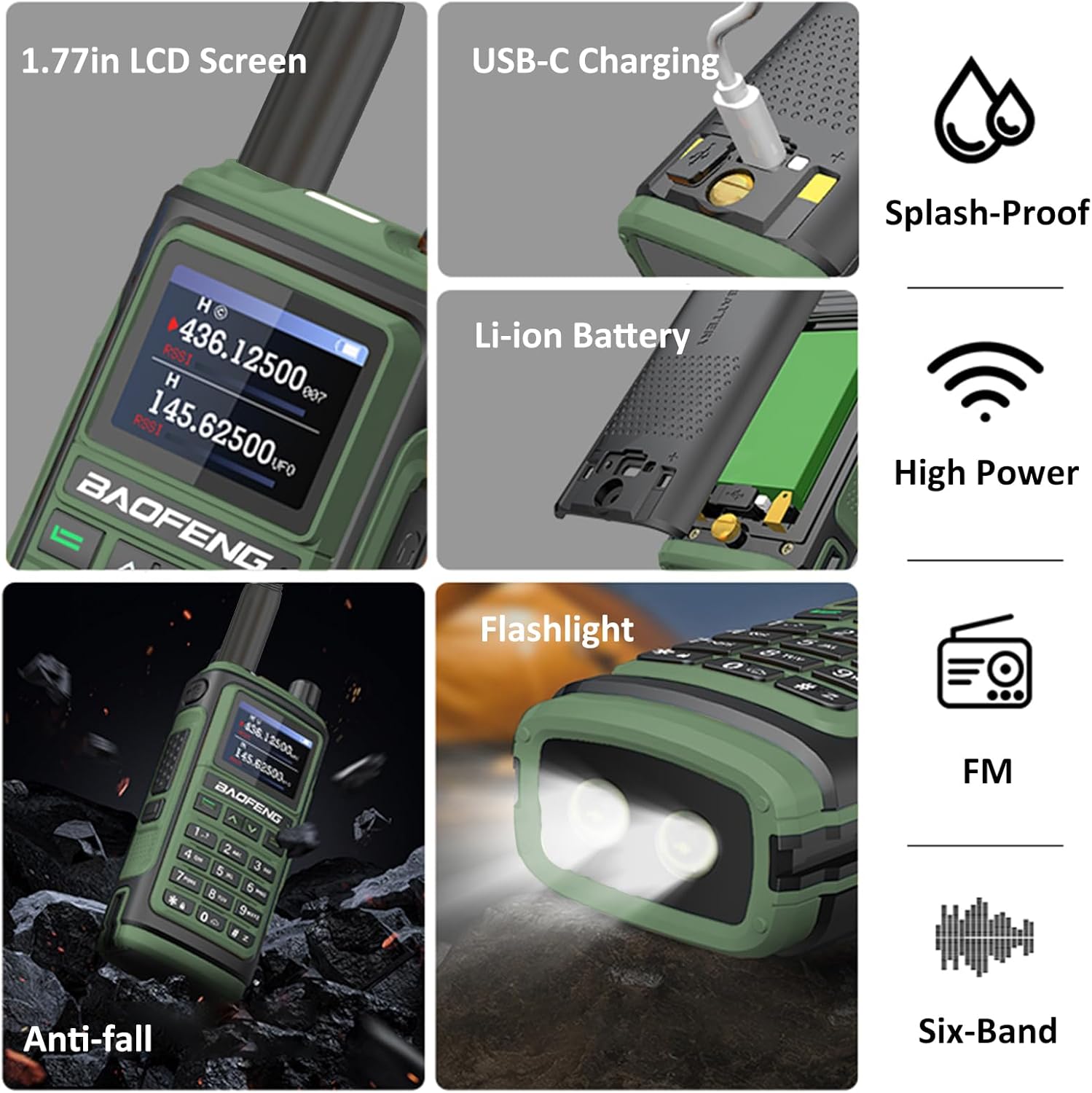
Figure 3.1: Key Features of BAOFENG UV-17H

Figure 3.2: UV-17H Feature Overview

Figure 3.3: GPS Functionality
4. Component Identification
Familiarize yourself with the various parts of your BAOFENG UV-17H radio:

Figure 4.1: BAOFENG UV-17H Component Diagram
- Antenna: For transmitting and receiving radio signals.
- Indicator: LED light indicating status (e.g., transmitting, receiving, charging).
- Switch: Power on/off and volume control knob.
- Flashlight Key: Activates the built-in flashlight.
- PTT Key (Push-to-Talk): Press and hold to transmit, release to receive.
- Squelch Key: Adjusts the squelch level to filter out weak signals or noise.
- Keypads: Numeric and function keys for input and menu navigation.
- 1.77in LCD Screen: Displays channels, frequencies, and menu options.
- Connector Mic: Port for external microphone/speaker accessories.
- Speaker: Outputs received audio.
- Flashlight: Integrated LED light at the bottom of the unit.
5. Setup
5.1 Battery Installation
- Ensure the radio is powered off.
- Align the battery pack with the grooves on the back of the radio.
- Slide the battery pack upwards until it clicks securely into place.
- To remove, press the battery release latch (if present) and slide the battery downwards.
5.2 Charging the Battery
The UV-17H supports convenient USB-C charging.
- Using the Charger Dock:
- Connect the AC adapter to the charger dock and plug it into a power outlet.
- Place the radio with the battery installed into the charging slot of the dock.
- The indicator light on the charger will show charging status (e.g., red for charging, green for fully charged).
- Using USB-C Direct Charging:
- Connect the USB-C cable to the USB-C port on the battery pack.
- Connect the other end of the USB-C cable to a compatible USB power source (e.g., car charger, PC USB port, power bank, or wall adapter).
- The radio's screen or an indicator light will show charging status.
A full charge typically takes approximately 3 hours. The battery provides approximately 2 days of active use and 3 days of standby time.

Figure 5.1: USB-C Charging Options and Battery Performance
5.3 Antenna Installation
- Hold the base of the antenna and screw it clockwise into the antenna connector on top of the radio until it is finger-tight. Do not overtighten.
- Always operate the radio with an antenna attached to prevent damage.
6. Operating Instructions
6.1 Power On/Off and Volume Control
- Power On: Rotate the Switch knob clockwise until you hear a click. The radio will power on and display the startup screen.
- Volume Adjustment: Continue rotating the Switch knob clockwise to increase volume, and counter-clockwise to decrease volume.
- Power Off: Rotate the Switch knob counter-clockwise until you hear a click. The radio will power off.
6.2 Channel/Frequency Selection
- Use the Up/Down Arrow keys to navigate through channels or frequencies.
- Alternatively, use the Keypads to directly input a desired frequency or channel number.
- The UV-17H supports dual band operation (144-148MHz, 420-450MHz).
6.3 Transmitting and Receiving
- Receiving: When a signal is received on the selected frequency, the speaker will output audio. The indicator light may turn green.
- Transmitting:
- Ensure you are on an appropriate frequency for transmission.
- Press and hold the PTT Key on the side of the radio. The indicator light will turn red.
- Speak clearly into the microphone, holding the radio approximately 2-3 inches from your mouth.
- Release the PTT Key to stop transmitting and return to receive mode.
6.4 Advanced Features Operation
- GPS Functionality: The radio's GPS feature allows for accurate real-time positioning. Refer to the on-screen menu for GPS status and coordinate display.
- NOAA Weather Channels: Access 10 NOAA weather channels for real-time weather alerts. Navigate to the weather channel mode via the menu.
- VOX (Voice Operated Transmission): Enable VOX in the menu to transmit automatically when you speak, without pressing the PTT key. Adjust VOX sensitivity as needed.
- Frequency Hopping & Scramble: These features enhance privacy. Consult the menu for activation and configuration.
- FM Radio: Press the dedicated FM button or access via the menu to switch to FM radio mode. Use the keypad or arrow keys to tune to stations.
- Flashlight: Press the Flashlight Key to turn the built-in torch on or off.
7. Maintenance
7.1 Cleaning
- Wipe the radio's surface with a soft, damp cloth. Do not use harsh chemicals or abrasive cleaners.
- Ensure the USB-C port and other connectors are free of dust and debris.
7.2 Battery Care
- Charge the battery fully before first use.
- Avoid overcharging or completely draining the battery, as this can reduce its lifespan.
- Store the radio and battery in a cool, dry place when not in use for extended periods.
8. Troubleshooting
| Problem | Possible Cause | Solution |
|---|---|---|
| Radio does not power on. | Battery is low or not installed correctly. | Charge the battery or re-install it securely. |
| Cannot transmit or receive. | Incorrect frequency/channel, antenna not connected, or out of range. | Verify frequency, ensure antenna is attached, move closer to other radios. |
| Poor audio quality. | Low battery, squelch level too high, or interference. | Charge battery, adjust squelch, move away from interference sources. |
| GPS not acquiring signal. | Obstructed view of sky, indoors. | Move to an open outdoor area with clear sky view. |
9. Specifications
| Feature | Detail |
|---|---|
| Model Number | UV-17H |
| Display | 1.77-inch Color LCD Screen |
| Frequency Range | 144-148MHz, 420-450MHz (UHF/VHF) |
| Number of Channels | 999 Memory Channels |
| Output Power | 5W |
| Battery Type | Lithium Ion (1 required) |
| Charging | USB-C Charging, Charger Dock |
| Special Features | GPS, 10 NOAA Weather Channels, VOX, Frequency Hopping, Scramble, FM Radio, Flashlight, Dual Watch/Standby |
| Water Resistance Level | Water Repellent |
| Manufacturer | BAOFENG Electronics CO., Ltd |
| Country of Origin | China |
10. Warranty and Support
The BAOFENG UV-17H radio comes with a 1-year warranty provided exclusively through "Shiqun Electronics Co., Ltd".
For technical support, warranty claims, or further assistance, please contact your retailer or Shiqun Electronics Co., Ltd. directly.
Please retain your proof of purchase for warranty purposes.
Related Documents - UV-17H
 |
Baofeng UV-28M/PRO MAX Amateur Radio User Manual Comprehensive user manual for the Baofeng UV-28M and UV-28 PRO MAX amateur radio transceivers. Learn about features, operation, charging, safety, and troubleshooting for reliable communication. |
 |
Baofeng BF-18H Series Amateur Radio User's Manual User's manual for the Baofeng BF-18H Series amateur radio transceiver, detailing operation, features, safety guidelines, and technical specifications for amateur radio enthusiasts. |
 |
Baofeng UV-82, UV-9R Plus, UV-XR Radio Transceiver User Manual Comprehensive user manual for Baofeng UV-82, UV-9R Plus, and UV-XR radio transceivers, covering safety, features, assembly, battery usage, controls, LCD display, operation modes, built-in functions, menu settings, CTCSS/DCS tones, and technical specifications. |
 |
BaoFeng UV-5R Series FAQs: Your Comprehensive Guide Frequently asked questions (FAQs) for the BaoFeng UV-5R, UV-5RA, UV-5RE, and UV-5R+ series radios. Covers firmware, FCC certification, transmitter/receiver, programming, scanning, tone access, accessories, software, audio, antennas, display, and general troubleshooting. |
 |
BAOFENG UV-5R Series Battery Eliminator Car Charger User Manual User manual for the BAOFENG UV-5R series battery eliminator car charger, detailing its features, specifications, compatible radio models, and package contents. Provides direct power from a vehicle to your UV-5R series walkie-talkie. |
 |
BAOFENG K61 User Manual: Features, Operation, and Specifications Comprehensive user manual for the BAOFENG K61 two-way radio. Discover its key features, dual-band capabilities, DMR functionality, operational guides, and technical details for effective communication. |
Ask a question about this manual
Ask about setup, troubleshooting, compatibility, parts, safety, or missing instructions. Manuals+ will review the question and use this page’s manual context to help answer it.