
NURSAL F100
NURSAL TENS EMS Foot Massager Instruction Manual
Model: F100
Introduction
This manual provides detailed instructions for the safe and effective use of your NURSAL TENS EMS Foot Massager. This device utilizes TENS (Transcutaneous Electrical Nerve Stimulation) and EMS (Electrical Muscle Stimulation) technologies to provide relief from neuropathic, chronic, acute, and arthritic foot pain, improve blood circulation, and relieve muscle soreness.
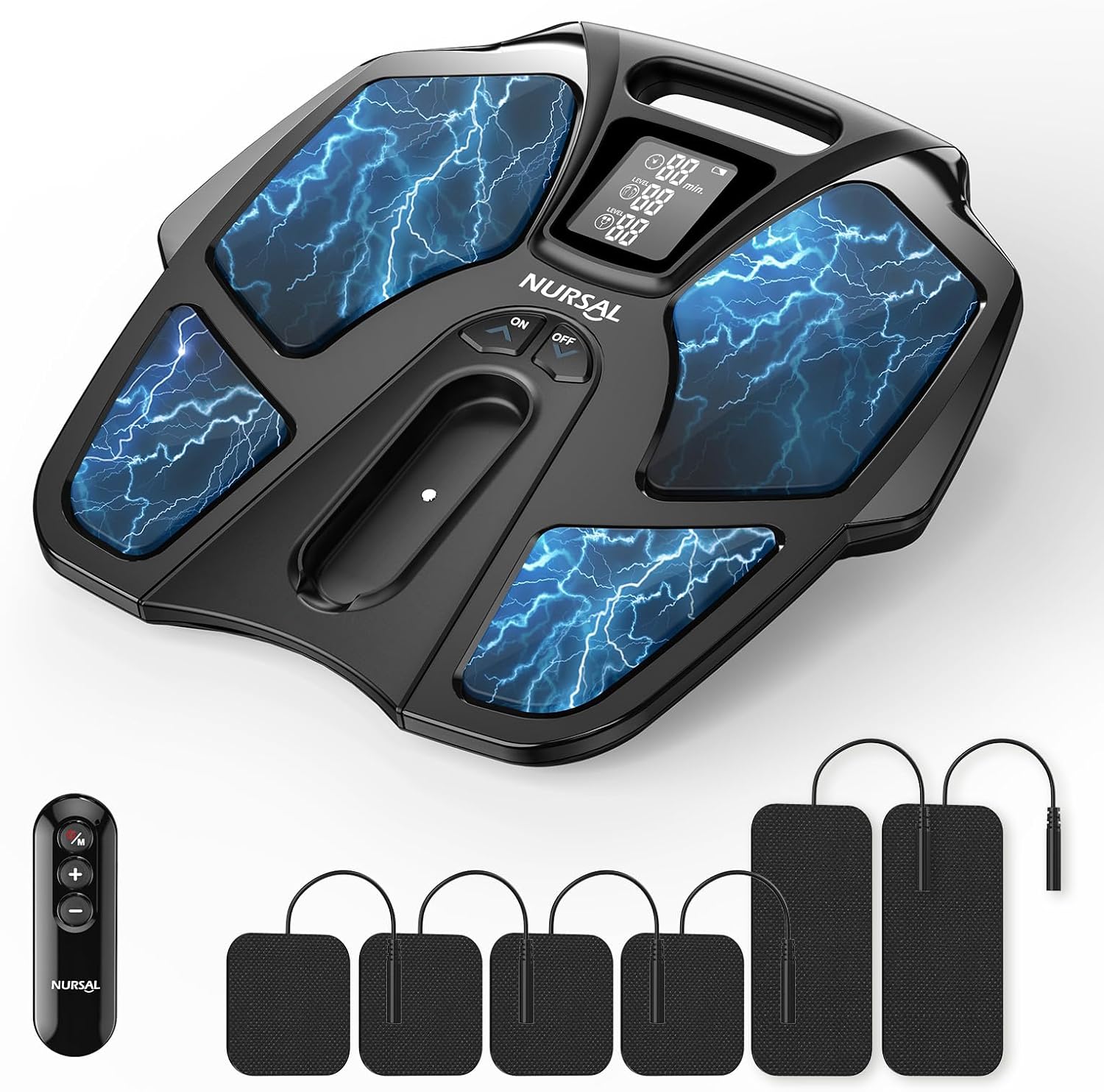
Image: The NURSAL TENS EMS Foot Massager unit, remote control, and various sizes of electrode pads.
Safety Information
Important Safety Note:
For proper operation and to adjust intensity, both feet must be placed on the massager to complete the current closed-loop. Using only one foot will not work.
Statements regarding dietary supplements have not been evaluated by the FDA and are not intended to diagnose, treat, cure, or prevent any disease or health condition.
What's Included
Your NURSAL TENS EMS Foot Massager package includes the following components:
- 1 x Foot Massager Device
- 1 x Remote Controller
- 1 x User Manual
- 2 x AAA Batteries (for remote)
- 4 x Electrode Pads (2x2")
- 2 x Electrode Pads (2x4")
- 2 x 1/2 Electric Wires
- 1 x USB Cable

Image: All components included in the NURSAL TENS EMS Foot Massager package, neatly arranged.
Setup
- Charge the Device: Before first use, fully charge the electric feet massager pad using the provided USB cable. The device cannot be used while charging.
- Power On: Press the power button on the device or the remote control for 1-2 seconds to start the NURSAL foot stimulator.
- Positioning: Place both bare feet flat on the foot circulation machine's footpads. Ensure full contact for effective stimulation.
- Electrode Pad Connection (Optional): If using the TENS unit pads for local treatment, connect them to the device via the electric wires and plug the wires into the designated output socket on the device.

Image: A user comfortably seated with their bare feet placed on the NURSAL foot massager, ready for use.
Operating Instructions
The NURSAL TENS EMS Foot Massager offers a variety of modes and intensity levels for a customized experience.
- Modes: The device features 25 treatment modes. Use the 'M' button on the remote control or the device to cycle through the available modes.
- Intensity Adjustment: Adjust the intensity level from 0 to 90 using the '+' and '-' buttons on the remote control or the device. Start with a low intensity and gradually increase to a comfortable level.
- Timing Function: The foot massager has a 30-minute timing function. You can adjust the session duration in 5-minute intervals using the remote control.
- Remote Control: For convenience, the device can be operated remotely using the included remote control.

Image: An illustrative diagram showing the electrical impulses of EMS and TENS technologies stimulating muscles in the legs while using the foot massager.

Image: A user adjusting the mode and intensity settings on the NURSAL foot massager for personalized comfort.
TENS Pad Usage
The NURSAL TENS EMS Foot Massager comes with 6 reusable TENS unit pads (4x 2x2" and 2x 2x4") that can be used for targeted treatment on various body parts.
- Preparation: Ensure your skin is clean and dry before applying the pads.
- Connection: Connect the electrode pads to the electric wires, then plug the wires into the designated output socket on the device.
- Placement: Apply the self-adhesive electrode pads to the painful or desired areas of the body. Refer to the diagram below for common placement suggestions.
- Operation: Once pads are placed, select a mode and adjust the intensity as desired.

Image: A visual guide illustrating various body areas such as shoulders, back, neck, legs, waist, and ankles, with suggested placements for the TENS unit pads to target pain relief.
Maintenance
- Cleaning: Wipe the device and electrode pads with a soft, damp cloth after each use. Do not use abrasive cleaners or immerse the device in water.
- Storage: Store the device and accessories in a cool, dry place, away from direct sunlight and extreme temperatures. Reattach the plastic sheets to the electrode pads after use to maintain their adhesiveness.
- Battery Care: The device is rechargeable. Use the provided USB cable for charging. Avoid overcharging.

Image: The NURSAL foot massager connected via its USB charging cable, highlighting its cordless and rechargeable design for convenience.
Troubleshooting
| Problem | Possible Cause | Solution |
|---|---|---|
| Device not turning on or no stimulation. | Not charged; only one foot on the device; electrode pads not properly connected or worn out. | Ensure device is fully charged. Place both bare feet firmly on the footpads. Check electrode pad connections and replace if worn. |
| Stimulation feels too weak or too strong. | Intensity level is not optimal for user comfort. | Adjust the intensity level using the '+' or '-' buttons on the device or remote control until a comfortable sensation is achieved. |
Specifications
- Product Dimensions: 15 x 15 x 4 inches
- Item Weight: 4 Pounds
- Model Number: F100
- Manufacturer: NURSAL
- Power Source: Battery Powered
- Material: Acrylonitrile Butadiene Styrene (ABS)
- Intended Use: Ankle, Calf, Foot, Legs
Warranty and Support
For warranty information and customer support, please refer to the contact details provided on the product packaging or visit the official NURSAL website. Keep your purchase receipt for any warranty claims.
Ask a question about this manual
Ask about setup, troubleshooting, compatibility, parts, safety, or missing instructions. Manuals+ will review the question and use this page’s manual context to help answer it.