
1. Introduction
The LICHIFIT Drone Airdrop System is a lightweight and versatile payload release device designed specifically for DJI Mini 3 Pro and DJI Mini 3 drones. This system allows for the remote delivery of small items, enhancing the drone's utility for various applications such as delivering small gifts, fishing bait, or emergency supplies. Its integrated design ensures easy installation and removal without obstructing the drone's visual positioning sensors.

Image: DJI Mini 3 Pro drone with the airdrop system in operation.
2. Safety Information
- Payload Limit: Do not exceed the maximum payload capacity of 200 grams (approximately 7 ounces). Overloading can affect drone stability, flight performance, and battery life, potentially leading to crashes or damage.
- Secure Attachment: Always ensure the airdrop system is securely fastened to the drone and the payload is properly attached before flight. A loose device or payload can cause instability.
- Flight Environment: Operate the drone with the airdrop system in clear, open areas, away from people, animals, buildings, and other obstacles. Avoid flying in strong winds or adverse weather conditions.
- Battery Safety: Use only the provided charging cable and ensure proper charging practices for both the launcher and remote control batteries. Do not expose batteries to extreme temperatures or physical damage.
- Legal Compliance: Be aware of and comply with all local drone regulations and laws regarding payload drops and drone operation.
3. Package Contents
Verify that all components are present in the package:
- 1 x Airdrop Launcher Device
- 1 x Remote Control
- 1 x USB Type-C Charging Cable
- 1 x Instruction Manual

Image: Package contents of the LICHIFIT Airdrop System.
4. Specifications
| Feature | Specification |
|---|---|
| Material | Plastic |
| Color | Light Gray |
| Dimensions | 8 x 4.5 x 7.5 cm (approx. 3.15 x 1.77 x 2.95 inches) |
| Launcher Charging Interface | USB Type-C |
| Launcher Charging Time | 120 minutes |
| Launcher Standby Time | Approx. 12 hours |
| Operations per Charge (Open/Close) | Up to 200 times |
| Max Remote Control Distance | 1000 meters (approx. 3280 feet) |
| Max Load Capacity | 200 grams (approx. 7 ounces) |
| Compatible Drones | DJI Mini 3 Pro, DJI Mini 3 |
| Launcher Battery Capacity | 3.7V/150mAh Li-ion |
| Remote Control Battery Capacity | 3V/600mAh Lithium |
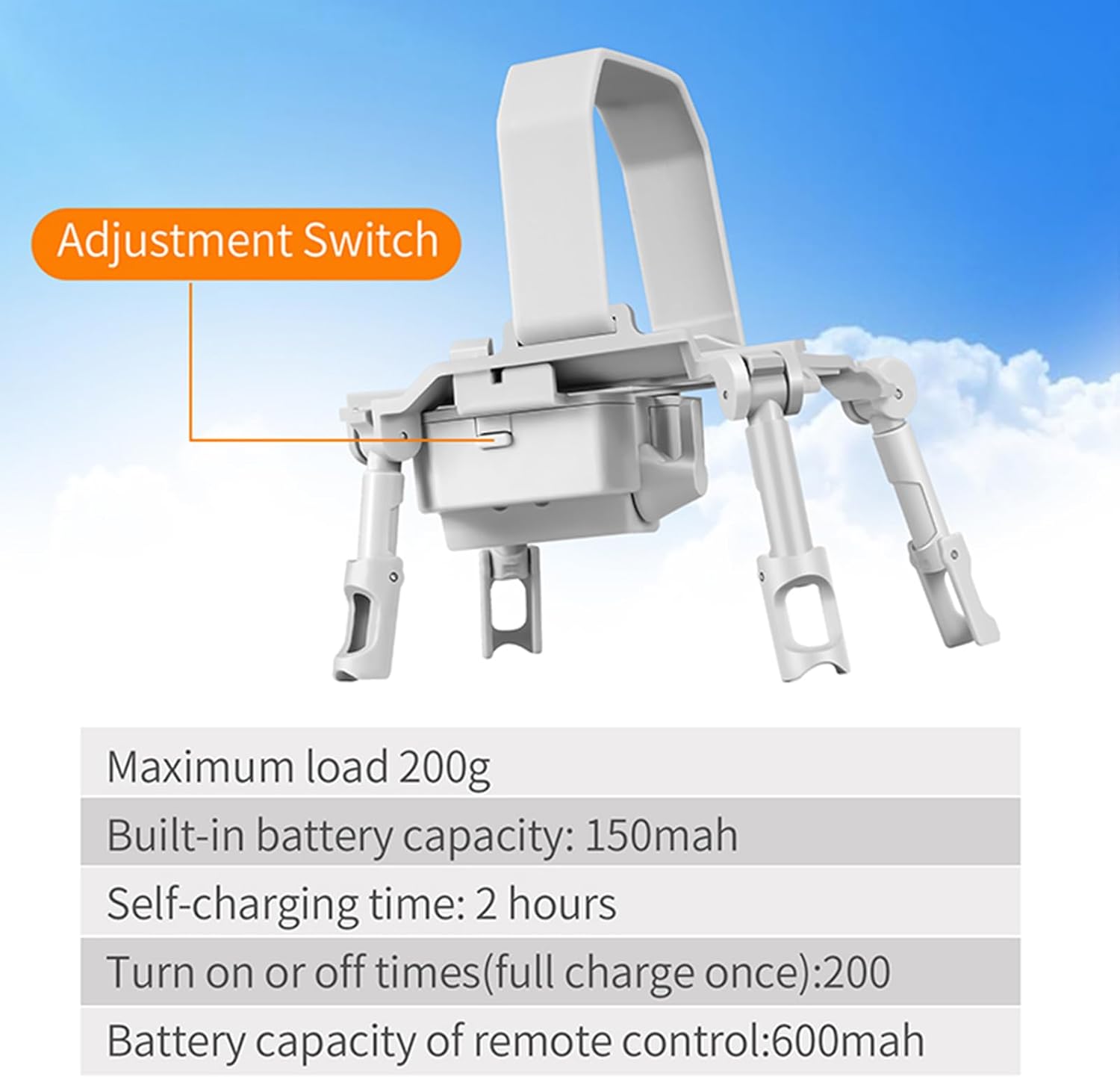
Image: Key specifications of the LICHIFIT Airdrop System.
5. Setup
5.1 Charging the Device
- Connect the provided USB Type-C charging cable to the charging port on the airdrop launcher device.
- Connect the other end of the cable to a standard USB power adapter (not included).
- The charging indicator light will illuminate during charging and turn off when fully charged. Charging takes approximately 120 minutes.
- For the remote control, ensure its battery is charged. The remote control has a 600mAh battery.
5.2 Attaching the Airdrop System to the Drone
The airdrop system features a folding integrated design for easy installation.
- Unfold and Open: Unfold the folding legs of the airdrop device and open the buckle mechanism.
- Position on Drone: Align the slot of the release device with the bulge at the bottom of your DJI Mini 3 Pro or Mini 3 drone's fuselage. Ensure it fits snugly and does not obstruct any sensors.
- Fasten Buckle: Securely fasten the buckle to firmly attach the launcher to the drone's body. Verify that the device is stable and will not detach during flight.

Image: Installation steps for the LICHIFIT Airdrop System.

Image: Labeled components of the airdrop system.
6. Operating Instructions
- Power On: Turn on the power switch on the airdrop launcher device. The work indicator light will show its status.
- Attach Payload: Carefully attach the item you wish to drop to the hook of the airdrop system. Ensure the payload does not exceed 200 grams and is balanced to prevent instability during flight.
- Drone Takeoff: Operate your DJI Mini 3 Pro/Mini 3 drone as usual and fly it to the desired drop location.
- Remote Release: Once the drone is in position, press the button on the dedicated remote control to trigger the release mechanism. The remote control has a maximum range of 1000 meters.
- Return Drone: After the payload is released, safely return your drone.

Image: Operating the airdrop system with remote control.
7. Maintenance
- Cleaning: Regularly wipe the device with a soft, dry cloth to remove dust and debris. Avoid using harsh chemicals or abrasive materials.
- Storage: Store the airdrop system and its remote control in a cool, dry place, away from direct sunlight and extreme temperatures.
- Battery Care: To prolong battery life, charge the launcher and remote control batteries at least once every three months, even if not in regular use. Avoid fully discharging the batteries frequently.
- Inspection: Periodically inspect the device for any signs of wear, damage, or loose parts. Do not use if damaged.
8. Troubleshooting
- Device Not Releasing:
- Check if the launcher device is powered on.
- Ensure both the launcher and remote control batteries are sufficiently charged.
- Verify that the remote control is within the operating range (up to 1000m) and has a clear line of sight to the drone.
- Confirm that the payload is not jammed or exceeding the 200g weight limit.
- Remote Control Not Responding:
- Recharge the remote control battery.
- Ensure there is no significant radio interference in the operating area.
- Try re-pairing the remote control with the launcher if applicable (refer to specific pairing instructions if provided in the included manual).
- Short Battery Life:
- Ensure the device is fully charged before use (120 minutes for the launcher).
- Battery performance can be affected by cold temperatures.
- If battery life significantly degrades over time, the battery may need replacement.
9. Warranty and Support
Warranty information for this product is not explicitly provided in the available details. For specific warranty terms, technical support, or service inquiries, please refer to the documentation included with your purchase or contact the manufacturer directly through their official support channels.