
Introduction
This manual provides detailed instructions for the proper use and maintenance of your BAOFENG UV-17H GPS Radio. The UV-17H is a 6-band, 999-channel two-way radio designed for reliable communication, featuring integrated GPS functionality, NOAA weather channels, and USB-C charging. Please read this manual thoroughly before operating the device to ensure safe and optimal performance.
Package Contents
Verify that all items listed below are included in your package:
- 1x BAOFENG UV-17H Radio Unit
- 1x USB-C Charging Battery
- 1x High Gain Antenna
- 1x Charger Dock
- 1x Belt Clip
- 1x Hand Strap
- 1x USB-C Cable
- 1x Screwdriver
- 1x 48cm/18.89in Foldable Tactical Antenna

Image: Contents of the BAOFENG UV-17H GPS Radio package, including the radio, two antennas, battery, charging dock, USB-C cable, belt clip, strap, and screwdriver.
Product Overview
The BAOFENG UV-17H features a robust design with a 1.77-inch color screen and a full keyboard for intuitive operation. Key components and features are highlighted below.

Image: Front view of the BAOFENG UV-17H radio with labels pointing to the Antenna, Indicator, Switch, Flashlight Key, PTT Key, Squelch Key, Keypads, 1.77in LCD Screen, Connector Mic, Speaker, and Flashlight.
Key Features:
- 1.77-inch Color Screen: Provides clear display of operating information.
- 999 Memory Channels: Extensive channel storage capacity.
- 5W Output Power: Ensures strong signal transmission.
- Dual Watch, Dual Standby: Monitor two frequencies simultaneously.
- GPS Functionality: For navigation and location services.
- 10 NOAA Weather Channels: Access to real-time weather alerts.
- USB-C Charging: Convenient and versatile charging options.
- Frequency Hopping & Scramble Functions: Enhances communication privacy.
- Built-in Flashlight: For illumination in low-light conditions.
- FM Radio Broadcast: For entertainment and information.
- Water Repellent Design: Offers protection against splashes.
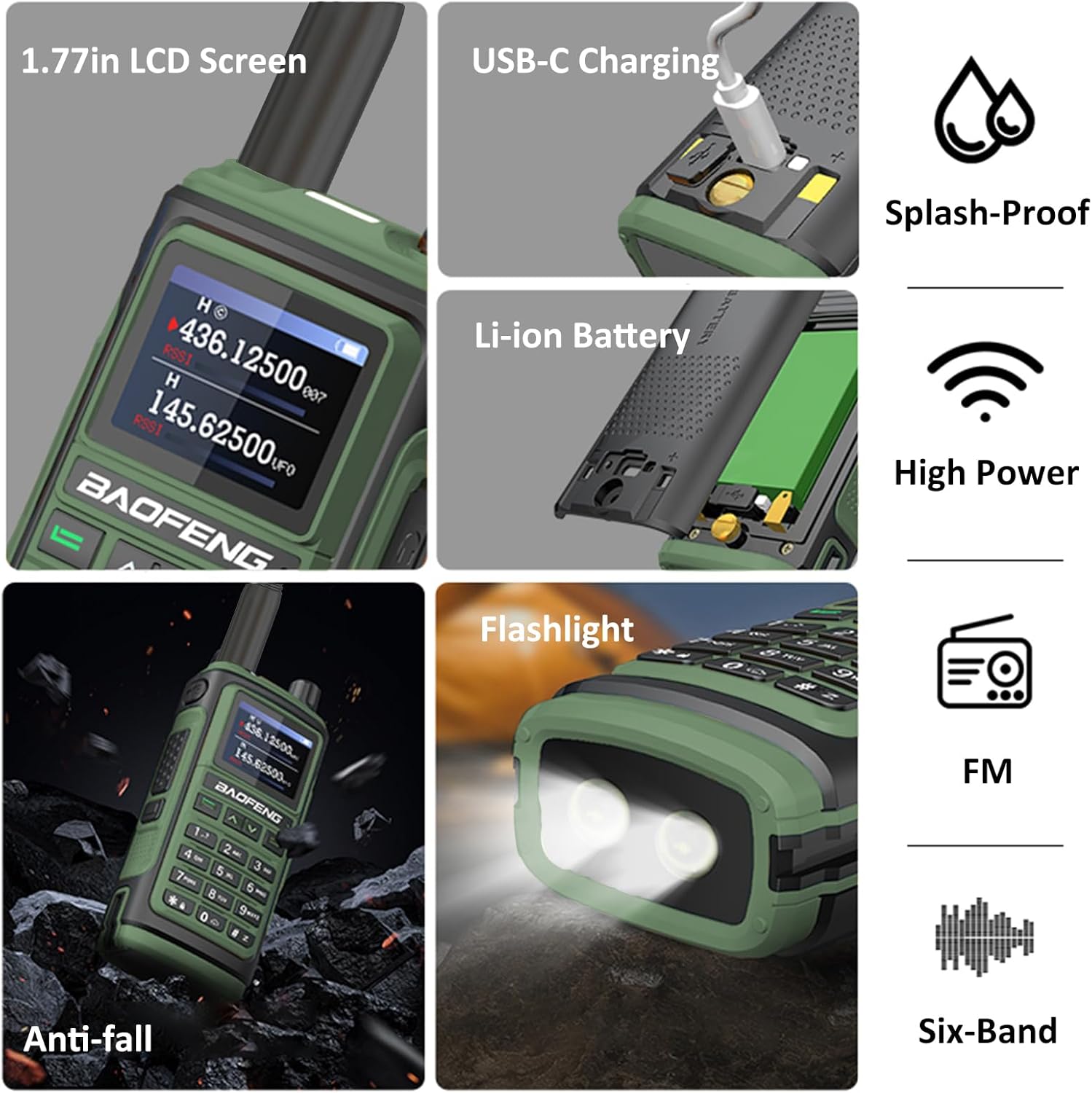
Image: Visual summary of key features: 1.77-inch LCD screen, USB-C charging port, splash-proof rating, Li-ion battery compartment, high power output, anti-fall design, integrated flashlight, FM radio, and six-band capability.
Setup
1. Battery Installation
- Align the battery pack with the grooves on the back of the radio.
- Slide the battery pack upwards until it clicks into place.
- To remove, press the release latch (if present) and slide the battery downwards.
2. Antenna Attachment
- Screw the desired antenna (High Gain or Foldable Tactical Antenna) clockwise into the connector on top of the radio until it is finger-tight. Do not overtighten.
3. Charging the Battery
The UV-17H supports both USB-C direct charging and charging via the included desktop charger dock.
- Using the Charger Dock: Place the radio with the battery installed into the charger dock. Ensure the charging indicator light on the dock illuminates.
- Using USB-C: Connect the USB-C cable to the port on the battery pack and to a compatible USB power source (e.g., car charger, PC USB port, power bank).
A full charge typically takes approximately 3 hours. The battery provides an approximate 2-day life and 3-day standby time.

Image: Illustration of the BAOFENG UV-17H battery being charged via USB-C, showing compatibility with car chargers, PC USB, and power banks. Also displays approximate battery life, standby time, and charging time.
Operating Instructions
1. Power On/Off and Volume
- To power on, rotate the top knob (Switch) clockwise.
- To power off, rotate the top knob counter-clockwise until it clicks.
- Adjust volume by rotating the same knob.
2. Channel Selection and Frequency Input
- Use the keypad to directly input frequencies.
- Use the up/down arrow keys to navigate through memory channels.
3. Transmitting and Receiving
- To transmit, press and hold the PTT (Push-To-Talk) key on the side of the radio. Speak clearly into the microphone.
- Release the PTT key to receive.
4. GPS Functionality
The integrated GPS module provides accurate real-time positioning. Refer to the on-screen menu for GPS status and navigation options.

Image: The BAOFENG UV-17H radio displaying GPS functionality, emphasizing accurate real-time positioning and sharing capabilities.
5. NOAA Weather Channels
Access 10 NOAA weather channels for real-time weather information and alerts. Consult the radio's menu for specific NOAA channel access and weather alarm settings.
6. Advanced Features
- VOX (Voice Operated Transmission): Allows hands-free transmission. Activate and adjust sensitivity in the menu.
- Scan Modes (Time/Carrier/Search): Use the scan function to monitor active frequencies.
- CTCSS/DCS Scan: Scan for CTCSS/DCS tones to filter unwanted signals.
- Frequency Hopping & Scramble: These features enhance communication privacy. Refer to the radio's menu for activation and configuration.
- DTMF: Dual-Tone Multi-Frequency signaling for various control functions.
- Flashlight: Press the dedicated Flashlight Key to activate the built-in torch.
- FM Radio: Tune into FM broadcast stations for entertainment.
Maintenance
- Cleaning: Wipe the radio with a soft, damp cloth. Do not use harsh chemicals or solvents.
- Battery Care: Avoid overcharging or completely draining the battery. Store the radio and battery in a cool, dry place when not in use for extended periods.
- Antenna: Ensure the antenna is securely attached. Avoid bending or stressing the antenna.
- Water Resistance: The radio is water repellent, meaning it can withstand splashes. Do not submerge the radio in water.
Troubleshooting
| Problem | Possible Cause | Solution |
|---|---|---|
| Radio does not power on. | Battery is low or not installed correctly. | Charge the battery or re-install it securely. |
| Cannot transmit or receive. | Incorrect frequency/channel, antenna not connected, low battery, or out of range. | Verify frequency/channel, check antenna connection, charge battery, move closer to other radios. |
| Poor audio quality. | Low signal strength, incorrect squelch setting, or antenna issue. | Adjust squelch level, check antenna, move to an area with better signal. |
| GPS not acquiring signal. | Obstructed view of the sky, indoors. | Move to an open outdoor area with a clear view of the sky. |
Specifications
| Feature | Detail |
|---|---|
| Model Number | UV-17H |
| Display | 1.77-inch Color Screen |
| Channels | 999 |
| Output Power | 5W |
| Frequency Range | 144-148MHz, 420-450MHz |
| Talking Range (Maximum) | 10 Kilometer |
| Battery Type | Lithium Ion (1 required) |
| Voltage | 7.4 Volts (DC) |
| Charging | USB-C, Charger Dock |
| Special Features | GPS, 10 NOAA Channels, One Key Match Frequency, Frequency Hopping, Scramble, VOX, Flashlight, FM Radio |
| Water Resistance Level | Water Repellent |
Warranty and Support
The BAOFENG UV-17H GPS Radio comes with a 1-year warranty provided through "Shiqun Electronics Co., Ltd". For warranty claims or technical support, please contact your retailer or the manufacturer directly.
Manufacturer: BAOFENG Electronics CO., Ltd