Introduction
Thank you for choosing the GOWENIC Page Turner Ring. This smart ring provides convenient remote control functionality for various applications, including page turning for e-books and one-touch selfie capabilities. This manual will guide you through the setup, operation, and maintenance of your device to ensure optimal performance.

A close-up of the GOWENIC Page Turner Ring, showcasing its sleek design.
Product Features
- Convenient Functionality: Turn pages in various applications with a simple finger movement.
- Extended Usage: Enjoy approximately 5 hours of continuous use after a quick 30-minute charge.
- Wide Compatibility: Compatible with most iOS and Android smartphones and tablets.
- One-touch Selfie: Easily capture photos and record videos using the scroll ring.
- Durable Design: Wear the ring with confidence during activities like washing hands or swimming due to its waterproof construction.
Package Contents
Please verify that all items are present in your package:
- 1 x Page Turner Ring
- 1 x Instruction Manual (this document)
- 1 x Charging Cable
Setup
1. Finger Circumference Measurement
To ensure a comfortable fit, it is recommended to wear the ring on your index finger. Follow these steps to measure your finger size:
- Wrap a piece of string or a strip of paper around the desired part of your finger.
- Mark the point where the string or paper overlaps.
- Measure the length of the string or paper with a ruler.
- Refer to the product sizing chart (if provided separately) to choose the appropriate ring size.

An illustration demonstrating how to measure finger circumference for proper sizing.
2. Initial Charging
Before first use, fully charge the Page Turner Ring.
- Connect the provided charging cable to a USB power source.
- Attach the magnetic end of the charging cable to the magnetic charging port on the ring. Ensure it snaps into place securely.
- The ring will indicate charging status (e.g., an indicator light).
- A full charge takes approximately 30 minutes.
A close-up view of the GOWENIC Page Turner Ring, highlighting the magnetic charging port.
3. Bluetooth Pairing
To connect the ring to your smartphone or tablet:
- Ensure the ring is charged and powered on.
- On your device, go to Settings > Bluetooth and turn Bluetooth on.
- Search for available devices. The ring should appear as LT3688.
- Select LT3688 to pair. Once paired, your device will confirm the connection.
Operating Instructions
The GOWENIC Page Turner Ring features several control points for various functions:
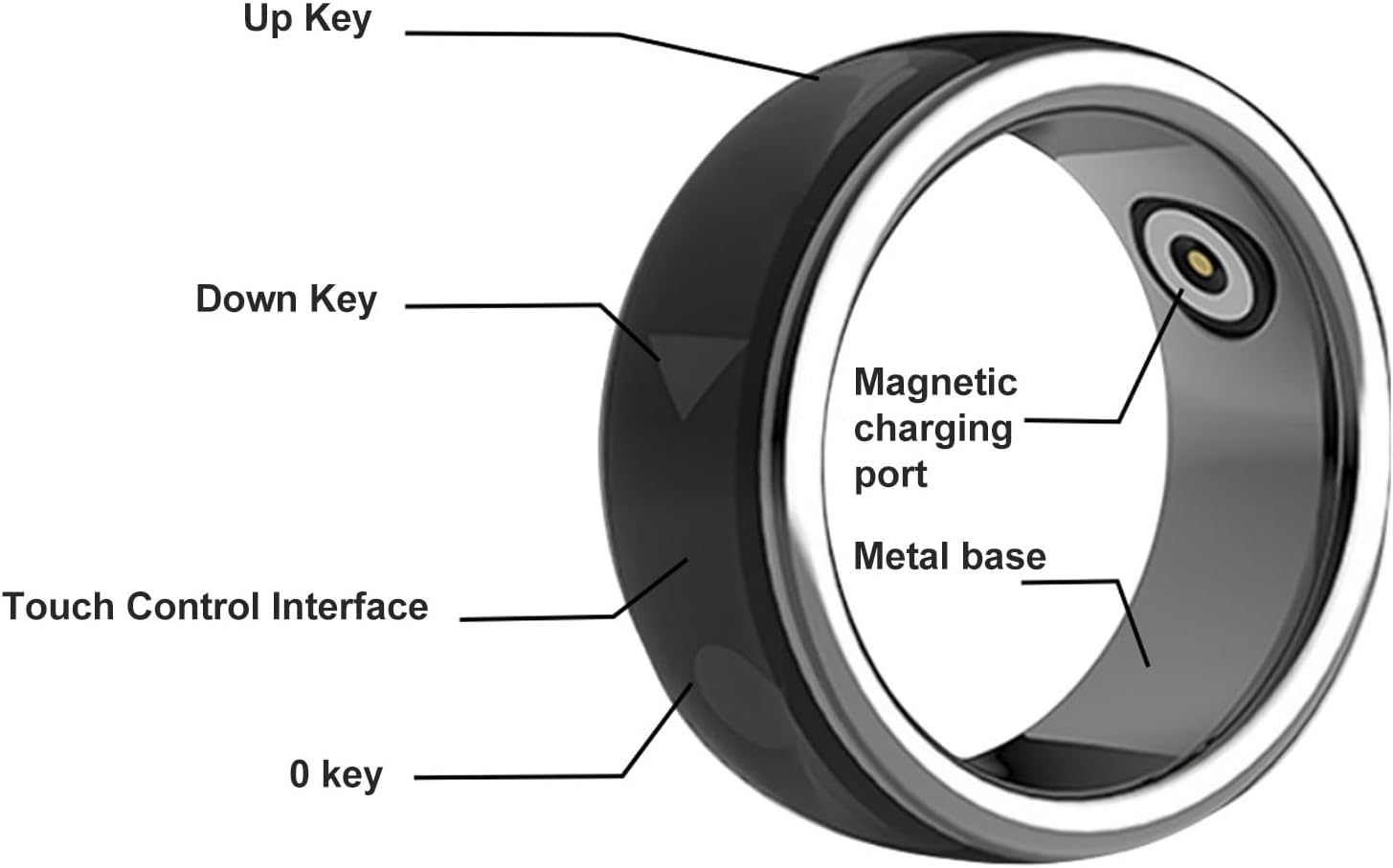
A detailed diagram of the Page Turner Ring, labeling its control components.
- Up Key: Typically used for scrolling up or moving to the previous page/item.
- Down Key: Typically used for scrolling down or moving to the next page/item.
- 0 Key: May serve as a confirmation or selection button.
- Touch Control Interface: Provides additional touch-sensitive controls for specific functions.
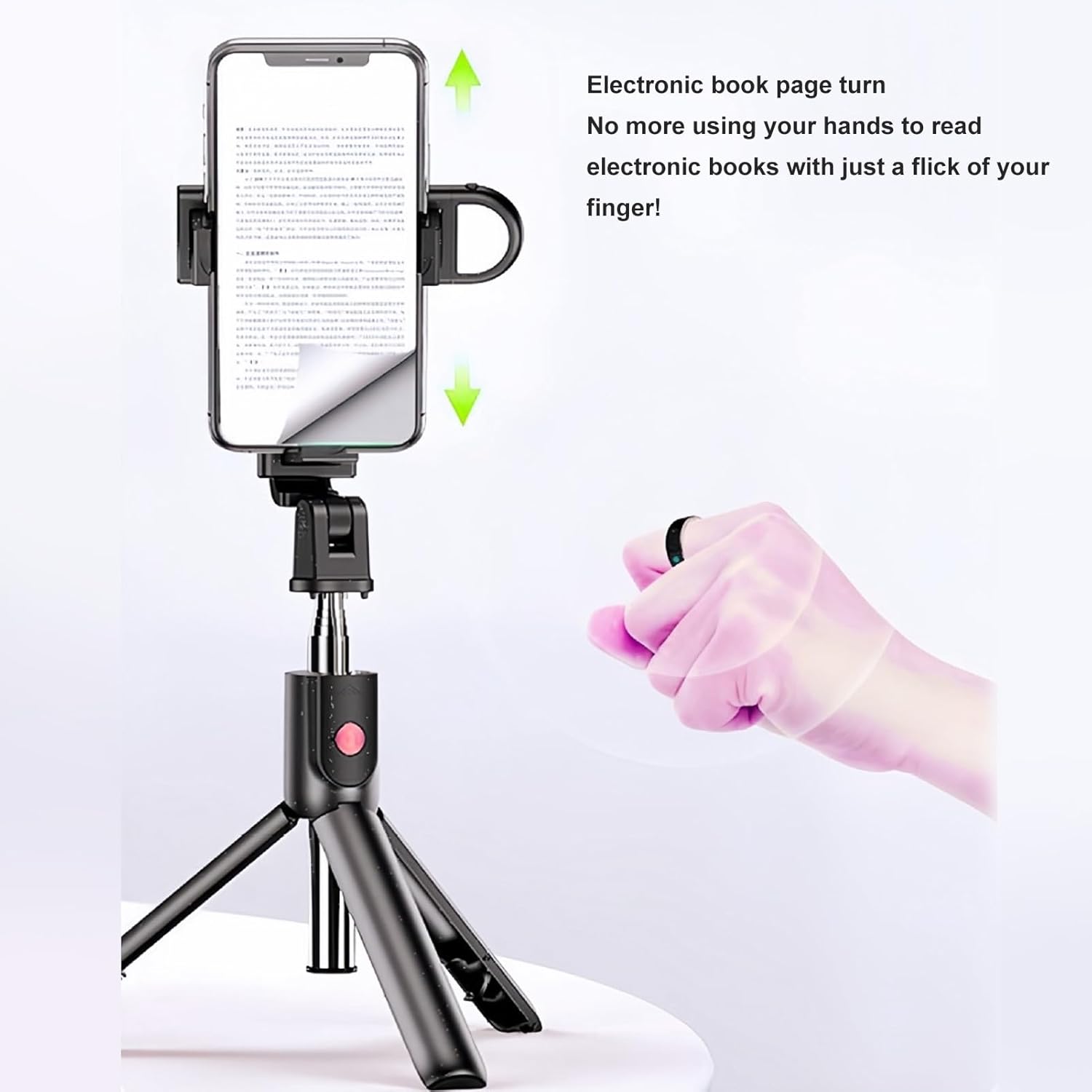
1. Page Turning Function
Use the Up and Down keys to navigate through content in compatible applications such as e-readers, social media feeds, or presentation software.

An image illustrating the use of the Page Turner Ring for electronic book page turning on a smartphone.
2. Selfie and Video Recording Function
The ring can act as a remote shutter for your device's camera. Open your camera application and use the designated key (often the '0' key or a specific touch gesture) to trigger the shutter for photos or start/stop video recording.

A graphic demonstrating the
no relevant documents