Introduction
Thank you for choosing btfarm Solar Lights. These IP65 waterproof LED spotlights are designed to illuminate and enhance your outdoor spaces with vibrant color-changing options. Powered by solar energy, they offer an eco-friendly and convenient lighting solution for gardens, pathways, trees, and more. Please read this manual carefully before installation and use to ensure optimal performance and longevity of your product.
Safety Information
- Ensure the product is installed in a location that receives direct sunlight for maximum charging efficiency.
- Avoid placing the lights near other strong light sources at night, as this may prevent the solar lights from activating automatically.
- Do not attempt to disassemble or modify the product. This may void the warranty and pose a safety risk.
- Keep out of reach of children.
- The product is IP65 waterproof, suitable for outdoor use in various weather conditions, but avoid submerging it in water.
Package Contents
Verify that all components are present in your package:
- 8 × Solar Landscape Spotlights
- 8 × Ground Spikes
- 16 x Screws
- 1 x Instruction Manual
Setup
1. Initial Charging
Before first use, ensure the solar lights are fully charged. Place the lights in direct sunlight for 6-8 hours. It is recommended to charge them for a full day before initial deployment to ensure optimal battery performance.
2. Mounting Options
Your btfarm Solar Lights offer two versatile mounting options:
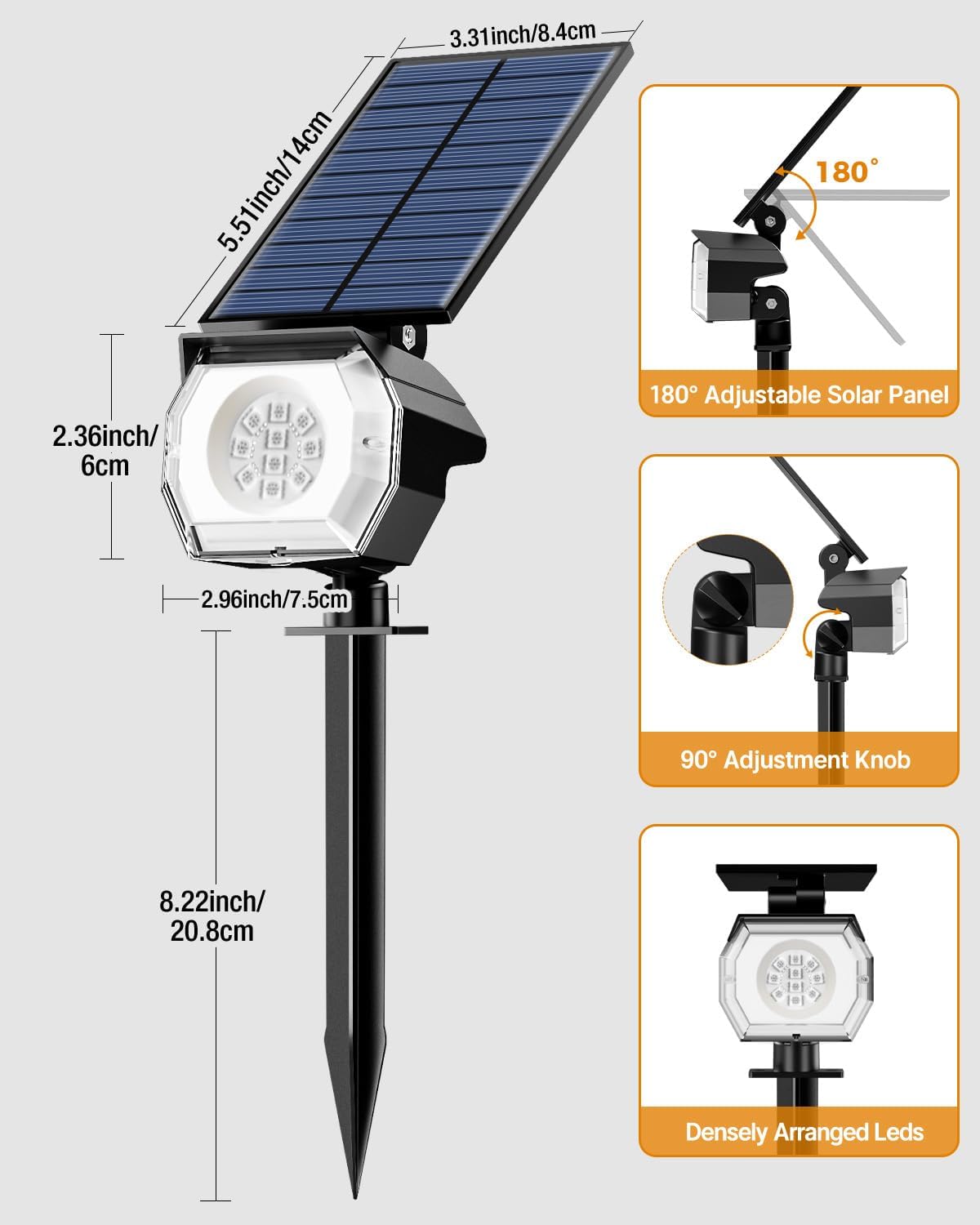
Ground Insert: Attach the ground spike to the light unit. Push the assembled light firmly into soft ground in your desired location. Ensure the solar panel faces upwards towards the sun.

Wall Mount: Use the provided screws to secure the light unit to a wall or fence. Ensure the solar panel is positioned to receive maximum direct sunlight.
3. Adjusting Solar Panel and Light Head

The solar panel can be adjusted up to 180 degrees to capture optimal sunlight throughout the day. The light head can be adjusted up to 90 degrees to direct illumination precisely where needed.
Operating Instructions
1. Power ON/OFF and Mode Selection

Locate the 'ON/OFF' button on the back of the light unit. Press the button to cycle through the available lighting modes:
- Fixed Color Modes: Press the button repeatedly to select from 6 fixed colors: Red, Blue, Green, Purple, Cyan, and Yellow.
- Automatic Color Cycling Mode: After cycling through the fixed colors, the next press will activate the automatic color cycling mode, which transitions between all 7 colors.
- OFF: Continue pressing the button until the light turns off.
2. Automatic Operation

Once a lighting mode is selected and the unit is charged, the btfarm Solar Lights will automatically turn on at dusk and turn off at dawn. They will recharge during the day (6-8 hours for full charge) and provide illumination for 8-12 hours at night, depending on the charge received and the selected brightness/color mode.
Maintenance
- Cleaning: Regularly wipe the solar panel with a soft, damp cloth to remove dust, dirt, or debris. A clean solar panel ensures efficient charging.
- Placement: Periodically check that the solar panel is free from obstructions (e.g., leaves, snow, shade from new growth) that might block sunlight.
- Battery: The integrated battery is designed for long-term use. If the light duration significantly decreases over time, ensure the solar panel is clean and receiving adequate sunlight.
Troubleshooting
| Problem | Possible Cause | Solution |
|---|---|---|
| Light does not turn on at night. | Insufficient sunlight for charging. Light switch is OFF. Nearby light source interfering. | Ensure solar panel receives 6-8 hours of direct sunlight. Press the ON/OFF button to activate. Relocate the light away from other bright lights. |
| Light duration is short. | Insufficient charging due to cloudy weather or panel obstruction. | Clean the solar panel. Ensure optimal sun exposure. Allow for several sunny days to fully recharge. |
| Light is dim. | Battery not fully charged. | Follow steps for 'Light duration is short'. |
Specifications
Detailed dimensions of the btfarm Solar Light unit.
| Feature | Detail |
|---|---|
| Brand | btfarm |
| Model Number | GS16 |
| Light Source Type | LED |
| Light Color | Multicolored (Red, Blue, Green, Purple, Cyan, Yellow, RGB cycle) |
| Brightness | Up to 1000 Lumens |
| Power Source | Solar Powered |
| Solar Panel Conversion Rate | Up to 25% |
| Battery Capacity | 1500 mAh |
| Charging Time | 6-8 hours (full sunlight) |
| Working Time | 8-12 hours (after full charge) |
| Water Resistance Level | IP65 Waterproof |
| Material | Acrylonitrile Butadiene Styrene, Plastic |
| Product Dimensions | 2.79"L x 12.6"W x 3"H |
| Special Features | Anti-Rust, Color Changing, Energy Efficient, Portable, Waterproof |
| Mounting Type | In-Ground Mount & Wall Mount |
Warranty
The btfarm Solar Lights come with a Lifetime Warranty. For any warranty claims or issues, please refer to the support information below.
Support
For further assistance, technical support, or warranty inquiries, please contact btfarm customer service through the retailer where the product was purchased or visit the official btfarm store online.


