Introduction
This manual provides essential information for the proper use and maintenance of your USARemote 4-Button Flip Key Fob. This product is an aftermarket replacement designed to function with specific Buick and Chevrolet vehicles. Please read these instructions carefully before attempting to use or program the key fob.
Product Overview
The USARemote 4-Button Flip Key Fob is a complete keyless entry remote with integrated electronics and a battery. It features four buttons for common vehicle functions: Lock, Unlock, Remote Start, and Panic. The key blade is designed to fold into the fob for compact storage.
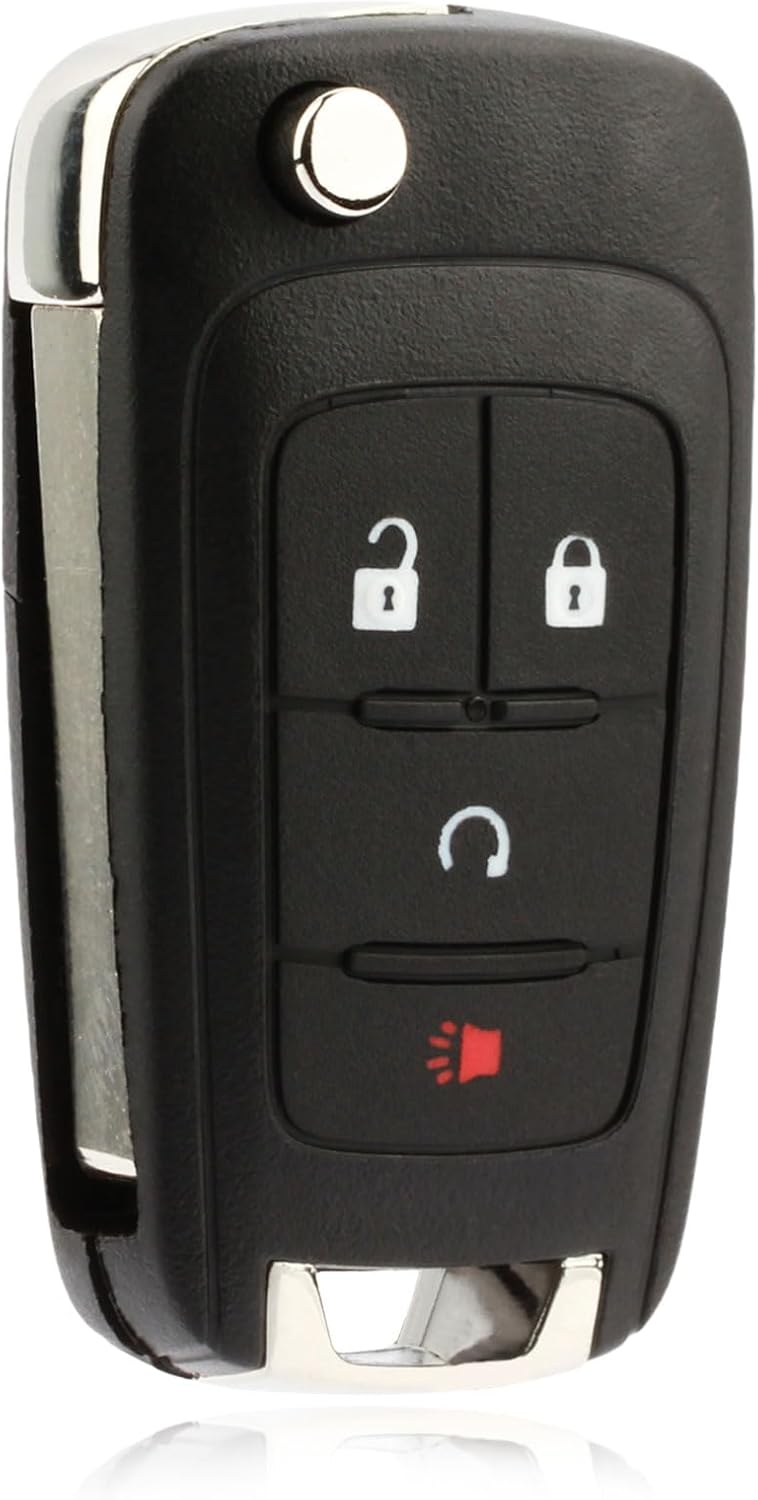
Image 1: Front view of the USARemote 4-button flip key fob, showing the Lock, Unlock, Remote Start, and Panic buttons.

Image 2: Back view of the USARemote flip key fob, illustrating the extended key blade and the overall design.
Vehicle Compatibility
This key fob is compatible with the following vehicle models and years. Please verify your vehicle's original part number matches OHT01060512 or KR55WK500733 for proper functionality.
- Buick: 2013 - 2018 Buick Encore
- Chevrolet: 2010 - 2019 Chevrolet Equinox
- Chevrolet: 2015 - 2019 Chevrolet Impala
- Chevrolet: 2012 - 2019 Chevrolet Sonic
- Chevrolet: 2015 - 2018 Chevrolet Trax

Image 3: Visual representation of compatible vehicle models and their respective year ranges.
Setup and Programming
Professional programming is required for this key fob. This device cannot be self-programmed by the end-user. Due to the security systems in modern vehicles, specialized equipment and expertise are necessary to link the new key fob to your vehicle's immobilizer and remote entry system.
Key Blade Cutting: The integrated key blade will also need to be cut by a professional locksmith to match your vehicle's ignition and door locks. This service is typically performed by automotive locksmiths or dealerships.
We recommend contacting a certified automotive locksmith or your local dealership for programming and key cutting services. They possess the necessary tools and knowledge to ensure correct functionality.

Image 4: The key fob and its separate key blade, highlighting the need for professional programming and key cutting. Part numbers OHT01060512 and KR55WK500733 are also shown.
Operating Instructions
Once programmed, your USARemote key fob provides convenient access and control over your vehicle's functions:
- Lock Button (Closed Padlock Icon): Press once to lock all vehicle doors. Some vehicles may provide an audible confirmation (horn chirp) or visual confirmation (lights flash).
- Unlock Button (Open Padlock Icon): Press once to unlock the driver's door. Press twice within a few seconds to unlock all vehicle doors.
- Remote Start Button (Circular Arrow Icon): To remotely start your vehicle, press the Lock button once, then immediately press and hold the Remote Start button for approximately 3-5 seconds. The vehicle's lights will flash, and the engine will start. The vehicle will run for a preset duration (typically 10-15 minutes) before shutting off automatically. To extend the run time, repeat the remote start procedure.
- Panic Button (Red Horn Icon): Press and hold this button to activate the vehicle's alarm system (horn and lights). Release the button to deactivate the alarm. This feature is useful for locating your vehicle in a crowded parking lot or for emergency situations.
Maintenance
Battery Replacement
The key fob is powered by a small coin-cell battery. If the remote's range decreases significantly or it stops responding, the battery may need replacement. Refer to your vehicle's owner's manual for specific battery type and replacement instructions, as the procedure can vary slightly between models. Generally, you will need to carefully pry open the key fob casing to access the battery compartment.
Care and Handling
- Avoid dropping the key fob or subjecting it to strong impacts.
- Keep the key fob dry and away from extreme temperatures.
- Do not attempt to disassemble the internal electronics unless performing a battery replacement.
Troubleshooting
- Key Fob Not Responding:
- Check the battery. Replace if necessary.
- Ensure you are within range of the vehicle.
- Verify that the key fob has been correctly programmed to your vehicle by a professional. Reprogramming may be required if the fob loses its connection.
- Remote Start Not Working:
- Ensure all doors are closed, the hood is latched, and the transmission is in Park.
- Confirm the remote start sequence (Lock button once, then hold Remote Start button) is performed correctly.
- Some vehicles require specific conditions (e.g., fuel level, engine temperature) for remote start to activate. Consult your vehicle's owner's manual.
- Reduced Operating Range:
- Replace the battery.
- Environmental factors or radio interference can affect range.
Product Specifications
| Brand | USARemote |
| OEM Part Numbers | OHT01060512, KR55WK500733 |
| Manufacturer Part Number | USAR-G-RS-MID-FLIP-1X |
| Number of Buttons | 4 (Lock, Unlock, Remote Start, Panic) |
| Automotive Fit Type | Vehicle Specific Fit |
| Vehicle Service Type | Car |
| Item Weight | 1 Ounce |
| Package Dimensions | 7.17 x 4.61 x 0.59 inches |
| Date First Available | June 26, 2024 |
Warranty and Support
As an aftermarket replacement part, warranty coverage is provided by the seller, USARemote. For specific warranty terms and conditions, please refer to your purchase documentation or contact USARemote directly.
For technical assistance or support, please reach out to USARemote customer service. You may find contact information on the seller's store page or through your purchase platform.
Visit the USARemote Store for more information.
